" height="18.016311920580208px" id="GKXyVanMq" stroke-dasharray="0" stroke-linecap="butt" stroke-linejoin="miter" stroke-miterlimit="10" stroke-width="0.5" stroke="rgb(0, 0, 0)" transform="translate(3 3)" width="18px"/></svg>)
"/><stop offset="1" stop-color="rgb(227, 224, 244)"/></linearGradient><linearGradient id="CBS1bzkxF-2031533640-linear-gradient" x1="0.49751243781094523" x2="0.5024875621890548" y1="0" y2="1"><stop offset="0" stop-color="rgb(255, 255, 255)"/><stop offset="1" stop-color="rgb(227, 224, 244)"/></linearGradient><linearGradient id="Jd7AK81w9-2031533640-linear-gradient" x1="0.49751243781094523" x2="0.5024875621890548" y1="0" y2="1"><stop offset="0" stop-color="rgb(255, 255, 255)"/><stop offset="1" stop-color="rgb(227, 224, 244)"/></linearGradient></defs><g d="M 0 16 L 0 0 L 16 0 L 16 16 Z M 9.167 5.167 C 9.167 4.891 8.943 4.667 8.667 4.667 C 8.391 4.667 8.167 4.891 8.167 5.167 C 8.167 6.784 7.809 7.834 7.155 8.488 C 6.501 9.143 5.451 9.5 3.833 9.5 C 3.557 9.5 3.333 9.724 3.333 10 C 3.333 10.276 3.557 10.5 3.833 10.5 C 5.451 10.5 6.501 10.857 7.155 11.512 C 7.809 12.166 8.167 13.216 8.167 14.833 C 8.167 15.109 8.391 15.333 8.667 15.333 C 8.943 15.333 9.167 15.109 9.167 14.833 C 9.167 13.216 9.524 12.166 10.178 11.512 C 10.832 10.857 11.883 10.5 13.5 10.5 C 13.776 10.5 14 10.276 14 10 C 14 9.724 13.776 9.5 13.5 9.5 C 11.883 9.5 10.832 9.143 10.178 8.488 C 9.524 7.834 9.167 6.784 9.167 5.167 Z M 4 3.667 C 4 3.483 3.851 3.333 3.667 3.333 C 3.483 3.333 3.333 3.483 3.333 3.667 C 3.333 4.32 3.189 4.715 2.952 4.952 C 2.715 5.189 2.32 5.333 1.667 5.333 C 1.483 5.333 1.333 5.483 1.333 5.667 C 1.333 5.851 1.483 6 1.667 6 C 2.32 6 2.715 6.145 2.952 6.382 C 3.189 6.618 3.333 7.013 3.333 7.667 C 3.333 7.851 3.483 8 3.667 8 C 3.851 8 4 7.851 4 7.667 C 4 7.013 4.145 6.618 4.382 6.382 C 4.618 6.145 5.013 6 5.667 6 C 5.851 6 6 5.851 6 5.667 C 6 5.483 5.851 5.333 5.667 5.333 C 5.013 5.333 4.618 5.189 4.382 4.952 C 4.145 4.715 4 4.32 4 3.667 Z M 7.333 1 C 7.333 0.816 7.184 0.667 7 0.667 C 6.816 0.667 6.667 0.816 6.667 1 C 6.667 1.422 6.573 1.65 6.445 1.778 C 6.317 1.906 6.089 2 5.667 2 C 5.483 2 5.333 2.149 5.333 2.333 C 5.333 2.517 5.483 2.667 5.667 2.667 C 6.089 2.667 6.317 2.761 6.445 2.889 C 6.573 3.016 6.667 3.244 6.667 3.667 C 6.667 3.851 6.816 4 7 4 C 7.184 4 7.333 3.851 7.333 3.667 C 7.333 3.244 7.427 3.016 7.555 2.889 C 7.683 2.761 7.911 2.667 8.333 2.667 C 8.517 2.667 8.667 2.517 8.667 2.333 C 8.667 2.149 8.517 2 8.333 2 C 7.911 2 7.683 1.906 7.555 1.778 C 7.427 1.65 7.333 1.422 7.333 1 Z" fill="transparent" height="16px" id="aoZYv33vR" width="16px"><path d="M 0 16 L 0 0 L 16 0 L 16 16 Z" fill="transparent" height="16px" id="Z2uGmhW9f" width="16px"/><g d="M 7.833 4.5 C 7.833 4.224 7.609 4 7.333 4 C 7.057 4 6.833 4.224 6.833 4.5 C 6.833 6.117 6.476 7.168 5.822 7.822 C 5.168 8.476 4.117 8.833 2.5 8.833 C 2.224 8.833 2 9.057 2 9.333 C 2 9.61 2.224 9.833 2.5 9.833 C 4.117 9.833 5.168 10.191 5.822 10.845 C 6.476 11.499 6.833 12.549 6.833 14.167 C 6.833 14.443 7.057 14.667 7.333 14.667 C 7.609 14.667 7.833 14.443 7.833 14.167 C 7.833 12.549 8.191 11.499 8.845 10.845 C 9.499 10.191 10.549 9.833 12.167 9.833 C 12.443 9.833 12.667 9.61 12.667 9.333 C 12.667 9.057 12.443 8.833 12.167 8.833 C 10.549 8.833 9.499 8.476 8.845 7.822 C 8.191 7.168 7.833 6.117 7.833 4.5 Z M 2.667 3 C 2.667 2.816 2.517 2.667 2.333 2.667 C 2.149 2.667 2 2.816 2 3 C 2 3.654 1.855 4.048 1.618 4.285 C 1.382 4.522 0.987 4.667 0.333 4.667 C 0.149 4.667 0 4.816 0 5 C 0 5.184 0.149 5.333 0.333 5.333 C 0.987 5.333 1.382 5.478 1.618 5.715 C 1.855 5.952 2 6.346 2 7 C 2 7.184 2.149 7.333 2.333 7.333 C 2.517 7.333 2.667 7.184 2.667 7 C 2.667 6.346 2.811 5.952 3.048 5.715 C 3.285 5.478 3.68 5.333 4.333 5.333 C 4.517 5.333 4.667 5.184 4.667 5 C 4.667 4.816 4.517 4.667 4.333 4.667 C 3.68 4.667 3.285 4.522 3.048 4.285 C 2.811 4.048 2.667 3.654 2.667 3 Z M 6 0.333 C 6 0.149 5.851 0 5.667 0 C 5.483 0 5.333 0.149 5.333 0.333 C 5.333 0.756 5.239 0.984 5.112 1.112 C 4.984 1.239 4.756 1.333 4.333 1.333 C 4.149 1.333 4 1.483 4 1.667 C 4 1.851 4.149 2 4.333 2 C 4.756 2 4.984 2.094 5.112 2.222 C 5.239 2.35 5.333 2.578 5.333 3 C 5.333 3.184 5.483 3.333 5.667 3.333 C 5.851 3.333 6 3.184 6 3 C 6 2.578 6.094 2.35 6.222 2.222 C 6.35 2.094 6.578 2 7 2 C 7.184 2 7.333 1.851 7.333 1.667 C 7.333 1.483 7.184 1.333 7 1.333 C 6.578 1.333 6.35 1.239 6.222 1.112 C 6.094 0.984 6 0.756 6 0.333 Z" fill="transparent" height="14.66671286102295px" id="ae6ccdFme" transform="translate(1.333 0.667)" width="12.66663px"><path d="M 5.833 0.5 C 5.833 0.224 5.609 0 5.333 0 C 5.057 0 4.833 0.224 4.833 0.5 C 4.833 2.117 4.476 3.168 3.822 3.822 C 3.168 4.476 2.117 4.833 0.5 4.833 C 0.224 4.833 0 5.057 0 5.333 C 0 5.61 0.224 5.833 0.5 5.833 C 2.117 5.833 3.168 6.191 3.822 6.845 C 4.476 7.499 4.833 8.549 4.833 10.167 C 4.833 10.443 5.057 10.667 5.333 10.667 C 5.609 10.667 5.833 10.443 5.833 10.167 C 5.833 8.549 6.191 7.499 6.845 6.845 C 7.499 6.191 8.549 5.833 10.167 5.833 C 10.443 5.833 10.667 5.61 10.667 5.333 C 10.667 5.057 10.443 4.833 10.167 4.833 C 8.549 4.833 7.499 4.476 6.845 3.822 C 6.191 3.168 5.833 2.117 5.833 0.5 Z" fill="url(%23t2lXByE48-2031533640-linear-gradient)" height="10.66671px" id="t2lXByE48" transform="translate(2 4)" width="10.66663px"/><path d="M 2.667 0.333 C 2.667 0.149 2.517 0 2.333 0 C 2.149 0 2 0.149 2 0.333 C 2 0.987 1.855 1.382 1.618 1.618 C 1.382 1.855 0.987 2 0.333 2 C 0.149 2 0 2.149 0 2.333 C 0 2.517 0.149 2.667 0.333 2.667 C 0.987 2.667 1.382 2.811 1.618 3.048 C 1.855 3.285 2 3.68 2 4.333 C 2 4.517 2.149 4.667 2.333 4.667 C 2.517 4.667 2.667 4.517 2.667 4.333 C 2.667 3.68 2.811 3.285 3.048 3.048 C 3.285 2.811 3.68 2.667 4.333 2.667 C 4.517 2.667 4.667 2.517 4.667 2.333 C 4.667 2.149 4.517 2 4.333 2 C 3.68 2 3.285 1.855 3.048 1.618 C 2.811 1.382 2.667 0.987 2.667 0.333 Z" fill="url(%23CBS1bzkxF-2031533640-linear-gradient)" height="4.66667px" id="CBS1bzkxF" transform="translate(0 2.667)" width="4.66667px"/><path d="M 2 0.333 C 2 0.149 1.851 0 1.667 0 C 1.483 0 1.333 0.149 1.333 0.333 C 1.333 0.756 1.239 0.984 1.112 1.112 C 0.984 1.239 0.756 1.333 0.333 1.333 C 0.149 1.333 0 1.483 0 1.667 C 0 1.851 0.149 2 0.333 2 C 0.756 2 0.984 2.094 1.112 2.222 C 1.239 2.35 1.333 2.578 1.333 3 C 1.333 3.184 1.483 3.333 1.667 3.333 C 1.851 3.333 2 3.184 2 3 C 2 2.578 2.094 2.35 2.222 2.222 C 2.35 2.094 2.578 2 3 2 C 3.184 2 3.333 1.851 3.333 1.667 C 3.333 1.483 3.184 1.333 3 1.333 C 2.578 1.333 2.35 1.239 2.222 1.112 C 2.094 0.984 2 0.756 2 0.333 Z" fill="url(%23Jd7AK81w9-2031533640-linear-gradient)" height="3.333333px" id="Jd7AK81w9" transform="translate(4 0)" width="3.3333399999999997px"/></g></g></svg>)
" height="24px" id="WCm44spAV" width="24px"/><path d="M 3.892 7.742 C 1.674 7.742 0 6.014 0 3.882 C 0 1.738 1.589 0 3.892 0 C 5.107 0 5.951 0.374 6.623 1.173 L 5.566 2.09 C 5.118 1.621 4.564 1.386 3.892 1.386 C 2.452 1.386 1.547 2.517 1.547 3.882 C 1.547 5.246 2.452 6.356 3.924 6.356 C 4.649 6.356 5.193 6.111 5.63 5.63 L 6.718 6.558 C 6.153 7.24 5.193 7.742 3.892 7.742 Z" fill="rgb(255, 255, 255)" height="7.741500000000002px" id="XEPpGD7l5" transform="translate(4 8.25)" width="6.717999999999989px"/><path d="M 2.74 7.922 C 1.215 7.922 0 6.632 0 5.032 C 0 3.433 1.215 2.122 2.74 2.122 C 3.7 2.122 4.201 2.516 4.5 3.113 L 4.5 2.239 L 5.928 2.239 L 5.928 7.784 L 4.531 7.784 L 4.531 6.877 C 4.233 7.507 3.731 7.922 2.74 7.922 Z M 1.439 5.023 C 1.439 5.865 2.057 6.622 2.975 6.622 C 3.924 6.622 4.531 5.897 4.531 5.033 C 4.531 4.169 3.924 3.423 2.975 3.423 C 2.057 3.423 1.439 4.159 1.439 5.022 Z M 6.784 7.784 L 6.784 0 L 8.224 0 L 8.224 7.784 L 6.784 7.784 Z" fill="rgb(255, 255, 255)" height="7.9224997406005855px" id="lGDJupIUR" transform="translate(10.5 8)" width="8.223500194549558px"/></g></svg>)
" width="18px"><path d="M 2 8 C 0.895 8 0 7.105 0 6 L 0 2 C 0 0.895 0.895 0 2 0 L 6 0 C 7.105 0 8 0.895 8 2 L 8 6 C 8 7.105 7.105 8 6 8 Z" fill="transparent" height="8px" id="ZrCrI93dV" stroke-dasharray="" stroke-linecap="round" stroke-linejoin="round" stroke-width="2" stroke="rgb(0, 0, 0)" width="8px"/><path d="M 0 0 L 0 4 C 0 5.105 0.895 6 2 6 L 6 6" fill="transparent" height="6px" id="emltWYAiE" stroke-dasharray="" stroke-linecap="round" stroke-linejoin="round" stroke-width="2" stroke="rgb(0, 0, 0)" transform="translate(4 8)" width="6px"/><path d="M 2 8 C 0.895 8 0 7.105 0 6 L 0 2 C 0 0.895 0.895 0 2 0 L 6 0 C 7.105 0 8 0.895 8 2 L 8 6 C 8 7.105 7.105 8 6 8 Z" fill="transparent" height="8px" id="WpBecYDfi" stroke-dasharray="" stroke-linecap="round" stroke-linejoin="round" stroke-width="2" stroke="rgb(0, 0, 0)" transform="translate(10 10)" width="8px"/></g></svg>)


5 Best Tutor Scheduling Software | Cal.com
If you're a solo tutor, you may just need an easy way for students or parents to book your available lessons. Add more subjects or tutors, though, and you may need separate schedules, recurring bookings, and a way to make sure each student gets booked with the right tutor.
Cal.com is the best tutor scheduling software for handling both scenarios. As a solo tutor, you can use the free plan to create unlimited event types, unlimited calendar connections, two-way sync with your connected calendars, accept payments via Stripe and PayPal, and send reminders before upcoming lessons.
As you add more tutors or start offering recurring lessons, Cal.com’s paid plans give you tools to manage recurring bookings, distribute bookings across tutors, and route students to the right tutor based on factors such as subject, level, language, or location.
We compare Cal.com with four other tutor scheduling platforms based on:
Parent booking: Can a parent find a slot, book, and pay without any back-and-forth?
Recurring lessons: Can you set up a series and change individual sessions when needed?
Cost predictability: Will your costs stay predictable as you schedule more lessons?
The comparison table below scores all five tools on those three questions, plus whether each has a real free plan.
TL;DR: the best tutor scheduling software at a glance
Cal.com: best overall for tutors and growing centers
TutorCruncher: best for tutoring businesses that need billing and tutor payments
Teachworks: best for centers that need detailed lesson and payroll management
TutorBird: best all-in-one option for solo tutors
Calendly: best for simple one-on-one tutoring sessions
What is tutor scheduling software?
Tutor scheduling software lets you manage your availability and give students or parents a way to book lessons without contacting you first. You publish a booking page, set your available times, and let them choose a slot that works for them.
After someone books, the software adds the lesson to your calendar, sends confirmations and reminders, shares the meeting link or location, and collects payment if you require it upfront.
If you need to manage recurring lessons, different subjects, multiple tutors, or teaching locations, your scheduling software should help you keep everything organized without adding unnecessary complexity.
Also, some platforms go beyond scheduling with features for invoicing, student management, lesson tracking, and tutor payments. Meanwhile, others focus on booking, calendar management, and payments.
What to look for in tutor scheduling software
The right tutor scheduling software depends on how you teach and how your tutoring business is structured.
At a minimum, look for these features:
Recurring lessons. Let students or parents book weekly or biweekly lessons in advance and change individual lessons when needed.
Booking controls. Set how far in advance someone must book, add time between lessons, and limit how many bookings you accept.
Payments at booking. Let students or parents pay when they book. Look for Stripe, PayPal, deposits, prepaid packages, and no-show fees.
Multi-tutor scheduling. If you work with other tutors, make sure students can book the tutor who teaches their subject or level. Look for round-robin scheduling and routing options.
Two-way calendar sync. Connect your Google, Outlook, or Apple calendar so the booking page doesn't offer times when you're already busy.
A branded booking page. Let students and parents book from your website or a booking page with your logo, colors, and branding.
Predictable pricing as you grow. Check whether the price increases with the number of tutors, students, lessons, or revenue. An API is also useful if you eventually want to build booking into your own website or portal.
The five tools below are graded on the three of these that separated them most: the booking page, recurring lessons, and predictable cost.
The 5 best tutor scheduling software
1. Cal.com: best overall for tutors and growing centers
Free plan? | Starting price | Standout feature | Best use case |
|---|---|---|---|
Yes, one tutor with unlimited event types and bookings | $16/user/month | Set up unlimited event types and payments on the free plan | Solo tutors and growing tutoring centers |

What it is: Cal.com gives you a booking page where students or parents can choose the lesson they need and book a time that works with your availability. You can create separate event types for different subjects or services, such as a 60-minute math lesson, a 90-minute exam prep session, or an introductory call, and set the availability and price for each one. You can also collect payment when someone books and embed the booking page directly on your website.
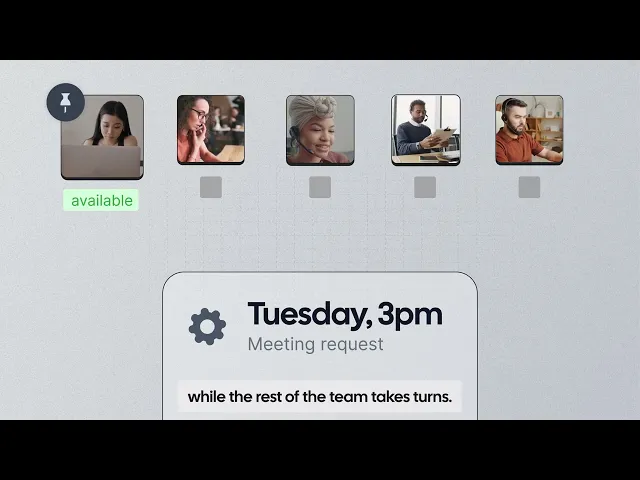
If you work with multiple tutors, you can use round-robin scheduling to share bookings across your team or routing to send students to a tutor based on their subject, level, language, or location. That means a parent can book the right type of lesson without you having to work out the schedule manually each time.
Why it ranks here: Cal.com gives you more control over how and when students book. You can add buffer time between lessons, require advance notice, and limit how far ahead students can book. For tutoring teams, recurring events, routing forms, and round-robin scheduling also help distribute bookings across tutors without having to assign each lesson manually.

Key features:
Unlimited event types: Create separate booking options for algebra, SAT prep, homework help, or an introductory call without limiting the number of lesson types you offer.
Separate availability rules: Set different hours, booking limits, buffers, and minimum notice requirements for each event type, so students only see times when that particular lesson is available.
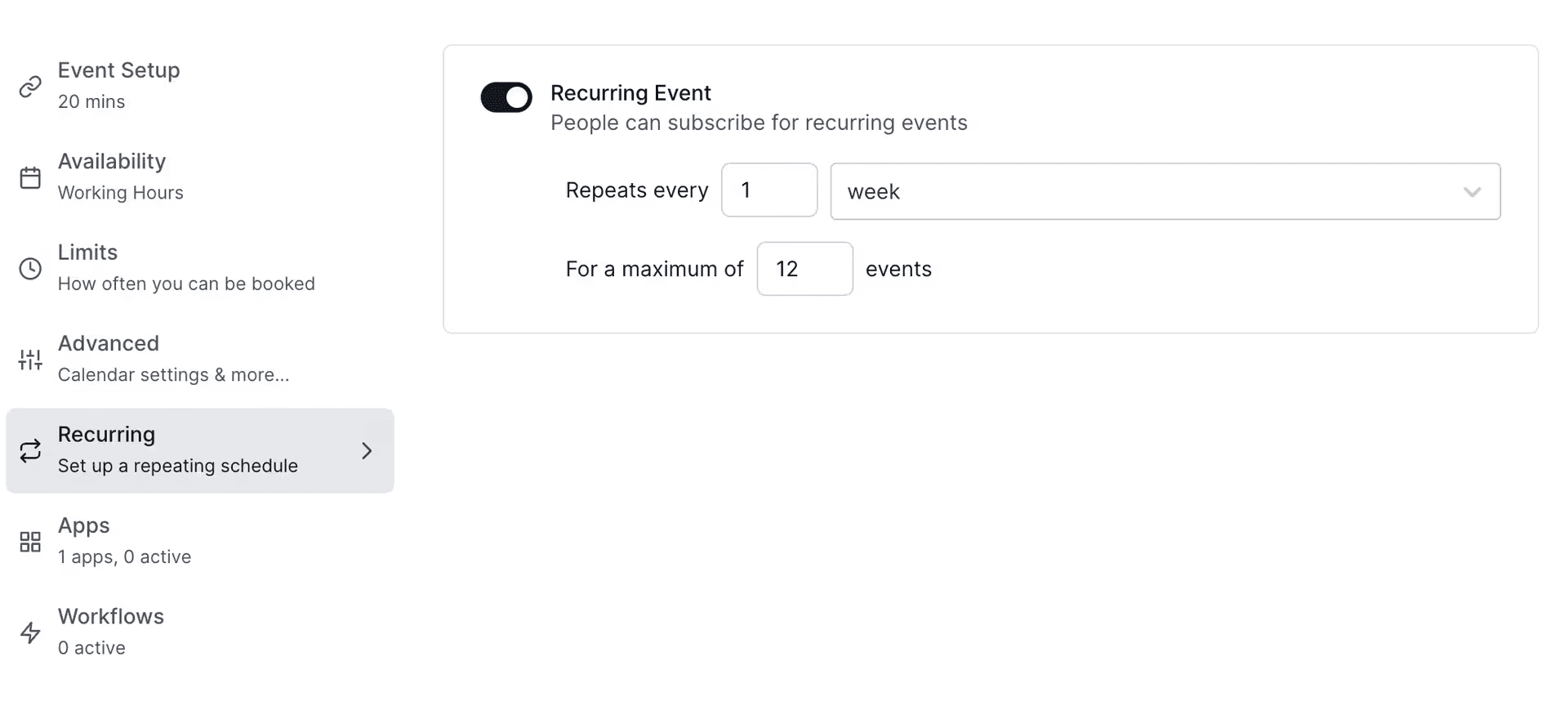
Recurring events: Let students book weekly or biweekly lessons as a recurring series instead of creating each lesson separately.
Multiple calendar connections: Connect Google, Outlook, Apple, and other supported calendars with two-way sync, so existing commitments are reflected in your availability.
Stripe and PayPal payments: Collect payment when a student books, including full payments or deposits, without sending a separate payment request.
No-show fees: Set up a fee to charge when someone misses a lesson, using the Stripe integration.
Email and SMS reminders: Send automatic booking confirmations, reminders, and follow-ups so students know when their lesson is coming up.
Video conferencing: Add a meeting link automatically with Cal Video, Zoom, Google Meet, Microsoft Teams, or another supported conferencing tool.
Round-robin scheduling: Distribute new bookings across your tutors based on availability or other scheduling rules instead of assigning every student manually.
Routing forms: Ask students or parents a few questions before booking and use their answers to direct them to the right tutor or lesson.
Booking analytics: See booking activity across your team to understand which event types are being booked and how your scheduling is performing.
Embedded booking: Add your booking page directly to your website or student portal instead of sending families to a separate scheduling site.
Custom workflows: Automate actions around a booking, such as reminders, follow-ups, and other notifications, so you don't have to handle each one manually.
Team and access controls: Manage tutors, permissions, shared scheduling, and organization-wide settings when multiple people need access to the same scheduling system.
100+ native integrations and API access: Connect Cal.com to your existing tutoring software, CRM, student portal, or internal tools to pass booking data between them.

Best for: Independent tutors, test-prep businesses, tutoring centers, and online tutoring companies that need flexible scheduling for different subjects, lesson types, and tutors without having to set up a complex, expensive tutoring management platform.
Pricing: Cal.com has a free plan for one user with unlimited event types and calendars, payments, and notifications. Paid plans start at $16/user/month, or $12/user/month when billed annually, and add recurring events, round-robin scheduling, routing forms, booking analytics, and API access.

Verdict: Cal.com works well if you want to make booking simple for students and families without giving up flexibility as your tutoring business grows. A solo tutor can start for free, while growing teams can add recurring bookings, routing, and other team features as needed.
Try Cal.com’s free plan to get started, or book a demo if you want to see how it could work for your tutoring business.
2. TutorCruncher: best for tutoring businesses that need billing and tutor payments
Free plan? | Starting price | Standout feature | Best use case |
|---|---|---|---|
No, 14-day trial | $30/month (+3.85% transaction fees) | Billing, payroll, and tutor payments | Agencies paying a roster of self-employed tutors |

What it is: TutorCruncher is tutoring business management software that combines lesson scheduling with student and client management, invoicing, tutor payroll, and payments. You can schedule one-off or recurring lessons, match students with tutors, and let parents or students book lessons themselves. Once lessons are delivered, you can use the same system to track what was taught, invoice clients, and calculate what tutors are owed.
Key features:
One-off and recurring lessons: Schedule individual sessions or create repeating lessons, with calendar sync to keep tutor availability up to date.
Self-service booking: Let clients view available times and book lessons themselves, with confirmations and reminders sent automatically.
Tutor-student matching: Match students with tutors based on factors such as subject, skills, availability, and location.
Invoicing and tutor payments: Generate client invoices from delivered lessons and calculate what tutors are owed based on their rates and completed sessions.
Automated reminders: Send email and SMS reminders to clients and tutors before scheduled lessons, reducing the need to follow up manually.
Limitations:
It doesn’t have a mobile app for tutors.
No built-in gradebook, assignments, or academic progress tracking.
Pricing: TutorCruncher doesn’t have a free plan, but offers a 14-day free trial. Paid plans start at $30/month and include lesson scheduling, invoicing, automatic payments, payroll, and email/SMS reminders. Card payments also incur a 3.85% fee at this starting price.
Verdict (vs. Cal.com): TutorCruncher works well tutoring businesses that need scheduling alongside student records, client billing, tutor payroll, and lesson management. Meanwhile, Cal.com is the best fit for tutors and teams that mainly need booking, payments, recurring lessons, and ways to route students to the right tutor. Cal.com also doesn't charge a transaction fee on bookings, so you keep more of your lesson revenue as your bookings increase.
3. Teachworks: best for centers that need detailed lesson and payroll management
Free plan? | Starting price | Standout feature | Best use case |
|---|---|---|---|
No, 21-day trial | $16.49/month (+ $0.32 per student lesson) | Lesson management and payroll | Tutoring centers managing teachers and lesson |

What it is: Teachworks is tutoring management software for tutoring companies, music schools, and language schools. It brings scheduling, student and teacher management, billing, lesson records, and payroll into one system. You can schedule individual or recurring lessons, manage teacher availability, assign teachers to students, and let students or parents book online. After each lesson, teachers can record notes, attendance, and other details, while administrators can use those records for invoicing, payments, and payroll. Teachworks also includes education-specific tools such as student progress tracking and customizable lesson records.
Key features:
Multi-view lesson calendar: Schedule individual, group, or recurring lessons, check teacher and location availability, and catch scheduling conflicts.
Recurring lessons: Set up repeating lessons and change individual sessions without changing the entire series.
Invoicing and payments: Generate invoices from lessons, packages, or flat fees and collect payments through Stripe.
Teacher payroll: Calculate teacher wages from completed lessons using different pay rates for teachers or services.
60+ integrations and add-ons: Connect Teachworks with QuickBooks, Google Calendar, Mailchimp, and Zapier to sync information and automate tasks.
Limitations:
API access isn’t available on the starter plan.
Two-way Google Calendar sync is a separate paid add-on.
Pricing: Teachworks doesn’t have a free plan but offers a 21-day free trial. Paid plans start at $16.49/month plus $0.32 per student lesson and include scheduling, invoicing, payments, payroll, and student management. The per-student lesson fee means the more lessons you deliver, the higher your monthly costs. Higher-priced plans reduce the per-lesson fee and add features such as API access.
Verdict (vs. Cal.com): Teachworks is better suited to tutoring centers that need detailed lesson management, invoicing, and teacher payroll. Cal.com is better if your priority is a flexible, branded booking experience with payments, two-way calendar sync, and routing to the right tutor. You can use Cal.com for booking and keep Teachworks for lesson and payroll management.
4. TutorBird: best all-in-one option for solo tutors
Free plan? | Starting price | Standout feature | Best use case |
|---|---|---|---|
No, 30-day trial | $16.95/month for one tutor (+ $4.95 per additional tutor) | Every feature in one flat price, unlimited students | Solo tutors wanting booking, billing, notes, and a website bundled |

What it is: TutorBird is designed for tutors who want to manage teaching and admin from the same system. You can schedule lessons, keep student records, write lesson notes, send invoices, and let parents view their child's schedule through a parent portal. Two-way calendar sync keeps your availability updated, while the built-in website builder gives you a basic place to promote your tutoring services.
Key features:
Lesson scheduling: Schedule private or group lessons, send reminders, and sync TutorBird with your calendar.
Student and parent portal: Give students and parents access to schedules, lesson notes, invoices, and payments.
Invoicing and payments: Send invoices, accept online payments, set up automatic payments, and manage late fees.
Lesson records and progress: Record attendance, lesson notes, attachments, and student progress.
Multi-tutor management: Manage tutor schedules, student assignments, and permissions from one system.
Limitations:
It has limited website customization.
There’s no built-in virtual classroom feature for hosting online lessons.
Pricing: TutorBird doesn’t have a free plan but offers a 30-day free trial. It has a single plan with all features for $16.95/month for the first tutor, plus $4.95/month for each additional tutor or staff member, with unlimited students included.
Verdict (vs. Cal.com): TutorBird is better suited to solo tutors who want scheduling, billing, student management, and lesson tools bundled into one system. Cal.com is better for tutors who want to set up a custom booking experience with branded pages, two-way calendar sync, payments, recurring events, and routing students to the right tutor based on their requirements.
5. Calendly: best for simple one-on-one tutoring sessions
Free plan? | Starting price | Standout feature | Best use case |
|---|---|---|---|
Yes, one user and one event type | $12/seat/month | Simple booking experience | Solo tutors with simple scheduling needs |

What it is: Calendly is a scheduling platform for booking one-on-one and group meetings. A tutor can create a booking page, set available hours, connect a calendar, and let students choose an available time. It works well for tutors who offer a small number of standard lesson types. If you need recurring lesson series, detailed student records, or lesson management, you’ll need to handle those tasks elsewhere.
Key features:
Booking pages and embeds: Share a booking page or add it to your website so students can choose an available lesson time.
Calendar sync: Connect Google, Outlook, or Exchange calendars so busy times are blocked and new bookings are added automatically.
Multiple event types: Create separate booking options for different lesson lengths, subjects, or services, each with its own availability and booking rules.
Payments: Connect Stripe or PayPal to collect payment when students book, including different prices for different event types.
Team scheduling: Use round-robin scheduling to automatically assign bookings to available tutors, with options to distribute meetings evenly across the team.
Limitations:
The free plan is limited to one event type and one calendar connection.
Routing and round-robin scheduling aren’t on the starter plan.
Pricing: Calendly has a free plan with one event type and one calendar connection. Paid plans start at $12/seat/month and add unlimited event types, multiple calendar connections, reminders, and payments. Higher-priced plans add round-robin scheduling and routing.
Verdict (vs. Cal.com): Calendly is a good fit for tutors who need a simple booking page for one-on-one sessions. Cal.com lets you offer multiple lesson types and accept payments on its free plan. Its starting paid plan also includes routing, round-robin scheduling, booking analytics, and API access, while Calendly requires a higher-priced plan for access to these features.
Tutor scheduling software: quick comparison
Here’s how the five tutor scheduling software options compare on free plans, key features, and costs:
Tool | Free plan? | Parent booking | Recurring lessons | Cost predictability |
|---|---|---|---|---|
Cal.com | ✅ Free, one user and unlimited event types | ✅ Branded booking page, embeds, and payments | ✅ One-off and recurring lessons | ✅ Free plan or flat per-user pricing |
TutorCruncher | ❌ No, 14-day trial | ✅ Self-service booking for students and parents | ✅ One-off and recurring lessons | ⚠️ Monthly fee plus transaction fees |
Teachworks | ❌ No, 21-day trial | ✅ Online booking for students and parents | ✅ Recurring lessons with individual session changes | ⚠️ Monthly fee plus per-student lesson fee |
TutorBird | ❌ No, 30-day trial | ✅ Parent portal and online booking | ✅ Recurring lessons | ✅ Flat monthly price plus additional tutor fees |
Calendly | ⚠️ Free, one user and one event type | ✅ Booking page and website embeds | ❌ No native recurring lessons | ✅ Flat per-seat pricing |
Final Verdict
The right tutor scheduling software depends on whether you need flexible booking for different lessons, scheduling with lesson and tutor management, or a simple way to book one-on-one sessions.
Cal.com is the best fit if flexible booking is your main priority. Its free plan gives solo tutors unlimited event types, calendar connections, payments, and reminders. Paid plans add recurring bookings, routing, and round-robin scheduling as your team grows.
For scheduling with lesson records, tutor payments, and payroll, consider TutorCruncher or Teachworks. For scheduling with student and lesson management, TutorBird is worth considering. And for basic one-on-one scheduling, Calendly gets the job done.
Try Cal.com for free and set up your tutoring booking page in minutes, or book a demo to see how it can work for your multi-tutor business.
Frequently asked questions
1. What is the best tutor scheduling software?
Cal.com is the best scheduling software for solo tutors and growing tutoring centers that need flexible booking. Its free plan supports unlimited event types and calendar connections, payments, and reminders, while paid plans add recurring events, round-robin scheduling, and attribute-based routing.
2. Is Cal.com free for tutors, and what does it cost as I grow?
Yes. Cal.com's free plan supports one user with unlimited event types and calendars, Stripe and PayPal payments, and automated reminders. Paid plans start at $16/user/month, or $12/user/month when billed annually, and add features such as recurring events, round-robin scheduling, routing forms, booking analytics, and API access.
3. Which tutor scheduling software is best for a solo tutor on a budget?
Cal.com's free plan is a good option if you mainly need booking, calendar sync, payments, and reminders on a $0 budget. TutorBird doesn’t have a free plan, but it’s another good option if you want scheduling alongside student management, lesson notes, invoicing, and other tutoring tools for just $16.95/month.
4. Can tutor scheduling software take payment when a student books?
Yes. Cal.com supports Stripe and PayPal payments, including deposits, and no-show fees through its Stripe integration. Calendly supports Stripe and PayPal on paid plans, while TutorCruncher and Teachworks include payment features alongside their other tutoring management tools.

Get started with Cal.com for free today!
Experience seamless scheduling and productivity with no hidden fees. Sign up in seconds and start simplifying your scheduling today, no credit card required!