" height="18.016311920580208px" id="GKXyVanMq" stroke-dasharray="0" stroke-linecap="butt" stroke-linejoin="miter" stroke-miterlimit="10" stroke-width="0.5" stroke="rgb(0, 0, 0)" transform="translate(3 3)" width="18px"/></svg>)
"/><stop offset="1" stop-color="rgb(227, 224, 244)"/></linearGradient><linearGradient id="CBS1bzkxF-2031533640-linear-gradient" x1="0.49751243781094523" x2="0.5024875621890548" y1="0" y2="1"><stop offset="0" stop-color="rgb(255, 255, 255)"/><stop offset="1" stop-color="rgb(227, 224, 244)"/></linearGradient><linearGradient id="Jd7AK81w9-2031533640-linear-gradient" x1="0.49751243781094523" x2="0.5024875621890548" y1="0" y2="1"><stop offset="0" stop-color="rgb(255, 255, 255)"/><stop offset="1" stop-color="rgb(227, 224, 244)"/></linearGradient></defs><g d="M 0 16 L 0 0 L 16 0 L 16 16 Z M 9.167 5.167 C 9.167 4.891 8.943 4.667 8.667 4.667 C 8.391 4.667 8.167 4.891 8.167 5.167 C 8.167 6.784 7.809 7.834 7.155 8.488 C 6.501 9.143 5.451 9.5 3.833 9.5 C 3.557 9.5 3.333 9.724 3.333 10 C 3.333 10.276 3.557 10.5 3.833 10.5 C 5.451 10.5 6.501 10.857 7.155 11.512 C 7.809 12.166 8.167 13.216 8.167 14.833 C 8.167 15.109 8.391 15.333 8.667 15.333 C 8.943 15.333 9.167 15.109 9.167 14.833 C 9.167 13.216 9.524 12.166 10.178 11.512 C 10.832 10.857 11.883 10.5 13.5 10.5 C 13.776 10.5 14 10.276 14 10 C 14 9.724 13.776 9.5 13.5 9.5 C 11.883 9.5 10.832 9.143 10.178 8.488 C 9.524 7.834 9.167 6.784 9.167 5.167 Z M 4 3.667 C 4 3.483 3.851 3.333 3.667 3.333 C 3.483 3.333 3.333 3.483 3.333 3.667 C 3.333 4.32 3.189 4.715 2.952 4.952 C 2.715 5.189 2.32 5.333 1.667 5.333 C 1.483 5.333 1.333 5.483 1.333 5.667 C 1.333 5.851 1.483 6 1.667 6 C 2.32 6 2.715 6.145 2.952 6.382 C 3.189 6.618 3.333 7.013 3.333 7.667 C 3.333 7.851 3.483 8 3.667 8 C 3.851 8 4 7.851 4 7.667 C 4 7.013 4.145 6.618 4.382 6.382 C 4.618 6.145 5.013 6 5.667 6 C 5.851 6 6 5.851 6 5.667 C 6 5.483 5.851 5.333 5.667 5.333 C 5.013 5.333 4.618 5.189 4.382 4.952 C 4.145 4.715 4 4.32 4 3.667 Z M 7.333 1 C 7.333 0.816 7.184 0.667 7 0.667 C 6.816 0.667 6.667 0.816 6.667 1 C 6.667 1.422 6.573 1.65 6.445 1.778 C 6.317 1.906 6.089 2 5.667 2 C 5.483 2 5.333 2.149 5.333 2.333 C 5.333 2.517 5.483 2.667 5.667 2.667 C 6.089 2.667 6.317 2.761 6.445 2.889 C 6.573 3.016 6.667 3.244 6.667 3.667 C 6.667 3.851 6.816 4 7 4 C 7.184 4 7.333 3.851 7.333 3.667 C 7.333 3.244 7.427 3.016 7.555 2.889 C 7.683 2.761 7.911 2.667 8.333 2.667 C 8.517 2.667 8.667 2.517 8.667 2.333 C 8.667 2.149 8.517 2 8.333 2 C 7.911 2 7.683 1.906 7.555 1.778 C 7.427 1.65 7.333 1.422 7.333 1 Z" fill="transparent" height="16px" id="aoZYv33vR" width="16px"><path d="M 0 16 L 0 0 L 16 0 L 16 16 Z" fill="transparent" height="16px" id="Z2uGmhW9f" width="16px"/><g d="M 7.833 4.5 C 7.833 4.224 7.609 4 7.333 4 C 7.057 4 6.833 4.224 6.833 4.5 C 6.833 6.117 6.476 7.168 5.822 7.822 C 5.168 8.476 4.117 8.833 2.5 8.833 C 2.224 8.833 2 9.057 2 9.333 C 2 9.61 2.224 9.833 2.5 9.833 C 4.117 9.833 5.168 10.191 5.822 10.845 C 6.476 11.499 6.833 12.549 6.833 14.167 C 6.833 14.443 7.057 14.667 7.333 14.667 C 7.609 14.667 7.833 14.443 7.833 14.167 C 7.833 12.549 8.191 11.499 8.845 10.845 C 9.499 10.191 10.549 9.833 12.167 9.833 C 12.443 9.833 12.667 9.61 12.667 9.333 C 12.667 9.057 12.443 8.833 12.167 8.833 C 10.549 8.833 9.499 8.476 8.845 7.822 C 8.191 7.168 7.833 6.117 7.833 4.5 Z M 2.667 3 C 2.667 2.816 2.517 2.667 2.333 2.667 C 2.149 2.667 2 2.816 2 3 C 2 3.654 1.855 4.048 1.618 4.285 C 1.382 4.522 0.987 4.667 0.333 4.667 C 0.149 4.667 0 4.816 0 5 C 0 5.184 0.149 5.333 0.333 5.333 C 0.987 5.333 1.382 5.478 1.618 5.715 C 1.855 5.952 2 6.346 2 7 C 2 7.184 2.149 7.333 2.333 7.333 C 2.517 7.333 2.667 7.184 2.667 7 C 2.667 6.346 2.811 5.952 3.048 5.715 C 3.285 5.478 3.68 5.333 4.333 5.333 C 4.517 5.333 4.667 5.184 4.667 5 C 4.667 4.816 4.517 4.667 4.333 4.667 C 3.68 4.667 3.285 4.522 3.048 4.285 C 2.811 4.048 2.667 3.654 2.667 3 Z M 6 0.333 C 6 0.149 5.851 0 5.667 0 C 5.483 0 5.333 0.149 5.333 0.333 C 5.333 0.756 5.239 0.984 5.112 1.112 C 4.984 1.239 4.756 1.333 4.333 1.333 C 4.149 1.333 4 1.483 4 1.667 C 4 1.851 4.149 2 4.333 2 C 4.756 2 4.984 2.094 5.112 2.222 C 5.239 2.35 5.333 2.578 5.333 3 C 5.333 3.184 5.483 3.333 5.667 3.333 C 5.851 3.333 6 3.184 6 3 C 6 2.578 6.094 2.35 6.222 2.222 C 6.35 2.094 6.578 2 7 2 C 7.184 2 7.333 1.851 7.333 1.667 C 7.333 1.483 7.184 1.333 7 1.333 C 6.578 1.333 6.35 1.239 6.222 1.112 C 6.094 0.984 6 0.756 6 0.333 Z" fill="transparent" height="14.66671286102295px" id="ae6ccdFme" transform="translate(1.333 0.667)" width="12.66663px"><path d="M 5.833 0.5 C 5.833 0.224 5.609 0 5.333 0 C 5.057 0 4.833 0.224 4.833 0.5 C 4.833 2.117 4.476 3.168 3.822 3.822 C 3.168 4.476 2.117 4.833 0.5 4.833 C 0.224 4.833 0 5.057 0 5.333 C 0 5.61 0.224 5.833 0.5 5.833 C 2.117 5.833 3.168 6.191 3.822 6.845 C 4.476 7.499 4.833 8.549 4.833 10.167 C 4.833 10.443 5.057 10.667 5.333 10.667 C 5.609 10.667 5.833 10.443 5.833 10.167 C 5.833 8.549 6.191 7.499 6.845 6.845 C 7.499 6.191 8.549 5.833 10.167 5.833 C 10.443 5.833 10.667 5.61 10.667 5.333 C 10.667 5.057 10.443 4.833 10.167 4.833 C 8.549 4.833 7.499 4.476 6.845 3.822 C 6.191 3.168 5.833 2.117 5.833 0.5 Z" fill="url(%23t2lXByE48-2031533640-linear-gradient)" height="10.66671px" id="t2lXByE48" transform="translate(2 4)" width="10.66663px"/><path d="M 2.667 0.333 C 2.667 0.149 2.517 0 2.333 0 C 2.149 0 2 0.149 2 0.333 C 2 0.987 1.855 1.382 1.618 1.618 C 1.382 1.855 0.987 2 0.333 2 C 0.149 2 0 2.149 0 2.333 C 0 2.517 0.149 2.667 0.333 2.667 C 0.987 2.667 1.382 2.811 1.618 3.048 C 1.855 3.285 2 3.68 2 4.333 C 2 4.517 2.149 4.667 2.333 4.667 C 2.517 4.667 2.667 4.517 2.667 4.333 C 2.667 3.68 2.811 3.285 3.048 3.048 C 3.285 2.811 3.68 2.667 4.333 2.667 C 4.517 2.667 4.667 2.517 4.667 2.333 C 4.667 2.149 4.517 2 4.333 2 C 3.68 2 3.285 1.855 3.048 1.618 C 2.811 1.382 2.667 0.987 2.667 0.333 Z" fill="url(%23CBS1bzkxF-2031533640-linear-gradient)" height="4.66667px" id="CBS1bzkxF" transform="translate(0 2.667)" width="4.66667px"/><path d="M 2 0.333 C 2 0.149 1.851 0 1.667 0 C 1.483 0 1.333 0.149 1.333 0.333 C 1.333 0.756 1.239 0.984 1.112 1.112 C 0.984 1.239 0.756 1.333 0.333 1.333 C 0.149 1.333 0 1.483 0 1.667 C 0 1.851 0.149 2 0.333 2 C 0.756 2 0.984 2.094 1.112 2.222 C 1.239 2.35 1.333 2.578 1.333 3 C 1.333 3.184 1.483 3.333 1.667 3.333 C 1.851 3.333 2 3.184 2 3 C 2 2.578 2.094 2.35 2.222 2.222 C 2.35 2.094 2.578 2 3 2 C 3.184 2 3.333 1.851 3.333 1.667 C 3.333 1.483 3.184 1.333 3 1.333 C 2.578 1.333 2.35 1.239 2.222 1.112 C 2.094 0.984 2 0.756 2 0.333 Z" fill="url(%23Jd7AK81w9-2031533640-linear-gradient)" height="3.333333px" id="Jd7AK81w9" transform="translate(4 0)" width="3.3333399999999997px"/></g></g></svg>)
" height="24px" id="WCm44spAV" width="24px"/><path d="M 3.892 7.742 C 1.674 7.742 0 6.014 0 3.882 C 0 1.738 1.589 0 3.892 0 C 5.107 0 5.951 0.374 6.623 1.173 L 5.566 2.09 C 5.118 1.621 4.564 1.386 3.892 1.386 C 2.452 1.386 1.547 2.517 1.547 3.882 C 1.547 5.246 2.452 6.356 3.924 6.356 C 4.649 6.356 5.193 6.111 5.63 5.63 L 6.718 6.558 C 6.153 7.24 5.193 7.742 3.892 7.742 Z" fill="rgb(255, 255, 255)" height="7.741500000000002px" id="XEPpGD7l5" transform="translate(4 8.25)" width="6.717999999999989px"/><path d="M 2.74 7.922 C 1.215 7.922 0 6.632 0 5.032 C 0 3.433 1.215 2.122 2.74 2.122 C 3.7 2.122 4.201 2.516 4.5 3.113 L 4.5 2.239 L 5.928 2.239 L 5.928 7.784 L 4.531 7.784 L 4.531 6.877 C 4.233 7.507 3.731 7.922 2.74 7.922 Z M 1.439 5.023 C 1.439 5.865 2.057 6.622 2.975 6.622 C 3.924 6.622 4.531 5.897 4.531 5.033 C 4.531 4.169 3.924 3.423 2.975 3.423 C 2.057 3.423 1.439 4.159 1.439 5.022 Z M 6.784 7.784 L 6.784 0 L 8.224 0 L 8.224 7.784 L 6.784 7.784 Z" fill="rgb(255, 255, 255)" height="7.9224997406005855px" id="lGDJupIUR" transform="translate(10.5 8)" width="8.223500194549558px"/></g></svg>)
" width="18px"><path d="M 2 8 C 0.895 8 0 7.105 0 6 L 0 2 C 0 0.895 0.895 0 2 0 L 6 0 C 7.105 0 8 0.895 8 2 L 8 6 C 8 7.105 7.105 8 6 8 Z" fill="transparent" height="8px" id="ZrCrI93dV" stroke-dasharray="" stroke-linecap="round" stroke-linejoin="round" stroke-width="2" stroke="rgb(0, 0, 0)" width="8px"/><path d="M 0 0 L 0 4 C 0 5.105 0.895 6 2 6 L 6 6" fill="transparent" height="6px" id="emltWYAiE" stroke-dasharray="" stroke-linecap="round" stroke-linejoin="round" stroke-width="2" stroke="rgb(0, 0, 0)" transform="translate(4 8)" width="6px"/><path d="M 2 8 C 0.895 8 0 7.105 0 6 L 0 2 C 0 0.895 0.895 0 2 0 L 6 0 C 7.105 0 8 0.895 8 2 L 8 6 C 8 7.105 7.105 8 6 8 Z" fill="transparent" height="8px" id="WpBecYDfi" stroke-dasharray="" stroke-linecap="round" stroke-linejoin="round" stroke-width="2" stroke="rgb(0, 0, 0)" transform="translate(10 10)" width="8px"/></g></svg>)


Double Booking: What It Is and How to Stop It for Good (2026)
It’s 2:00 PM, and you have a customer coming in; at the same time, you notice a client call is also marked at 2:00 PM on your calendar. What do you do? In both scenarios, you have to make someone wait or reschedule. Both solutions are less than ideal and even unprofessional. This leads to frustrations and a serious hit to your reputation. However, this isn’t some unpreventable act of god; this problem, also known as double booking, can be easily avoided.
When two commitments line up on your calendar in the same time slot, that’s when you call it a double booking. This can be for anything from a client meeting crossing over with an in-person customer visit, or an internal team meeting being booked at the same time as your lunch hour. These little mistakes are enough to derail the day for any professional or business. That’s why, to prevent double bookings, businesses today use a dedicated scheduling software, like Cal.com, which you can start using for free.
It is a platform that checks all your calendars in real time and has complete knowledge of your actual availability. It only allows someone to book an appointment with you when you’re actually available, completely removing the risk of double booking scheduling. Even though some businesses will have you know that they intentionally double-book accounts to make up for no-shows. Accidental double bookings cause unnecessary disarray, waste everyone’s time, and breach customer trust.
On a technical level, double bookings are caused by disconnected calendars, manual scheduling practices, and outdated booking processes. So, in this guide, we’ve definitely answered what is double booking. We’ll also discuss why it happens, why some businesses use it intentionally, and whether that’s a sound strategy. And lastly, we’ll give you complete details on how to stop double booking appointments for good with Cal.com.
If you’re ready to eliminate your scheduling conflicts, feel free to create your free booking page with Cal.com today. It will sync all your calendars to your booking page in real-time automatically.
How Cal.com stops double booking for you
The fix | What it does | How Cal.com handles it |
One source of truth | Checks every connected calendar to ensure up-to-date availability before showing available time slots. This prevents scheduling conflicts, even when using multiple calendars. | Cal.com allows you to integrate Google Calendar, Microsoft Outlook, and iCalendar in one place. This lets Cal.com check every calendar to ensure free availability before confirming a booking. What helps here is Cal.com’s two-way calendar sync, which is really what helps prevent double bookings. |
Real-time availability sync | It removes a time slot the moment it is booked from your availability. The removal is done across platforms, ensuring no one else can reserve it. | The two-way calendar sync mentioned previously is what helps Cal.com achieve real-time availability updation. As soon as any slot is booked, Cal.com automatically removes it from your booking page, making double booking impossible. |
Buffer times and booking limits | These features prevent overloading your schedule with meetings every day and also prevent back-to-back meetings. | Cal.com helps you set this up with built-in buffer time settings between meetings. This relates to a minimum notice period between meetings. It also offers a maximum daily meeting count, which helps you keep your calendar unclogged and reduce any risk of double booking scheduling issues. |
Team conflict prevention | Ensures protection against multiple team members reserving the same time slot for the same resource. | This is mediated using round-robin scheduling and shared team availability. It automatically distributes bookings without creating conflicts between staff members. |
Automated confirmations and reminders | Eliminates manual scheduling errors while reducing no-shows and last-minute rescheduling. | Cal.com does this with automated booking confirmations, reminders, and workflows, keeping every appointment synchronized without relying on spreadsheets or manual calendar updates. |
Cal.com offers all the features mentioned above on its free plan. So, create a free account today and stop any accidental double booking incidents before they happen.
What is double booking?
At its simplest, double booking refers to two appointments being booked at the same time slot on the same day. It could be a booking for your time, or it could be a booking for resources. Nonetheless, the key lies in two people being reserved to get the same thing at the same time, which isn’t technically or practically feasible.
The double booking meaning applies across industries for a freelancer; it could mean two client meetings booked at the same time. For a hospital, it could mean two patients being scheduled for a doctor visit at the same time. Similarly, a salon might have two customers coming in at the same time for an appointment. Double booking causes problems when appointments are specific.
You don’t go to the hospital to see just any doctor that’s available; you generally visit a specific doctor. Similarly, for a salon, customers often have a preference for who they want to get their service from. So, this is where double booking becomes a problem because one person can’t attend to two things at the same time.
So, in case of a double booking, your front desk staff is left apologizing and requesting rescheduling while taking a hit on the brand's trustworthiness, and also getting an earful from the clients. To help you understand double bookings even better, here are a few laid-out examples.
Scenario | What happens |
Medical clinic | Two patients are booked with the same physician at the same time |
Consulting business | A client meeting overlaps with an internal meeting |
Hair salon | Two customers are assigned to one stylist for the same appointment slot |
Legal practice | An attorney is booked for two client consultations at the same time |
The scenarios mentioned above are examples of accidental double booking. This is what people refer to when they’re asking what is double booking. The primary cause for these booking errors is manual scheduling processes, disconnected calendars, and booking systems used by multiple users.
The double booking scheduling problem is entirely preventable with a scheduling platform like Cal.com. As previously shown, once a slot is booked, it is immediately made unavailable for future bookings when you use a platform like Cal.com. So, this entirely avoids the risk of double bookings.
Double booking in scheduling vs overbooking vs double-booked room
This is laying it all out there, because believe it or not, there are a lot of people who think either all of these are the same thing or misunderstand each of them for something else. So, to clear the air, here’s a clear definition of each and how they differ from each other.
Double booking is when two appointments are scheduled in the same time slot for the same person. This is generally done by mistake or sometimes, by design (we’ll get into it later). This is generally the most common interpretation of double booking and the most widely accepted double booking definition that’s out there.
Overbooking is a business practice where businesses would intentionally book more appointments than they can possibly handle in the hopes that some people would no-show anyway, and they’ll still be able to fulfill all appointments. This is a common practice in airlines, hotels, and even healthcare practices. When it was mentioned that businesses sometimes intentionally double-book, this is what it meant: it is overbooking.
A double-booked room or double reservation is when one physical room at a hotel or even one resource is assigned to two different people for the same date and time. Think of it like two people being able to book the same venue on the same day. In a large venue with multiple venue spots, two hosts can easily host different events on the same day at the same time in the same venue. This is what’s called a double reservation.
To break it down for you easily, here’s a quick comparison of all three booking types.
Term | Meaning | Intention |
Double booking | Accidental booking of two appointments or meetings at the same time slot with one person. | Generally accidental |
Overbooking | Accepting more bookings than you can attend, hoping someone or the other will no-show unannounced | This is an intentional business practice |
Double reservation | Reserving the same venue, room, or resource for multiple people simultaneously | Can be accidental or intentional |
Understanding the difference between these three booking types will help you know that double booking is generally accidental and preventable. Overbooking is a greedy business practice and not accidental at all. Lastly, a double reservation may also be accidental and caused by scheduling errors, so even that is avoidable with scheduling software like Cal.com if you want.
Double booking in a medical office
In a healthcare scenario, double booking medical appointments refers to scheduling two patients with the same provider during the same appointment slot. Now, this can be accidental, as mentioned before, or in some cases, it may even be done intentionally as a part of a patient flow strategy.
This is why the double booking medical definition is slightly different from the general definition of the term. To put it simply, clinical scheduling must account for provider availability, exam room availability, patient complexity, procedure times, and regulatory requirements.
So, in a medical setting, a double booking doesn’t just disrupt the patient flow and operations at a medical practice; it also inconveniences patients and delays care. Not to mention, it overwhelms front desk staff sometimes for no fault of their own.
If you’re still wondering what double booking is in a medical office setting, picture this: a physician is set to consult with a patient at 10:00 AM, unknowingly, another staff member using a different scheduling system has also scheduled the physician to consult with a different patient at the same 10:00 AM slot. Now, both patients arrive to be seen immediately, but someone has to wait, and the front desk will have to resolve this situation.
So, in a medical scenario where patients come in with varying levels of physical and health problems, double booking scheduling can be a real problem. Not only is it inconvenient for the patients, but it is also highly unempathetic towards them. Using connected scheduling platforms like Cal.com is the only solution here, as it helps eliminate scheduling conflicts altogether by checking every connected calendar before making an appointment available.
Additionally, medical practices cannot just use any scheduling platform; scheduling appointments involves handling patient health information (PHI), which means the scheduling platform must provide a signed Business Associate Agreement (BAA) as per HIPAA compliance to the healthcare practice. Cal.com is among the top scheduling platforms online that provide HIPAA-ready scheduling with signed BAAs available for every Cal.com user.
Why do some clinics double-book on purpose?
This is not ideal, but sometimes, to prevent no-shows disrupting the physician’s time and schedule, medical practices and clinics allow intentional double booking. This is done with the expectation that both patients will not show up. So, whoever does show up gets the booking, and the provider does not have to sit idle during their working hours.
Common reasons used by clinics to purposefully double-book appointments include:
Filling gaps in the physician's schedule
Maximizing physician productivity during peak hours
Reducing the impact of no-shows
Improving patient throughput in high-volume practices
Double booking intentionally is never a good idea, especially in a healthcare setting. It is unfair to one patient or the other, and it also causes unnecessary hassle for patients. That being said, now you know the difference between what’s an accidental double booking and what’s an intentional “productivity” read cash grab.
Is double booking good or bad? Advantages and disadvantages
From a strategic standpoint, double booking is not a good idea in any scenario. There are many different ways to prevent no-shows and to improve team productivity without dishonest/shady business practices.
Cal.com itself supports many such measures, including but not limited to automated reminders on emails, SMS, and even calls to ensure attendees are expected to attend their appointments or not. In fact, the software also allows you to put a paywall on appointment booking, which incentivizes attendees to attend appointments, since they’ve already paid and there’s no refund for missed appointments.
One of the common defences you’ll hear about planned double booking is that “it is a calculated strategy to maximize productivity.” Well, does this calculated strategy also not leave patients frustrated and cause operational chaos when everyone shows up when they’re supposed to?
It is our duty to present to you the double booking scheduling advantages and disadvantages. However, being the team that worked hard on building a software that allows you to maximize productivity without duping your customers/clients, we don’t particularly celebrate intentional double booking.
When double booking is used intentionally
Some businesses, for lack of better planning, intentionally double-book appointments. This approach is common in industries where cancellations, last-minute no-shows, and short appointment requests are frequent. To answer the question, when is double-booking often used? It is used when businesses notice high demand for their services and are okay with a slight hit to their reputation if it means they can milk the demand.
Supposed advantages of intentional double booking include:
Higher utilization of staff and resources: Providers, consultants, or service professionals spend less time waiting between appointments.
Improved revenue potential: More appointments directly relate to higher revenues, and this is one of the main reasons businesses push for it.
Great scheduling flexibility: Businesses can better manage fluctuating appointment lengths and cancellations.
Reduced impact of no-shows: Empty appointment slots are less likely to affect daily productivity.
The risks of overusing intentional double booking
The risks of overusing intentional double booking are that the effects stop being individual incidents and ripple out to tarnish the brand image of your business. Not only that, it basically creates mistrust with your clients and customers who would likely have a very high bounce rate if they experience delays during their appointment times more than once. The other disadvantages include:
Longer wait times for customers and clients
Client or customer frustration and loss of confidence in the business
Increased workload and harassment for front-desk teams trying to resolve scheduling conflicts
Provider and employee stress from constantly adjusting schedules
Damage to business reputation in the long term
So, to summarize, intentional overbooking is called a business strategy, but accidental double booking is just scheduling failure. While there’s no solution for corporate greed, there is, however, an end-to-end solution for accidental double bookings, and it's Cal.com. With connected calendars, availability syncing, booking limits, buffer times, and shared team scheduling, there are a lot of features specifically designed to help you optimize your calendar and prevent avoidable mistakes.
Why does double booking happen? (common causes)
Accidental double booking is not caused by the failure of a single tool in your workflow. It is generally caused by disconnected systems, manual processes, or outdated scheduling workflows. Like they say, “everything has to go wrong at the right time for a disaster to occur.” Sayings aside, understanding the common causes of double booking appointments can help you learn how to avoid them and actively place safeguards in place before it disrupts your day.
Manual scheduling and paper calendars: If you’re using handwritten appointment books, spreadsheets, or manual calendar entries, the risk of human error skyrockets. This is not a skill issue, but rather different users using the system at different times may accidentally make errors and leave two appointments at the same time, especially when managing busy schedules.
A connected scheduling platform like Cal.com eliminates this problem by automating the data entry part and creating a single and always up-to-date source of truth. With Cal.com, every booking is automatically recorded and checked before it’s confirmed, removing the guesswork from double booking scheduling.Multiple disconnected calendars: One of the biggest causes of double scheduling is managing separate calendars that don’t communicate with each other. This works because certain scheduling platforms only connect to one calendar, while someone may book your time using another calendar, which will not be reflected in your scheduling platform. As a result, it becomes possible to create double bookings and create problems in your schedule.
So, instead of using multiple disjointed calendars, you can use Cal.com to connect all your calendars into one system. Cal.com supports native-level integration with Google Calendar, Microsoft Outlook, and iCalendar, among others. With all your calendars in the same system, the risk of accidental double bookings becomes virtually zero. This is because the software is programmed to check through all your calendars before confirming any slot for an appointment.No real-time availability sync: If you use digital calendars, delays in synchronization can create scheduling conflicts. For example, someone books an appointment with you at any given time slot, but your scheduling system does not update your availability in real-time, then it becomes possible for others to also book an appointment with you in the meantime and create a double booking.
So, instead of waiting ‘x’ amount of time before your calendar syncs, you can use a platform like Cal.com that syncs your availability against all your existing obligations in real time. This ensures there are never any double booking scheduling mishaps in your workday to disrupt your productivity.Shared teams booking without visibility: In a scenario where multiple employees schedule appointments for the same professional, adequate visibility is crucial. Without it, different employees can schedule different appointments at the same time slot without any knowledge of the other employee’s actions. In such cases, the matter can only come to light when it is too late, creating unforeseen circumstances in your daily work.
Shared availability solves this problem entirely, and with Cal.com, you can avail of this feature that gives teams a unified view of schedules, while features like round-robin routing automatically assign bookings to available team members instead of creating collisions.Time zone confusion: This is one of the newer problems with scheduling and double booking that have become more popular with the advent and popularization of remote work. Today, if your scheduling processes can not handle time zones automatically, it can lead to unintended double booking problems.
This is why a platform like Cal.com is crucial, as it can handle time zones automatically and ensure that your availability is translated to the user’s local time zone without any manual intervention. This ensures that double bookings or booking appointments beyond your defined availability become impossible.Manual booking confirmations and re-entry: Manual booking entries leave room for human error. This primarily happens because today, booking details come in from multiple channels, including social media, emails, phone calls, and even SMS. In such cases, manually adding every appointment item to your calendar may lead to mistakenly adding two appointments to the same appointment slot.
This is why a platform like Cal.com is a must because it helps you manage omnichannel inputs without breaking a sweat. Each input is automatically routed to the booking engine, which checks your availability, confirms the date and time, and only then offers booking confirmation. Once the confirmation is delivered, that slot is locked and not made available for any further bookings.
How to stop double booking appointments (with Cal.com)
Now that you understand why double booking happens, it is easier to prevent it. The key is to replace disconnected calendars and manual scheduling with a system that automatically checks availability before anyone can book a meeting or appointment.
As one of the best solutions for double booking prevention, here’s how you can stop double booking appointments with Cal.com.
Step 1: Put every calendar in one place
The first step to preventing double booking scheduling problems is to eliminate disjointed calendars. When you use multiple calendars separately, or you use different scheduling tools at the same time, it is possible for appointments to slip through the cracks and create double bookings.
This is why you should instead consolidate every calendar you use into a single scheduling system. Now, many scheduling platforms limit the number of calendars you can add to an account.
This is why you should choose Cal.com, because even with its free account, there’s no limit to the number of calendars you can add to your profile. This allows you to ensure your true availability is always available on Cal.com, and any changes to your schedule are immediately reflected in both your calendars and your availability on the platform.
This feature and Cal.com as a whole make it simple to prevent accidental double bookings.
Step 2: Let the availability update in real time
The accuracy of your scheduling system depends on your availability data. If your availability data is not up-to-date, it can cause scheduling conflicts, even in the most feature-rich and well-set-up systems. There are two parts to ensuring your availability updates in real-time. The first part is ensuring your calendars update any availability changes in real-time. The second is ensuring there’s only one source of truth in your system.
Cal.com offers both these features and ensures your availability always remains up-to-date in real time. How does it do that? With the help of two-way calendar sync technology. Cal.com automatically updates the availability changes on your calendar and your booking page to the other platform in real-time.
Also, Cal.com, either its booking page info or any specific calendar that you set as the source of truth. So, there’s always something to cross-verify whether the availability information is up-to-date or not. This helps prevent double bookings in an automated system.
Step 3: Add buffers and booking limits
If you have back-to-back meetings in a day, when are you going to get your work done? There’s more to work than being in meetings for most people, and that’s why double booking isn’t always two appointments at the same time; it is also a barrage of constant appointments one after the other, which leaves one exhausted and dazed. In the age of personal secretaries, people could request their secretaries not to book more than ‘x’ number of meetings in a day. However, with the advent of digital booking platforms, that sort of control is thought to be lost.
Using Cal.com can help you regain control over your schedule. It has built-in buffer times between meetings, so you’re never left scrambling from one meeting to another with no second to catch your breath in between. Additionally, you can set the maximum number of appointments/meetings you want to have in a day, so that your productivity and work are not hampered by constantly being on calls.
Step 4: Prevent team collisions
Double booking scheduling errors are more common in organizations where multiple people are in charge of booking appointments for the same people. This leads to unfortunate human errors in some cases, where two distinct employees can assign the same slot to two different people. The error here is not caused by the employees; the problem lies in the lack of visibility among team members and not having enough controls over the scheduling flow.
Cal.com solves this with a shared scheduling system. It gives everyone the same access and live availability visibility. This helps everyone have the same information when booking an appointment, removing the risk of double bookings caused by a lack of visibility among different staff members. Cal.com also supports round-robin scheduling to automatically route bookings to the appropriate team member based on availability.
Step 5: Automate confirmations and reminders
Manual scheduling doesn’t end after someone books an appointment. Many businesses still have to copy booking details into calendars manually and then send confirmation emails. Rescheduling requests are also managed through spreadsheets, which can be prone to errors if not done with perfect attention.
These factors add layers of friction to the scheduling process and create spots that increase the probability of error. This is why it is important that you choose a platform like Cal.com that can help you automate the scheduling process to a great extent. With Cal.com, you can send confirmation emails automatically as well as reminders.
In fact, you don’t even have to add the appointment details to the calendar manually; Cal.com does it for you without any mistakes ever. This helps you reduce the load on your front desk and admin team, as well as improve the chances of reducing no-shows and preventing accidental double bookings.
So, if you’re ready to eliminate scheduling conflicts in minutes? Head on over to Cal.com and create a free scheduling page today.
Why Cal.com is the best way to prevent double bookings
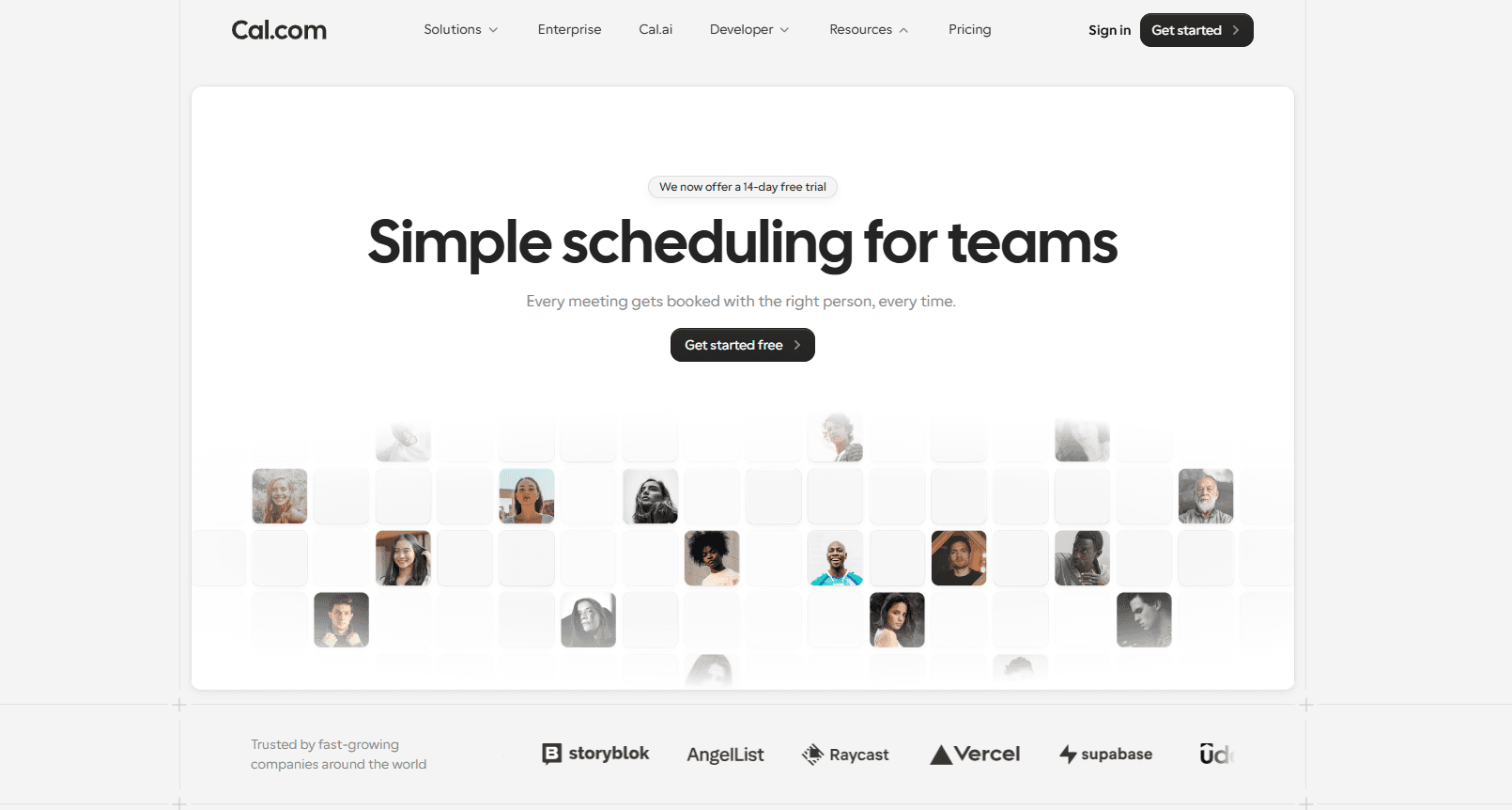
What it is: Cal.com is an API-first end-to-end scheduling platform that helps businesses and teams leverage automated scheduling to improve workplace productivity and reduce the risk of double bookings and no-shows. Scheduling conflicts are bad for business, and they can derail entire workdays if not dealt with in the right way. Cal.com manages these conflicts by preventing them in the first place.
Unlike traditional scheduling tools, Cal.com is a modern cloud-based scheduling platform. It automatically updates scheduling information to your calendar and keeps your booking page availability up-to-date in line with your calendar appointments. This is done automatically thanks to the API-first infrastructure of Cal.com, which can seamlessly integrate with workplace tools, like calendars, video conferencing apps, messaging apps, and business management software.
Here’s why Cal.com stands out:
Free to start: You can begin using Cal.com at no cost, making conflict-proof scheduling accessible whether you’re an independent consultant or managing a growing business.
Automates reminders and workflows: Cal.com can help you automate a lot of the manual labor that comes with scheduling. From updating the appointment information on your calendars to sending confirmations, reminders, and even follow-ups, all of it is possible without any manual intervention when you choose Cal.com.
Checks all calendars in real-time: If you have multiple calendars, Cal.com updates and keeps track of them at the same time without any input from your end. This is why it can verify your availability across all calendars before approving a new appointment.
Prevents schedule overload: To ensure you’re not stuck on back-to-back meetings all day long, Cal.com helps you manage your workload with built-in buffer times between each meeting and also sets a cap on the maximum number of meetings that can be booked in a day. This prevents double booking scheduling issues and helps you stay focused and productive at work.
Regulated industry support: Several industries, like healthcare organizations, require HIPAA-ready scheduling with signed BAAs for legal operation. Cal.com provides signed BAAs and a complete HIPAA-compliant scheduling solution for healthcare practice users on every plan.
Offers shared availability: Shared team availability and round-robin scheduling automatically route bookings to the right team member. It prevents scheduling conflicts and ensures that teams can function seamlessly even without manual coordination at all times.
Cal.com Pricing
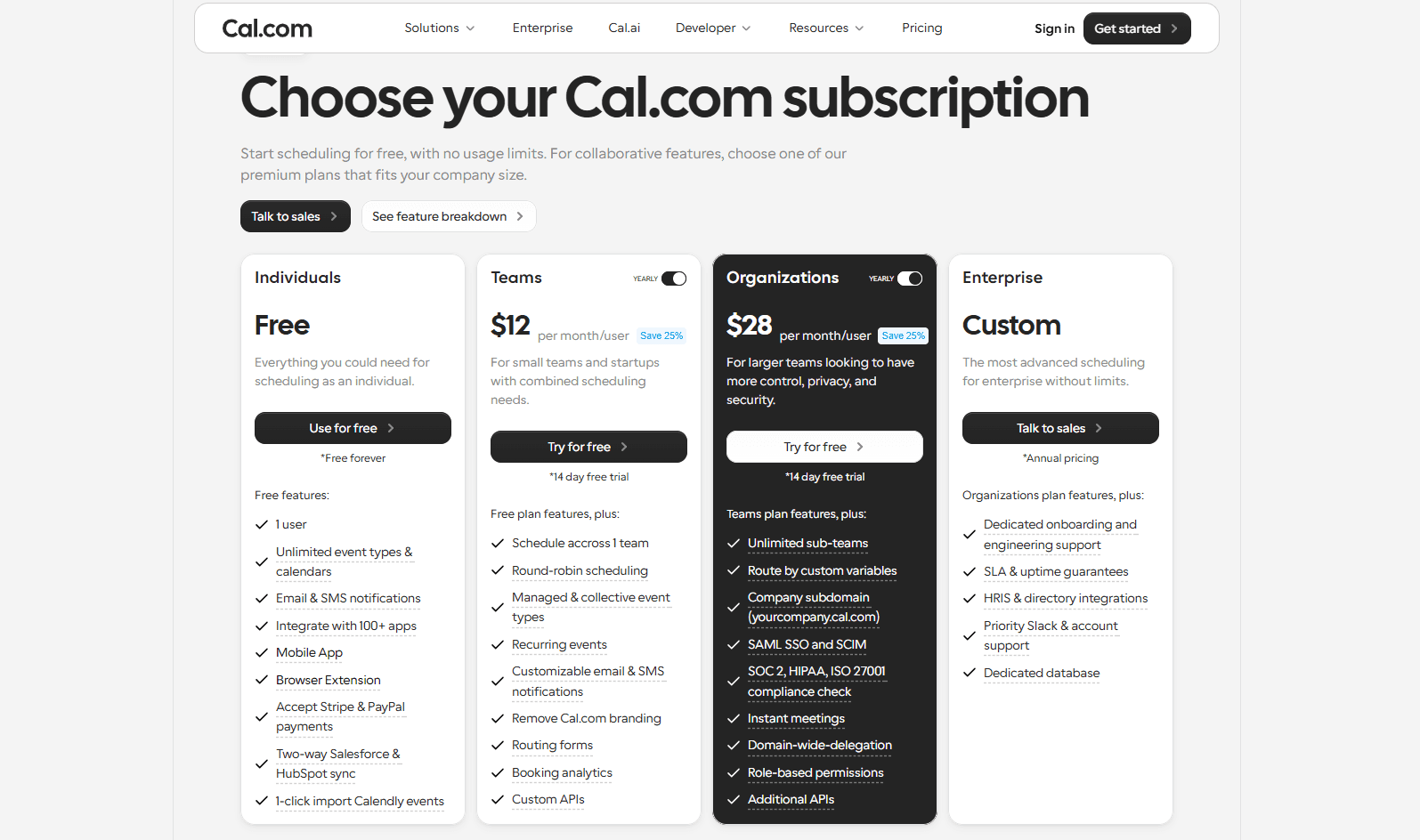
Cal.com has a generous free plan that’s free to use for individuals forever. The platform also has paid plans that are specifically aimed at businesses of different sizes. Here’s a detailed view of the pricing plans of Cal.com.
Plan | Price | Best for |
Free | Free forever | Individuals and bootstrapped startups that need a reliable, conflict-free booking experience. |
Teams | $12/user per month | Suited for teams that require features like round-robin scheduling and custom lead routing, alongside other collaboration features. |
Organizations | $28/user per month | Suited for businesses that require specialized administration and compliance support, including ISO 27001, SAML, SSO, SCIM, SOC 2, and HIPAA. |
Enterprise | Custom quote-based pricing | Suited for large organizations that want to self-host Cal.com and keep complete control over their own data. |
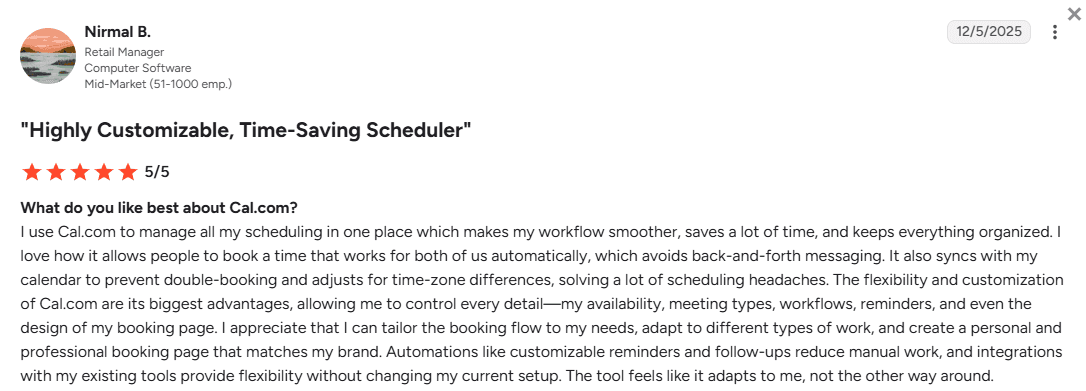
So, if you’re ready to stop accidental double bookings that affect your business and customers’ trust in your establishment, choose Cal.com today. You can get started with a free account and start accepting conflict-free bookings in minutes.
Conclusion
Accidental double booking is a serious operational blunder for any business. It can hamper your credibility with clients/customers as well as put your front desk staff through unnecessary harassment. The primary reason for accidental double booking even today is because of outdated scheduling processes, disjointed calendars and scheduling platforms, and a lack of availability visibility across the team.
Cal.com fixes the exact problems listed above. From real-time calendar synchronization to enforcing booking limits and buffer times, Cal.com helps you take control of your scheduling workflow. For teams, it helps them manage workload automatically with round-robin scheduling, automated reminders, and custom routing options. Cal.com makes scheduling conflict-free and easy for individuals, teams, organizations, and enterprises.
So, why wait? Stop accidental double bookings for good with Cal.com. Create your free scheduling page in under two minutes and start accepting bookings online today.
Frequently asked questions
What is double booking/what does double booking mean?
A double booking, by definition, is a situation where two appointments, meetings, or reservations are booked for the same person, resource, or time slot. This can happen accidentally because of problems with the scheduling flow. The easiest solution to preventing double bookings is to use a scheduling platform like Cal.com.
What does double booking mean in a medical office?
A double booking in a medical office means that two patient appointments have been booked at the same time slot with the same physician. This can be done accidentally when one appointment has, for example, been booked over the phone while the other one has been booked online. To prevent this, an end-to-end scheduling system like Cal.com can help you prevent these accidental double bookings.
Is double booking legal?
The legality of double bookings depends a lot on the context. In an appointment or meeting booking context, it is not illegal per se, but it is severely frowned upon because it hampers customer relationships and a customer’s view of your business/brand. For hospitality rentals, a double reservation could mean contractual disputes and consumer protection concerns. So, in such cases, it may be illegal, unless explicitly directed by local laws.
Is double booking good or bad?
Double booking, both intentional and accidental, is bad for your business because, in the end, it has the same effect. Even in intentional double booking, it causes harm to your business reputation and sours the relationship you have with your clients/customers. So, instead, you should consider using a proper scheduling platform like Cal.com to prevent double bookings for good in the first place.
What’s the best way to stop double booking appointments?
The best way to stop double booking appointments for your business is to use a modern and powerful scheduling system that can help you automate and get control over your scheduling flow. A software like Cal.com that can offer native-level calendar integrations, real-time availability updates, buffer time support, and active booking limits. These features virtually make it impossible for you to get double-booked appointments or meetings, eliminating the problem altogether.

Get started with Cal.com for free today!
Experience seamless scheduling and productivity with no hidden fees. Sign up in seconds and start simplifying your scheduling today, no credit card required!