8 Best Driving School Scheduling Software | Cal.com
Your students shouldn't have to call the office every time they want to book a driving lesson. Driving school scheduling software lets them see available times and book lessons themselves, while giving you more control over your schedule.
Aug 24, 2026
On this page
- The 8 best driving school scheduling software at a glance
- What is driving school scheduling software?
- What to look for in scheduling software for a driving school
- The 8 best driving school scheduling software, ranked
- 1. Cal.com: best for online bookings and payments on your own website
- 2. Zutobi Instructor: best for scheduling, school management, and driver education
- 3. Driving School Software: best for state paperwork and student records
- 4. Drive Scout: best for managing instructors and vehicles together
- 5. Drivers Ed Solutions: best for schools with seasonal student demand
- 6. Square Appointments: best for schools already using Square for payments
- 7. Picktime: best for small schools that need free vehicle tracking
- 8. SimplyBook.me: best for offering bookings in multiple languages
- Driving school scheduling software: quick comparison
- Final verdict
- Frequently asked questions
Cal.com is the best driving school scheduling software if online booking is your priority. You can embed its booking flow on your own website, take payment through Stripe or PayPal, and set rules for minimum notice, buffers, and advance bookings.
Plus, Cal.com’s free plan covers unlimited bookings, calendar sync, and payment at booking, while paid plans add team scheduling features for schools with multiple instructors.
If you need more specialized driving school features, another tool may be a better fit. We compared eight driving school scheduling software to help you find the right one.
We graded each option on:
-
Calendar sync: Does it keep the instructor’s calendar and bookings in sync?
-
Upfront payment: Can you collect payment when the lesson is booked?
-
Reminders: Can it send email and SMS reminders to instructors and students?
The comparison table near the end shows how each tool performs on these criteria at a glance.
The 8 best driving school scheduling software at a glance
-
Cal.com: best for online bookings and payments on your own website
-
Zutobi Instructor: best for scheduling, school management, and driver education
-
Driving School Software: best for state paperwork and student records
-
Drive Scout: best for managing instructors and vehicles together
-
Drivers Ed Solutions: best for schools with seasonal student demand
-
Square Appointments: best for schools already using Square for payments
-
Picktime: best for small schools that need free vehicle tracking
-
SimplyBook.me: best for offering bookings in multiple languages
What is driving school scheduling software?
Driving school scheduling software lets students book driving lessons online and helps you keep track of lessons, instructors, vehicles, and pickup locations. It replaces phone calls, texts, and spreadsheets with one place to handle your bookings.
There are two main types of driving scheduling software:
-
Purpose-built platforms handle scheduling, student records, and state reporting.
-
Booking platforms focus on online booking and student scheduling.
The right choice comes down to what you need the software to do. If you need help with student records and state reporting, choose a purpose-built platform. If you mainly need students to book lessons online, choose a booking platform.
What to look for in scheduling software for a driving school
Not every scheduling tool is a good fit for driving schools. Here’s what to consider before choosing one:
-
Self-scheduling with booking rules. Students should be able to book themselves. Look for minimum notice, buffer time between lessons, and limits on how far ahead they can book.
-
Instructor and vehicle availability. The software should prevent double-booking an instructor or vehicle. Look for tools that let you schedule both together. With dedicated scheduling software, this often means adding vehicles as bookable resources, just like instructors.
-
Waitlists and cancellation alerts. Look for a waitlist, cancellation notifications, or last-minute opening alerts that help you offer a freed-up slot to another student.
-
Payment at booking. Taking a full payment or deposit upfront reduces no-shows and saves you from chasing payments later. Check which payment processors are supported and whether you can charge cancellation fees automatically.
-
Recurring bookings. If students take lessons at the same time each week, look for recurring bookings so you can reserve those slots without creating each appointment manually.
-
Student and compliance records. If you need state forms, driving-hour records, guardian signatures, evaluations, or completion certificates, look for software that includes the records you need.
The 8 best driving school scheduling software, ranked
1. Cal.com: best for online bookings and payments on your own website
| Free plan? | Starting price | Standout feature | Best use case |
|---|---|---|---|
| Yes, free forever | $16/user/month | Online booking with payment, calendar sync, and custom reminders | Schools that want students to book from their own website |

What it is: Cal.com is a scheduling platform that lets you embed booking into your existing website rather than sending students to a separate booking marketplace. That makes it a good fit for driving schools that want online bookings to feel like part of their own website.
Why it ranks first: Cal.com lets driving schools add lesson bookings to their own website and accept payments through Stripe or PayPal. Schools can control when students can book, including minimum notice, buffers, and advance booking limits. Instructors can sync their calendars, while features like recurring bookings, round-robin scheduling, routing forms, and customizable workflows make it easier to manage bookings as the school grows.
Key features:
-
Booking embedded on your own website: Add Cal.com to your existing site instead of sending students to a separate booking page.
-
Two-way calendar sync: Connect Google, Outlook, Apple, and Zoho calendars so existing events block lesson availability.
-
Custom reminder workflows: Create automated email and SMS workflows for bookings, cancellations, and upcoming lessons.
-
Payment at booking: Accept payments through Stripe or PayPal before confirming a lesson.
-
Buffers, minimum notice, and booking limits: Control how soon students can book, add travel time between lessons, and limit how far ahead they can schedule.
-
Recurring events: Reserve the same weekly lesson slot for a pupil.
-
Round-robin scheduling: Distribute new bookings across instructors based on their availability.
-
Routing forms: Collect details such as lesson type or location and use them to route bookings to the right instructor.
-
Group sessions: Let multiple students book the same classroom or theory session.
-
Full white-label: Remove Cal.com branding and run bookings from your own subdomain.
Pricing: Cal.com has a free plan for one user and unlimited bookings. Paid plans start at $16/user/month and add features such as recurring events, shared availability, round-robin scheduling, routing forms, and customizable email and SMS workflows.

Best for: Driving schools that want students to book and pay for lessons online through their own website instead of calling to schedule.
Verdict: Cal.com is the best fit if your priority is managing lesson bookings online rather than student administration. You can start taking online bookings and payments for free, then add team scheduling and automated workflows as the school grows.
Want to see Cal.com in action? Start taking bookings with the free plan, or book a demo if you want to see how it handles scheduling for your team.
2. Zutobi Instructor: best for scheduling, school management, and driver education
| Free plan? | Starting price | Standout feature | Best use case |
|---|---|---|---|
| No, two week trial after a demo | Not publicly available | Scheduling software with built-in driver education curriculum | Schools running classroom and behind-the-wheel lessons together |
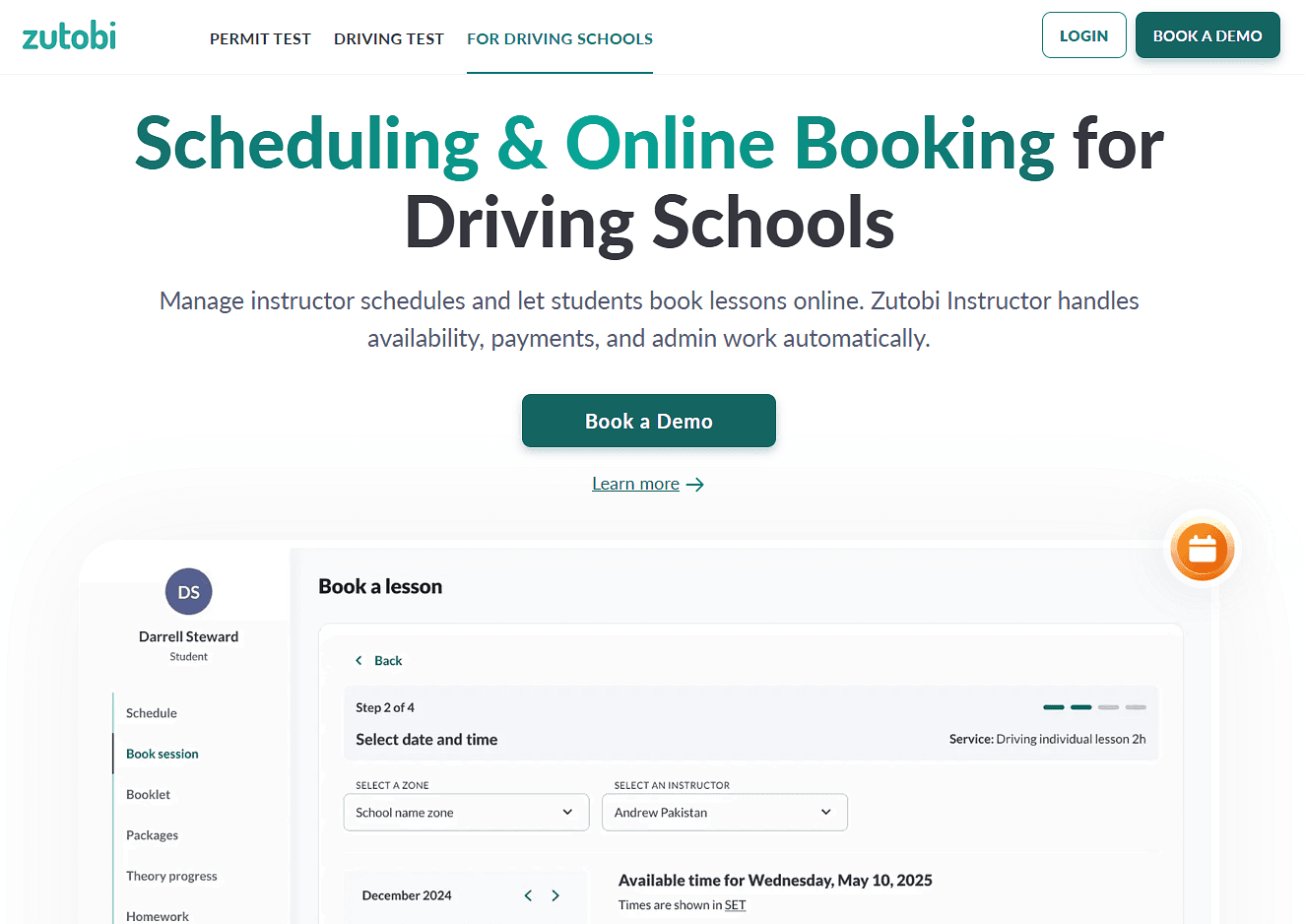
What it is: Zutobi Instructor combines driving school management with a built-in driver education curriculum. Alongside scheduling, payments, reminders, and student records, it includes state-specific video lessons and classroom materials.
Key features:
-
Online self-booking: students and parents can book behind-the-wheel and classroom sessions themselves.
-
Instructor, vehicle, and zone scheduling: manage availability and prevent scheduling conflicts.
-
Text and email reminders: send reminders for lessons, road tests, and permit expirations without a per-message charge.
-
E-signatures: collect digital signatures for enrollment documents, waivers, and other forms, including guardian signatures.
-
Built-in curriculum: access state-specific video lessons and classroom materials.
Pricing: Zutobi Instructor doesn’t have a free plan, but offers a two-week trial after a demo. Pricing is no longer published on its website, so contact Zutobi for a quote.
Pros:
-
Scheduling, student management, and curriculum all in one platform.
-
Text reminders with no separate per-message fees.
-
No setup fees or long-term contracts.
-
Multi-location management and role-based access.
Cons:
-
Pricing isn't published on the website.
-
You need to book a demo before starting the free trial.
-
You may pay for features you already have, such as curriculum and student management.
Best for: Driving schools that teach both theory and behind-the-wheel lessons and want curriculum, scheduling, payments, and student management in one system.
Comparison verdict: Zutobi Instructor is the better choice if you want curriculum and driving school management in one platform. If you already have those systems and mainly need online booking, Cal.com is simpler to start with.
3. Driving School Software: best for state paperwork and student records
| Free plan? | Starting price | Standout feature | Best use case |
|---|---|---|---|
| No, and no trial | Not publicly available | State-specific workflows and student records | Schools with detailed reporting and compliance requirements |

What it is: Driving School Software is built specifically for driving schools, combining scheduling with student records, payments, instructors, vehicles, classroom sessions, drive sheets, evaluations, and state documents. It also supports workflows for specific state systems, including Michigan’s CARS system, Massachusetts ATLAS data entry, and Washington’s sales tax requirements.
Key features:
-
In-car and classroom scheduling: manage instructors, vehicles, students, and lessons in one calendar.
-
Student self-scheduling: let students and parents book lessons online according to your rules.
-
Late cancellation and no-show rules: apply your policies and make cancelled slots available again.
-
Drive sheets and evaluations: Keep a record of each student's lessons and evaluations.
-
State documents and certificates: store and print documents required by your state.
Pricing: Driving School Software has no free plan or trial. Pricing isn't published, so you'll need to contact the team for a custom quote.
Pros:
-
Built specifically for driving schools.
-
Includes a mobile-friendly website and hosting.
-
Includes state-related workflows and student records.
-
Handles scheduling, payments, and compliance in one system.
Cons:
-
Pricing isn't published.
-
There's no self-serve trial.
-
The site doesn't clearly document calendar syncing.
Best for: Established driving schools that need scheduling alongside student records, state paperwork, and compliance workflows.
Comparison verdict: Driving School Software solves a different problem from Cal.com. If state reporting and student records are your main concern, its purpose-built features make it worth considering. If your main goal is getting an online booking system live quickly, Cal.com is easier to start with.
4. Drive Scout: best for managing instructors and vehicles together
| Free plan? | Starting price | Standout feature | Best use case |
|---|---|---|---|
| No, and no trial | $50/user/month, five users minimum | Prevents double booking of instructors and vehicles | Schools managing several instructors and cars |

What it is: Drive Scout is a driving school management platform for scheduling instructors, students, vehicles, and services. Its main advantage is that vehicles are treated as part of the scheduling process, so you can see whether both the instructor and car are available before booking a lesson.
Key features:
-
Conflict blocking across instructors and vehicles: a lesson can't be created if either is already committed.
-
student and parent self-service: online scheduling, payments and balance management from any device.
-
Text and email reminders: plus last minute opening alerts, so a freed slot gets offered out instead of sitting empty.
-
Report cards and progress notes: instructors submit feedback per lesson and students see their own history.
-
Payroll and payment reports: instructor hours and reconciliation come out of the system that holds the schedule.
Pricing: Drive Scout has no free plan or trial. Its single paid plan includes all features and costs $50 per user per month, with a five-user minimum. That means the minimum cost is $250 per month.
Pros:
-
One pricing tier includes all features.
-
Last-minute opening alerts help fill cancelled lessons.
-
Vehicle conflict checking is built into the scheduling system.
Cons:
-
Five-user minimum makes it costly for small schools.
-
The setup fee adds to the upfront cost.
-
Browser-based, with no dedicated mobile app.
Best for: Driving schools with several instructors and vehicles that need one schedule to manage both.
Comparison verdict: Drive Scout is the better fit if vehicle management is a key part of your operation. The downside is its $250 monthly minimum. Cal.com is a better option for smaller schools, with a free plan and paid plans that do not require a minimum number of users.
5. Drivers Ed Solutions: best for schools with seasonal student demand
| Free plan? | Starting price | Standout feature | Best use case |
|---|---|---|---|
| No, and no trial | $6.25 one-time fee per student | No monthly subscription | Schools with big seasonal changes in enrollment |

What it is: Drivers Ed Solutions uses a different pricing model from most scheduling software. Instead of charging a monthly subscription, it charges a one-time fee per student registration. That can work well for schools with large swings in enrollment because the software cost increases when you enroll more students rather than staying fixed every month.
Key features:
-
Online registration and self-scheduling: let students register and book classroom and behind-the-wheel sessions.
-
Automated reminders: send text and email reminders for lessons and classes.
-
Late cancellation and missed-lesson fees: charge according to your school's policies.
-
Instructor work logs and reports: track lessons, instructor activity, and payments.
-
Waitlists: manage demand for full classes.
Pricing: Drivers Ed Solutions has no free plan or trial. It charges a one-time $6.25 fee per student, with no hosting fee or monthly subscription. Website and setup packages cost $600, $750, or $1,200, depending on what is included. Online payments are optional and cost an additional $275 to set up. If services sold are under $250, a 2.5% fee applies; for example, a $50 road test incurs a $1.25 fee.
Pros:
-
Costs scale with enrollment rather than staff count.
-
No monthly subscription or hosting fee.
-
Users and locations aren't charged separately.
-
Pre-filled state forms reduce administrative work.
Cons:
-
There's no self-serve trial, only a demo.
-
Setup can cost $600 to $1,200 before you start using the system.
-
The one-time-per-student model becomes expensive for schools with consistently high enrollment.
Best for: Schools with seasonal enrollment that prefer a per-student cost instead of a recurring monthly subscription.
Comparison verdict: Drivers Ed Solutions is worth considering if enrollment changes significantly throughout the year. The trade-off is the upfront setup cost, while Cal.com lets you start taking bookings without a setup package.
6. Square Appointments: best for schools already using Square for payments
| Free plan? | Starting price | Standout feature | Best use case |
|---|---|---|---|
| Yes, single location | $49/location/month | Scheduling and Square payments in one system | Schools already using Square for payments |
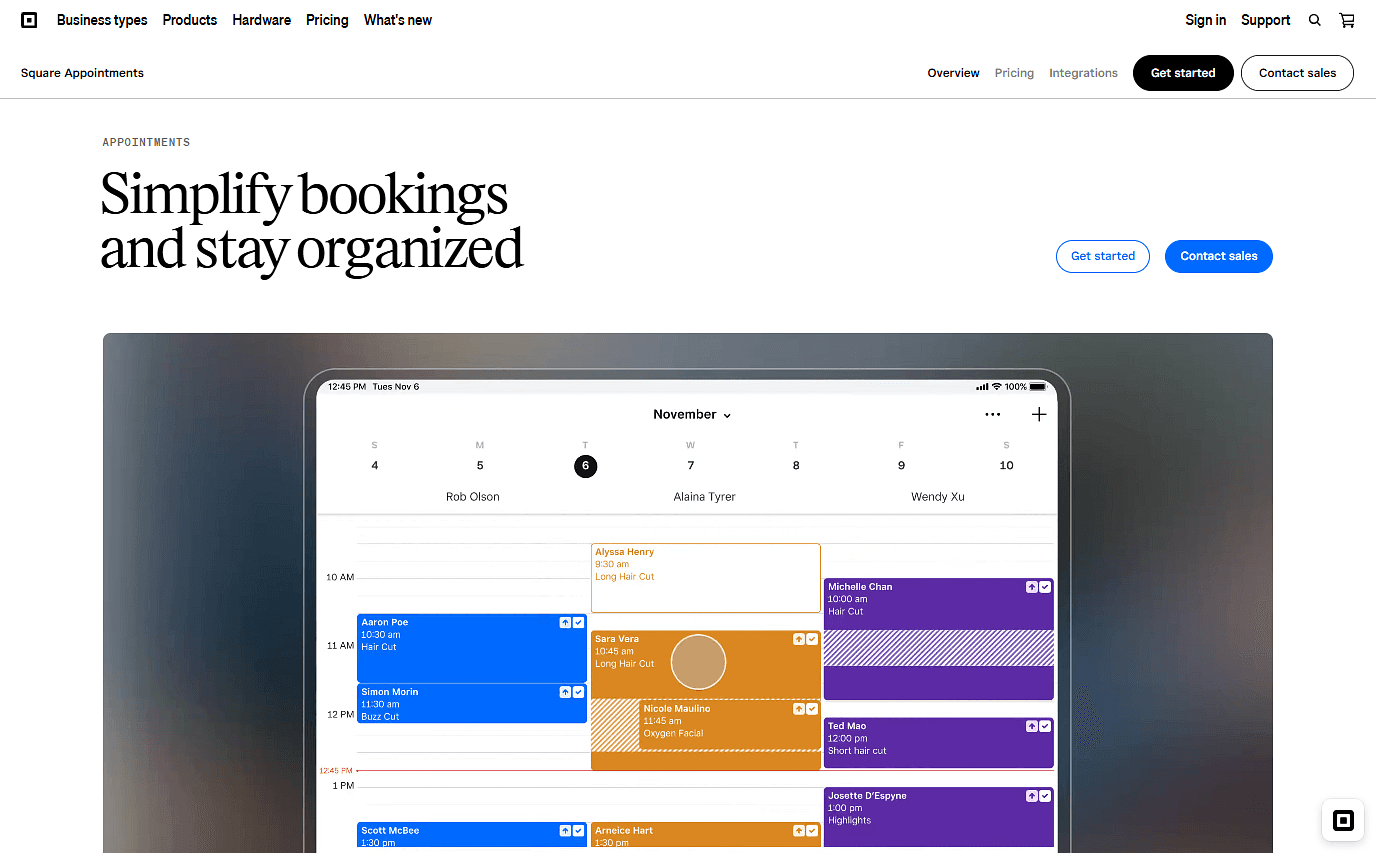
What it is: Square Appointments combines online scheduling with Square's payment system. If your driving school already uses Square to process payments, adding appointments keeps bookings and payments in the same ecosystem. That said, it’s not designed specifically for driving schools, so it lacks some features built for them, such as curriculum management and learner progress tracking.
Key features:
-
Online booking site and booking widget: let pupils book from a website or booking page.
-
Text and email reminders: automatically remind customers about upcoming appointments.
-
Prepayments and deposits: collect payment before the lesson.
-
Cancellation and no-show policies: charge according to your booking rules on supported plans.
-
Packages and recurring appointments: sell lesson packages and schedule repeat bookings.
Pricing: Square Appointments has a free plan for one location. Paid plans start at $49/location/month and include additional features such as no-show fees, multi-staff appointment booking, and waitlists.
Pros:
-
Scheduling and payments are managed in one system.
-
The free plan includes unlimited calendars and reminders.
-
Payment processing is built in.
Cons:
-
Resource management is limited to the highest paid plan.
-
Google Calendar sync isn't available on the free plan.
-
Adding locations increases the subscription cost.
Best for: Driving schools that want online booking alongside their existing Square payment setup.
Comparison verdict: Square is a good fit for schools already using its payment system. If you want more control over bookings and lower-cost access to team scheduling features, Cal.com is a better fit.
7. Picktime: best for small schools that need free vehicle tracking
| Free plan? | Starting price | Standout feature | Best use case |
|---|---|---|---|
| Yes, three users and three resources | $4/user/month | Three bookable resources on the free plan | Small schools testing online booking |

What it is: Picktime is a scheduling platform with support for driving schools. Its resource feature lets you treat vehicles as bookable resources, so you can prevent the same car from being assigned to overlapping lessons. This makes it useful for small schools that need basic vehicle scheduling without paying for purpose-built driving school software.
Key features:
-
Cars as bookable resources: Manage up to three vehicles on the free plan.
-
Online booking: Let pupils choose from available lesson times.
-
Buffer times and booking controls: Add gaps between lessons and control when pupils can book.
-
Class management: Run theory sessions with set capacity limits.
-
Payments: Accept PayPal on the free plan and add Stripe or Square on paid plans.
Pricing: Picktime has a free plan with three users, three resources, two locations, unlimited appointments, and PayPal payments. Paid plans start at $4/user/month when billed annually and add two-way calendar sync, recurring bookings, SMS reminders, and Stripe and Square payments.
Pros:
-
The free plan supports unlimited appointments.
-
Paid plans add two-way calendar sync and SMS.
-
The resource feature works well for tracking vehicles.
Cons:
-
SMS isn't available on the free plan.
-
Calendar sync is one-way on the free plan.
-
More users or resources require a paid plan or a higher tier.
Best for: Solo instructors and small driving schools that want online booking and vehicle tracking on a free plan.
Comparison verdict: Picktime is one of the better free options if you need to track cars as resources. Cal.com is a better fit if you need broader team scheduling and customizable workflows as you grow.
8. SimplyBook.me: best for offering bookings in multiple languages
| Free plan? | Starting price | Standout feature | Best use case |
|---|---|---|---|
| Yes, 50 bookings a month | $13.90/month | Multilingual booking website | Schools serving customers who speak different languages |

What it is: SimplyBook.me is an online booking platform with a multilingual booking website. Customers can choose from multiple languages when booking, making it a useful option for driving schools serving multilingual communities. It also supports employee and resource scheduling, so you can manage instructors and vehicles alongside your bookings.
Key features:
-
Employee and resource scheduling: manage instructors and vehicles alongside appointments.
-
Booking website and widget: let pupils book from your site or a hosted booking page.
-
Email reminders: send confirmations and reminders automatically, with SMS available as a paid add-on.
-
Recurring appointments: book regular weekly lessons in advance.
-
Payments and deposits: collect payments through supported payment gateways.
Pricing: SimplyBook.me has a free plan with one staff member and 50 bookings per month. Paid plans start at $13.90 per month and include up to five staff members, 100 bookings, and three optional features you can add to the system.
Pros:
-
Customers can use the booking website in 20+ languages.
-
Resource scheduling helps manage vehicles alongside instructors.
-
Flat pricing doesn't increase with every additional instructor.
Cons:
-
SMS messages cost extra.
-
Plans are capped by monthly bookings.
-
More complex setups can take time to configure.
Best for: Driving schools that serve a multilingual customer base.
Comparison verdict: SimplyBook.me is the better choice for driving schools that need multilingual bookings. Cal.com is a better fit for schools that want more control over bookings and team scheduling.
Driving school scheduling software: quick comparison
Here’s how the driving school scheduling platforms compare on key features and free plans:
| Tool | Free plan | Instructor calendars | Upfront payment | Text reminders |
|---|---|---|---|---|
| Cal.com | ✅ Free forever | ✅ Two-way sync | ✅ Stripe and PayPal | ✅ Email and SMS |
| Zutobi Instructor | ❌ No free plan, only two-week trial after demo | ❌ Not documented | ✅ Online payments | ✅ Email and SMS |
| Driving School Software | ❌ No free plan or trial | ❌ Not documented | ✅ Online payments | ✅ Email and SMS |
| Drive Scout | ❌ No free plan or trial | ❌ Not documented | ✅ Online payments | ✅ Email and SMS |
| Drivers Ed Solutions | ❌ No free plan or trial | ❌ Not documented | ⚠️ Additional setup fee | ✅ Email and SMS |
| Square Appointments | ✅ Single location | ⚠️ Paid plan required | ✅ Prepayments and deposits | ✅ Email and SMS |
| Picktime | ✅ Three users and three resources | ⚠️ One-way on free; two-way on paid | ⚠️ PayPal on free; Stripe/Square on paid | ⚠️ SMS on paid plans |
| SimplyBook.me | ✅ 50 bookings/month | ⚠️ Available through integrations | ⚠️ Available from paid plans | ⚠️ SMS costs extra |
Final verdict
The best driving school scheduling software depends on what you need it to do.
If you need student records, state paperwork, drive sheets, and compliance tools, look at purpose-built platforms such as Driving School Software or Zutobi Instructor.
If you mainly need online bookings and payments, Cal.com is the best fit for you. You can start for free, embed bookings on your own website, and add team scheduling and automated workflows as your school grows.
Ready to get started? Try Cal.com’s free plan, or book a demo to see how it can work for your driving school team.
Frequently asked questions
-
How much does driving school scheduling software cost? Pricing ranges from free with tools such as Cal.com, Picktime, and Square Appointments to $100+ per month for some purpose-built platforms.
-
Can students book their own behind the wheel lessons online? Yes. Cal.com, Zutobi Instructor, Drive Scout, and the other tools in this roundup support online self-booking. With Cal.com, you can set minimum notice, buffer times, advance booking limits, and recurring bookings to control how pupils book lessons.
-
Does driving school scheduling software with SMS cost extra? It depends on the tool. Cal.com includes SMS to US and Canadian numbers on its starter plan, while Picktime and SimplyBook.me charge for SMS separately. Zutobi Instructor includes text reminders with no per-message fee.
-
Which driving school booking system is best if my state requires structured reporting? Driving School Software is the best fit for state-specific reporting and records. It supports systems such as Michigan CARS and Massachusetts ATLAS and provides state documents and certificates. Drivers Ed Solutions also offers pre-filled state forms.
-
Can you run a driving school on a free plan? Yes. Cal.com lets you take bookings and payments for free, Picktime includes three users and three bookable resources on its free plan, and Square Appointments has a free plan for one location.