

Recommended: Use the Cal.com CLI
For agents that can execute commands on a machine, use the official Cal.com CLI instead of calling the API directly. The CLI handles authentication, versioning, and common workflows automatically.- npm
- curl
--help flags on all commands to learn about available options:
Only fall back to the API approach below if your agent cannot install or execute the CLI on its machine.
Overview
Cal.com API v2 enables AI agents to:- Check availability - Query available time slots for any user or team
- Create bookings - Schedule meetings on behalf of users
- Manage event types - Create and configure different meeting types
- Handle rescheduling and cancellations - Modify existing bookings
- Manage schedules - Set and update user availability
- Track credit usage - Check balances and charge credits for agent interactions
Authentication
AI agents should authenticate using an API key. Generate one in Settings → Developer → API Keys.Common workflows
1. Check availability
Query available slots using username and event slug—no need to look up IDs first:2. Create a booking
Schedule a meeting using username and event slug. This is the most common pattern for AI agents that extract scheduling intent from natural language (e.g., “book 15min with bailey”):The booking creation endpoint is public and does not require authentication. This allows agents to book on behalf of external users.
3. Handle custom booking questions
Most Cal.com users have required questions on their booking pages (e.g., “What is this meeting about?”). If you omit required fields, the API returns a 400 error. Include responses inbookingFieldsResponses:
4. Instant bookings for urgent requests
For teams handling urgent requests, use theinstant flag to bypass normal scheduling and immediately ring available team members:
Instant bookings require the event type to be configured for instant meetings. This is ideal for AI agents routing urgent customer requests.
5. Get user’s event types
Retrieve available event types to offer booking options:6. Reschedule a booking
Move an existing booking to a new time:7. Cancel a booking
Credit management
If your AI agent runs on the Cal.com platform, you can track usage by checking and charging credits through the API. This is useful for metering agent interactions against your account’s credit balance.Check available credits
Before performing a billable action, verify that the user or team has sufficient credits:balance object breaks down your remaining credits:
monthlyRemaining— credits included in your current billing cycleadditional— purchased credits outside the monthly allowance
Charge credits
After a completed agent interaction, charge the appropriate number of credits:Example: check-then-charge pattern
Best practices for AI agents
Handle time zones correctly
Always specify time zones explicitly. Store user preferences and pass them in requests:Implement retry logic
API requests may occasionally fail. Implement exponential backoff:Validate availability before booking
Always check slots before attempting to create a booking to avoid conflicts:Use webhooks for real-time updates
Configure webhooks to receive notifications when bookings are created, rescheduled, or cancelled:Discover the API from a booking page
Cal.com web app pages, including personal, team and organization booking pages, send aLink header that points agents to the API:
Discovery documents under
/.well-known/ also work on organization domains such as acme.cal.com. They are served as discovery documents, not treated as organization booking pages.
OAuth protected-resource metadata
Each origin serves OAuth protected-resource metadata (RFC 9728) for the page you are on./.well-known/oauth-protected-resource names the origin itself as the resource. To get metadata for a specific page, add its path after the metadata path:
https://api.cal.com/.well-known/oauth-protected-resource, which the API catalog links to.
Booking page tools for in-browser agents
Cal.com booking pages register WebMCP tools when the visitor’s browser supports WebMCP (document.modelContext). An agent running in the browser can use them to read the event and pick a time without scraping the page.
Each tool returns its result as JSON text.
select_time never creates a booking. The visitor still has to fill in the booking form and confirm. It declines, and asks for the time to be picked on the page, when the event asks the booker to propose several times or when picking a time would book straight away (for example, because every required booking question is already prefilled).Who can use the Cal.com assistant
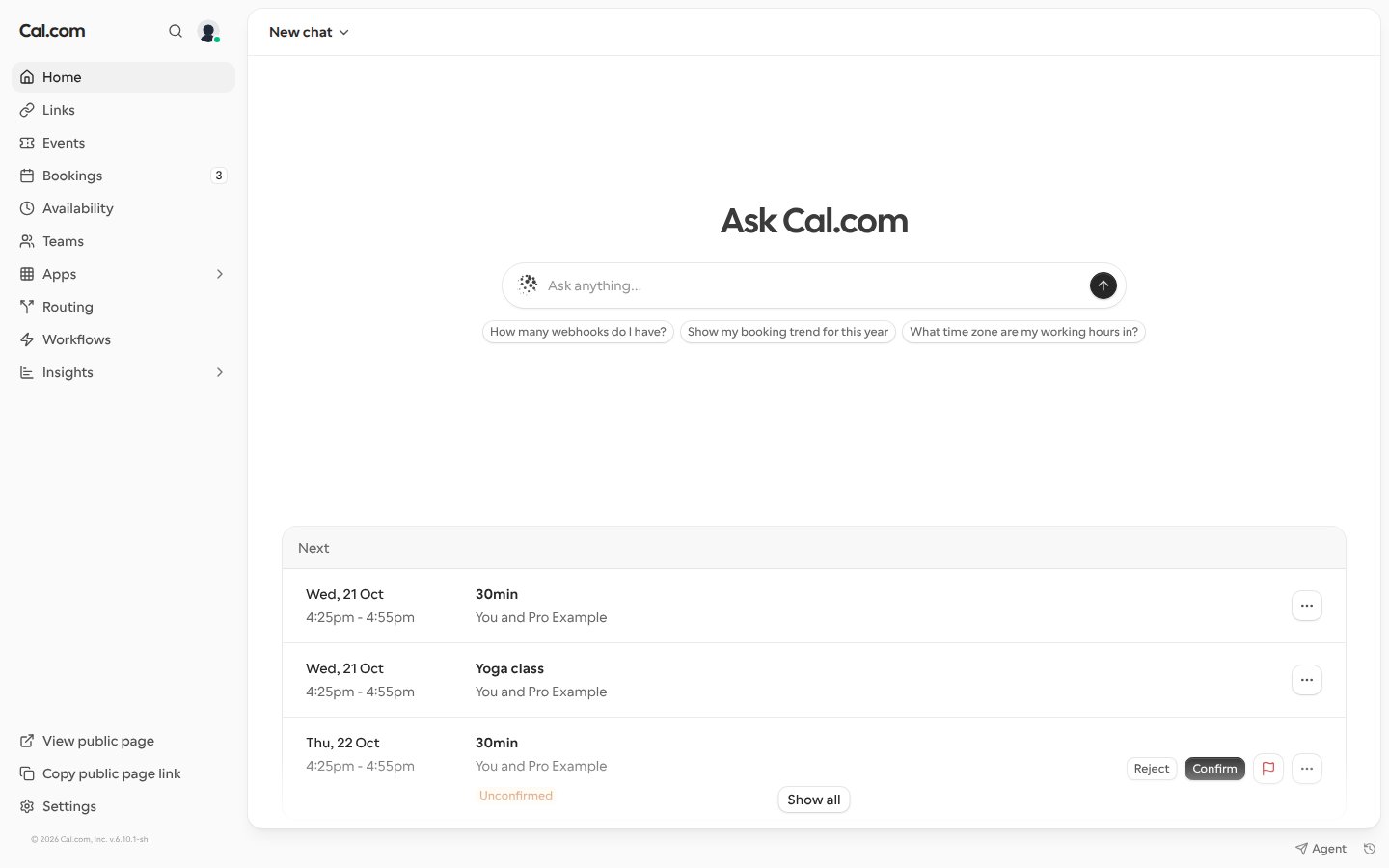
The Cal.com assistant is available to every signed-in Cal.com user, including personal accounts that don’t belong to an organization. There’s nothing to turn on.- Web: select Home in the sidebar, or open the assistant from any app page.
- Slack, Telegram and iMessage: link the app to your Cal.com account through the Cal.com assistant, then message it there.
Open the assistant with a prompt already typed
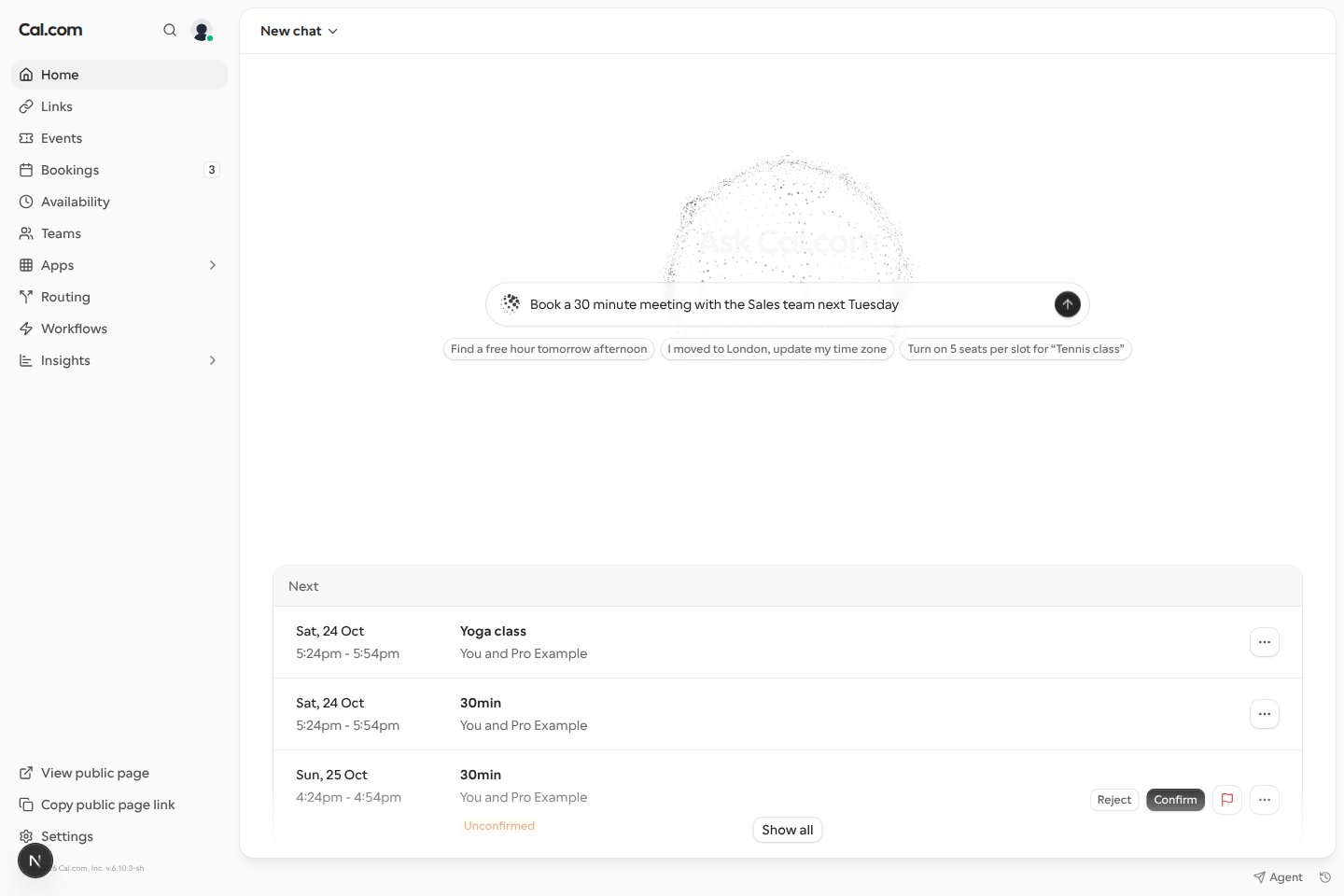
You can link someone to the Cal.com assistant with a request already written for them by addingq with a URL-encoded prompt to the Home page address, for example https://app.cal.com/home?q=book%20pro%2F30min.
When a signed-in user opens the link, the prompt appears in the chat box but isn’t sent. They can edit it, then press Enter to send it, so opening a link never uses AI credits or starts work on its own. Once the prompt is in the chat box, q is removed from the address, so reloading the page doesn’t add it again.
q is ignored when the link also opens an existing chat with session. If the user has to sign in first, the prompt isn’t kept, and they land on an empty chat box.Free questions without AI credits
If you have no AI credits, you can still ask the Cal.com assistant 10 questions a month for free, as long as your email address is verified. Free questions work on the web and in Slack, Telegram and iMessage, and they don’t use or add credits.- The 10 questions reset at the start of each calendar month (UTC).
- Each new message counts as one question, including a follow-up sent while the assistant is still answering. Retrying the same message, or answering an approval the assistant asked for, doesn’t use another question.
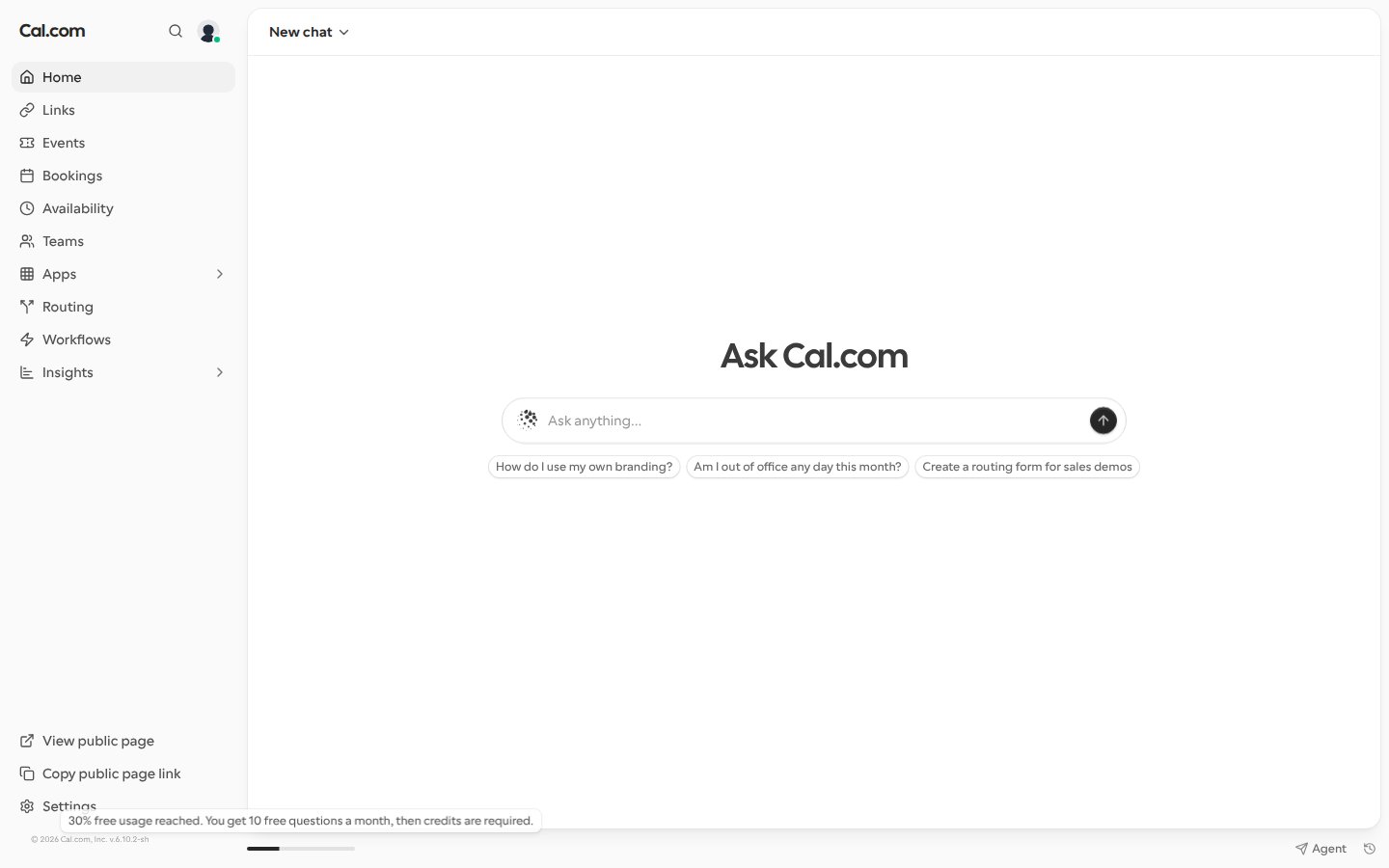
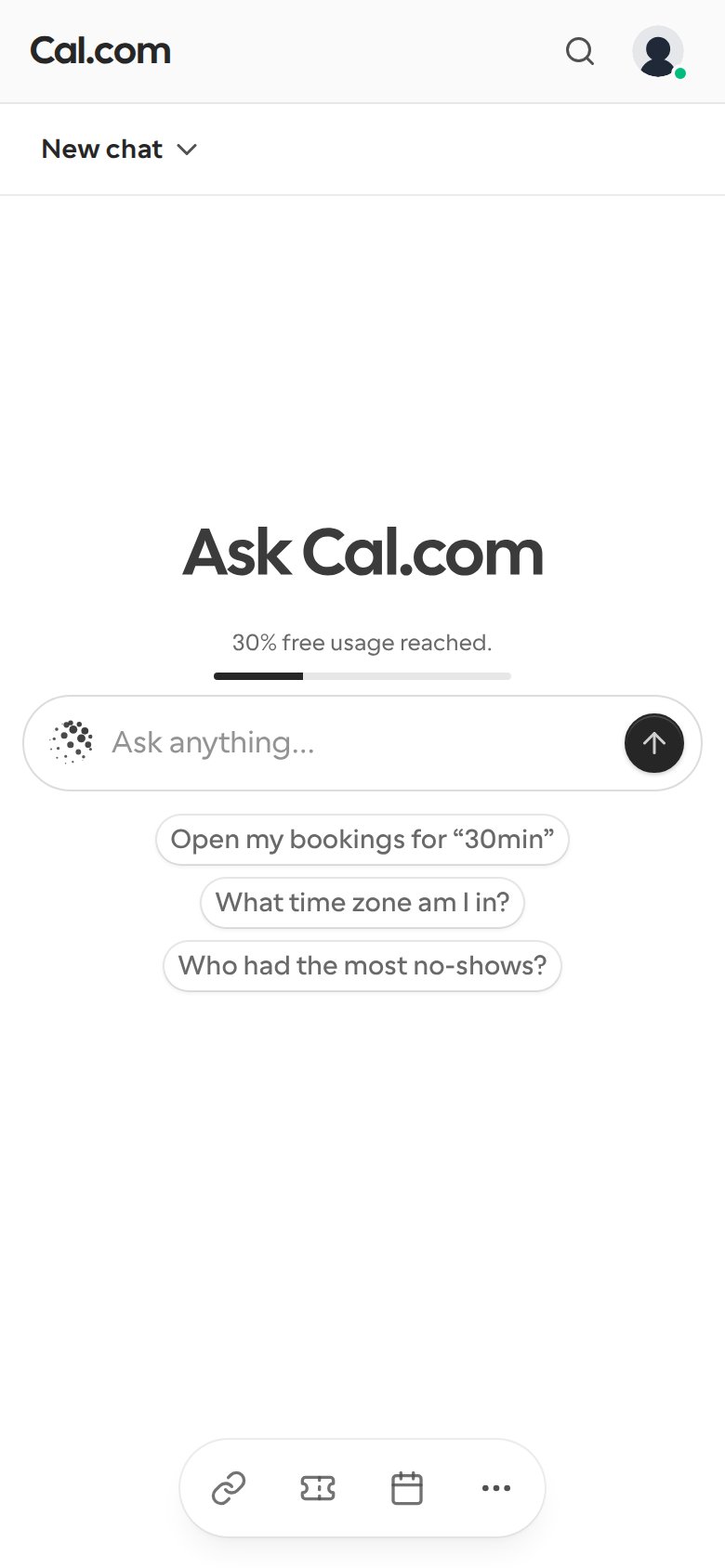
- From your second free question, the Home page shows how much of this month’s free usage you’ve reached: a progress bar at the bottom of the page on desktop (hover it to see the percentage) and above the chat box on mobile.
- After the tenth question, the assistant replies that you’re out of AI credits and points you to Settings → Billing to buy more. Your free questions come back at the start of the next month (UTC). When you have AI credits, the assistant uses them as usual and free questions aren’t counted.
When you’re out of AI credits
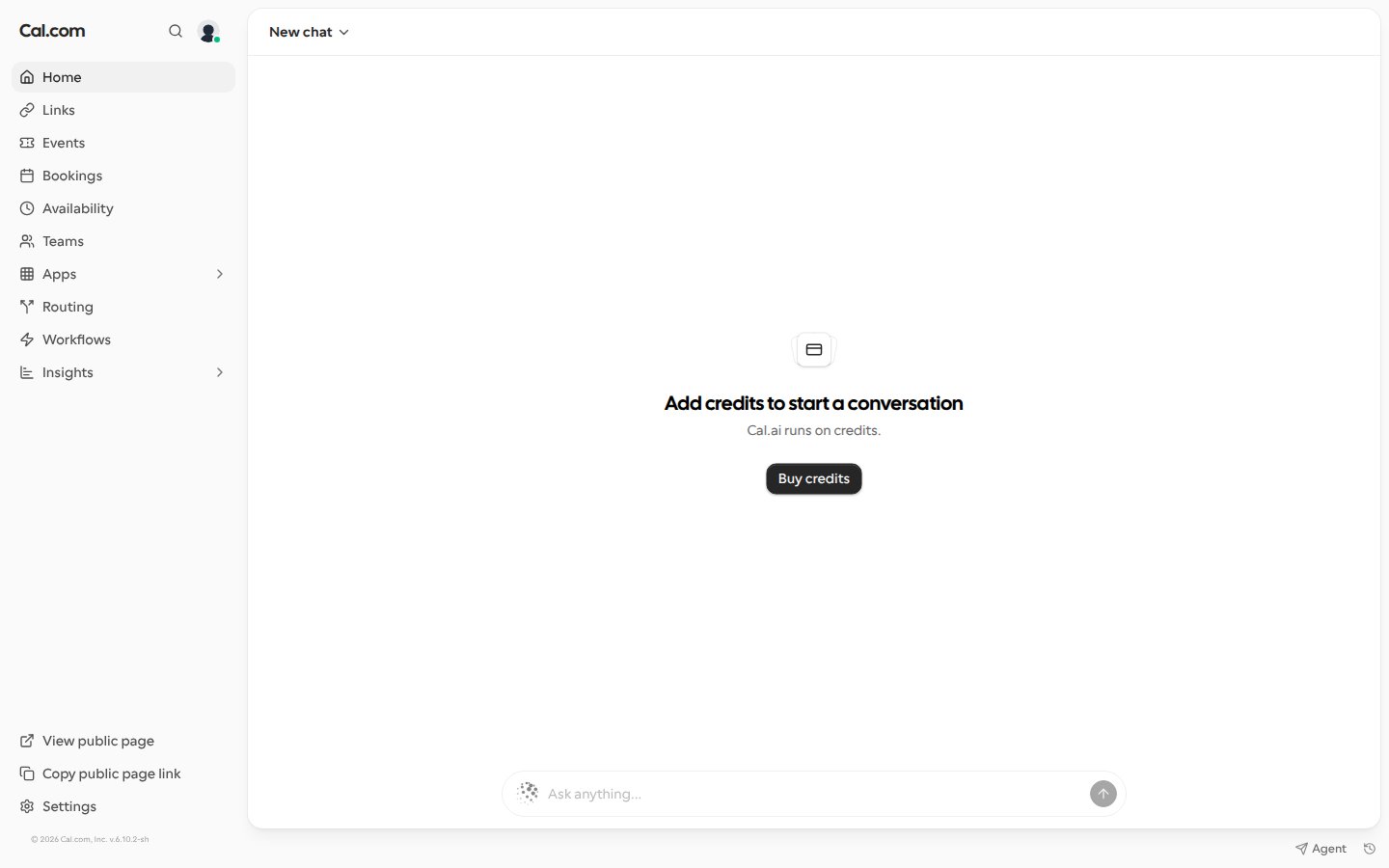
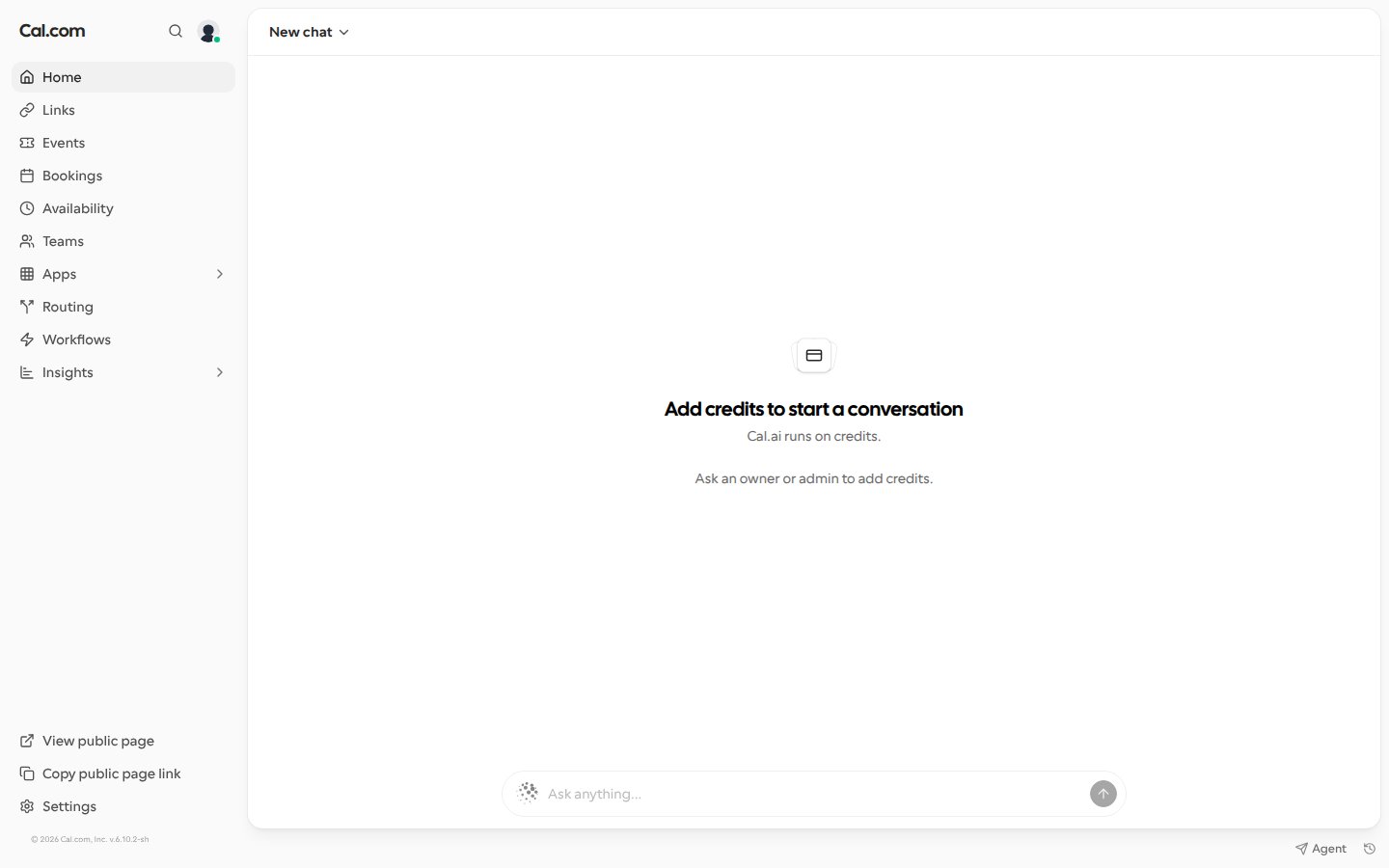
When you have no AI credits, the Cal.com assistant on the web stops you before you send a message, so you don’t type a request that can’t run. The chat box is disabled and the assistant checks your balance again each time you come back to the window.- New chat: instead of the suggested questions, the assistant shows Add credits to start a conversation.
- Existing conversation: an alert, You’re out of credits, appears above the chat box. Your earlier messages stay visible, and your event types, bookings and workflows aren’t affected. If a reply is still in progress, you can still stop it.
Once credits are added, return to the chat and the chat box works again.
Rename a chat
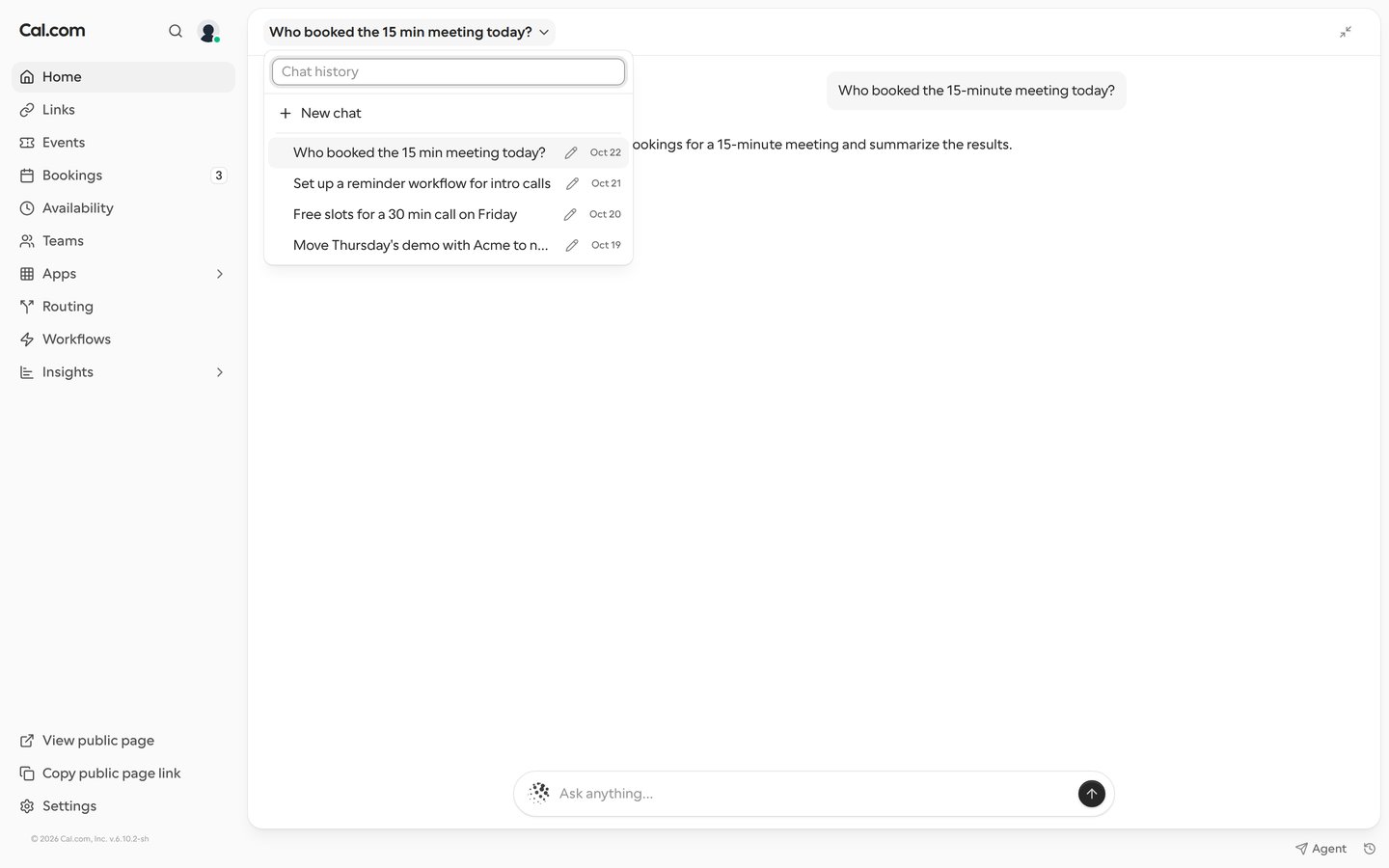
On the web, you can rename a Cal.com assistant chat, so you can still find it in your history after the conversation has moved on from its first topic.1
Open your chat history
On the Home page, select the chat title in the header. In the floating assistant toolbar on other pages, select the history icon (Chat history).
2
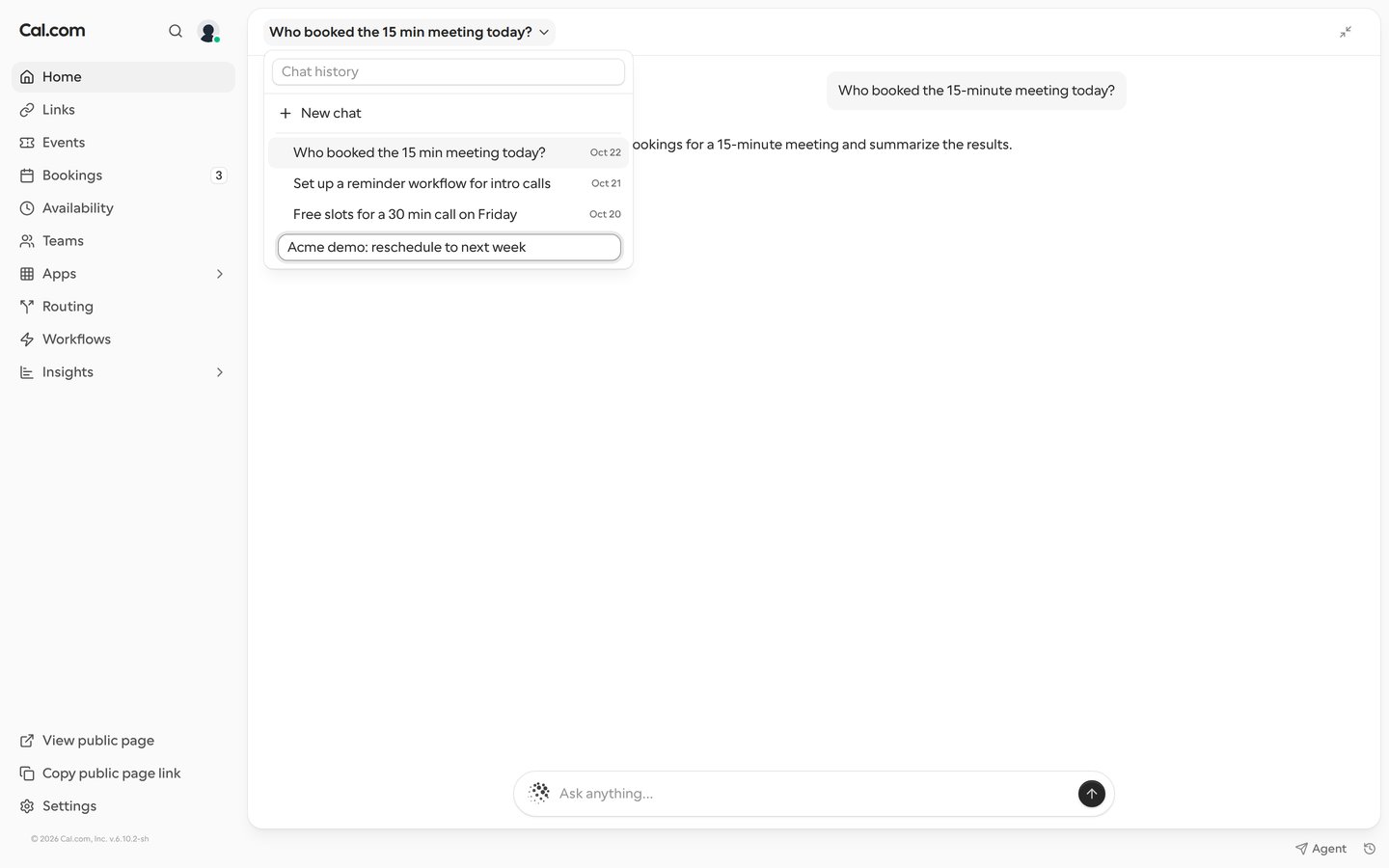
Edit the title
Select the pencil next to the chat you want to rename. The chat doesn’t open.
3
Save the new name
Type the new name and press Enter, or click outside the field. Press Escape to keep the old name.
- A name can be up to 120 characters. If you clear the field, the chat keeps its old name. A name that contains HTML isn’t saved: you see Couldn’t rename this chat and the old name stays.
- The new name shows in the header and in the history on both the Home page and the floating toolbar. The assistant doesn’t replace it with a generated title when you send more messages.
- A rename counts as activity, so after you reload the page the renamed chat is listed with your most recent chats.
- You can only rename your own chats.
See the assistant’s reasoning
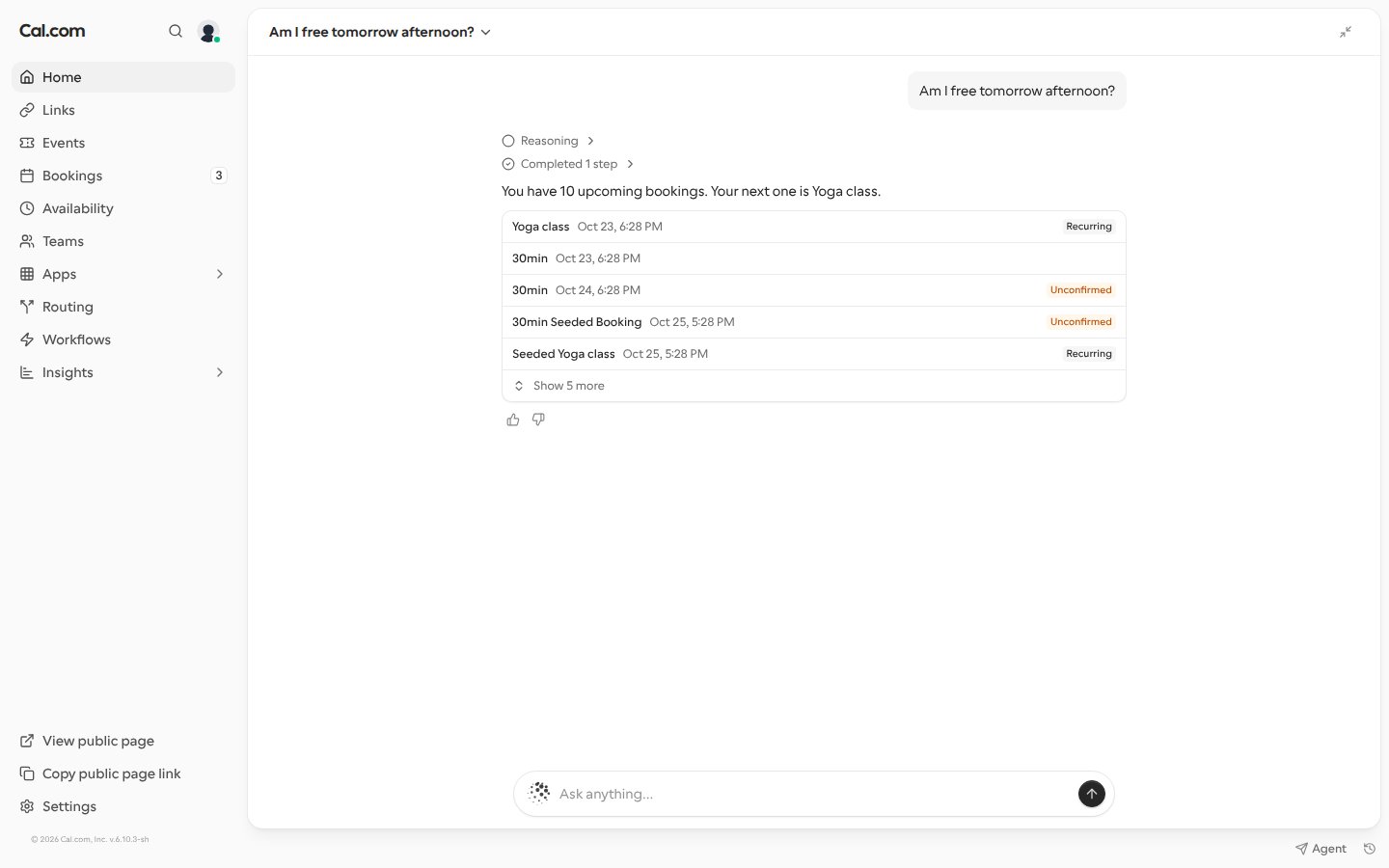
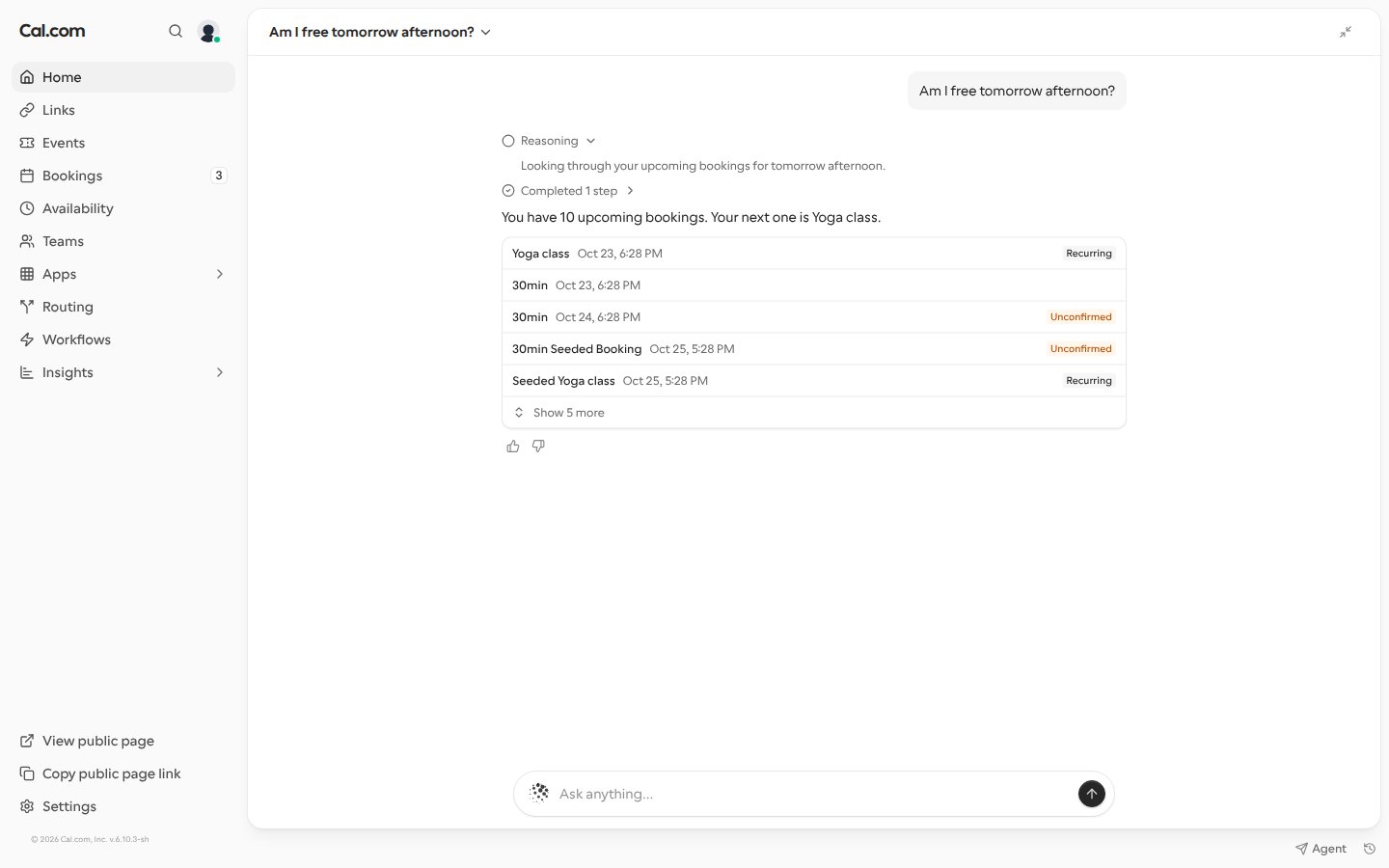
On the web, the Cal.com assistant sometimes writes short progress updates while it works on a request, for example “Looking through your upcoming bookings for tomorrow afternoon.” These updates appear in a collapsed Reasoning row where they were written in the reply, so the reply itself stays the answer. Select Reasoning to read the updates, and select it again to close them.- Updates written one after another share one Reasoning row. A reply without updates has no row.
- An update appears once it’s finished. While the assistant is still writing, you see Thinking… instead.
- The sentence that introduces an approval card stays part of the reply, above the card, not under Reasoning.
- The Reasoning row only appears in the conversation as it happens. When you reopen a chat from your history, the replies show without it.
iMessage RSVPs from a linked phone number
When a Cal Event offers Register with iMessage, a guest can RSVP by texting from their phone instead of filling in the form. If the guest’s phone number is linked to a Cal.com account through the Cal.com assistant on iMessage, an RSVP made while signed out of Cal.com is saved to that account, the same as an RSVP made while signed in. It shows on the event page when they sign in. To link a number, message the Cal.com assistant on iMessage, open the link it replies with, and select Connect account while signed in to Cal.com.If the RSVP is started from the event page while signed in, it’s saved to the signed-in account, even when the phone number is linked to a different account. An RSVP from a number that no account has linked or verified on its profile stays anonymous. A number verified on a profile takes priority over an iMessage link.
Booking messages in Slack, Telegram and iMessage
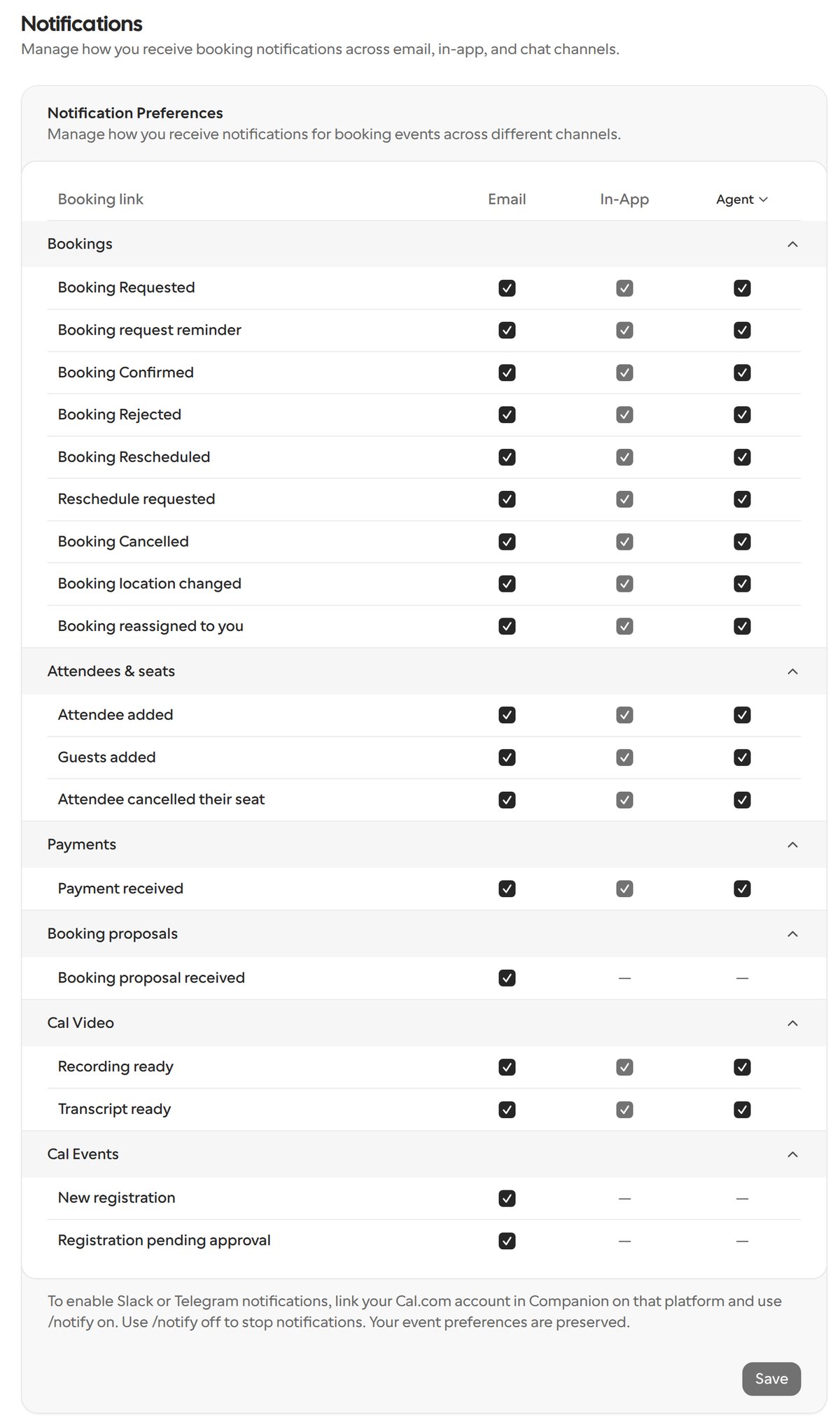
When you link Slack, Telegram or iMessage to your Cal.com account through the Cal.com assistant, booking notifications arrive there as direct messages. You can get a message for every booking notification on the Notifications settings page:- Bookings: booking requested, booking request reminder, booking confirmed, booking rejected, booking rescheduled, reschedule requested, booking cancelled, booking location changed and booking reassigned to you
- Attendees & seats: attendee added, guests added and attendee cancelled their seat
- Payments: payment received
- Cal Video: recording ready and transcript ready
Email: line (Emails: when there are several), so you can contact them without opening the booking.
The reminder sent one minute before a meeting starts doesn’t include email addresses. Seated events that hide attendees from each other don’t show attendee names or email addresses.
Pick a meeting length when the assistant books
When a personal or team booking link offers several durations, the Cal.com assistant can book any of them. Ask for the one you want, for example “book the 60-minute version of Sam’s intro call”. The assistant checks times for that length, and the approval card shows the duration it will book. If you don’t say which length you want, the assistant asks before looking for times.The assistant only books lengths the link offers. A length the link doesn’t list, or any other length on a link with one duration, is refused before approval, and the assistant tells you which lengths the link offers. If the length changes after you approve, the approval no longer applies and the assistant asks again.
Book a teammate who has no booking link
When you ask the Cal.com assistant to meet a teammate who has no booking links of their own, for example “book 30 minutes with Sam on Thursday when we’re both free”, it books the two of you as a dynamic group meeting, the same way your ownyou+sam group link would. The assistant checks when you’re both free, and the approval card reads Book a meeting for you and Sam? with Hosts: you and Sam. After you approve, one meeting is booked with both of you as hosts.
A group meeting with you holds up to five people, you included.
This needs Dynamic group links turned on in your general settings. If it’s off, or your account is locked, the assistant tells you that you can’t be booked on a group link yourself, without showing an approval card. Your teammate must also be bookable on group links. If the group can’t be booked, the assistant looks for team booking links your teammate is part of instead.
Where the meeting is, after the assistant books it
When the Cal.com assistant books a meeting for you, its reply says where the meeting takes place, for a confirmed booking or one waiting for the host’s confirmation:- A video app’s name, such as Cal Video or Zoom
- Online meeting for a fixed meeting link, or a video app it can’t name
- Phone call for any phone location. Phone numbers aren’t shown.
- The address or place, for an in-person meeting
A fixed meeting link that contains a username or password isn’t shared in the reply. For a recurring booking, the reply gives the first meeting’s location and link.
Change a booking’s length when the assistant moves it
When you ask the Cal.com assistant to move a booking to a new time, you can change its length in the same request, for example “move my call with Dana to Thursday 3pm and make it 60 minutes”. The new length must be one of the durations the booking’s event type offers. If you don’t ask for a different length, the assistant doesn’t change it. The approval card shows the new length, for example Length: 60 minutes, and its check for overlaps and working hours covers the whole new time. This also works when you move several bookings in one request, for example “move all my Thursday calls to Friday and make them 15 minutes”. Each booking can get its own length, and the approval card lists the new length under each booking it changes, for example Intro call: 15 minutes. If a booking’s event type doesn’t offer the length you asked for, that booking isn’t moved and the assistant tells you why, while the other bookings still move.A booking’s length can’t be changed when its event type offers only one duration, or when it’s a seated event. The assistant tells you instead of moving the booking.
Mark or clear no-shows through the assistant
You can ask the Cal.com assistant to mark the host or attendees of a booking as no-shows, or to clear a no-show you marked by mistake, for example “mark Sam as a no-show for this morning’s demo” or “I marked Sam as a no-show by mistake, undo that”. Here, the host means the booking’s organizer. One request can mark some people and clear others, for up to 50 attendees of a booking. The assistant works the same way asPOST /v2/bookings/{bookingUid}/mark-absent, with absent: false for an attendee or host: false to clear.
Before saving, the approval card names the booking and its time, and lists who will be marked absent and whose absence will be cleared, such as Clear absence for 1 selected attendee: Sam (sam@example.com). Clearing a no-show runs the same no-show workflows and webhooks as marking one, and the card says so.
No-shows can only be marked or cleared after the booking has started, and for one occurrence of a recurring booking at a time. To change the rest of the series, use the Bookings page. Attendance for Cal Event attendees is managed on the event page.
Add guests to a booking through the assistant
You can ask the Cal.com assistant to add guests to one of your bookings, for example “add Marco Rossi (marco@example.com) to my 3pm call. He’s in Rome, so send his invite in Italian.” For each guest you give an email address and, optionally, their name, time zone and language. The guest’s name, time zone and language are saved with the booking and used for their invite. If you don’t give a time zone or language, the guest gets the organizer’s. The approval card lists each guest by name and email, with the time zone and invite language you asked for. After you approve, the guests are added. Adding them may update calendars and send them notifications, and guests already on the booking are skipped. If a guest’s details change after you approve, the assistant asks for approval again.A request can add up to 100 guests to one booking. Names must be plain text of up to 255 characters, without markup. An unknown time zone or an unsupported language is refused before approval. For a recurring booking, guests are added only to the occurrence you name, not the rest of the series. Guests can’t be added this way to a seated event, a Cal Event, or a booking that has ended or isn’t accepted or waiting for confirmation.
Ask why a booking was cancelled or moved
You can ask the Cal.com assistant about a booking’s history, for example “why did Bob cancel tomorrow’s demo?”, “where did the 10am move to?”, “how did they rate it?”, “was I marked a no-show?” or “when did Sam book this?”. When it reads a booking, the assistant gets the same history details thatGET /v2/bookings/{bookingUid} returns:
- Cancellation and rescheduling reasons: the reason given by whoever cancelled or rescheduled, which the assistant quotes as their own words. A rescheduling reason is stored on the new booking, so when you name the old one, the assistant first follows it to the booking it moved to. If no reason was given, the assistant says so instead of guessing one.
- Rescheduled from and to: the booking this one was moved from, and the booking it was moved to.
- No-show: whether the host was marked as a no-show.
- Rating: the attendee’s rating.
- Timestamps: when the booking was made, shown in your time zone, and when it last changed.
Reasons and the rating are only shown when you can change the booking, the same as the booker’s additional notes. Otherwise the assistant tells you that you can’t see them. Reasons have markup removed and are cut to 500 characters. The assistant only opens the booking something was moved from or to if you can see that booking too, and it never shares the email address of whoever cancelled or rescheduled.
Check busy times on a specific calendar through the assistant
When you ask the Cal.com assistant when you’re busy, it reads your Cal.com bookings, your out of office days and the connected calendars checked for conflicts in Settings → Calendars. You can also ask about specific connected calendars, including ones that aren’t checked for conflicts, for example “is my personal Google calendar busy Thursday afternoon? It isn’t checked for conflicts”. The assistant then reads those calendars instead of the ones checked for conflicts, along with your Cal.com bookings and out of office days.This is a one-off read. It doesn’t change which calendars are checked for conflicts, so the calendar still doesn’t block times on your booking links until you check it in Settings → Calendars. The assistant can read up to 10 calendars and up to 31 days at a time. Calendars connected through a delegation credential can’t be read this way. Busy times never include what fills them, such as event titles or attendees.
Find routing forms through the assistant
You can ask the Cal.com assistant about a routing form by its name, for example “what does the Sales intake form do?”, without saying which team it belongs to. The assistant looks through your personal routing forms and the forms of every team where you have permission to view routing forms. You can still name a team to list only that team’s forms. A form on a team where you can’t view routing forms isn’t listed, even if you created it. If you belong to an organization, you can also ask for every routing form in it, for example “list all routing forms in my organization”. The assistant lists the forms of every team in your organization, including teams you haven’t joined, grouped team by team with each team’s name. Personal forms aren’t included. You can narrow the list to some of the organization’s teams, up to 50 at a time, or ask for the most recently created or changed forms across the whole organization.Listing your organization’s routing forms needs the View organization routing forms permission on your organization. Without it, the assistant finds no forms. Opening one of these forms to see what it does still needs permission to view routing forms on its team.
Check routing form times through the assistant
You can ask the Cal.com assistant which times a booker would be offered after answering one of your team’s routing forms, for example “what times would someone who picks Enterprise on our Sales form get next week?”. The assistant runs the answers through the form’s routes without saving a response, and lists the open times for the event type they reach, in your time zone. This works on any team routing form you have permission to view, whether or not the team belongs to an organization. A form you can’t view is answered the same way as one that doesn’t exist. When you check times for rescheduling a booking, the booking’s current time stays open. If the booking’s event type is round robin and lets the booker choose a host when rescheduling, you can ask for the original host’s times only, or for any available host.Personal routing forms aren’t supported. A route that ends in a custom message or an external URL has no times to show.
Draft a routing form through the assistant
You can ask the Cal.com assistant to draft a new routing form, describing its questions and where each answer should go. Nothing is saved while it drafts: the assistant reads the form back to you and shows an approval card with what the form does and any warnings, and the form is created only when you approve. A draft expires after an hour, and the assistant creates new forms only. To change a form you already have, use the routing form editor. In a team that belongs to an organization, a route to a round-robin team event type can also narrow which hosts get the booking by your organization’s member attributes, for example “send EMEA leads to the Sales round robin, but only to reps whose Region is EMEA”. You can add a fallback filter for when no host matches, such as “otherwise, reps whose Region is Global”.Drafting a team form needs permission to view the team’s routing forms or event types. If a member filter matches nobody on the team today, the assistant warns you before you save that bookings on that route go to every host. On a team outside an organization, member filters aren’t available: the draft is created without them, and the assistant tells you that route reaches every host. Routing to the CRM contact owner is set up in the routing form editor.
Find who holds an attribute through the assistant
In an organization, you can ask the Cal.com assistant which members hold an attribute option, for example “who is in Region EMEA?” or “who on the Sales team is in Region EMEA?”. The assistant looks up the attribute, then lists each matching option with the name and username of the members who hold it.- You can narrow the answer to some of the attribute’s options, or to members of one or more teams in your organization.
- Only accepted members of the organization are listed. Pending invitees aren’t included.
- The assistant reads members in pages of up to 100, ordered by name, and tells you how many members hold a matching option in total. It fetches the next page when there are more.
This needs permission to read your organization’s attributes, even for attributes you hold yourself. To narrow the answer to a private team, you also need permission to see that team’s members. An attribute you can’t read, from another organization or with a team outside your organization is answered as if it doesn’t exist. Attributes whose value is another member of your organization can’t be listed this way.
Ask who someone is
You can ask the Cal.com assistant who someone is, such as a person who booked you or a name you mention, for example “who is Ugo?”. The assistant looks the person up in your own past, upcoming and unconfirmed bookings, searches the public web for their professional background, and answers with both:- Their likely role or company, with links to the pages it used.
- Your history with them: how many past meetings you’ve had, the date and title of the latest one, the next upcoming one, and the booker’s notes from the latest past booking when you can see them.
The web search uses the person’s name, their email address when you typed it or it’s on one of your bookings, and a company, role, city or business email domain that narrows who they are. Results may be about someone else with the same name. The assistant only looks for professional background, never home addresses, phone numbers, family or health details. You can run up to 20 lookups an hour; after that, try again later. When public web search isn’t turned on for your Cal.com instance, the assistant answers from your booking history only and says so.
Manage notification preferences through the assistant
You can ask the Cal.com assistant to show or change your booking notification preferences, the same ones on the Notifications settings page. For example, “turn off emails for cancelled bookings” or “stop sending booking notifications to Telegram”. The assistant can change:- Email, In-App and Agent for each booking notification event. Agent controls whether that event reaches your connected chats.
- The Slack, Telegram and iMessage toggles for each chat you’ve connected.
The assistant doesn’t change anything when the event doesn’t support that channel (booking proposals and Cal Event registrations are email-only), when you change In-App without the Cal.com mobile app connected, when you change Agent without a connected chat, or when you change a chat you haven’t connected. Browser notifications are set per browser, so change them on the settings page.
Change your bio and booking limits through the assistant
You can ask the Cal.com assistant to change your own profile settings instead of opening Settings → My Account → General, for example “update my bio to …” or “don’t let anyone book me more than 4 times a day”. Along with your name, time zone, clock, week start and language, the assistant can change:- Bio: the assistant replaces your whole bio with the new text, or clears it. Your bio is public on your booking page.
- Booking limits: the most bookings you accept per day, week, month and year across all your event types. Each limit is a whole number of at least 1. You can set or change one limit and keep the others, remove one limit, or remove them all.
Booking limits can only be changed through the assistant if you belong to an organization. A shorter period’s limit can’t be higher than a longer one’s, for example a per-day limit above your per-week limit, and such a change is refused without saving anything. A new bio goes through the same checks as on the General settings page. Your email address, username, password, avatar and billing can’t be changed through the assistant.
Create a workflow through the assistant
You can ask the Cal.com assistant to create a workflow for your event types instead of building it on the Workflows page, for example “email my attendees a thank-you 1 hour after the meeting”, “email me when someone books” or “email ops@acme.com on every new booking”. You choose:- What starts it: before or after the event, a new booking, a cancellation, a reschedule, a booking that’s requested, rejected, paid or has a payment started, a no-show update, or a host or guest no-show on Cal Video
- How long before or after it runs, in minutes, hours or days, up to 365 days. A workflow that runs before the event defaults to 24 hours before. Triggers such as a new booking or a cancellation run straight away
- Up to 10 steps, in order, each one an email to the host, the attendees or an email address, or an SMS or WhatsApp message to the attendees or a phone number
- What each step sends: the standard reminder, a rating request, or the completed, cancelled or rescheduled template, or your own message. An email with your own message needs a subject. WhatsApp always sends a fixed template
- For each step, whether an email attaches the calendar invite, whether a text to attendees makes the phone number required, a sender name or SMS sender ID, whether an email to attendees skips attendees marked as no-shows, and, in an organization, whether the message is translated into each attendee’s language
- The event types it runs on: the ones you name, or all of them, including ones you create later. A workflow on no event types sends nothing until you turn it on for some
The assistant follows the same rules as the workflow editor. It refuses a workflow, without showing a card, when a step would send to an email address or phone number that isn’t verified in Cal.com, or use an email with your own text on the free plan. Steps that text attendees add a phone number field to the workflow’s booking links and can use SMS credits.
Change a workflow through the assistant
You can ask the Cal.com assistant to change one of your existing workflows instead of opening the workflow editor, for example “send my reminder 1 hour before instead of 24”, “change the reminder text to …” or “also email the host”. The assistant can change:- The workflow’s name
- Its trigger, such as before the event, after the event, a new booking or a cancellation
- How long before or after the event it runs, up to 365 days, for a workflow that runs before or after the event
- Its steps: add an email or text step, change a step’s recipient, subject or message, switch a step to another email or text action, or remove a step
{EVENT_NAME} left as they are. This works for email, text and WhatsApp steps. A step with no text of its own sends the template’s standard text, and the assistant says so.
A new message replaces the whole current one. When you ask to change part of it, for example “make the text friendlier” or “add the meeting link”, the assistant starts from the current message and keeps the rest of it and its variables as they are. It doesn’t add wording you didn’t ask for, and asks you for the text if you ask for a change without saying what it should be. A message can be up to 5,000 characters; if the change would make it longer, the assistant links you to the workflow to edit it there instead of shortening it. A new step without a message sends the standard reminder. To switch a step between email and text, the assistant removes it and adds a new one in the same change.
The assistant follows the same rules as the workflow editor. It refuses a change, without showing a card, when it would send to an email address or phone number that isn’t verified in Cal.com, use custom message text on the free plan, or set a timing on a trigger that doesn’t run before or after the event. Steps that text attendees add a phone number field to the workflow’s booking links and can use SMS credits.
Change booking questions through the assistant
You can ask the Cal.com assistant to add, edit, remove or reorder the questions bookers answer on an event type you can edit, for example “add a required Work email question that only accepts acme.com”, “rename Additional notes to ‘What would you like to discuss?’”, “ask for first and last name separately” or “move Company above notes”. The assistant accepts the same booking-question settings asPATCH /v2/event-types/{eventTypeId}/booking-fields:
- Any question: label, placeholder, required, hidden, and whether a prefilled answer is locked so the booker can’t change it. A question can’t be both required and hidden.
- Email questions: domains or addresses that can’t book, or the only ones that can, such as
acme.com. A new list replaces the old one. - Long text questions: a minimum and maximum number of characters, from 0 to 1000.
- Select, multiselect, radio and checkbox questions: their options. A new list replaces the old one.
- Name: one full-name field, or first and last name asked separately, with their own labels and placeholders. First name is always required; last name can be optional.
- Order: a new order for all of the event type’s questions.
Switch a team event type between collective and round robin through the assistant
You can ask the Cal.com assistant to switch a team event type you can edit from collective, where every host is on every booking, to round robin, where each booking goes to one host, or back again, for example “switch our Sales Demo from collective to round robin, with Sam as a mandatory host”. The assistant makes the same change asschedulingType on PATCH /v2/teams/{teamId}/event-types/{eventTypeId}:
- Hosts: a switch needs the hosts for the new type in the same request: every team member, or the members you name. Without them, the assistant doesn’t switch the event type.
- To round robin: a host is mandatory only if you say so.
- To collective: every host is mandatory, and host priority, weight, host groups and round-robin settings can’t be set.
Managed event types, and members’ copies of them, can’t be switched: create a new team event type and delete the old one instead. Personal event types can’t be collective or round robin.
Create a managed event type through the assistant
You can ask the Cal.com assistant to create a managed event type for a team, where each assigned member gets their own copy on their booking page, for example “create a 30-minute managed Customer check-in for Sales, for Ana and Ben” or “for everyone on Sales”. The assistant creates it the same way asschedulingType: managed on POST /v2/teams/{teamId}/event-types, with one of:
- Selected members: only the members you name get a copy. Name only members who have accepted the team invitation: if one of them hasn’t, nothing is created.
- All team members: every member of the team gets a copy, including people who join later.
Creating a team event type needs permission to create event types on that team. A managed event type has no hosts, and the assistant can’t create one with seats, recurring bookings, several durations or booking confirmation. It tells you before showing the card, and you can set those in the event type’s settings in Cal.com.
Give several event types the same description through the assistant
You can ask the Cal.com assistant to set one description on several event types at once, for example “change the description of all my event types to ‘hello’”. The assistant changes them in one request, the same way it changes other settings that mean the same on every event type, such as length or minimum notice. Instead of one approval card per event type, you get a single card, Change these booking links?, with the new description, such as Description: hello, and the name of each event type it changes. Select Change 3 booking links (with your number) to update them all.One request can change up to 20 event types you can edit. Markup that could run as code is removed from the description before it’s saved, and the card shows the description as it will be saved. Titles, links, locations and hosts are still changed one event type at a time.
Write a description with the assistant
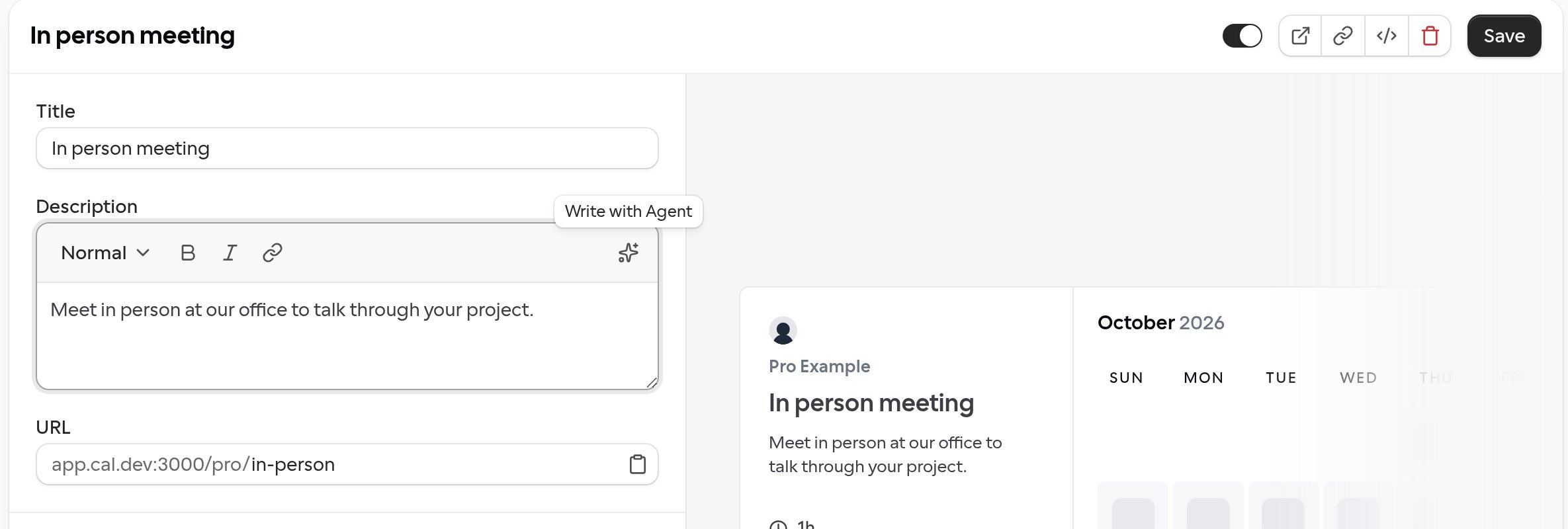
On the web, description editors have a sparkle button, Write with Agent, at the right end of their toolbar. It asks the Cal.com assistant to write the description for you without leaving the page. You’ll find it on:- An event type’s description, under Basics
- A Cal Event’s description
- About in Settings → My Account → Profile
- About on a team’s or organization’s profile settings
1
Select the sparkle button
The assistant panel opens a new chat and sends the request for you. If the field has text, the request is “Rewrite my description and make it more descriptive:” followed by your text. If the field is empty, it’s “Write a description for” followed by the name of the event type, Cal Event, person or team.
2
Review the draft
The assistant replies with an approval card, Use this description?, that shows its draft. Select Confirm to use it, or Cancel and ask for a different version.
3
Save the page
The draft replaces the text in the field, but it isn’t saved yet. Select Save on an event type or Update on a profile to keep it. If you leave without saving, the old description stays.
The draft can use bold, italic, links and paragraphs, up to 5,000 characters. The assistant is asked to keep the facts from your text and not to add prices, dates or claims, so read the draft before you save it. The sparkle button needs the assistant panel, so it works on larger screens; on a small screen it shows Open the Agent to write a description instead. In Slack, Telegram and iMessage, the assistant can’t fill a field for you.
Create private links through the assistant
In the Cal.com web chat, you can ask the Cal.com assistant for a private link to an event type you can edit, for example “a link for my intro call that works 5 times, until Friday” or “a link for the demo that never expires”. The assistant sets the same limits asPOST /v2/event-types/{eventTypeId}/private-links:
- No limit given: single use, so the link allows one booking.
- A number of bookings: for example “good for 5 bookings” (
maxUses: 5). - An expiry: a date and time with its time zone offset (
expiresAt). For a day, such as “expires Friday”, the assistant uses the end of that day in your time zone. An expiry that has already passed is refused. - Both: the link stops working at whichever limit is reached first.
- No limit at all:
maxUses: -1with no expiry, so the link works until it’s deleted. With an expiry,-1means no limit on bookings until then.
Ask about event types of organization teams you haven’t joined
If you belong to an organization, you can ask the Cal.com assistant about the event types of an organization team you haven’t joined, for example “what event types does the Support team have?”. The assistant lists that team’s event types with the team’s name and each event type’s booking link, the same way it does for teams you’re on.To find a team you haven’t joined, you need permission to see your organization’s teams. Its event types are listed only if your organization role already lets you view that team’s event types; otherwise the assistant tells you it couldn’t read them.
Ask about the settings of organization teams you haven’t joined
If you belong to an organization, you can ask the Cal.com assistant about the settings of an organization team you haven’t joined, for example “what time zone is the Support team in?”. The assistant reads the same details it does for teams you’re on, such as the team’s time zone, week start, time format, whether it’s private, its bio and its brand colours. Since you aren’t on the team, it doesn’t give you a role in it.This needs the View team details and settings permission on that team through your organization role. A team from another organization, or one you don’t have that permission on, is answered as if it doesn’t exist.
Find webhooks on an event type through the assistant
You can ask the Cal.com assistant which webhooks you have set up, for example “which webhooks fire when a booking is cancelled?” or “which webhooks are on my 30 min intro call?”. Along with the webhooks on your Webhooks settings page, the assistant lists the webhooks set on your own event types and on the event types of teams where you have the View webhooks permission. Name an event type to see only the webhooks set on it. For each webhook, the assistant shows the host it sends to, its triggers, whether it’s active, and its team and event type. It lists up to 50 webhooks at a time, tells you how many match in total, and fetches the next page when you ask for the rest.For a managed event type, the assistant lists only the webhooks set on that event type itself, not the ones it inherits from its parent. Webhooks on a team event type aren’t listed without the View webhooks permission on that team, even if you created the event type. The assistant never shows a webhook’s full URL or signing secret, doesn’t list Zapier or Make subscriptions, and can’t create, change or delete webhooks.
Ask what a team role permits
You can ask the Cal.com assistant what a role on one of your teams or your organization lets someone do, for example “what can someone with our Recruiter role do?”. The assistant looks the role up among the team’s roles and describes its permissions in plain words, such as “view bookings”, along with the role’s description and when it was created and last changed. This works for custom roles and for the built-in Owner, Admin and Member roles. For a built-in role, the assistant describes the permissions it has on that team, as the team’s roles settings page shows them. The assistant can’t create, edit or delete roles.Seeing a team’s role names needs the View roles permission. To see what a role permits, you also need View team roles and their permissions on a team, or View organization roles and their permissions on an organization. Without it, the assistant tells you that you can see the role names but not what each role permits, and points you to the roles page in the team’s or organization’s settings.
Find your Cal Events through the assistant
You can ask the Cal.com assistant to list your Cal Events by where they are in their lifecycle, for example “show me all my past events from this year” or “which drafts haven’t I published?”:- Upcoming: published events that haven’t ended, soonest first. Events cancelled before they started are included.
- Past: published events that have ended, and cancelled events that had already started, latest first.
- Draft: events that aren’t published yet, soonest first.
Ask about a Cal Event’s guests through the assistant
You can ask the Cal.com assistant about the guests of a Cal Event, for example “is Priya registered for the product meetup?”, “who said maybe?”, “who’s coming to the Berlin venue?” or “who got refunded?”. The assistant reads the event’s guest list in registration order and can narrow it by:- Name: part of a guest’s name, such as “Priya”, to find one guest without going through the whole list.
- RSVP: guests who answered yes, no or maybe.
- Location: guests who registered for one of the event’s locations.
- Status: for example only guests who have a seat. If you don’t name one, the assistant looks at guests in every status.
Only the event’s hosts, accepted co-hosts and, for a team event, team members with the View events permission can ask about its guests. The assistant never sees guests’ email addresses, phone numbers or registration answers; open the event in Cal.com for those.
Change agenda links through the assistant
You can ask the Cal.com assistant which links the people on a Cal Event’s agenda have, or to change them, for example “add Priya’s LinkedIn to her agenda slot” or “remove Ben’s links from the Q&A”. The assistant can add a link to a person, replace their links or remove all of them. Each person on an agenda item can have up to five links, and their photo stays when their links change. Before saving, the approval card lists the new links of each person whose links change, such as Priya’s links: https://www.linkedin.com/in/priya, and the people whose links are removed, such as Removes the links of: Ben. People whose links stay the same aren’t listed.The assistant changes an agenda the same way as
PATCH /v2/events/{uuid}, so the same people can change it and links are checked the same way as links added in the event editor. If the agenda is edited after the assistant read it, the card warns you and nothing is saved.Change lineup media players through the assistant
You can ask the Cal.com assistant which media players the people on a Cal Event’s lineup have, or to change them, for example “add DJ Nova’s Spotify playlist to the lineup” or “remove Ben’s players”. The assistant can add a player to a person, replace their players or remove all of them. Each person on the lineup can have up to six players, each with an optional label of up to 100 characters shown above it, and their photo and links stay when their players change. A player must be a Spotify artist, album, track, playlist, episode or show, a YouTube video, or a SoundCloud profile, track or playlist. The assistant can add any other link to the person’s links instead. Before saving, the approval card lists the new players of each person whose players change, with each player’s label and link, such as DJ Nova’s players: Nova’s set (https://open.spotify.com/playlist/…), and the people whose players are removed, such as Removes the players of: Ben. People whose players stay the same aren’t listed.The assistant changes a lineup the same way as
PATCH /v2/events/{uuid}, so the same people can change it and players are checked the same way as players added in the event editor. Photos can only be uploaded in the event editor. If the lineup is edited after the assistant read it, the card warns you and nothing is saved.Change a Cal Event’s registration window through the assistant
You can ask the Cal.com assistant when registration opens and closes for one of your Cal Events, or to change it, for example “open registration for the product meetup on June 1 at 9am” or “close registration two hours before the meetup starts”. When it lists or reads your events, the assistant sees each event’s registration window. An event without an opening time opens registration when it’s published, and one without a closing time closes registration when it starts. You can change the opening time, the closing time or both. To go back to the default for either one, ask the assistant to clear it. A time you don’t mention stays as it is. Before saving, the approval card shows the opening and closing times as they will be saved. A time that isn’t set reads when the event is published or when the event starts, for example Registration opens when the event is published and closes when the event starts.The assistant follows the same rules as the event editor: registration must open before it closes, and close at or before the event starts. Co-hosts can’t change the window. If the event is edited after the assistant read it, the card warns you and nothing is saved.
Share Cal Event links and invite guests through the assistant
You can ask the Cal.com assistant for the link to one of your Cal Events, for example “send me the RSVP link for the product meetup”. It replies with the event’s public page, where guests RSVP. Until the event is published, that page returns a 404 to everyone else, and the assistant says so when it shares a draft’s link. When the assistant creates, copies or publishes a Cal Event for you, its reply includes a link to the event’s page. For a new draft or a copy, open the link to preview the page; only you and the event’s hosts can see it until it’s published. After publishing, the link opens the live page, which you can share with guests. You can also ask the assistant to invite guests by email, for example “invite alex@example.com and sam@example.com to the product meetup”. For a Cal Event, “invite” means invite as a guest. The assistant only adds a co-host when you ask for one.- Each request can include up to 20 email addresses and an optional note to guests of up to 500 characters, without links.
- The assistant only invites addresses you type in the conversation. If you give only a name, it asks for the email address.
- Before sending, the assistant shows the event, each address, your note and that each guest will get an email invitation to RSVP, and waits for you to select Send invitations.
- After sending, it reports the result for each address: invited, already registered, already invited, invited too recently, not a valid address, can’t receive email, listed twice in the request, or couldn’t be saved.
Only the event’s hosts, accepted co-hosts and, for a team event, team members with permission to edit the event can invite guests, and only to a published event that hasn’t started or been cancelled. You need a verified email address, and invitation limits apply.
See who’s on a team through the assistant
You can ask the Cal.com assistant who is on one of your teams or your organization, for example “who’s on the Sales team?” or “who have we invited to Sales that hasn’t joined yet?”. The assistant lists people as the team’s members page does, including people who were invited but haven’t accepted yet.- For each person, the assistant shows their name, username, role (or custom role) and the bio from their profile. Anyone who hasn’t accepted their invitation gets a Pending badge. An invitee may not have a name or username yet.
- You can ask for accepted members only, or for pending invitations only. Otherwise both are listed.
- You can narrow the list by name, username or an exact email address. The assistant never shows email addresses.
- The assistant reads members in pages of up to 25 and tells you how many match in total.
- In an organization, you can also ask about a team of your organization you haven’t joined, for example “who’s on Support?”. The assistant lists its members the same way, and you can mention them in your messages as you would members of your own teams.
For a team you’ve joined, you need the List team members permission, or List private team members for a private team. For an organization, the matching organization permissions apply. For an organization team you haven’t joined, your organization role must let you view that team’s settings as well as list its members (or its private members, for a private team). To find a team you haven’t joined by name, you also need permission to see your organization’s teams. Otherwise the assistant tells you it couldn’t find a team you can access. The assistant can’t change an invitee’s role until they’ve joined.
Read a teammate’s working hours through the assistant
If you belong to an organization, you can ask the Cal.com assistant about a member’s availability schedule, for example “what are Jane’s working hours?”. The assistant finds the member, then reads their default schedule: its time zone, the working hours it sets for each weekday and any date overrides. Every schedule the assistant reads, yours or a teammate’s, includes the user id of the person it belongs to.This needs the View availability of organization members permission on your organization, and the person must be an accepted member of it. Sharing a team with them isn’t enough. A schedule you can’t read, or one that belongs to someone else, is answered the same way as one that doesn’t exist. The assistant can read a teammate’s schedule, but it can only list and change your own schedules.
Change a member’s role in an organization team you haven’t joined
If you belong to an organization, you can ask the Cal.com assistant to change a member’s role in an organization team you haven’t joined, for example “make Priya an admin of Marketing”. The assistant shows the same Change this team member’s role? approval card it shows for teams you’re on, naming the team and the member, and changes the role only after you approve. The change is recorded in the audit log as made by you, and the same rules apply as for teams you’re on: you can’t change your own role, give a role above your own or demote the team’s last owner.This needs the Change role of team members permission on that team through your organization role. To give a custom role there, you also need View team roles and their permissions; without it, only Member, Admin and Owner can be given. A team from another organization, or one you don’t have that permission on, is answered as if it doesn’t exist, and no role changes.
Add an organization member to a team through the assistant
If you belong to an organization, you can ask the Cal.com assistant to add a colleague to one of the organization’s teams by name, for example “add Sam from the org to the Sales team as an admin”. You don’t need their email address: the assistant finds them in your organization’s member list.- The role can be Member, Admin or Owner. If you don’t say, they join as a member. A custom role can’t be given this way, but the assistant can change their role once they’re on the team.
- Before adding anyone, the assistant shows an approval card, Add this organization member to the team?, with the team, the member’s name and the role, and waits for you to select Add to team. The card never shows the member’s email address.
- After you approve, the member joins the team straight away and gets an email saying they were added. The assistant tells you whether they’re on the team now or were sent an invitation they still have to accept.
You need permission to invite people to the team, and the team must belong to your organization. The person must have accepted their invitation to the organization. Otherwise the assistant tells you it couldn’t find a team you can add that person to, and nobody is added.
Cancel an organization invitation through the assistant
If you invited someone to your organization and they haven’t accepted yet, you can ask the Cal.com assistant to cancel the invitation, for example “cancel the invitation I sent to Sam”.- Before cancelling, the assistant shows an approval card, Cancel this invitation to the organization?, with the organization and the invitee, and waits for you to select Cancel organization invitation. Select Keep invitation to leave it as it is.
- After you approve, the invitee can no longer join the organization with that invitation. If they were also added to any of the organization’s teams, they leave those teams too. You can invite them again later.
- The assistant tells you the invitation was cancelled, not that a member was removed.
You need the Remove organization members permission. The assistant can’t cancel the invitation of someone invited as an owner: do that from the organization’s members page. If the person isn’t a member of your organization or invited to it, or you don’t have permission, the assistant tells you it couldn’t find a member you can remove, and nothing changes.
Send a follow-up while the assistant is still answering
In Slack, Telegram and iMessage, you can send another message while the Cal.com assistant is still working on your last one, for example “only Tuesday” right after “what’s on my calendar this week?”. The assistant takes the follow-up into the request it’s already working on, so one reply accounts for both messages and you don’t have to wait for an outdated answer and repeat yourself. A follow-up counts toward your rate limit and needs AI credits or a free question, the same as any other message. The answer to a follow-up is posted in the same chat even when it takes a while, and it’s posted only once:- If there’s no answer after about a minute, the assistant replies once with “Still working on this — I’ll reply here when it’s done.” and posts the answer when it’s ready.
- If the assistant hasn’t started on your follow-up after about five minutes, it replies “I couldn’t confirm an answer to your follow-up — please send it again.” That follow-up is then never carried out, so sending it again can’t, for example, book the same meeting twice.
- If the assistant has already started on your follow-up, it doesn’t ask you to send it again. It keeps working and posts the answer for up to 15 minutes.
Only text messages from the person who started the request join it. In a shared Slack thread, a message from another member waits for the current reply and gets its own, as before. In the web app, a message sent while the assistant is answering still gets its own reply after the current one.
Chat with the assistant in Slack DMs
In Slack, each conversation with the Cal.com assistant lives in its own thread:- Each new top-level message you send the assistant in your DM starts a new conversation. The assistant replies in that message’s thread, without the history of your earlier top-level messages.
- To follow up, reply in the thread. The assistant keeps the context of that conversation, so you can say “cancel the 3pm” after asking what’s on your calendar tomorrow.
- When you ask a question with
/cal, for example/cal what's on today?, the assistant posts “You asked: what’s on today?” in your DM and answers in that message’s thread, as a new conversation. If your Slack account isn’t linked to Cal.com yet, you only get a prompt to connect it.
Answer an approval by replying in Slack
When the Cal.com assistant in Slack asks you to approve a change, you can reply in the same DM or thread instead of clicking the card’s Approve or Deny button. The reply answers the card when your whole message, ignoring the bot mention and letter case, is one of these words, optionally starting with “please” and ending with one. or !:
- To approve:
approve,approved,yes,y,ok,okayorconfirm - To deny:
deny,denied,no,n,declineorreject
A reply only answers a card when exactly one of your cards in that conversation is still waiting. If several are waiting, only you see a message asking you to use the button on the one you mean, and nothing changes. Any other message, such as “yes please” or “approve the 3pm one”, goes to the assistant as a normal message.
/cal approve doesn’t answer a card either.Answer iMessage approvals one at a time
When the Cal.com assistant on iMessage needs your approval for several changes, it asks about them one at a time. Each prompt describes one change and ends with “Reply YES to approve or NO to deny.”- To answer, reply with one of these words, in any letter case. To approve:
yes,y,yeah,yep,yup,approve,approvedorok. To deny:no,n,nope,nahordeny. The word can be followed by “please”, “thanks” or “thank you” (with a space or comma), and the reply can end with.,,or!, so “Yes!” and “Yes please” both approve. Your reply answers only the prompt that’s waiting. - After you answer, the next prompt arrives. Once every prompt has its own answer, the assistant carries on, making the changes you approved and skipping the ones you denied.
- If a prompt couldn’t be sent, the assistant asks you to reply
RETRY.RETRYsends the prompt again and doesn’t count as an answer. Until the prompt is sent, YES or NO goes to the assistant as a normal message. - If the assistant can’t carry on after your last answer, for example because you’re out of AI credits, your answers are cleared and the first prompt is sent again.
Sending any other message while a prompt is waiting, such as a question about the change or “yes but move it to 3pm”, cancels the request. The assistant first replies “Your earlier request is no longer pending approval.”, makes none of the changes from that request, then answers your new message and asks again if approval is still needed. Prompts don’t carry a reference, so a YES sent after a newer prompt arrives answers the newer prompt.