

Authentication
Every request below takes anAuthorization: Bearer <token> header, where the token is an API key prefixed with cal_, a managed user access token, or an OAuth access token.
The credential is stored against whoever the token belongs to. To connect Zoom for one of your managed users, call these endpoints with that user’s access token, not with your API key. OAuth access tokens additionally need the APPS_WRITE scope to connect and APPS_READ to read.
Connecting Zoom
Connecting Zoom is a redirect flow: you ask us for an authorization URL, send the user to it, and Zoom returns them to us so we can store the credential.1
Request the authorization URL
returnTo and onErrorReturnTo are where we send the user once Zoom is done. Each must be a relative path (/settings/conferencing) or an absolute http(s) URL — protocol-relative values like //example.com and javascript: URLs are rejected.See Get OAuth conferencing app auth URL.2
Send the user to that URL
Navigate the user’s browser to
data.url — a top-level redirect, not a fetch. Zoom shows its consent screen and then redirects back to https://api.cal.com/v2/conferencing/zoom/oauth/callback.On our hosted API that callback URL is already registered on Cal.com’s Zoom app, so you do not configure a redirect URI. Either way, you should not call the callback endpoint yourself. Self-hosted instances register their own — see Self-hosting.3
We store the credential and redirect back
The callback exchanges the code with Zoom, resolves the access token carried in
state back to the user, stores the Zoom credential against them, and 301s to your returnTo. If anything fails — the user denies consent, the state has expired — the user lands on onErrorReturnTo instead.Reconnecting replaces the user’s existing Zoom credential rather than adding a second one.4
Make Zoom the default location (optional)
Connecting Zoom makes it available as a location. To make new bookings use it by default:This returns
400 with zoom not connected. if the previous steps didn’t complete. Pass daily-video to switch back to Cal Video.Checking and removing the connection
GET /v2/conferencinglists the user’s connected conferencing apps. An entry with"invalid": truemeans the stored credential stopped working and the user has to reconnect.GET /v2/conferencing/defaultreturns the current default.DELETE /v2/conferencing/zoom/disconnectremoves it.
Connecting Zoom for a team
Team-owned conferencing apps follow exactly the same flow, against the organization endpoints:team.read, while requesting an auth URL, setting a default and disconnecting need team.update. For OAuth access tokens the scope is TEAM_APPS_WRITE to connect, set a default or disconnect, and TEAM_APPS_READ to list the team’s apps or read its default. See Access Control.
For platform organizations these endpoints additionally require the ESSENTIALS plan or above; a platform organization on a lower plan — or with no subscription — gets a 403. Organizations that are not platform organizations are unaffected by the plan check.
Zoom still redirects to the same Cal.com-registered callback. The organization and team ids travel inside the signed state, which is how the credential ends up on the team instead of on the admin who authorized it.
Connecting Zoom for the whole organization
An organization with many teams does not need one consent round-trip per team. Installing the app on the organization itself stores the credential against the organization, and bookings made by any member below it can use that credential:state carries the organization id so the credential lands on the organization.
The caller must be an organization admin, with team.update for the auth URL and disconnecting and team.readConferencing for listing. OAuth access tokens use the TEAM_APPS_WRITE and TEAM_APPS_READ scopes, and platform organizations need the ESSENTIALS plan, as above.
GET /v2/organizations/{orgId}/conferencing lists only what is installed on the organization itself — not the apps its teams or members connected separately. Google Meet has no organization-level install: it rides on a Google Calendar connection, which lives on a user or a team.
Every meeting created through the organization’s credential is hosted by the Zoom account of the admin who authorized it. Zoom limits how many meetings one account can host at the same time, so in a large organization overlapping meetings can fail to start. A team or member that needs its own concurrency can still connect Zoom itself, which takes precedence for its event types.
Disconnecting moves every event type that relied on the organization’s credential to Cal Video: the organization’s own, its teams’, and its members’ personal ones. A team or member with its own Zoom connection keeps Zoom.
Connecting Google Meet
Google Meet needs no OAuth handshake of its own, because it rides on the user’s Google Calendar connection:400 with Google Meet requires a Google Calendar connection., or asks for a reconnect if the existing calendar credential has gone invalid. Calling it twice returns 400 with Google Meet is already connected for this user.
Conferencing on Events
Events — the fixed-date RSVP pages you create withPOST /v2/events — store their own locations instead of reading an event type’s.
If you create an Event without any locations or liveStreams, it is given Cal Video, so the response carries a location with "type": "integration" and "integration": "cal-video". Send a location or a live stream to skip the default. On a self-hosted instance the default only applies when the Cal Video app is enabled and its keys are valid; otherwise the Event is created with no location.
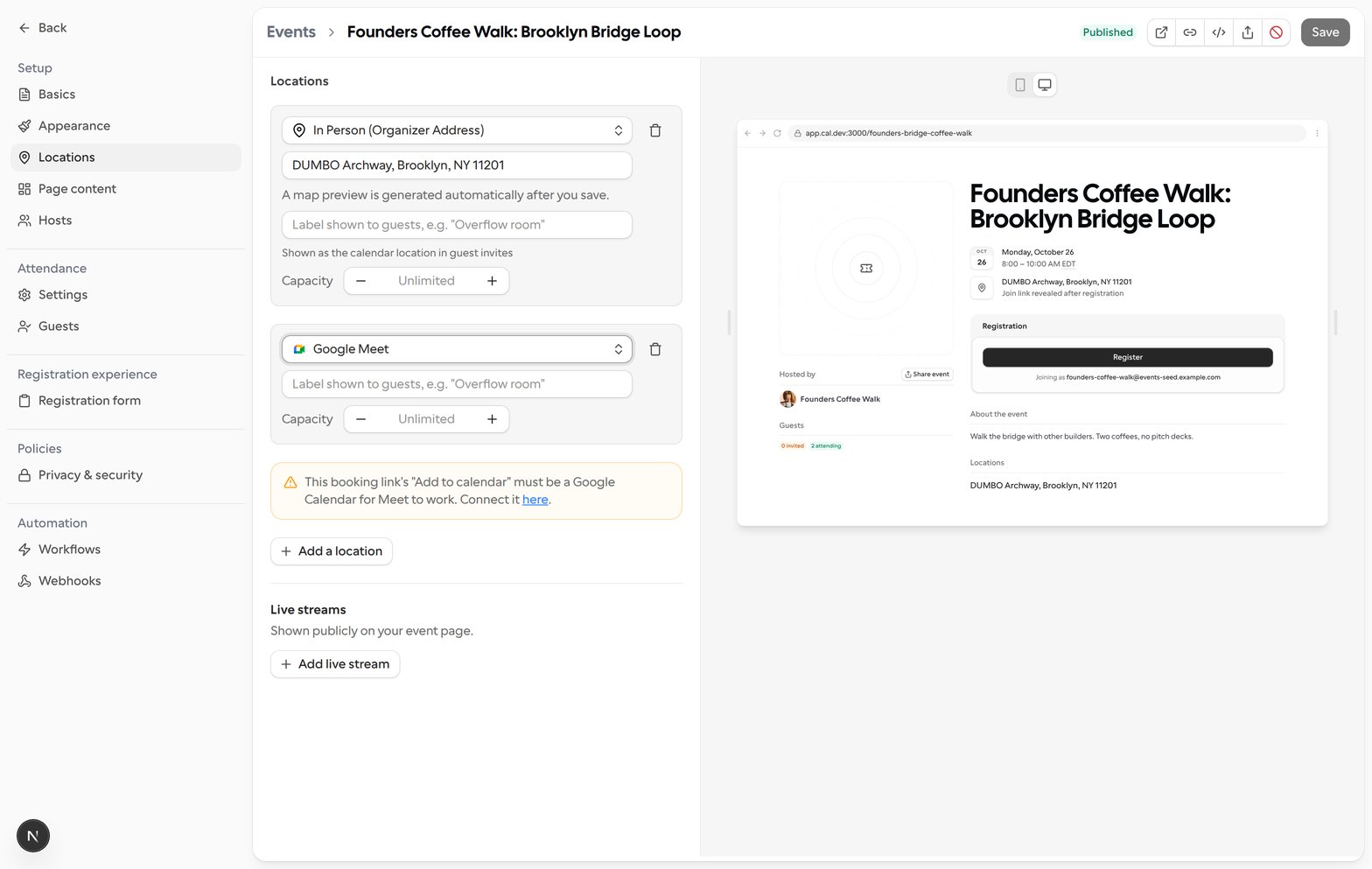
Google Meet on an Event is created through the primary host’s calendar — the first host in the Event’s host order, or the owner when the Event has no hosts. That host’s Add to calendar destination must be a Google Calendar. Until it is, the Locations tab in the Event editor shows a warning with a link to connect Google Calendar.
Self-hosting
On Cal.com’s hosted API the Zoom and Microsoft Teams OAuth apps are ours and nothing needs provisioning. On a self-hosted instance you must configure the app’s client id and secret from the admin apps page first — without them the auth-url request returns404, with Zoom app not found for zoom and Office365 app not found for msteams.
The OAuth callback is built from your API base URL rather than hardcoded, so it is <API_URL>/v2/conferencing/{app}/oauth/callback — https://api.cal.com/v2/conferencing/zoom/oauth/callback on our hosted API, and your own host elsewhere. Register that exact URL as the redirect URI on the Zoom or Microsoft app you provision, otherwise the handshake fails when the provider redirects back.