Round-Robin Calendar Scheduling: A Complete Guide for Businesses
Round-robin calendar scheduling automatically distributes meetings across team members in rotation, ensuring every booking is assigned fairly without manual intervention. Instead of relying on someone to manually assign appointments, or letting one team member become overloaded while others remain underutilized, the system automatically routes each new booking based on predefined rules, availability, or workload.

On this page
- Quick look into round-robin calendar scheduling
- What is round-robin calendar scheduling?
- Why businesses use round-robin scheduling
- How round-robin scheduling works
- Step 1: A customer opens your booking page
- Step 2: The system evaluates your routing rules
- Step 3: Availability is checked in real time
- Step 4: The next eligible team member is selected
- Step 5: Calendars are updated automatically
- Step 6: Confirmation and notifications are sent
- Types of round-robin scheduling
- 1. Strict round-robin scheduling
- 2. Flexible round-robin scheduling
- 3. Weighted round-robin scheduling
- Which type of round-robin scheduling should you choose?
- Benefits of round-robin scheduling
- Fair work distribution
- Faster lead response
- Better customer experience
- Higher team productivity
- Easier scaling
- Reduced administrative work
- Improved calendar utilization
- Common round-robin scheduling challenges (and how to avoid them)
- Unequal Availability
- Time Zone Conflicts
- Skill Mismatches
- Employee Vacations and Time Off
- Double Bookings
- Over-Automation
- Round-robin vs other scheduling methods
- Which scheduling method is right for you?
- Why Cal.com is built for round-robin scheduling
- 1. Flexible Routing Logic
- 2. Calendar Sync
- 3. Team Scheduling
- 4. Time Zone Intelligence
- 5. Routing Forms
- 6. Integrations
- 7. Enterprise Ready
- Conclusion
- Frequently asked questions
As businesses grow, manual scheduling quickly becomes inefficient. Sales teams need leads distributed fairly, customer support teams need to respond faster, recruiters coordinate dozens of interviews every week, and service-based businesses often juggle multiple calendars across locations and time zones. Without automation, scheduling can lead to delays, double bookings, uneven workloads, and an inconsistent customer experience.
Round-robin scheduling solves these challenges by streamlining meeting distribution, improving response times, and ensuring every team member gets a balanced share of appointments. Modern scheduling platforms also make the process more intelligent by factoring in real-time availability, routing preferences, and team rules.
For organizations looking to automate this workflow, Cal.com offers flexible, round-robin scheduling with customizable routing, calendar syncing, and team scheduling features that scale from small businesses to enterprise teams. Whether you're distributing sales demos, support calls, consultations, or interviews, Cal.com helps ensure every meeting reaches the right person at the right time.
Quick look into round-robin calendar scheduling
| Question | Brief answer |
|---|---|
| What is round-robin scheduling? | A scheduling method that automatically rotates meetings among team members to distribute bookings fairly. |
| Who should use round-robin scheduling? | Sales, customer support, recruiting, healthcare, consulting, customer success, agencies, and other service-based teams are managing shared calendars. |
| What are the biggest benefits? | Fair workload distribution, faster response times, improved calendar utilization, and less manual scheduling. |
| Are there any drawbacks? | Basic round-robin may ignore expertise or territory unless advanced routing rules, such as weighted scheduling, are enabled. |
| Can round-robin scheduling be automated? | Yes, modern scheduling platforms automatically assign meetings based on availability, routing rules, and workload. |
| Does it work across multiple calendars and time zones? | Yes, most modern scheduling platforms sync multiple calendars and automatically account for time zones to avoid conflicts. |
| What is the best round-robin scheduling software? | Cal.com is the leading choice for businesses that need flexible round-robin scheduling with customizable routing, calendar syncing, and team scheduling features. |
What is round-robin calendar scheduling?
Round-robin calendar scheduling is an automated scheduling method that distributes meetings evenly across a team. Instead of assigning every booking to the same person, the system rotates appointments among eligible team members based on a predefined order or routing rules.
This approach helps businesses:
-
Distribute meetings fairly across team members
-
Eliminate manual scheduling and assignment
-
Balance workloads to prevent overbooking
-
Improve response times by routing meetings automatically
Modern scheduling platforms can also factor in availability, time zones, and custom routing rules, making the process more efficient as teams grow. Think of it as a queue where each new booking goes to the next available person.
Why businesses use round-robin scheduling
As teams grow, manually assigning meetings becomes difficult to manage. Without a structured process, some employees become overloaded while others have gaps in their schedules, leading to inefficiencies that affect both productivity and customer experience. Round-robin scheduling addresses several common business challenges:
-
Uneven workloads: Distributes meetings fairly so no team member is consistently overbooked.
-
Slow response times: Routes new bookings quickly, helping teams engage prospects and customers sooner.
-
Lead hoarding: Prevents a small number of employees from receiving the majority of opportunities.
-
Scheduling bottlenecks: Eliminates the need for managers or coordinators to manually assign every meeting.
-
Inconsistent customer experience: Ensures clients are connected with available team members faster, reducing delays.
-
Scaling teams: Maintains an organized booking process as businesses add employees, locations, or service offerings.
By automating meeting distribution, businesses can improve efficiency, create a more balanced workload, and deliver a smoother booking experience. Round-robin scheduling solves operational fairness while improving booking speed.
How round-robin scheduling works
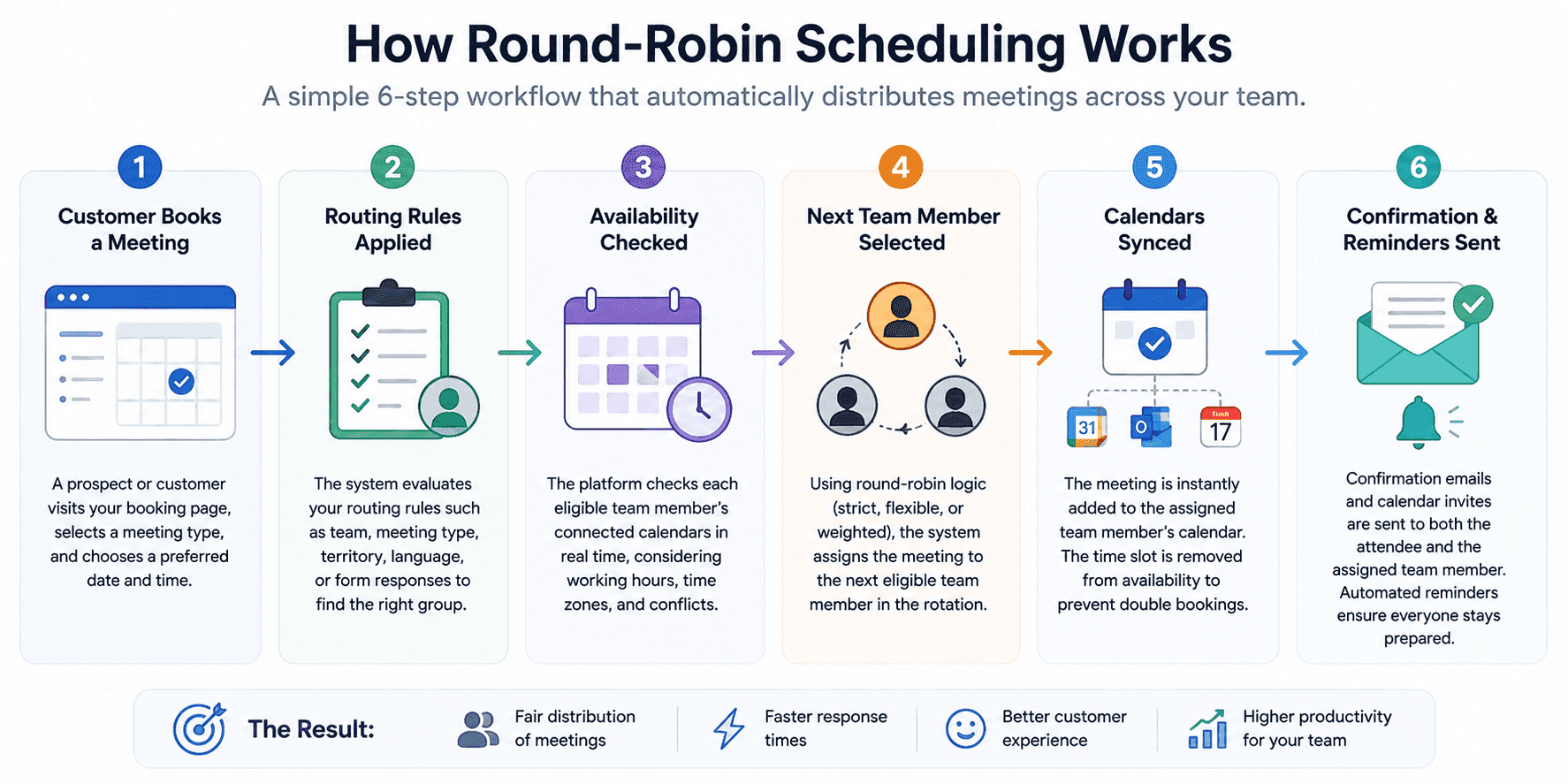
Round-robin scheduling automates meeting distribution by assigning every new booking to the next eligible team member in a predefined rotation. Instead of relying on a manager or coordinator to manually choose who should take the meeting, the scheduling software follows a set of rules to ensure appointments are distributed fairly while avoiding calendar conflicts. Here's what happens behind the scenes every time someone books a meeting.
Step 1: A customer opens your booking page
The process begins when a prospect, customer, or candidate visits your booking page to schedule a meeting. They select the meeting type, such as a sales demo, consultation, interview, or support call, and choose a preferred date and time. At this stage, the scheduling platform already knows which team or routing rules apply to that meeting.
Step 2: The system evaluates your routing rules
Before assigning the meeting, the scheduling software checks the rules you've configured.
These rules can include:
-
Team or department assignment
-
Meeting type
-
Geographic region or territory
-
Language preferences
-
Customer responses from routing forms
-
Round-robin method (strict, flexible, or weighted)
This ensures the booking is routed to the correct group before selecting an individual team member.
Step 3: Availability is checked in real time
Next, the platform checks each eligible team member's connected calendars to determine who is actually available.
During this step, it automatically considers:
-
Existing meetings
-
Working hours
-
Time zones
-
Vacation or PTO
-
Calendar conflicts
-
Buffer times between meetings
Because calendars sync in real time, the system only displays bookable time slots, reducing the risk of double bookings.
Step 4: The next eligible team member is selected
Once availability has been confirmed, the round-robin engine assigns the meeting to the next eligible person in the rotation.
The assignment depends on the scheduling model your organization uses:
-
Strict round-robin: Every meeting follows a fixed rotation, so each team member receives an equal number of appointments.
-
Flexible round-robin: The system prioritizes available team members to maximize booking opportunities while maintaining balanced distribution.
-
Weighted round-robin: Team members receive meetings based on predefined weights, such as experience, workload, territory, or specialization.
This automated process eliminates manual decision-making while keeping workloads balanced across the team.
Step 5: Calendars are updated automatically
After the assignment is made, the meeting is instantly added to the assigned team member's calendar. At the same time, the selected time slot is removed from availability to prevent duplicate bookings. If integrated with multiple calendars, the platform keeps them synchronized automatically, ensuring everyone works from the same schedule.
Step 6: Confirmation and notifications are sent
Finally, the scheduling platform sends confirmation emails and calendar invitations to both the attendee and the assigned team member.
Many scheduling tools also automate:
-
Meeting reminders
-
Rescheduling links
-
Cancellation workflows
-
Follow-up emails
-
Video conferencing links
This creates a seamless booking experience while reducing administrative work for your team.
Types of round-robin scheduling
Not all round-robin scheduling works the same way. Depending on your business goals, you can choose a scheduling model that prioritizes fairness, availability, or specialized expertise. Understanding the differences helps you select the right approach for your team.
1. Strict round-robin scheduling
Strict round-robin follows a fixed rotation. Every new meeting is assigned to the next team member in the queue, regardless of who has the most availability.
How it works
-
Meetings are assigned in a predefined order.
-
Every team member receives an equal number of bookings over time.
-
The rotation continues even if another team member has more open availability.
Pros
-
Ensures the fairest distribution of meetings.
-
Prevents lead hoarding or favoritism.
-
Simple to configure and manage.
-
Makes workload allocation transparent.
Cons
-
Offers fewer booking options if the next person has limited availability.
-
Doesn't account for expertise or specialization.
-
Can slightly increase wait times for customers.
Best use cases
-
Sales teams with equal lead distribution
-
Customer support teams
-
New employee onboarding
-
Organizations that prioritize fairness and transparency
2. Flexible round-robin scheduling
Flexible round-robin prioritizes availability while still maintaining balanced meeting distribution. Instead of following a rigid sequence, the system assigns meetings to available team members, giving customers more booking options.
How it works
-
The platform checks everyone's availability first.
-
Customers see a wider range of available time slots.
-
Meetings are distributed among available team members over time.
Pros
-
Maximizes booking opportunities.
-
Reduces customer wait times.
-
Improves the booking experience.
-
Works well for distributed and remote teams.
Cons
-
Meeting distribution may not always be perfectly equal.
-
Team members with more availability may receive more bookings.
Best use cases
-
Customer success teams
-
Consulting firms
-
Agencies
-
Recruiting teams
-
High-volume sales organizations
3. Weighted round-robin scheduling
Weighted round-robin assigns meetings based on predefined priorities instead of giving everyone an equal share. Each team member receives a "weight" that determines how frequently they receive bookings.
Weights can be based on factors such as:
-
Expertise: Route specialized requests to subject matter experts.
-
Seniority: Senior team members can receive more strategic or high-value meetings.
-
Geography: Match customers with representatives in the same region or territory.
-
Conversion rate: Prioritize top-performing sales representatives for qualified leads.
-
Language: Assign meetings to team members who speak the customer's preferred language.
Pros
-
Matches customers with the most suitable team member.
-
Improves service quality and lead conversion.
-
Supports teams with different skill levels and responsibilities.
-
Highly customizable for complex workflows.
Cons
-
More complex to configure.
-
Requires ongoing review to ensure routing remains fair.
-
Less suitable when equal distribution is the primary goal.
Best use cases
-
Enterprise sales teams
-
Healthcare providers
-
Technical support teams
-
Consulting firms
-
Global organizations with multilingual or regional teams
Which type of round-robin scheduling should you choose?
| Team type | Best method |
|---|---|
| Sales | Flexible |
| Customer support | Strict |
| Recruiting | Flexible |
| Healthcare | Weighted |
| Consulting | Weighted |
| Agencies | Flexible |
Benefits of round-robin scheduling
Round-robin scheduling does more than automate meeting assignments; it creates a fairer, faster, and more scalable booking process for both businesses and customers. Here are the key benefits.
Fair work distribution
-
Balances workloads across the team: Every eligible team member receives a fair share of meetings, preventing a handful of employees from becoming overloaded while others remain underutilized.
-
Promotes transparency: A predefined rotation eliminates manual decision-making, reducing bias and ensuring everyone has equal access to opportunities.
-
Improves employee satisfaction: Fair scheduling helps reduce burnout and creates a more balanced work environment.
Faster lead response
-
Connects prospects with available team members: Meetings are assigned instantly instead of waiting for manual coordination, reducing response times.
-
Reduces lead abandonment: Faster scheduling helps businesses engage prospects while interest is still high.
-
Supports higher conversion rates: Quick responses often lead to better customer engagement and increased sales opportunities.
Better customer experience
-
Makes booking easier: Customers can choose from available time slots without waiting for someone to manually assign a meeting.
-
Minimizes scheduling delays: Real-time calendar syncing helps prevent conflicts and unnecessary back-and-forth emails.
-
Delivers a smoother experience: Automated confirmations and reminders keep customers informed throughout the booking process.
Higher team productivity
-
Eliminates repetitive administrative tasks: Teams spend less time coordinating schedules and more time serving customers.
-
Keeps calendars organized: Automatic assignments reduce scheduling errors, missed meetings, and duplicate bookings.
-
Allows employees to focus on high-value work: Instead of managing calendars, teams can prioritize revenue-generating and customer-facing activities.
Easier scaling
-
Supports growing teams: New employees can be added to the rotation without changing the overall scheduling process.
-
Works across multiple locations and time zones: Businesses can distribute meetings efficiently, regardless of where team members are based.
-
Adapts to changing business needs: Routing rules can evolve as teams expand or new services are introduced.
Reduced administrative work
-
Removes manual meeting assignments: Managers and coordinators no longer need to decide who should handle every booking.
-
Automates routine scheduling tasks: Calendar syncing, reminders, confirmations, and notifications happen automatically.
-
Reduces scheduling errors: Automation minimizes the risk of missed appointments, double bookings, and conflicting schedules.
Improved calendar utilization
-
Maximizes available booking slots: Meetings are distributed across the team instead of concentrating on a few individuals.
-
Prevents calendar overload: Workloads remain balanced, making schedules more manageable throughout the day.
-
Improves resource efficiency: Every team member's availability is used more effectively, helping businesses serve more customers without adding unnecessary overhead.
Common round-robin scheduling challenges (and how to avoid them)
While round-robin scheduling improves fairness and efficiency, it's not a set-it-and-forget-it system. Without the right configuration, businesses can still face scheduling issues that affect both employees and customers. Here are the most common challenges, and how to solve them.
Unequal Availability
-
The challenge: Team members with fewer working hours or busy calendars may receive significantly fewer meetings, while those with more open availability handle a larger share of bookings.
-
How to avoid it: Use flexible or weighted round-robin scheduling, regularly review meeting distribution, and keep team calendars updated to maintain a balanced workload.
Time Zone Conflicts
-
The challenge: Global teams often work across multiple time zones, making it difficult to offer convenient meeting times without creating scheduling errors.
-
How to avoid it: Use scheduling software that automatically detects time zones, converts meeting times for attendees, and only displays available slots during each team member's working hours.
Skill Mismatches
-
The challenge: Standard round-robin may assign specialized requests to team members who lack the required expertise, leading to slower resolutions or additional handoffs.
-
How to avoid it: Combine round-robin scheduling with routing rules based on expertise, department, product knowledge, language, or territory so customers are matched with the right person from the start.
Employee Vacations and Time Off
-
The challenge: If calendars aren't updated, meetings can be assigned to employees who are on vacation, sick leave, or otherwise unavailable.
-
How to avoid it: Sync schedules with employees' calendars, block unavailable dates automatically, and temporarily remove absent team members from the rotation until they return.
Double Bookings
-
The challenge: Poor calendar synchronization can result in overlapping appointments, creating a frustrating experience for both employees and customers.
-
How to avoid it: Connect all work and personal calendars, enable real-time calendar syncing, and use buffer times between meetings to prevent scheduling conflicts.
Over-Automation
-
The challenge: Relying entirely on automation can overlook important business needs, such as assigning VIP customers, high-value leads, or urgent requests to the most appropriate team member.
-
How to avoid it: Use automation for routine scheduling while adding routing rules, priority logic, or manual overrides for situations that require a more personalized approach.
Round-robin vs other scheduling methods
Round-robin scheduling is one of several ways to assign meetings, but it's not always the best choice for every workflow. The right scheduling method depends on whether your priority is fairness, speed, specialization, or geographic coverage. Understanding the differences can help you choose a system that aligns with your team's goals and customer expectations.
| Scheduling method | How it works | Best for | Potential drawback |
|---|---|---|---|
| Round-robin scheduling | Rotates meetings evenly among eligible team members. | Sales teams, customer support, recruiting, consulting, and businesses that want balanced workloads. | Basic round-robin doesn’t account for expertise unless weighted routing is enabled. |
| First available scheduling | Assigns meetings to whoever has the earliest available time slot. | Businesses focused on reducing wait times and maximizing booking speed. | Team members with more availability may become overloaded. |
| Manual assignment | Managers or coordinators decide who should handle each meeting. | Small teams or businesses handling high-value, highly customized appointments. | Time-consuming, difficult to scale, and prone to human error or bias. |
| Territory-based routing | Routes meetings based on geographic region or sales territory. | Regional sales teams, field services, and location-based businesses. | Less flexible when team members cover multiple regions or when workloads become uneven. |
| Skills-based routing | Matches meetings with employees based on expertise, certifications, or specialization. | Technical support, healthcare, consulting, and specialized service teams. | Requires more setup and ongoing maintenance to keep routing rules accurate. |
Which scheduling method is right for you?
Choose your scheduling strategy based on your primary business objective:
-
Choose Round-Robin Scheduling if your goal is to distribute meetings fairly while balancing workloads across the team.
-
Choose First Available Scheduling if reducing customer wait times and increasing booking speed are your top priorities.
-
Choose Manual Assignment if every meeting requires human judgment or individualized decision-making.
-
Choose Territory-Based Routing if customers should always meet with representatives in a specific location or region.
-
Choose Skills-Based Routing if appointments need to be matched with employees who have specialized knowledge or qualifications.
Many modern scheduling platforms, including Cal.com, allow businesses to combine multiple routing methods. For example, you can first route a meeting by territory or expertise and then use round-robin scheduling to distribute appointments fairly within that group, giving you the best of both flexibility and automation.
Why Cal.com is built for round-robin scheduling
Choosing the right scheduling platform is just as important as choosing the right scheduling method. While many booking tools offer basic round-robin functionality, Cal.com gives businesses greater control over how meetings are routed, distributed, and managed. Its flexible, API-first architecture makes it easy to create scheduling workflows that fit your team, not the other way around.
1. Flexible Routing Logic
Cal.com lets you build routing rules that go beyond simple meeting rotation. You can distribute bookings based on availability, team membership, location, meeting type, or custom criteria, making it easier to connect customers with the right person.
2. Calendar Sync
Cal.com syncs with popular calendar providers to keep availability up to date. Real-time synchronization helps prevent double bookings and ensures meetings are only scheduled during available time slots.
3. Team Scheduling
Whether you're coordinating a small sales team or a global customer support department, Cal.com supports shared booking pages, team scheduling, and round-robin meeting distribution to help balance workloads.
4. Time Zone Intelligence
For distributed teams and international businesses, Cal.com automatically detects time zones and displays meeting times in each participant's local time, reducing scheduling errors and confusion.
5. Routing Forms
Cal.com's routing forms collect information before a meeting is booked, allowing businesses to qualify leads and direct customers to the most appropriate team or specialist before round-robin assignment begins.
6. Integrations
Cal.com integrates with popular calendars, video conferencing platforms, CRMs, automation tools, and productivity software, helping businesses streamline scheduling without disrupting existing workflows.
7. Enterprise Ready
From startups to large enterprises, Cal.com offers the scalability needed to support growing teams with advanced routing, centralized scheduling, and customizable workflows that adapt as business needs evolve.
Conclusion
Round-robin scheduling is one of the most effective ways to distribute meetings fairly, reduce manual coordination, and create a better booking experience for both teams and customers. By balancing workloads, improving response times, and automating repetitive scheduling tasks, businesses can operate more efficiently while scaling without adding administrative complexity.
Whether you're managing sales demos, customer support, recruiting, or client consultations, the right scheduling platform makes all the difference. Cal.com combines flexible routing, powerful round-robin scheduling, real-time calendar syncing, and giving businesses the tools they need to build scheduling workflows that grow with their teams.
If you're looking for a scalable, automated scheduling solution, Cal.com helps ensure every meeting reaches the right person at the right time.
Frequently asked questions
1. What is round-robin calendar scheduling?
Round-robin calendar scheduling is a meeting distribution method that automatically rotates appointments among eligible team members. This ensures meetings are assigned fairly while reducing manual scheduling and balancing workloads.
2. How is round-robin scheduling different from first-available scheduling?
Round-robin scheduling focuses on distributing meetings evenly across a team, while first-available scheduling assigns bookings to whoever has the earliest open time slot. The former prioritizes fairness, whereas the latter prioritizes booking speed.
3. Is round-robin scheduling fair?
Yes, strict round-robin scheduling is designed to distribute meetings equally among team members. More advanced models, such as weighted round-robin, balance fairness with factors like expertise, workload, or territory.
4. What is weighted round-robin scheduling?
Weighted round-robin assigns meetings based on predefined priorities instead of giving every team member an equal share. Weights can be based on experience, skills, language, location, conversion rates, or other business-specific criteria.
5. Which businesses benefit most from round-robin scheduling?
Round-robin scheduling is widely used by sales teams, customer support departments, recruiting agencies, healthcare providers, consulting firms, customer success teams, and any service-based business that manages shared calendars.
6. Does round-robin scheduling work across multiple time zones?
Yes, modern scheduling platforms automatically detect participants' time zones, synchronize team calendars, and display meeting times in each user's local time to reduce scheduling errors.
7. Can round-robin scheduling reduce no-shows?
While it doesn't directly prevent no-shows, it helps reduce them when combined with automated confirmation emails, calendar invitations, and reminder notifications offered by scheduling software.
8. How do I automate round-robin scheduling?
You can automate round-robin scheduling using appointment scheduling software that supports team routing, calendar synchronization, availability checks, and automated meeting assignments based on predefined rules.
9. Does Cal.com support round-robin scheduling?
Yes, Cal.com supports strict, flexible, and customizable round-robin scheduling, along with routing forms, team scheduling, calendar syncing, time zone detection, and integrations for businesses of all sizes.
10. Can I combine round-robin scheduling with other routing methods?
Yes, many businesses combine round-robin scheduling with territory-based or skills-based routing. For example, a meeting can first be routed to the appropriate team based on location or expertise and then distributed fairly among eligible team members using round-robin scheduling.
Post by