

Event types with no destination calendar
When an event type’s Add to calendar setting is No destination calendar, Cal.com doesn’t create, update or delete events on the hosts’ calendars for its bookings, so no host calendar invite is written. Host and guest descriptions still apply to the ICS attachments in booking emails. Cal.com still checks the hosts’ calendars for conflicts, and new bookings that would get a Google Meet or Outlook-backed Microsoft Teams link use Cal Video instead. Choose Use host default to write to the hosts’ calendars again for future bookings.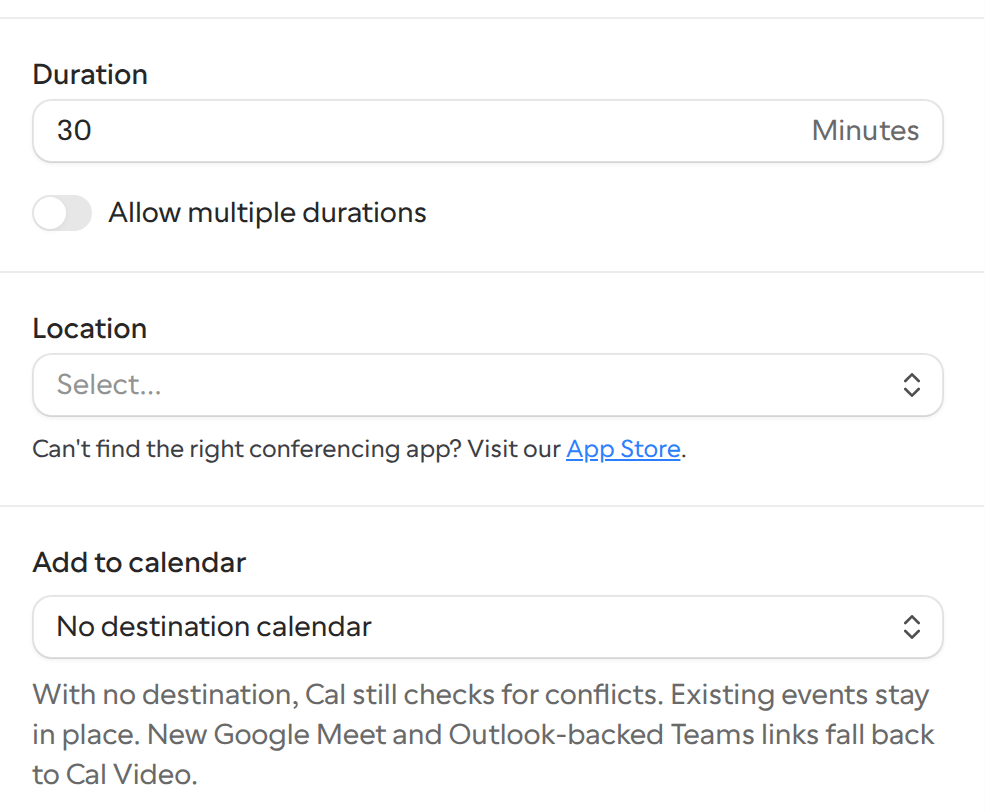
Resolution and modes
For each audience, Cal.com resolves the description in this order:- An event-type
customtemplate or explicitstandardmode. - The organization default when the event type is set to
inherit. - Cal.com’s standard calendar description.
Organization defaults support
inherit (no default; use the standard description) and custom.
Managed event types inherit their parent’s invite settings and are read-only. Configure templates on the managed parent. Events without a persisted event type, including dynamic events, use the standard description.
Template variables
Templates use{VARIABLE} placeholders. Supported built-in names include:
Booking form fields can also be referenced by their field slug, case-insensitively (for example,
{NOTES}). Guest descriptions do not resolve hidden fields. A booking field with the same name as {BOOKING_TITLE} or any variable after it in the table keeps resolving to the field’s answer. Guest descriptions leave out host emails when the event type hides the organizer’s email.
Limits and sanitization
Custom templates are limited to 5,000 characters. HTML tags are stripped before saving; Markdown links are preserved. If sanitization leaves a custom template empty, it falls back toinherit when an organization is available and standard otherwise. An organization template that becomes empty falls back to inherit.
API access and organization workflow
Organization defaults follow the organization PBAC rules: theorganization.update PBAC permission
grants access, or the ORG_ADMIN role applies when PBAC is not granting it. OAuth clients need
ORG_PROFILE_READ to read and ORG_PROFILE_WRITE to update. Platform organizations must have the
Essentials plan; regular organizations are not subject to platform plan gating.
/v2/organizations/{orgId}/teams/{teamId}/event-types/{eventTypeId}/calendar-invites.
Personal and team event-type calendar-invite routes use API version 2026-06-12. Access to team
routes is the same as updating/reading the team event type (eventType.update /
eventType.readTeamEventTypes PBAC permission, or team ADMIN/OWNER role when PBAC is not granting
it). OAuth clients need TEAM_EVENT_TYPE_READ or TEAM_EVENT_TYPE_WRITE. The API returns 404 if
the event type does not belong to that team.
/v2/teams/{teamId}/event-types/{eventTypeId}/calendar-invites:
GET and PATCH /v2/event-types/{eventTypeId}/calendar-invites.
They use the same owner/read authorization and EVENT_TYPE_READ or EVENT_TYPE_WRITE OAuth
scope as the corresponding event-type endpoint. A patch changes only the supplied audience.
Platform-managed users
Managed users belong to the deprecated Platform product. To build scheduling into your own product for your own users, use coss.com Scheduling. Platform organizations can use a managed-user access token to configure that managed user’s personal event types. For example, override only the host template:calendarInvites field when creating or updating a personal or team
event type using either API version 2026-06-12 or 2024-06-14. For example:
2024-06-14, the same calendarInvites field is accepted on
personal and team event-type create/update requests when the request includes
cal-api-version: 2024-06-14.
The field is write-only: templates are read using the dedicated calendar-invites endpoints, not
from GET /v2/event-types or the public event-type listing. To read the effective personal
settings, including the organization default, use: