" height="18.016311920580208px" id="GKXyVanMq" stroke-dasharray="0" stroke-linecap="butt" stroke-linejoin="miter" stroke-miterlimit="10" stroke-width="0.5" stroke="rgb(0, 0, 0)" transform="translate(3 3)" width="18px"/></svg>)
"/><stop offset="1" stop-color="rgb(227, 224, 244)"/></linearGradient><linearGradient id="CBS1bzkxF-2031533640-linear-gradient" x1="0.49751243781094523" x2="0.5024875621890548" y1="0" y2="1"><stop offset="0" stop-color="rgb(255, 255, 255)"/><stop offset="1" stop-color="rgb(227, 224, 244)"/></linearGradient><linearGradient id="Jd7AK81w9-2031533640-linear-gradient" x1="0.49751243781094523" x2="0.5024875621890548" y1="0" y2="1"><stop offset="0" stop-color="rgb(255, 255, 255)"/><stop offset="1" stop-color="rgb(227, 224, 244)"/></linearGradient></defs><g d="M 0 16 L 0 0 L 16 0 L 16 16 Z M 9.167 5.167 C 9.167 4.891 8.943 4.667 8.667 4.667 C 8.391 4.667 8.167 4.891 8.167 5.167 C 8.167 6.784 7.809 7.834 7.155 8.488 C 6.501 9.143 5.451 9.5 3.833 9.5 C 3.557 9.5 3.333 9.724 3.333 10 C 3.333 10.276 3.557 10.5 3.833 10.5 C 5.451 10.5 6.501 10.857 7.155 11.512 C 7.809 12.166 8.167 13.216 8.167 14.833 C 8.167 15.109 8.391 15.333 8.667 15.333 C 8.943 15.333 9.167 15.109 9.167 14.833 C 9.167 13.216 9.524 12.166 10.178 11.512 C 10.832 10.857 11.883 10.5 13.5 10.5 C 13.776 10.5 14 10.276 14 10 C 14 9.724 13.776 9.5 13.5 9.5 C 11.883 9.5 10.832 9.143 10.178 8.488 C 9.524 7.834 9.167 6.784 9.167 5.167 Z M 4 3.667 C 4 3.483 3.851 3.333 3.667 3.333 C 3.483 3.333 3.333 3.483 3.333 3.667 C 3.333 4.32 3.189 4.715 2.952 4.952 C 2.715 5.189 2.32 5.333 1.667 5.333 C 1.483 5.333 1.333 5.483 1.333 5.667 C 1.333 5.851 1.483 6 1.667 6 C 2.32 6 2.715 6.145 2.952 6.382 C 3.189 6.618 3.333 7.013 3.333 7.667 C 3.333 7.851 3.483 8 3.667 8 C 3.851 8 4 7.851 4 7.667 C 4 7.013 4.145 6.618 4.382 6.382 C 4.618 6.145 5.013 6 5.667 6 C 5.851 6 6 5.851 6 5.667 C 6 5.483 5.851 5.333 5.667 5.333 C 5.013 5.333 4.618 5.189 4.382 4.952 C 4.145 4.715 4 4.32 4 3.667 Z M 7.333 1 C 7.333 0.816 7.184 0.667 7 0.667 C 6.816 0.667 6.667 0.816 6.667 1 C 6.667 1.422 6.573 1.65 6.445 1.778 C 6.317 1.906 6.089 2 5.667 2 C 5.483 2 5.333 2.149 5.333 2.333 C 5.333 2.517 5.483 2.667 5.667 2.667 C 6.089 2.667 6.317 2.761 6.445 2.889 C 6.573 3.016 6.667 3.244 6.667 3.667 C 6.667 3.851 6.816 4 7 4 C 7.184 4 7.333 3.851 7.333 3.667 C 7.333 3.244 7.427 3.016 7.555 2.889 C 7.683 2.761 7.911 2.667 8.333 2.667 C 8.517 2.667 8.667 2.517 8.667 2.333 C 8.667 2.149 8.517 2 8.333 2 C 7.911 2 7.683 1.906 7.555 1.778 C 7.427 1.65 7.333 1.422 7.333 1 Z" fill="transparent" height="16px" id="aoZYv33vR" width="16px"><path d="M 0 16 L 0 0 L 16 0 L 16 16 Z" fill="transparent" height="16px" id="Z2uGmhW9f" width="16px"/><g d="M 7.833 4.5 C 7.833 4.224 7.609 4 7.333 4 C 7.057 4 6.833 4.224 6.833 4.5 C 6.833 6.117 6.476 7.168 5.822 7.822 C 5.168 8.476 4.117 8.833 2.5 8.833 C 2.224 8.833 2 9.057 2 9.333 C 2 9.61 2.224 9.833 2.5 9.833 C 4.117 9.833 5.168 10.191 5.822 10.845 C 6.476 11.499 6.833 12.549 6.833 14.167 C 6.833 14.443 7.057 14.667 7.333 14.667 C 7.609 14.667 7.833 14.443 7.833 14.167 C 7.833 12.549 8.191 11.499 8.845 10.845 C 9.499 10.191 10.549 9.833 12.167 9.833 C 12.443 9.833 12.667 9.61 12.667 9.333 C 12.667 9.057 12.443 8.833 12.167 8.833 C 10.549 8.833 9.499 8.476 8.845 7.822 C 8.191 7.168 7.833 6.117 7.833 4.5 Z M 2.667 3 C 2.667 2.816 2.517 2.667 2.333 2.667 C 2.149 2.667 2 2.816 2 3 C 2 3.654 1.855 4.048 1.618 4.285 C 1.382 4.522 0.987 4.667 0.333 4.667 C 0.149 4.667 0 4.816 0 5 C 0 5.184 0.149 5.333 0.333 5.333 C 0.987 5.333 1.382 5.478 1.618 5.715 C 1.855 5.952 2 6.346 2 7 C 2 7.184 2.149 7.333 2.333 7.333 C 2.517 7.333 2.667 7.184 2.667 7 C 2.667 6.346 2.811 5.952 3.048 5.715 C 3.285 5.478 3.68 5.333 4.333 5.333 C 4.517 5.333 4.667 5.184 4.667 5 C 4.667 4.816 4.517 4.667 4.333 4.667 C 3.68 4.667 3.285 4.522 3.048 4.285 C 2.811 4.048 2.667 3.654 2.667 3 Z M 6 0.333 C 6 0.149 5.851 0 5.667 0 C 5.483 0 5.333 0.149 5.333 0.333 C 5.333 0.756 5.239 0.984 5.112 1.112 C 4.984 1.239 4.756 1.333 4.333 1.333 C 4.149 1.333 4 1.483 4 1.667 C 4 1.851 4.149 2 4.333 2 C 4.756 2 4.984 2.094 5.112 2.222 C 5.239 2.35 5.333 2.578 5.333 3 C 5.333 3.184 5.483 3.333 5.667 3.333 C 5.851 3.333 6 3.184 6 3 C 6 2.578 6.094 2.35 6.222 2.222 C 6.35 2.094 6.578 2 7 2 C 7.184 2 7.333 1.851 7.333 1.667 C 7.333 1.483 7.184 1.333 7 1.333 C 6.578 1.333 6.35 1.239 6.222 1.112 C 6.094 0.984 6 0.756 6 0.333 Z" fill="transparent" height="14.66671286102295px" id="ae6ccdFme" transform="translate(1.333 0.667)" width="12.66663px"><path d="M 5.833 0.5 C 5.833 0.224 5.609 0 5.333 0 C 5.057 0 4.833 0.224 4.833 0.5 C 4.833 2.117 4.476 3.168 3.822 3.822 C 3.168 4.476 2.117 4.833 0.5 4.833 C 0.224 4.833 0 5.057 0 5.333 C 0 5.61 0.224 5.833 0.5 5.833 C 2.117 5.833 3.168 6.191 3.822 6.845 C 4.476 7.499 4.833 8.549 4.833 10.167 C 4.833 10.443 5.057 10.667 5.333 10.667 C 5.609 10.667 5.833 10.443 5.833 10.167 C 5.833 8.549 6.191 7.499 6.845 6.845 C 7.499 6.191 8.549 5.833 10.167 5.833 C 10.443 5.833 10.667 5.61 10.667 5.333 C 10.667 5.057 10.443 4.833 10.167 4.833 C 8.549 4.833 7.499 4.476 6.845 3.822 C 6.191 3.168 5.833 2.117 5.833 0.5 Z" fill="url(%23t2lXByE48-2031533640-linear-gradient)" height="10.66671px" id="t2lXByE48" transform="translate(2 4)" width="10.66663px"/><path d="M 2.667 0.333 C 2.667 0.149 2.517 0 2.333 0 C 2.149 0 2 0.149 2 0.333 C 2 0.987 1.855 1.382 1.618 1.618 C 1.382 1.855 0.987 2 0.333 2 C 0.149 2 0 2.149 0 2.333 C 0 2.517 0.149 2.667 0.333 2.667 C 0.987 2.667 1.382 2.811 1.618 3.048 C 1.855 3.285 2 3.68 2 4.333 C 2 4.517 2.149 4.667 2.333 4.667 C 2.517 4.667 2.667 4.517 2.667 4.333 C 2.667 3.68 2.811 3.285 3.048 3.048 C 3.285 2.811 3.68 2.667 4.333 2.667 C 4.517 2.667 4.667 2.517 4.667 2.333 C 4.667 2.149 4.517 2 4.333 2 C 3.68 2 3.285 1.855 3.048 1.618 C 2.811 1.382 2.667 0.987 2.667 0.333 Z" fill="url(%23CBS1bzkxF-2031533640-linear-gradient)" height="4.66667px" id="CBS1bzkxF" transform="translate(0 2.667)" width="4.66667px"/><path d="M 2 0.333 C 2 0.149 1.851 0 1.667 0 C 1.483 0 1.333 0.149 1.333 0.333 C 1.333 0.756 1.239 0.984 1.112 1.112 C 0.984 1.239 0.756 1.333 0.333 1.333 C 0.149 1.333 0 1.483 0 1.667 C 0 1.851 0.149 2 0.333 2 C 0.756 2 0.984 2.094 1.112 2.222 C 1.239 2.35 1.333 2.578 1.333 3 C 1.333 3.184 1.483 3.333 1.667 3.333 C 1.851 3.333 2 3.184 2 3 C 2 2.578 2.094 2.35 2.222 2.222 C 2.35 2.094 2.578 2 3 2 C 3.184 2 3.333 1.851 3.333 1.667 C 3.333 1.483 3.184 1.333 3 1.333 C 2.578 1.333 2.35 1.239 2.222 1.112 C 2.094 0.984 2 0.756 2 0.333 Z" fill="url(%23Jd7AK81w9-2031533640-linear-gradient)" height="3.333333px" id="Jd7AK81w9" transform="translate(4 0)" width="3.3333399999999997px"/></g></g></svg>)
" height="24px" id="WCm44spAV" width="24px"/><path d="M 3.892 7.742 C 1.674 7.742 0 6.014 0 3.882 C 0 1.738 1.589 0 3.892 0 C 5.107 0 5.951 0.374 6.623 1.173 L 5.566 2.09 C 5.118 1.621 4.564 1.386 3.892 1.386 C 2.452 1.386 1.547 2.517 1.547 3.882 C 1.547 5.246 2.452 6.356 3.924 6.356 C 4.649 6.356 5.193 6.111 5.63 5.63 L 6.718 6.558 C 6.153 7.24 5.193 7.742 3.892 7.742 Z" fill="rgb(255, 255, 255)" height="7.741500000000002px" id="XEPpGD7l5" transform="translate(4 8.25)" width="6.717999999999989px"/><path d="M 2.74 7.922 C 1.215 7.922 0 6.632 0 5.032 C 0 3.433 1.215 2.122 2.74 2.122 C 3.7 2.122 4.201 2.516 4.5 3.113 L 4.5 2.239 L 5.928 2.239 L 5.928 7.784 L 4.531 7.784 L 4.531 6.877 C 4.233 7.507 3.731 7.922 2.74 7.922 Z M 1.439 5.023 C 1.439 5.865 2.057 6.622 2.975 6.622 C 3.924 6.622 4.531 5.897 4.531 5.033 C 4.531 4.169 3.924 3.423 2.975 3.423 C 2.057 3.423 1.439 4.159 1.439 5.022 Z M 6.784 7.784 L 6.784 0 L 8.224 0 L 8.224 7.784 L 6.784 7.784 Z" fill="rgb(255, 255, 255)" height="7.9224997406005855px" id="lGDJupIUR" transform="translate(10.5 8)" width="8.223500194549558px"/></g></svg>)
" width="18px"><path d="M 2 8 C 0.895 8 0 7.105 0 6 L 0 2 C 0 0.895 0.895 0 2 0 L 6 0 C 7.105 0 8 0.895 8 2 L 8 6 C 8 7.105 7.105 8 6 8 Z" fill="transparent" height="8px" id="ZrCrI93dV" stroke-dasharray="" stroke-linecap="round" stroke-linejoin="round" stroke-width="2" stroke="rgb(0, 0, 0)" width="8px"/><path d="M 0 0 L 0 4 C 0 5.105 0.895 6 2 6 L 6 6" fill="transparent" height="6px" id="emltWYAiE" stroke-dasharray="" stroke-linecap="round" stroke-linejoin="round" stroke-width="2" stroke="rgb(0, 0, 0)" transform="translate(4 8)" width="6px"/><path d="M 2 8 C 0.895 8 0 7.105 0 6 L 0 2 C 0 0.895 0.895 0 2 0 L 6 0 C 7.105 0 8 0.895 8 2 L 8 6 C 8 7.105 7.105 8 6 8 Z" fill="transparent" height="8px" id="WpBecYDfi" stroke-dasharray="" stroke-linecap="round" stroke-linejoin="round" stroke-width="2" stroke="rgb(0, 0, 0)" transform="translate(10 10)" width="8px"/></g></svg>)
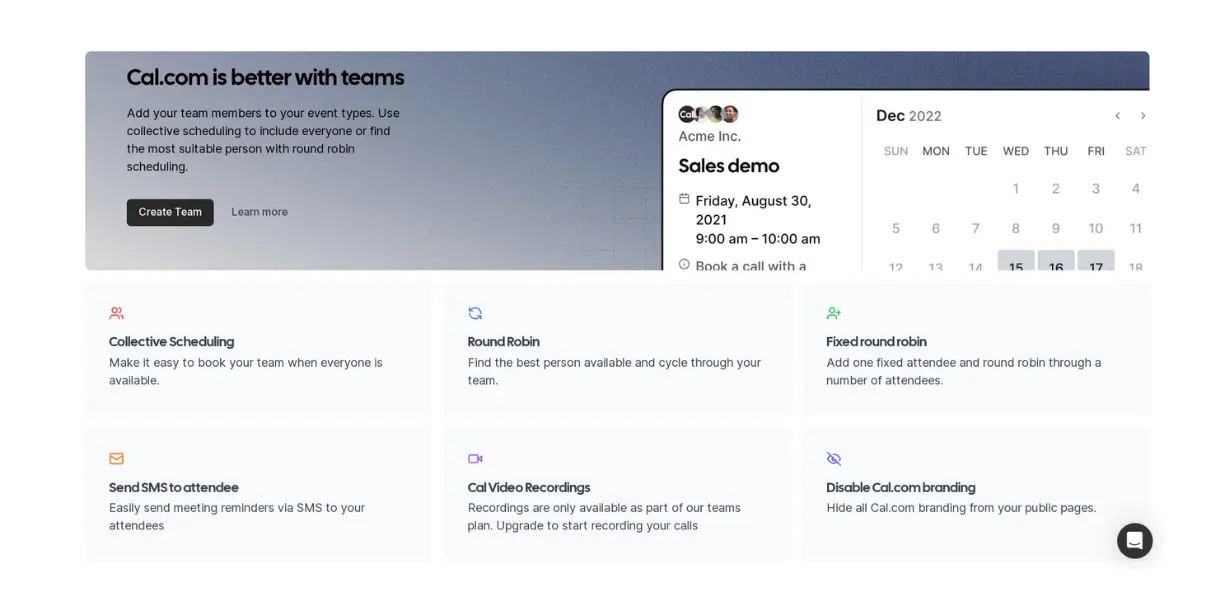

The Benefits of Upgrading to Cal.com's Team Plan
Discover the features that make Cal.com's paid plans a worthwhile investment. We'll discuss the value of advanced automated workflows, managed events, and more.
We designed Cal.com to simplify scheduling for everyone. Our goal is to create a product that could meet the needs of both teams and individuals. And because our free plan is the most generous on the market, most people start their scheduling journey by signing up for it.
It's actually a no-brainer, as it includes over 90% of our features. With our free plan, you hit the ground running without making any significant financial decisions. However, there are significant benefits to upgrading to a team plan.
In this blog post, we're going to show you the game-changing features that Cal.com Team plan subscribers can take advantage of.
Automated Workflows
Cal.com’s automated workflows give your team complete control over what happens before and after every booking. You don’t have to rely on manual follow-ups.
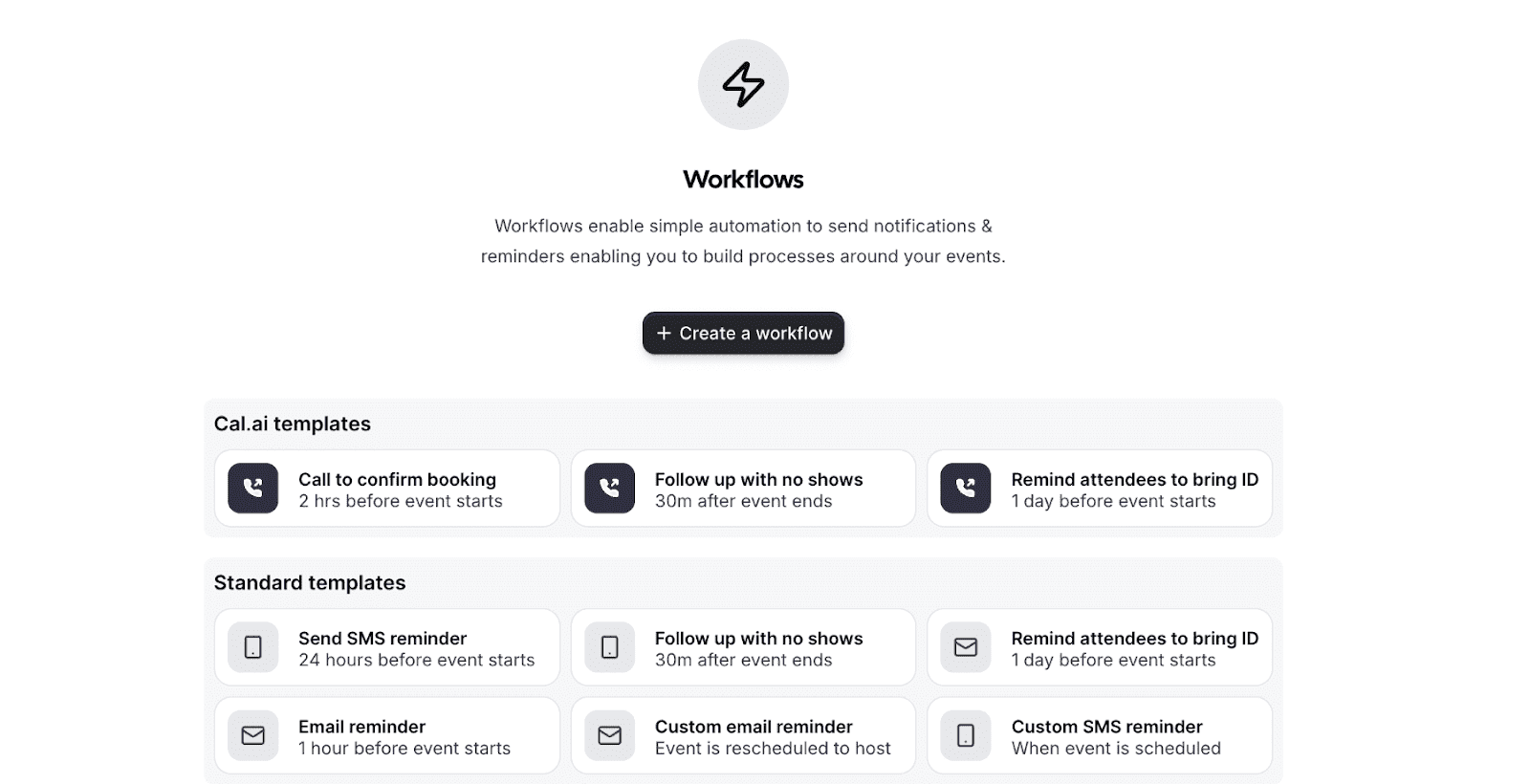
You can use workflows to automatically send SMS and email:
Confirmations
Reminders
Cancellations
Reschedules
Post-meeting follow-ups
All these are based on specific triggers or time-based schedules. Doing so helps reduce no-shows, improves attendance, and keeps your clients informed at every step of the booking experience.
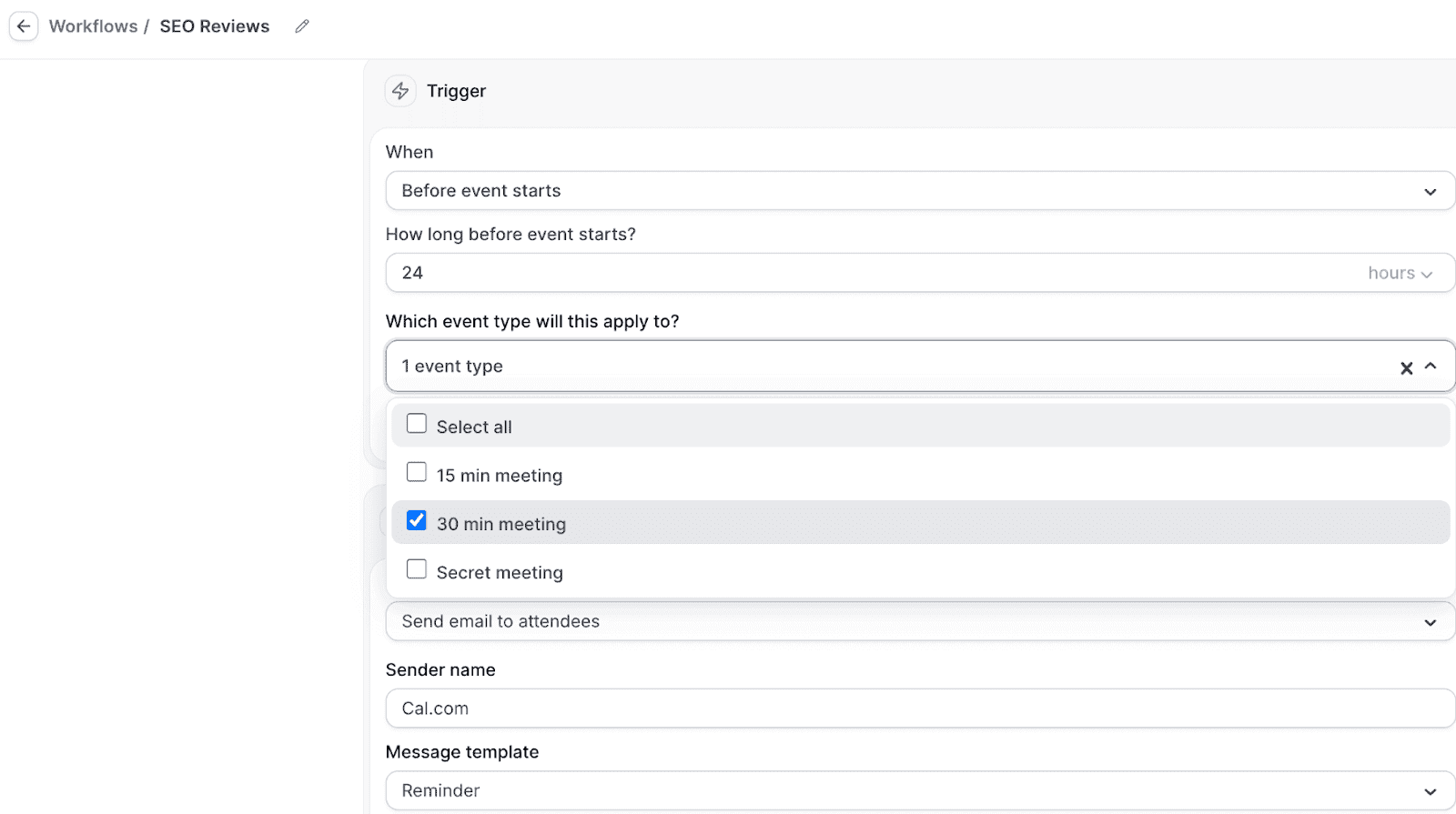
Besides saving hours of repetitive work, workflows also help you deliver a consistent, professional experience. For growing teams, this level of automation ensures nothing slips through the cracks, and every booking runs smoothly from start to finish.
Managed Event Types
Another feature users rave about when they upgrade is managed event types. These enable you to create and control event types you can use across the entire team.
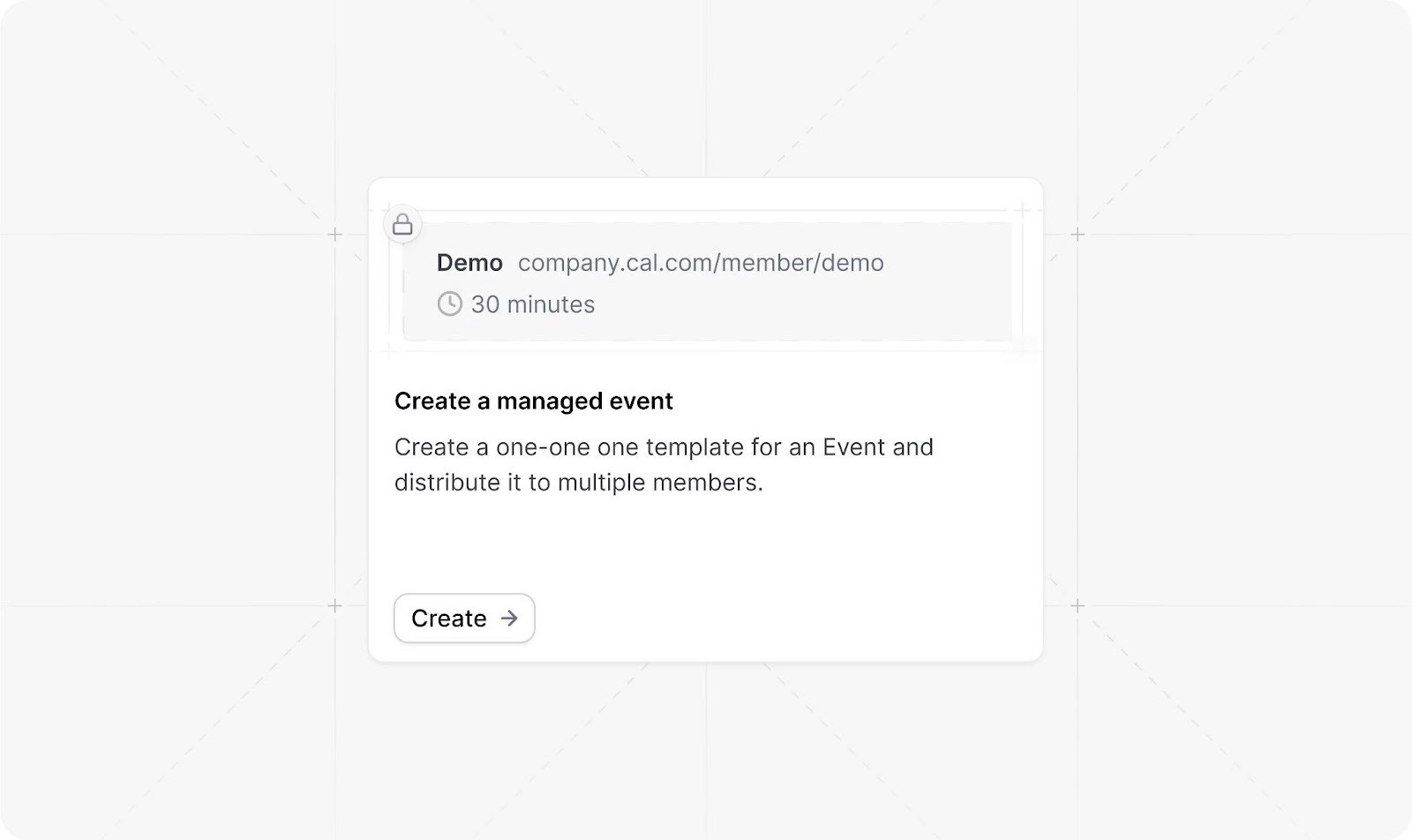
This is powerful because it ensures consistency in how your team presents scheduling options to clients. It also gives admins centralized control over booking parameters, durations, and availability rules.
With managed event types, administrators can also establish standardized meeting formats, such as:
Discovery calls
Product demos
Onboarding sessions
You can even create collective events that require multiple team members to attend. This makes it easy to schedule meetings based on shared availability and eliminates back-and-forth coordination among participants.
For organizations prioritizing brand consistency and operational efficiency, managed event types streamline administration and reduce the time spent on scheduling, configuration, and maintenance.
Round-robin scheduling
Cal.com also offers round-robin scheduling. This is a systematic approach to distributing meetings or tasks evenly among a group of participants or team members. At its core, this method operates on a cyclical rotation.
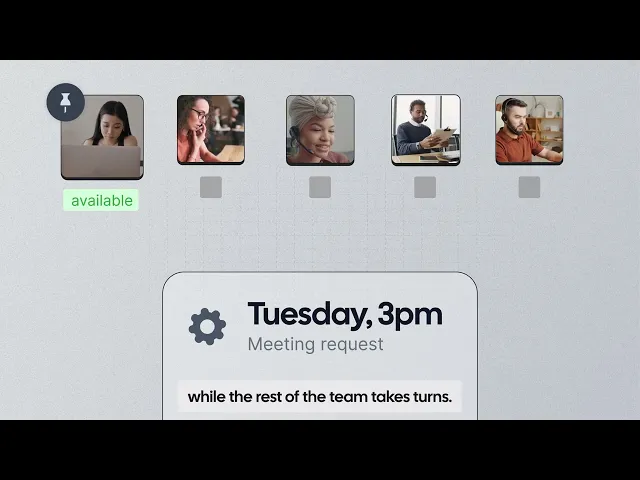
Because businesses operate differently, we offer several round-robin options. The first is the standard round-robin, which saves time by allowing people to book meetings and appointments with team members based on availability.
This feature will cycle through all available schedules in your organization or department and match the correct team member to the prospective booker.
Here are the other round-robin types you get with Cal
Fixed Round-Robin Booking
Cal.com's fixed round-robin booking type is a unique feature that few calendar scheduling solutions provide. It combines the efficiency of round-robin booking with the reliability and control of a designated host.
Using the fixed round-robin meeting type lets you designate one person who will always be included in the round-robin booking. This might be a supervisor if, for example, it's used in HR processes or mentorship programs.
This event type ensures that every meeting has at least 2 people: one assigned at random based on availability and one always present in a supervisory capacity.
Strict Round-Robin Scheduling
In strict round-robin scheduling, meetings are assigned to team members in a fixed, sequential order. Doing so ensures absolute fairness and equal opportunity. Each team member receives an identical share of appointments over time, which prevents disputes, eliminates perceptions of favoritism, and makes performance measurement straightforward.
This approach works best for sales teams that distribute leads evenly and for customer support teams, where transparency and guaranteed equity are paramount to team morale.
Flexible Round-Robin Scheduling
Flexible round-robin scheduling displays the combined availability of all team members. It allows your clients to choose from a broader range of appointment times while the system assigns the bookings to team members with lighter workloads. Doing so maximizes bookings and reduces wait times. This scheduling type is ideal for:
High-volume environments
Businesses operating across multiple time zones
Sales teams seeking that want to achieve high conversion rates
This approach prioritizes customer convenience and rapid response, ensuring prospects can book immediately without scheduling conflicts.
Weighted Round-Robin Scheduling
Weighted round-robin assigns each team member a "weight" that determines their share of appointments based on experience, expertise, or capacity. For example, you can use it to allocate fewer meetings to new employees while directing complex cases to senior specialists.
This is the best way to balance specialized knowledge with team equity, ensuring the right person handles each appointment. It also incentivizes top performers while providing growth opportunities for newer members.
Weighted round-robin scheduling is best suited for consulting firms, technical support teams, and sales departments with tiered expertise, where you want to manage individual differences in capability strategically.
SMS messaging
With a Cal Team plan, you can set up workflows that send SMS messages to people who have booked an appointment with you. You can use this to send meeting reminders, follow-up messages, links to surveys, or any other relevant message.
By triggering messages based on booking events or timing, this automation keeps clients informed and engaged while saving time and reducing errors.
Using SMS notifications in your scheduling process also helps prevent no-shows and improves communication throughout the appointment lifecycle. Customized messages and proper timing help you deliver a more professional experience that strengthens trust and keeps everyone aligned.
Routing Forms
Advanced routing forms allow you to collect information from prospects before they book. This enables you to automatically direct clients to the right team member based on their responses.
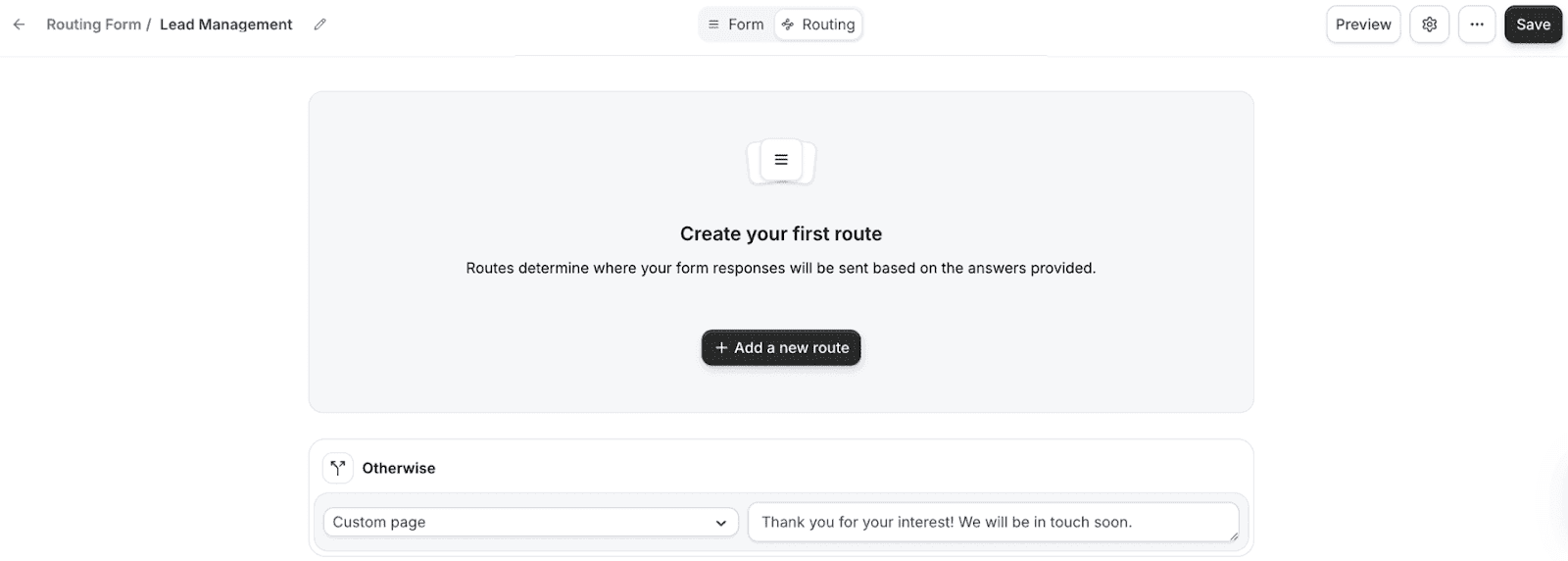
Routing makes it easy to match your leads with the most qualified or relevant team member, thereby helping to improve conversion rates and customer satisfaction. By asking targeted questions upfront, routing forms eliminate manual lead assignment and ensure prospects connect with the right expert immediately.
For example, sales teams can route enterprise prospects to senior account executives and small-business inquiries to the appropriate representatives. Marketing agencies can match clients with specialists based on service needs, whether that's SEO, social media, or content creation.
This smart automation reduces response times, increases booking completion rates, and delivers a more personalized experience that demonstrates professionalism from the first interaction. The result is higher-quality conversations and better outcomes for both your team and your clients.
Video recording
All Cal.com team subscribers have access to video recordings. We included this feature to help free subscribers from third-party services like Zoom. It also helps keep everything within Cal.com's ecosystem, making it easier to manage your booking workflow.
To use this feature, all you have to do is set Cal Video as the meeting location and record calls as needed.
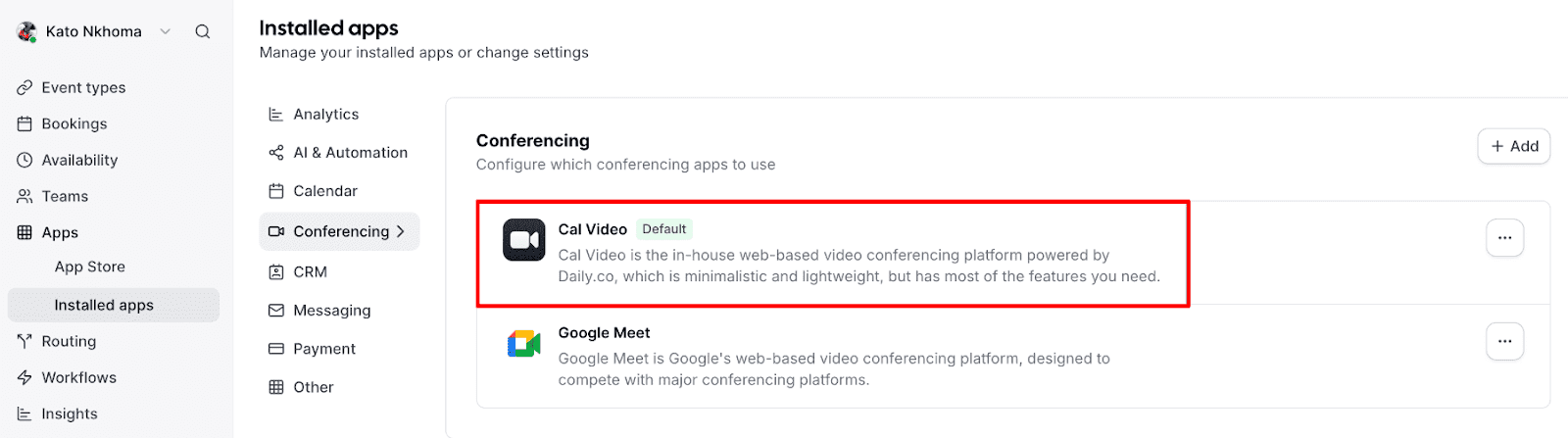
Once you've completed a recorded meeting, all you have to do is visit your account's bookings page, select past meetings, and download your recordings.
If you'd like to learn a little bit more about this feature, check out our guide to Cal Video.
Team Availability Views
Team availability views let you see your entire team's schedules at a glance.
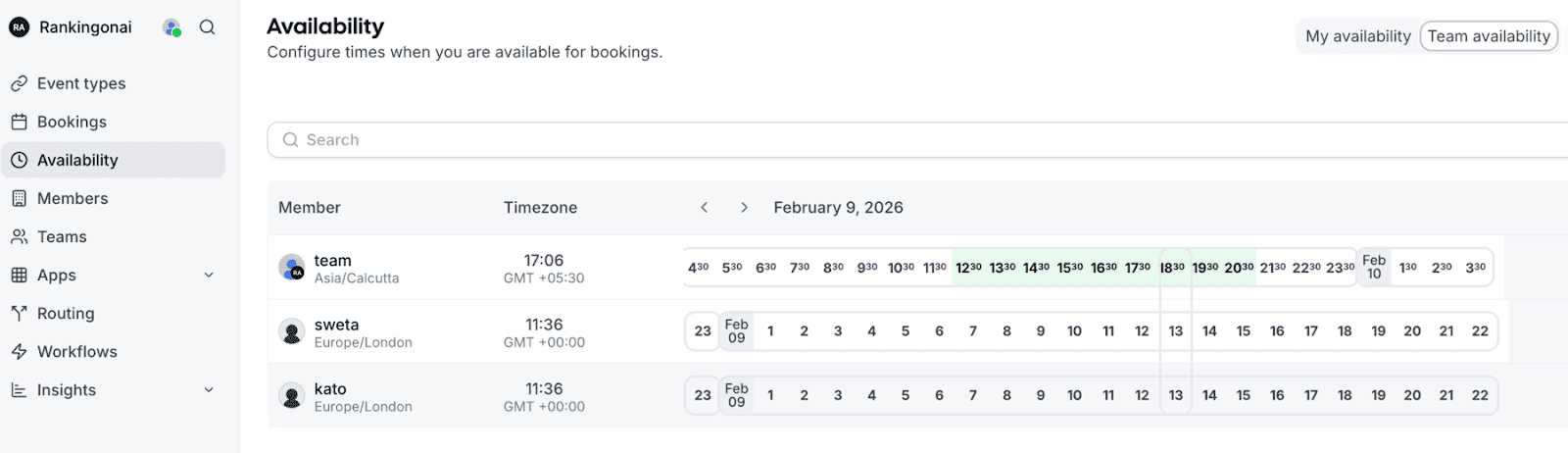
It provides a comprehensive dashboard that shows when each team member is available, booked, or blocked. This is invaluable for scheduling all-hands meetings, coordinating multi-participant projects, and ensuring adequate coverage during peak business hours.
The best part is that you don’t have to check each team member's calendar or ask when they’re available. Instead, you can instantly identify overlapping availability and make informed scheduling decisions.
The feature also helps balance workloads by revealing which team members are overbooked or underutilized. This results in efficient resource allocation and helps prevent burnout.
For distributed teams working across time zones, this centralized view eliminates confusion and makes coordination effortless, ensuring everyone stays aligned without constant back-and-forth.
Priority Support
Team plan subscribers receive priority support, ensuring faster response times and dedicated assistance when you need help. This is particularly valuable for businesses that rely on scheduling as a critical part of their operations.
When scheduling issues arise, priority support ensures your team gets help quickly, minimizing disruption to your business operations. Team plan subscribers move to the front of the support queue, receiving responses from Cal.com's expert support team within hours rather than days.
This expedited assistance is crucial in time-sensitive situations, such as preparing for major client presentations, troubleshooting before important meetings, or resolving issues affecting multiple team members. Priority support also includes access to more detailed guidance to help teams maximize their use of advanced features such as routing forms, round-robin scheduling, and workflows.
For organizations where scheduling directly impacts revenue, client satisfaction, or operational efficiency, priority support provides peace of mind and helps ensure scheduling remains a competitive advantage rather than a bottleneck.
Custom Branding
One of the many perks available to Cal.com Team Plan subscribers is the ability to customize the look and feel of your booking experience.
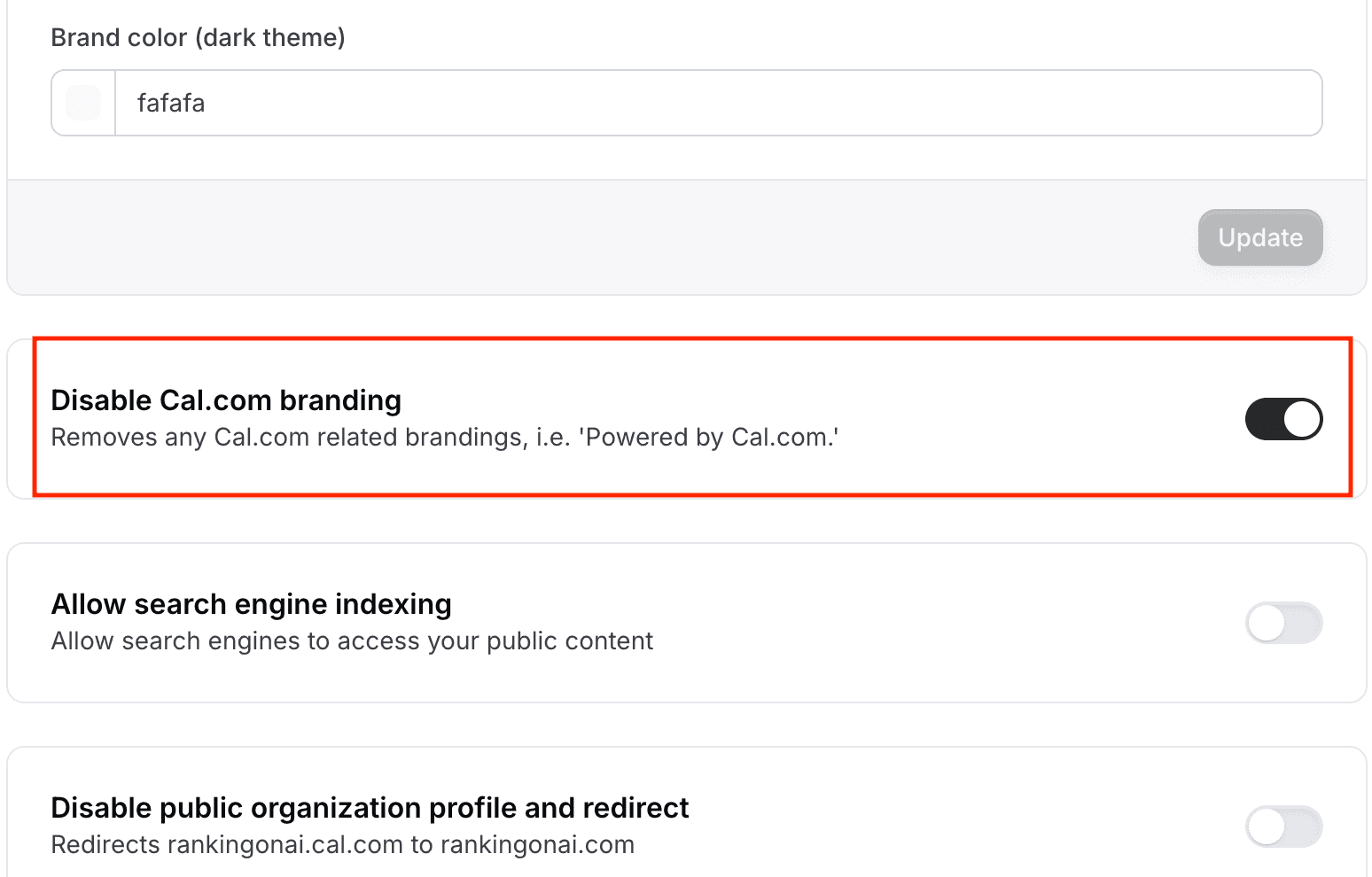
This means you can remove the Cal.com logo from public pages and create short, memorable booking links that feel native to your business.
Strong branding builds trust, reinforces credibility, and improves conversion rates, especially when scheduling is part of your marketing funnel. While simple on the surface, custom branding has a powerful impact on professionalism, brand recall, and the confidence with which clients engage with your business.
Upgrade to a Cal.com Team Plan Today
Cal.com’s free plan is among the most generous for scheduling, but the Team plan is where scheduling becomes a true growth engine. With advanced automation, smarter routing, flexible team scheduling, centralized controls, and full brand ownership, the Team plan removes friction from every step of the booking experience. Instead of managing scheduling manually, your team can focus on what matters most: serving customers, closing deals, and growing the business.
If scheduling plays a meaningful role in your operations, revenue, or client experience, upgrading to a Team plan is a natural next step.
FAQs on Upgrading to Cal.com’s Paid Plans
What’s the difference between Cal.com’s free plan and the Team plan?
Cal.com’s free plan includes over 90% of core scheduling features, making it ideal for individuals and small use cases. The Team plan unlocks advanced capabilities like automated workflows, collective events, multiple round-robin options, routing forms, managed event types, priority support, and removing Cal.com branding. These features are designed specifically for teams that rely on scheduling to drive growth, revenue, or client experience.
How do automated workflows help teams save time?
Automated workflows handle confirmations, reminders, cancellations, reschedules, and follow-ups automatically via email and SMS. This reduces manual work, minimizes no-shows, and ensures consistent communication across every booking.
Can Cal.com route bookings to the right team member automatically?
Yes. Routing forms collect information before a booking is confirmed and automatically direct prospects to the most appropriate team member. This improves conversion rates, reduces response times, and ensures clients speak with the right expert from the start.

Get started with Cal.com for free today!
Experience seamless scheduling and productivity with no hidden fees. Sign up in seconds and start simplifying your scheduling today, no credit card required!







