" height="18.016311920580208px" id="GKXyVanMq" stroke-dasharray="0" stroke-linecap="butt" stroke-linejoin="miter" stroke-miterlimit="10" stroke-width="0.5" stroke="rgb(0, 0, 0)" transform="translate(3 3)" width="18px"/></svg>)
"/><stop offset="1" stop-color="rgb(227, 224, 244)"/></linearGradient><linearGradient id="CBS1bzkxF-2031533640-linear-gradient" x1="0.49751243781094523" x2="0.5024875621890548" y1="0" y2="1"><stop offset="0" stop-color="rgb(255, 255, 255)"/><stop offset="1" stop-color="rgb(227, 224, 244)"/></linearGradient><linearGradient id="Jd7AK81w9-2031533640-linear-gradient" x1="0.49751243781094523" x2="0.5024875621890548" y1="0" y2="1"><stop offset="0" stop-color="rgb(255, 255, 255)"/><stop offset="1" stop-color="rgb(227, 224, 244)"/></linearGradient></defs><g d="M 0 16 L 0 0 L 16 0 L 16 16 Z M 9.167 5.167 C 9.167 4.891 8.943 4.667 8.667 4.667 C 8.391 4.667 8.167 4.891 8.167 5.167 C 8.167 6.784 7.809 7.834 7.155 8.488 C 6.501 9.143 5.451 9.5 3.833 9.5 C 3.557 9.5 3.333 9.724 3.333 10 C 3.333 10.276 3.557 10.5 3.833 10.5 C 5.451 10.5 6.501 10.857 7.155 11.512 C 7.809 12.166 8.167 13.216 8.167 14.833 C 8.167 15.109 8.391 15.333 8.667 15.333 C 8.943 15.333 9.167 15.109 9.167 14.833 C 9.167 13.216 9.524 12.166 10.178 11.512 C 10.832 10.857 11.883 10.5 13.5 10.5 C 13.776 10.5 14 10.276 14 10 C 14 9.724 13.776 9.5 13.5 9.5 C 11.883 9.5 10.832 9.143 10.178 8.488 C 9.524 7.834 9.167 6.784 9.167 5.167 Z M 4 3.667 C 4 3.483 3.851 3.333 3.667 3.333 C 3.483 3.333 3.333 3.483 3.333 3.667 C 3.333 4.32 3.189 4.715 2.952 4.952 C 2.715 5.189 2.32 5.333 1.667 5.333 C 1.483 5.333 1.333 5.483 1.333 5.667 C 1.333 5.851 1.483 6 1.667 6 C 2.32 6 2.715 6.145 2.952 6.382 C 3.189 6.618 3.333 7.013 3.333 7.667 C 3.333 7.851 3.483 8 3.667 8 C 3.851 8 4 7.851 4 7.667 C 4 7.013 4.145 6.618 4.382 6.382 C 4.618 6.145 5.013 6 5.667 6 C 5.851 6 6 5.851 6 5.667 C 6 5.483 5.851 5.333 5.667 5.333 C 5.013 5.333 4.618 5.189 4.382 4.952 C 4.145 4.715 4 4.32 4 3.667 Z M 7.333 1 C 7.333 0.816 7.184 0.667 7 0.667 C 6.816 0.667 6.667 0.816 6.667 1 C 6.667 1.422 6.573 1.65 6.445 1.778 C 6.317 1.906 6.089 2 5.667 2 C 5.483 2 5.333 2.149 5.333 2.333 C 5.333 2.517 5.483 2.667 5.667 2.667 C 6.089 2.667 6.317 2.761 6.445 2.889 C 6.573 3.016 6.667 3.244 6.667 3.667 C 6.667 3.851 6.816 4 7 4 C 7.184 4 7.333 3.851 7.333 3.667 C 7.333 3.244 7.427 3.016 7.555 2.889 C 7.683 2.761 7.911 2.667 8.333 2.667 C 8.517 2.667 8.667 2.517 8.667 2.333 C 8.667 2.149 8.517 2 8.333 2 C 7.911 2 7.683 1.906 7.555 1.778 C 7.427 1.65 7.333 1.422 7.333 1 Z" fill="transparent" height="16px" id="aoZYv33vR" width="16px"><path d="M 0 16 L 0 0 L 16 0 L 16 16 Z" fill="transparent" height="16px" id="Z2uGmhW9f" width="16px"/><g d="M 7.833 4.5 C 7.833 4.224 7.609 4 7.333 4 C 7.057 4 6.833 4.224 6.833 4.5 C 6.833 6.117 6.476 7.168 5.822 7.822 C 5.168 8.476 4.117 8.833 2.5 8.833 C 2.224 8.833 2 9.057 2 9.333 C 2 9.61 2.224 9.833 2.5 9.833 C 4.117 9.833 5.168 10.191 5.822 10.845 C 6.476 11.499 6.833 12.549 6.833 14.167 C 6.833 14.443 7.057 14.667 7.333 14.667 C 7.609 14.667 7.833 14.443 7.833 14.167 C 7.833 12.549 8.191 11.499 8.845 10.845 C 9.499 10.191 10.549 9.833 12.167 9.833 C 12.443 9.833 12.667 9.61 12.667 9.333 C 12.667 9.057 12.443 8.833 12.167 8.833 C 10.549 8.833 9.499 8.476 8.845 7.822 C 8.191 7.168 7.833 6.117 7.833 4.5 Z M 2.667 3 C 2.667 2.816 2.517 2.667 2.333 2.667 C 2.149 2.667 2 2.816 2 3 C 2 3.654 1.855 4.048 1.618 4.285 C 1.382 4.522 0.987 4.667 0.333 4.667 C 0.149 4.667 0 4.816 0 5 C 0 5.184 0.149 5.333 0.333 5.333 C 0.987 5.333 1.382 5.478 1.618 5.715 C 1.855 5.952 2 6.346 2 7 C 2 7.184 2.149 7.333 2.333 7.333 C 2.517 7.333 2.667 7.184 2.667 7 C 2.667 6.346 2.811 5.952 3.048 5.715 C 3.285 5.478 3.68 5.333 4.333 5.333 C 4.517 5.333 4.667 5.184 4.667 5 C 4.667 4.816 4.517 4.667 4.333 4.667 C 3.68 4.667 3.285 4.522 3.048 4.285 C 2.811 4.048 2.667 3.654 2.667 3 Z M 6 0.333 C 6 0.149 5.851 0 5.667 0 C 5.483 0 5.333 0.149 5.333 0.333 C 5.333 0.756 5.239 0.984 5.112 1.112 C 4.984 1.239 4.756 1.333 4.333 1.333 C 4.149 1.333 4 1.483 4 1.667 C 4 1.851 4.149 2 4.333 2 C 4.756 2 4.984 2.094 5.112 2.222 C 5.239 2.35 5.333 2.578 5.333 3 C 5.333 3.184 5.483 3.333 5.667 3.333 C 5.851 3.333 6 3.184 6 3 C 6 2.578 6.094 2.35 6.222 2.222 C 6.35 2.094 6.578 2 7 2 C 7.184 2 7.333 1.851 7.333 1.667 C 7.333 1.483 7.184 1.333 7 1.333 C 6.578 1.333 6.35 1.239 6.222 1.112 C 6.094 0.984 6 0.756 6 0.333 Z" fill="transparent" height="14.66671286102295px" id="ae6ccdFme" transform="translate(1.333 0.667)" width="12.66663px"><path d="M 5.833 0.5 C 5.833 0.224 5.609 0 5.333 0 C 5.057 0 4.833 0.224 4.833 0.5 C 4.833 2.117 4.476 3.168 3.822 3.822 C 3.168 4.476 2.117 4.833 0.5 4.833 C 0.224 4.833 0 5.057 0 5.333 C 0 5.61 0.224 5.833 0.5 5.833 C 2.117 5.833 3.168 6.191 3.822 6.845 C 4.476 7.499 4.833 8.549 4.833 10.167 C 4.833 10.443 5.057 10.667 5.333 10.667 C 5.609 10.667 5.833 10.443 5.833 10.167 C 5.833 8.549 6.191 7.499 6.845 6.845 C 7.499 6.191 8.549 5.833 10.167 5.833 C 10.443 5.833 10.667 5.61 10.667 5.333 C 10.667 5.057 10.443 4.833 10.167 4.833 C 8.549 4.833 7.499 4.476 6.845 3.822 C 6.191 3.168 5.833 2.117 5.833 0.5 Z" fill="url(%23t2lXByE48-2031533640-linear-gradient)" height="10.66671px" id="t2lXByE48" transform="translate(2 4)" width="10.66663px"/><path d="M 2.667 0.333 C 2.667 0.149 2.517 0 2.333 0 C 2.149 0 2 0.149 2 0.333 C 2 0.987 1.855 1.382 1.618 1.618 C 1.382 1.855 0.987 2 0.333 2 C 0.149 2 0 2.149 0 2.333 C 0 2.517 0.149 2.667 0.333 2.667 C 0.987 2.667 1.382 2.811 1.618 3.048 C 1.855 3.285 2 3.68 2 4.333 C 2 4.517 2.149 4.667 2.333 4.667 C 2.517 4.667 2.667 4.517 2.667 4.333 C 2.667 3.68 2.811 3.285 3.048 3.048 C 3.285 2.811 3.68 2.667 4.333 2.667 C 4.517 2.667 4.667 2.517 4.667 2.333 C 4.667 2.149 4.517 2 4.333 2 C 3.68 2 3.285 1.855 3.048 1.618 C 2.811 1.382 2.667 0.987 2.667 0.333 Z" fill="url(%23CBS1bzkxF-2031533640-linear-gradient)" height="4.66667px" id="CBS1bzkxF" transform="translate(0 2.667)" width="4.66667px"/><path d="M 2 0.333 C 2 0.149 1.851 0 1.667 0 C 1.483 0 1.333 0.149 1.333 0.333 C 1.333 0.756 1.239 0.984 1.112 1.112 C 0.984 1.239 0.756 1.333 0.333 1.333 C 0.149 1.333 0 1.483 0 1.667 C 0 1.851 0.149 2 0.333 2 C 0.756 2 0.984 2.094 1.112 2.222 C 1.239 2.35 1.333 2.578 1.333 3 C 1.333 3.184 1.483 3.333 1.667 3.333 C 1.851 3.333 2 3.184 2 3 C 2 2.578 2.094 2.35 2.222 2.222 C 2.35 2.094 2.578 2 3 2 C 3.184 2 3.333 1.851 3.333 1.667 C 3.333 1.483 3.184 1.333 3 1.333 C 2.578 1.333 2.35 1.239 2.222 1.112 C 2.094 0.984 2 0.756 2 0.333 Z" fill="url(%23Jd7AK81w9-2031533640-linear-gradient)" height="3.333333px" id="Jd7AK81w9" transform="translate(4 0)" width="3.3333399999999997px"/></g></g></svg>)
" height="24px" id="WCm44spAV" width="24px"/><path d="M 3.892 7.742 C 1.674 7.742 0 6.014 0 3.882 C 0 1.738 1.589 0 3.892 0 C 5.107 0 5.951 0.374 6.623 1.173 L 5.566 2.09 C 5.118 1.621 4.564 1.386 3.892 1.386 C 2.452 1.386 1.547 2.517 1.547 3.882 C 1.547 5.246 2.452 6.356 3.924 6.356 C 4.649 6.356 5.193 6.111 5.63 5.63 L 6.718 6.558 C 6.153 7.24 5.193 7.742 3.892 7.742 Z" fill="rgb(255, 255, 255)" height="7.741500000000002px" id="XEPpGD7l5" transform="translate(4 8.25)" width="6.717999999999989px"/><path d="M 2.74 7.922 C 1.215 7.922 0 6.632 0 5.032 C 0 3.433 1.215 2.122 2.74 2.122 C 3.7 2.122 4.201 2.516 4.5 3.113 L 4.5 2.239 L 5.928 2.239 L 5.928 7.784 L 4.531 7.784 L 4.531 6.877 C 4.233 7.507 3.731 7.922 2.74 7.922 Z M 1.439 5.023 C 1.439 5.865 2.057 6.622 2.975 6.622 C 3.924 6.622 4.531 5.897 4.531 5.033 C 4.531 4.169 3.924 3.423 2.975 3.423 C 2.057 3.423 1.439 4.159 1.439 5.022 Z M 6.784 7.784 L 6.784 0 L 8.224 0 L 8.224 7.784 L 6.784 7.784 Z" fill="rgb(255, 255, 255)" height="7.9224997406005855px" id="lGDJupIUR" transform="translate(10.5 8)" width="8.223500194549558px"/></g></svg>)
" width="18px"><path d="M 2 8 C 0.895 8 0 7.105 0 6 L 0 2 C 0 0.895 0.895 0 2 0 L 6 0 C 7.105 0 8 0.895 8 2 L 8 6 C 8 7.105 7.105 8 6 8 Z" fill="transparent" height="8px" id="ZrCrI93dV" stroke-dasharray="" stroke-linecap="round" stroke-linejoin="round" stroke-width="2" stroke="rgb(0, 0, 0)" width="8px"/><path d="M 0 0 L 0 4 C 0 5.105 0.895 6 2 6 L 6 6" fill="transparent" height="6px" id="emltWYAiE" stroke-dasharray="" stroke-linecap="round" stroke-linejoin="round" stroke-width="2" stroke="rgb(0, 0, 0)" transform="translate(4 8)" width="6px"/><path d="M 2 8 C 0.895 8 0 7.105 0 6 L 0 2 C 0 0.895 0.895 0 2 0 L 6 0 C 7.105 0 8 0.895 8 2 L 8 6 C 8 7.105 7.105 8 6 8 Z" fill="transparent" height="8px" id="WpBecYDfi" stroke-dasharray="" stroke-linecap="round" stroke-linejoin="round" stroke-width="2" stroke="rgb(0, 0, 0)" transform="translate(10 10)" width="8px"/></g></svg>)

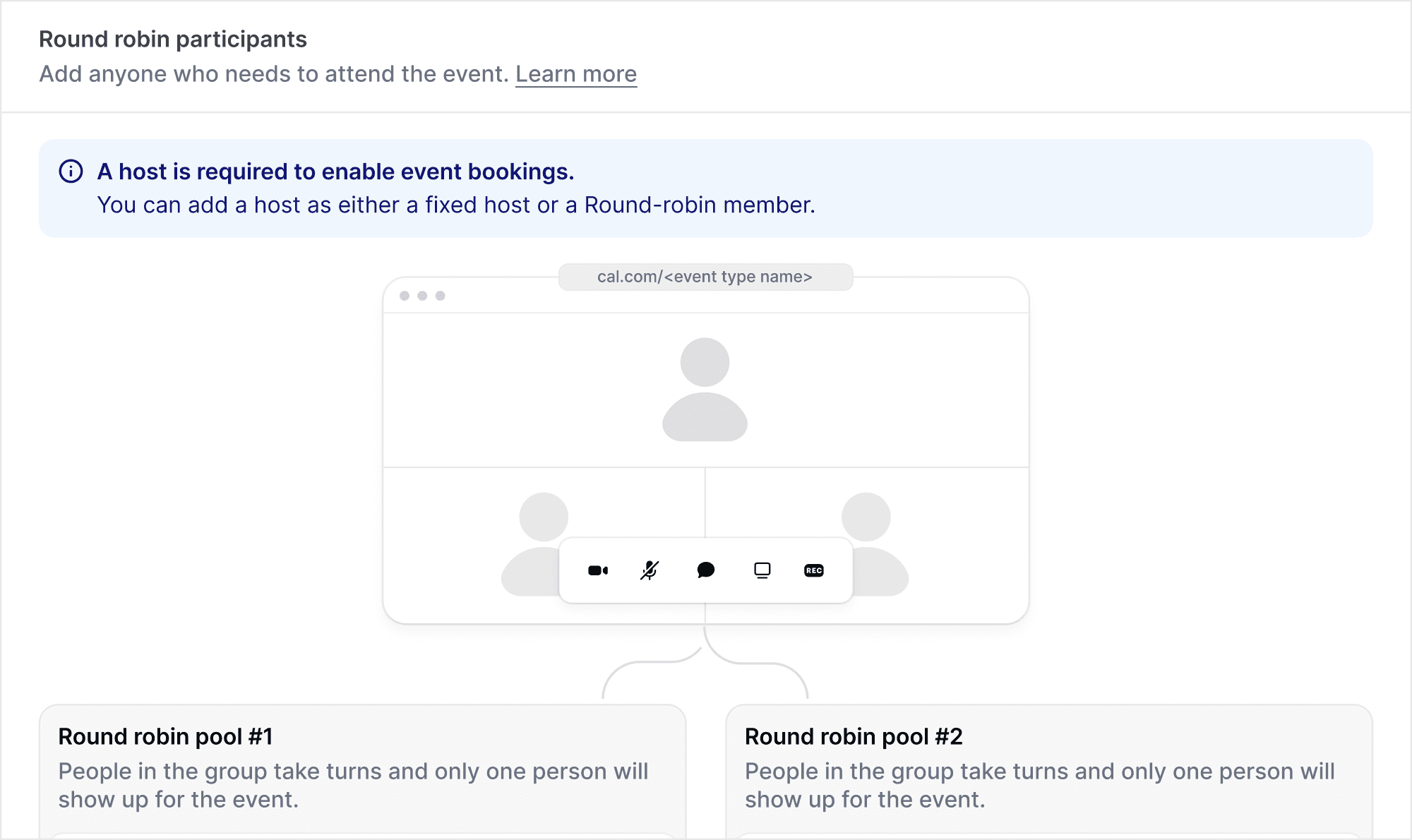
What is round robin scheduling? Learn how to use round robin for efficient scheduling for teams
Round robin scheduling is a method used to evenly distribute tasks or appointments among a team, ensuring fairness and efficiency. It’s commonly used in industries like sales, customer support, and healthcare to manage workloads and optimize team performance. In this guide, you’ll learn what round robin scheduling is, how it works, its benefits, and how to set it up for your team with tools like Cal.com.
What is round robin scheduling?
Round robin scheduling is a method of assigning tasks, appointments, or customers to individuals in a fixed, cyclic order. The goal is to ensure a fair and even distribution of work, eliminating bias and preventing any one team member from being overwhelmed or underutilized. This method works by looping through a list of people or resources and assigning each one a task in sequence, repeating the cycle once everyone has been assigned.
The core principle of round robin scheduling is its simplicity and fairness. For example, in a sales team, round robin might distribute incoming leads to each salesperson in turn, ensuring each has an equal opportunity to engage with potential clients. In customer support, it can be used to evenly assign tickets to agents, helping to balance workloads and response times.
How does round robin scheduling work?
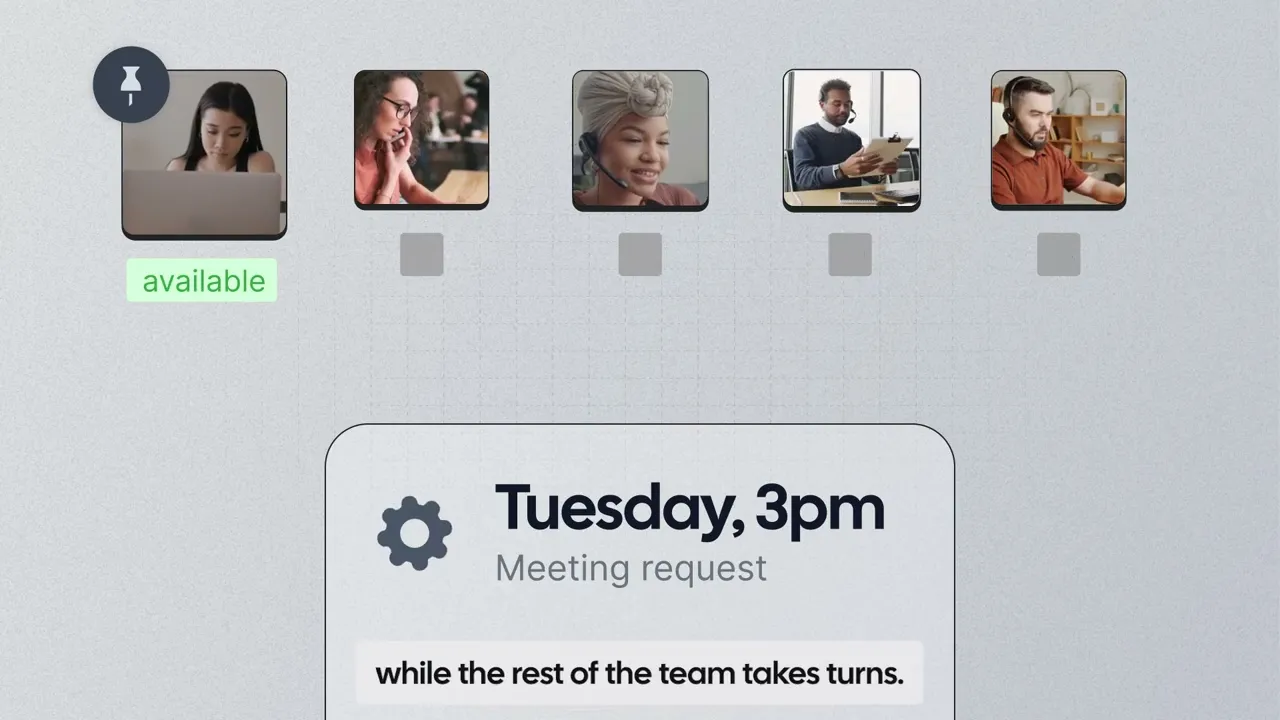
Round robin scheduling works by assigning meeting hosts or available team members in a rotating order. Instead of one person handling every booking, each new appointment is automatically routed to the next available teammate in the cycle.
For example, if three team members share a booking link, the first meeting might go to Alex, the next to Sam, then Jordan, and then the rotation repeats. This ensures appointments are distributed fairly across the team while keeping everyone’s calendars balanced.
In appointment scheduling, round robin also helps maximize booking availability. Because multiple hosts can be assigned to the same event type, clients see more open time slots to choose from, increasing the likelihood that a meeting gets scheduled quickly.
Most modern scheduling tools automate this process, making it easy for teams to route bookings efficiently without manual coordination.
The main benefits of round robin scheduling for teams
Round robin scheduling offers several key advantages for teams that handle appointments and customer-facing meetings:
Fair distribution of bookings: Meetings are automatically rotated among hosts, preventing one team member from receiving all appointments while others remain underbooked.
Faster scheduling for clients: Because multiple calendars are included, round robin increases the number of available time slots, making it easier for clients to book quickly.
Reduced scheduling overhead: Automated host assignment removes the need for managers or coordinators to manually assign meetings.
Balanced team capacity: Round robin helps teams avoid burnout by spreading appointments evenly, especially in high-volume environments like sales or support.
Consistent customer experience: Clients can always book with the next available team member, improving responsiveness and reducing wait times.
Overall, round robin scheduling helps teams stay organized, respond faster, and manage appointments more efficiently.
Use cases for round robin scheduling
Round robin scheduling is widely used across various industries to improve efficiency, balance workloads, and enhance accessibility. Here are some common use cases:
Sales teams: Round robin scheduling can be used to distribute incoming leads to salespeople, ensuring each representative has an equal opportunity to engage with potential clients.
Customer support: In customer service teams, round robin assigns support tickets to agents, ensuring even distribution of workload and reducing response time.
Appointment scheduling: For businesses offering services, round robin can be used to assign available time slots to customers, maximizing booking opportunities and providing clients with a broader range of options.
Healthcare: In healthcare settings, round robin helps evenly distribute patients to doctors or nurses, ensuring balanced caseloads and reducing wait times.
Event scheduling: For scheduling meetings or events with multiple participants, round robin can ensure that all team members have equal availability, making it easier for clients or colleagues to choose a time that works for everyone.
Round robin scheduling is a flexible tool that can be adapted to many different needs, from sales to service-based businesses, to optimize workflow and improve customer experience.
How to set up round robin scheduling in Cal.com
Setting up round robin scheduling in Cal.com is easy and offers flexibility to suit various team needs. With Cal.com, you can choose between load balancing and maximize availability options, tailor team member priorities, and utilize advanced features like weighted distribution and round robin groups. Here’s how to get started:
1. Log into Cal.com
First, create a Cal.com account or log into your Cal.com account.
2. Create a new event type
On the event types dashboard, click on '+ New' to create a new event type.
3. Select a team and event type
In the dropdown, select one of your (sub)teams, then choose 'round robin' as the event type. Fill out the basic details of your event.
4. Set up round robin team members
Choose the team members that should be a part of the round robin event. You can:
Pick each team member individually.
Add everyone in a specific (sub)team, including future members.
Add everyone with a specific attribute associated with them.
5. Continue with the additional features of round robin scheduling in Cal.com
Additional round robin scheduling features in Cal.com
Once the team members are selected, the basic setup for your round robin event type is done. However, you have optional additional steps to further customize the round robin event.
1. Choose your round robin type
Cal.com offers two primary round robin scheduling modes:
Load balancing: Load balancing keeps bookings evenly distributed by monitoring how many meetings each host has received. If someone gets too far ahead, their availability is temporarily removed so others can catch up. This helps prevent uneven workloads without setting manual limits.
Maximize availability (mostly used): With this setting, round robin rotates available time slots between team members, giving potential bookers more options and increasing the chances of finding an open slot.

2. Set team member priorities
Adjust the priority of each team member on a scale of lowest, low, medium (default), high, or highest. This ensures that certain team members are prioritized for tasks or appointments, giving them more opportunities to be assigned.
3. Enable weighted distribution
For further customization, apply weighted distribution, which allocates tasks based on percentage allocations. This is helpful when you want certain team members to handle more appointments or tasks. Set the percentage for each team member to control their workload.
4. Set up fixed hosts
Designate specific team members as fixed hosts. These team members will always be assigned to the event, regardless of the round robin cycle, alongside one of the additional team members. This is useful for ensuring key individuals are always present in the event.

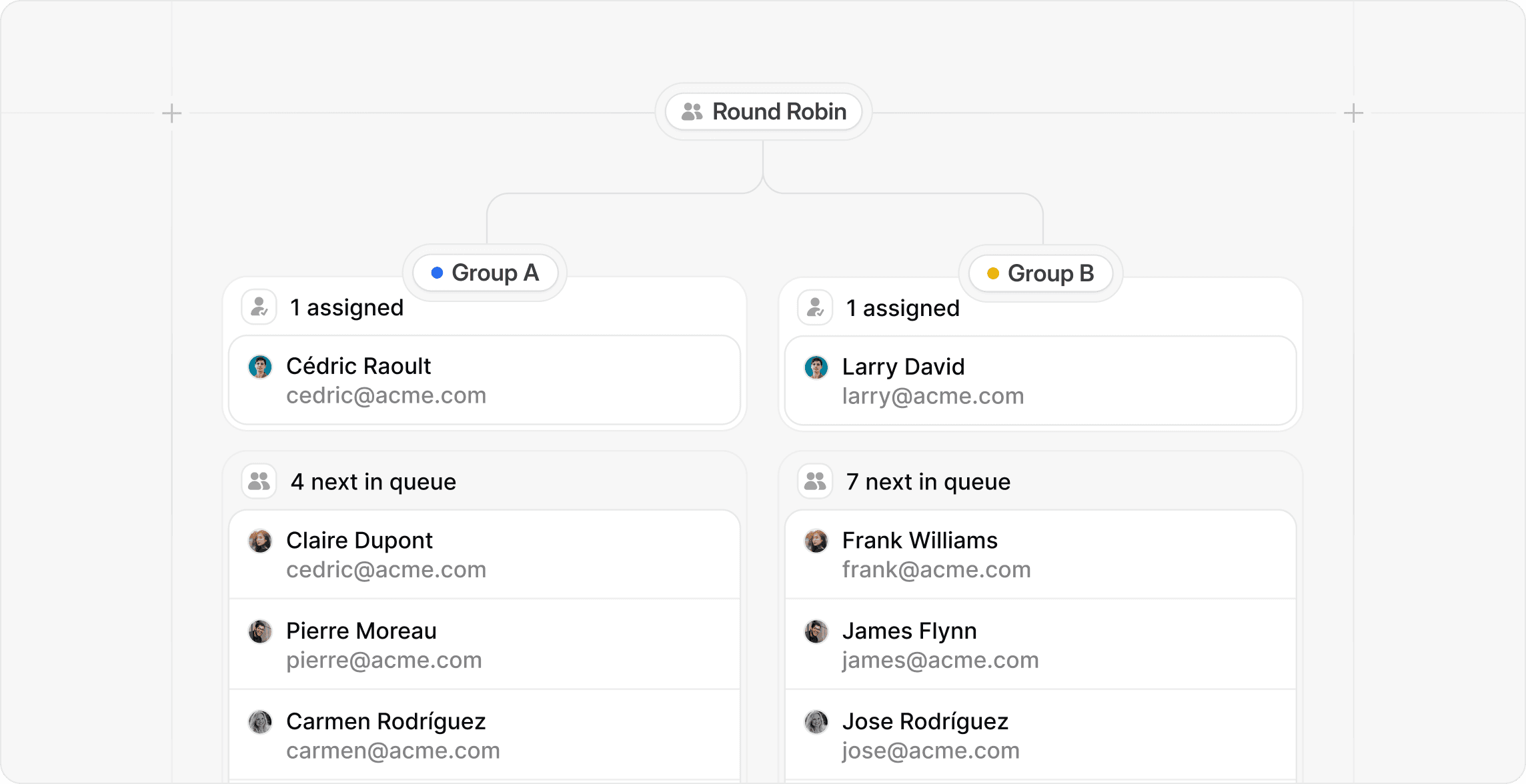
5. Create round robin groups
For more complex scheduling needs, use round robin groups. This feature allows you to organize team members into separate groups, like departments or roles. For example, a sales representative and a solutions engineer could be in different groups but both join the same event. This ensures key roles are represented in the event, enhancing collaboration.
6. Set additional details for your event type
Complete the event setup with additional details, such as:
Title and description
Time settings
Conferencing apps (like Zoom, Google Meet, etc.)
Booking questions
Availability settings
Limits (for maximum attendees or session duration)
Any other relevant features based on your needs
Round robin scheduling vs. other scheduling methods
In Cal.com, we offer several scheduling methods to cater to different team and individual needs. Here's a brief comparison between round robin scheduling and other available methods:
1. Personal events
Personal events are designed for individual scheduling, where a user manages their own availability. This method allows users to set their own time slots for meetings, without involving other team members. It's ideal for one-on-one meetings or appointments where the focus is solely on the availability of the individual.
Key difference: Personal events are not team-based. The focus is on a single person managing their availability, unlike round robin, which evenly distributes tasks or time slots among multiple team members.
2. Collective events
Collective events allow a group of people to participate in a meeting or event, but the key difference from round robin is that they don't involve task or time slot distribution. Instead, all members in a group share the same availability, and a meeting is scheduled when all participants are free. It's useful for team-wide meetings where everyone needs to be present at the same time.
Key difference: Collective events focus on finding a common time for a group, while round robin evenly assigns tasks or time slots across individuals.
3. Managed events
Managed events are personal event types that are controlled by a team admin. Instead of each user managing their own event settings, a team admin creates and manages the event on their behalf. This ensures consistency across the team while still allowing meetings to be booked with individual team members.
Key difference: Managed events are still tied to one person’s availability, but the setup and configuration are handled centrally by a team admin — unlike round robin, which distributes bookings across multiple hosts.
4. Dynamic group links
Dynamic group links allow you to create a shared booking link by combining multiple usernames in the URL, for example: cal.com/carina+cedric+peer. This creates a single scheduling page that includes all listed team members. Depending on the event setup, meetings can be scheduled with one or multiple people from that group.
Key difference: Dynamic group links are created directly from usernames in the URL, while round robin is configured as a team event type that automatically rotates bookings between assigned hosts.
Conclusion: Why round robin scheduling is essential for efficient team scheduling
Round robin scheduling is an essential tool for teams looking to streamline their scheduling process while maintaining fairness and efficiency. By evenly distributing tasks or appointments, round robin ensures no team member is overloaded, helping to prevent burnout and improve overall productivity. Whether you're looking to maximize availability for clients or balance the workload across team members, round robin offers a simple yet powerful solution.
Its automated nature reduces manual intervention, saving time and minimizing errors in task assignment. Furthermore, with features like team member prioritization, weighted distribution, and dynamic group links, round robin scheduling can be customized to fit the unique needs of any team or business.
Ready to streamline your team’s scheduling and boost efficiency? Start using round robin scheduling in Cal.com today! Whether you’re balancing workloads or maximizing availability, our easy-to-use tools make it simple to set up and customize round robin events for your team. Sign up now and experience the benefits of automated, fair, and efficient scheduling for yourself.

Get started with Cal.com for free today!
Experience seamless scheduling and productivity with no hidden fees. Sign up in seconds and start simplifying your scheduling today, no credit card required!







