" height="18.016311920580208px" id="GKXyVanMq" stroke-dasharray="0" stroke-linecap="butt" stroke-linejoin="miter" stroke-miterlimit="10" stroke-width="0.5" stroke="rgb(0, 0, 0)" transform="translate(3 3)" width="18px"/></svg>)
"/><stop offset="1" stop-color="rgb(227, 224, 244)"/></linearGradient><linearGradient id="CBS1bzkxF-2031533640-linear-gradient" x1="0.49751243781094523" x2="0.5024875621890548" y1="0" y2="1"><stop offset="0" stop-color="rgb(255, 255, 255)"/><stop offset="1" stop-color="rgb(227, 224, 244)"/></linearGradient><linearGradient id="Jd7AK81w9-2031533640-linear-gradient" x1="0.49751243781094523" x2="0.5024875621890548" y1="0" y2="1"><stop offset="0" stop-color="rgb(255, 255, 255)"/><stop offset="1" stop-color="rgb(227, 224, 244)"/></linearGradient></defs><g d="M 0 16 L 0 0 L 16 0 L 16 16 Z M 9.167 5.167 C 9.167 4.891 8.943 4.667 8.667 4.667 C 8.391 4.667 8.167 4.891 8.167 5.167 C 8.167 6.784 7.809 7.834 7.155 8.488 C 6.501 9.143 5.451 9.5 3.833 9.5 C 3.557 9.5 3.333 9.724 3.333 10 C 3.333 10.276 3.557 10.5 3.833 10.5 C 5.451 10.5 6.501 10.857 7.155 11.512 C 7.809 12.166 8.167 13.216 8.167 14.833 C 8.167 15.109 8.391 15.333 8.667 15.333 C 8.943 15.333 9.167 15.109 9.167 14.833 C 9.167 13.216 9.524 12.166 10.178 11.512 C 10.832 10.857 11.883 10.5 13.5 10.5 C 13.776 10.5 14 10.276 14 10 C 14 9.724 13.776 9.5 13.5 9.5 C 11.883 9.5 10.832 9.143 10.178 8.488 C 9.524 7.834 9.167 6.784 9.167 5.167 Z M 4 3.667 C 4 3.483 3.851 3.333 3.667 3.333 C 3.483 3.333 3.333 3.483 3.333 3.667 C 3.333 4.32 3.189 4.715 2.952 4.952 C 2.715 5.189 2.32 5.333 1.667 5.333 C 1.483 5.333 1.333 5.483 1.333 5.667 C 1.333 5.851 1.483 6 1.667 6 C 2.32 6 2.715 6.145 2.952 6.382 C 3.189 6.618 3.333 7.013 3.333 7.667 C 3.333 7.851 3.483 8 3.667 8 C 3.851 8 4 7.851 4 7.667 C 4 7.013 4.145 6.618 4.382 6.382 C 4.618 6.145 5.013 6 5.667 6 C 5.851 6 6 5.851 6 5.667 C 6 5.483 5.851 5.333 5.667 5.333 C 5.013 5.333 4.618 5.189 4.382 4.952 C 4.145 4.715 4 4.32 4 3.667 Z M 7.333 1 C 7.333 0.816 7.184 0.667 7 0.667 C 6.816 0.667 6.667 0.816 6.667 1 C 6.667 1.422 6.573 1.65 6.445 1.778 C 6.317 1.906 6.089 2 5.667 2 C 5.483 2 5.333 2.149 5.333 2.333 C 5.333 2.517 5.483 2.667 5.667 2.667 C 6.089 2.667 6.317 2.761 6.445 2.889 C 6.573 3.016 6.667 3.244 6.667 3.667 C 6.667 3.851 6.816 4 7 4 C 7.184 4 7.333 3.851 7.333 3.667 C 7.333 3.244 7.427 3.016 7.555 2.889 C 7.683 2.761 7.911 2.667 8.333 2.667 C 8.517 2.667 8.667 2.517 8.667 2.333 C 8.667 2.149 8.517 2 8.333 2 C 7.911 2 7.683 1.906 7.555 1.778 C 7.427 1.65 7.333 1.422 7.333 1 Z" fill="transparent" height="16px" id="aoZYv33vR" width="16px"><path d="M 0 16 L 0 0 L 16 0 L 16 16 Z" fill="transparent" height="16px" id="Z2uGmhW9f" width="16px"/><g d="M 7.833 4.5 C 7.833 4.224 7.609 4 7.333 4 C 7.057 4 6.833 4.224 6.833 4.5 C 6.833 6.117 6.476 7.168 5.822 7.822 C 5.168 8.476 4.117 8.833 2.5 8.833 C 2.224 8.833 2 9.057 2 9.333 C 2 9.61 2.224 9.833 2.5 9.833 C 4.117 9.833 5.168 10.191 5.822 10.845 C 6.476 11.499 6.833 12.549 6.833 14.167 C 6.833 14.443 7.057 14.667 7.333 14.667 C 7.609 14.667 7.833 14.443 7.833 14.167 C 7.833 12.549 8.191 11.499 8.845 10.845 C 9.499 10.191 10.549 9.833 12.167 9.833 C 12.443 9.833 12.667 9.61 12.667 9.333 C 12.667 9.057 12.443 8.833 12.167 8.833 C 10.549 8.833 9.499 8.476 8.845 7.822 C 8.191 7.168 7.833 6.117 7.833 4.5 Z M 2.667 3 C 2.667 2.816 2.517 2.667 2.333 2.667 C 2.149 2.667 2 2.816 2 3 C 2 3.654 1.855 4.048 1.618 4.285 C 1.382 4.522 0.987 4.667 0.333 4.667 C 0.149 4.667 0 4.816 0 5 C 0 5.184 0.149 5.333 0.333 5.333 C 0.987 5.333 1.382 5.478 1.618 5.715 C 1.855 5.952 2 6.346 2 7 C 2 7.184 2.149 7.333 2.333 7.333 C 2.517 7.333 2.667 7.184 2.667 7 C 2.667 6.346 2.811 5.952 3.048 5.715 C 3.285 5.478 3.68 5.333 4.333 5.333 C 4.517 5.333 4.667 5.184 4.667 5 C 4.667 4.816 4.517 4.667 4.333 4.667 C 3.68 4.667 3.285 4.522 3.048 4.285 C 2.811 4.048 2.667 3.654 2.667 3 Z M 6 0.333 C 6 0.149 5.851 0 5.667 0 C 5.483 0 5.333 0.149 5.333 0.333 C 5.333 0.756 5.239 0.984 5.112 1.112 C 4.984 1.239 4.756 1.333 4.333 1.333 C 4.149 1.333 4 1.483 4 1.667 C 4 1.851 4.149 2 4.333 2 C 4.756 2 4.984 2.094 5.112 2.222 C 5.239 2.35 5.333 2.578 5.333 3 C 5.333 3.184 5.483 3.333 5.667 3.333 C 5.851 3.333 6 3.184 6 3 C 6 2.578 6.094 2.35 6.222 2.222 C 6.35 2.094 6.578 2 7 2 C 7.184 2 7.333 1.851 7.333 1.667 C 7.333 1.483 7.184 1.333 7 1.333 C 6.578 1.333 6.35 1.239 6.222 1.112 C 6.094 0.984 6 0.756 6 0.333 Z" fill="transparent" height="14.66671286102295px" id="ae6ccdFme" transform="translate(1.333 0.667)" width="12.66663px"><path d="M 5.833 0.5 C 5.833 0.224 5.609 0 5.333 0 C 5.057 0 4.833 0.224 4.833 0.5 C 4.833 2.117 4.476 3.168 3.822 3.822 C 3.168 4.476 2.117 4.833 0.5 4.833 C 0.224 4.833 0 5.057 0 5.333 C 0 5.61 0.224 5.833 0.5 5.833 C 2.117 5.833 3.168 6.191 3.822 6.845 C 4.476 7.499 4.833 8.549 4.833 10.167 C 4.833 10.443 5.057 10.667 5.333 10.667 C 5.609 10.667 5.833 10.443 5.833 10.167 C 5.833 8.549 6.191 7.499 6.845 6.845 C 7.499 6.191 8.549 5.833 10.167 5.833 C 10.443 5.833 10.667 5.61 10.667 5.333 C 10.667 5.057 10.443 4.833 10.167 4.833 C 8.549 4.833 7.499 4.476 6.845 3.822 C 6.191 3.168 5.833 2.117 5.833 0.5 Z" fill="url(%23t2lXByE48-2031533640-linear-gradient)" height="10.66671px" id="t2lXByE48" transform="translate(2 4)" width="10.66663px"/><path d="M 2.667 0.333 C 2.667 0.149 2.517 0 2.333 0 C 2.149 0 2 0.149 2 0.333 C 2 0.987 1.855 1.382 1.618 1.618 C 1.382 1.855 0.987 2 0.333 2 C 0.149 2 0 2.149 0 2.333 C 0 2.517 0.149 2.667 0.333 2.667 C 0.987 2.667 1.382 2.811 1.618 3.048 C 1.855 3.285 2 3.68 2 4.333 C 2 4.517 2.149 4.667 2.333 4.667 C 2.517 4.667 2.667 4.517 2.667 4.333 C 2.667 3.68 2.811 3.285 3.048 3.048 C 3.285 2.811 3.68 2.667 4.333 2.667 C 4.517 2.667 4.667 2.517 4.667 2.333 C 4.667 2.149 4.517 2 4.333 2 C 3.68 2 3.285 1.855 3.048 1.618 C 2.811 1.382 2.667 0.987 2.667 0.333 Z" fill="url(%23CBS1bzkxF-2031533640-linear-gradient)" height="4.66667px" id="CBS1bzkxF" transform="translate(0 2.667)" width="4.66667px"/><path d="M 2 0.333 C 2 0.149 1.851 0 1.667 0 C 1.483 0 1.333 0.149 1.333 0.333 C 1.333 0.756 1.239 0.984 1.112 1.112 C 0.984 1.239 0.756 1.333 0.333 1.333 C 0.149 1.333 0 1.483 0 1.667 C 0 1.851 0.149 2 0.333 2 C 0.756 2 0.984 2.094 1.112 2.222 C 1.239 2.35 1.333 2.578 1.333 3 C 1.333 3.184 1.483 3.333 1.667 3.333 C 1.851 3.333 2 3.184 2 3 C 2 2.578 2.094 2.35 2.222 2.222 C 2.35 2.094 2.578 2 3 2 C 3.184 2 3.333 1.851 3.333 1.667 C 3.333 1.483 3.184 1.333 3 1.333 C 2.578 1.333 2.35 1.239 2.222 1.112 C 2.094 0.984 2 0.756 2 0.333 Z" fill="url(%23Jd7AK81w9-2031533640-linear-gradient)" height="3.333333px" id="Jd7AK81w9" transform="translate(4 0)" width="3.3333399999999997px"/></g></g></svg>)
" height="24px" id="WCm44spAV" width="24px"/><path d="M 3.892 7.742 C 1.674 7.742 0 6.014 0 3.882 C 0 1.738 1.589 0 3.892 0 C 5.107 0 5.951 0.374 6.623 1.173 L 5.566 2.09 C 5.118 1.621 4.564 1.386 3.892 1.386 C 2.452 1.386 1.547 2.517 1.547 3.882 C 1.547 5.246 2.452 6.356 3.924 6.356 C 4.649 6.356 5.193 6.111 5.63 5.63 L 6.718 6.558 C 6.153 7.24 5.193 7.742 3.892 7.742 Z" fill="rgb(255, 255, 255)" height="7.741500000000002px" id="XEPpGD7l5" transform="translate(4 8.25)" width="6.717999999999989px"/><path d="M 2.74 7.922 C 1.215 7.922 0 6.632 0 5.032 C 0 3.433 1.215 2.122 2.74 2.122 C 3.7 2.122 4.201 2.516 4.5 3.113 L 4.5 2.239 L 5.928 2.239 L 5.928 7.784 L 4.531 7.784 L 4.531 6.877 C 4.233 7.507 3.731 7.922 2.74 7.922 Z M 1.439 5.023 C 1.439 5.865 2.057 6.622 2.975 6.622 C 3.924 6.622 4.531 5.897 4.531 5.033 C 4.531 4.169 3.924 3.423 2.975 3.423 C 2.057 3.423 1.439 4.159 1.439 5.022 Z M 6.784 7.784 L 6.784 0 L 8.224 0 L 8.224 7.784 L 6.784 7.784 Z" fill="rgb(255, 255, 255)" height="7.9224997406005855px" id="lGDJupIUR" transform="translate(10.5 8)" width="8.223500194549558px"/></g></svg>)
" width="18px"><path d="M 2 8 C 0.895 8 0 7.105 0 6 L 0 2 C 0 0.895 0.895 0 2 0 L 6 0 C 7.105 0 8 0.895 8 2 L 8 6 C 8 7.105 7.105 8 6 8 Z" fill="transparent" height="8px" id="ZrCrI93dV" stroke-dasharray="" stroke-linecap="round" stroke-linejoin="round" stroke-width="2" stroke="rgb(0, 0, 0)" width="8px"/><path d="M 0 0 L 0 4 C 0 5.105 0.895 6 2 6 L 6 6" fill="transparent" height="6px" id="emltWYAiE" stroke-dasharray="" stroke-linecap="round" stroke-linejoin="round" stroke-width="2" stroke="rgb(0, 0, 0)" transform="translate(4 8)" width="6px"/><path d="M 2 8 C 0.895 8 0 7.105 0 6 L 0 2 C 0 0.895 0.895 0 2 0 L 6 0 C 7.105 0 8 0.895 8 2 L 8 6 C 8 7.105 7.105 8 6 8 Z" fill="transparent" height="8px" id="WpBecYDfi" stroke-dasharray="" stroke-linecap="round" stroke-linejoin="round" stroke-width="2" stroke="rgb(0, 0, 0)" transform="translate(10 10)" width="8px"/></g></svg>)


By

Max Tavepholjalern
On-Premise Scheduling Software for Enterprises and How to Run It
Somewhere in your enterprise, your security team is asking where your meeting data lives. If the honest answer is "on our provider's servers, somewhere", this guide is for you.
On-premise scheduling software keeps bookings, availability, and attendee details on infrastructure you control. It's the right call for some enterprises and an expensive hobby for others.
TL;DR
What is on-premise scheduling software? On-premise scheduling software is a booking and calendar scheduling system that your organization installs and runs on its own servers, in its own data center, instead of using a provider's cloud. Your team controls where scheduling data is stored, who can reach it, and when the software is updated.
Can you run Cal.com on-premise? Yes. On-premise Cal.com is part of our Enterprise offering, and access is by invitation through our sales team. Our team works with you on the deployment. If you'd rather not run servers at all, managed Cal.com offers configurable data residency options and a dedicated database on Enterprise.
Planning a scheduling rollout over email is how you end up with 47 replies and no meeting. Book a call with us to walk through on-premise and managed Enterprise with the people who deploy it.
Key takeaways
On-premise scheduling puts your team in charge of the servers, patches, backups, and uptime that a cloud provider would otherwise handle.
Enterprises choose it for data residency, regulated workloads, and tight links to internal systems such as an on-premises Exchange server.
The cost doesn't disappear. Subscription fees turn into hardware, engineering, and security work.
Whichever way you deploy, the scheduler still needs SSO, SCIM, role-based access, audit logs, and routing.
Cal.com offers three paths: managed Cal.com, Cal.com Enterprise on-premise, and Cal.diy for personal, non-production use.
What on-premise scheduling actually means
On-premise means the software runs on hardware your organization owns or leases, inside a network you control. The scheduling application, its database, and every booking record sit behind your firewall, not in a provider's multi-tenant cloud.
People use a handful of terms for this, and they don't all mean the same thing. The difference matters when a security reviewer asks you to pick one.
Deployment model | Where it runs | Who runs it |
|---|---|---|
On-premise | Your own data center or server room | Your IT team, end to end |
Self-hosted (private cloud) | Cloud infrastructure in your own account | Your team runs the software, the cloud provider runs the hardware |
Managed, single-tenant | The provider's infrastructure, with a database dedicated to you | The provider |
Managed, multi-tenant (SaaS) | The provider's shared infrastructure | The provider |
Self-hosted and on-premise overlap a lot. Every on-premise system is self-hosted, but not every self-hosted system is on-premise.
Why enterprises still keep scheduling in-house
Scheduling data looks harmless until you read it closely. A booking record holds names, email addresses, phone numbers, and answers to intake questions. In healthcare, legal, and financial services, those answers can be sensitive on their own.
Most enterprises that go on-premise do it for one of four reasons.
The data has to stay in a specific place. A regulator, a public-sector contract, or an internal policy says where personal data may live, and "our provider's region" isn't an acceptable answer.
The workload is regulated. Patient intake, legal consultations, and financial advice create records that fall under HIPAA, GDPR, or industry rules.
Scheduling has to talk to systems that never left the building. An on-premises Exchange server, an internal HR database, or a CRM that runs in your own data center.
The security team wants to own the response. If something goes wrong, they want the logs, the servers, and the incident timeline in their own hands.
The stakes are real. IBM's 2026 Cost of a Data Breach report puts the global average cost of a breach at $4.99 million, up 12% on the year before. No security team wants the booking widget to be the line item that explains it.
One honest caveat. On-premise gives you control, and control isn't the same as security. A server that misses a patch is less safe than a well-run cloud service, so the real question is whether your team can run it well.
The bill nobody puts in the RFP
On-premise scheduling can cut what you spend on software subscriptions. It rarely cuts what you spend overall, because the costs move into budgets that don't say "scheduling" on them.
Cost | What it covers | Who usually pays |
|---|---|---|
Hardware and hosting | Servers, storage, networking, power, and spare capacity for peak weeks | IT infrastructure |
Engineering time | Installation, configuration, upgrades, and integration work | Platform or IT engineering |
Security | Patching, monitoring, vulnerability scans, and audits | Security |
Backups and recovery | Backup storage, restore tests, and a recovery plan someone has actually rehearsed | IT operations |
Licenses and support | The software license and the support contract with the company behind it | Procurement |
Downtime | Missed sales calls, interviews, and patient appointments while bookings are offline | The whole business |
The cost that surprises teams most is upgrades, and it hides inside engineering time. Software doesn't age like wine. It ages like the milk someone left in the server room, and every security release means a maintenance window on your calendar, not the provider's.
Before you commit, model the cost over three to five years. Include your team's hours, and compare the result with a managed plan at the same number of seats.
Cloud vs on-premise scheduling, side by side
Neither model is better in general. Each one hands a different set of jobs to a different team.
Factor | On-premise scheduling | Cloud scheduling |
|---|---|---|
Where data lives | Inside your network | In the provider's chosen regions, sometimes configurable |
Setup time | Weeks to months, including hardware and security review | Days |
Security work | Your team patches, monitors, and audits | The provider does, and you check their reports |
Updates | You schedule and test every release | New features and fixes arrive automatically |
Integration with internal systems | Direct, inside the firewall | Through APIs, connectors, and allow-listed access |
Uptime | Your team owns it | Often backed by the provider's SLA |
Cost pattern | Higher upfront, then infrastructure and staff | Predictable subscription |
A useful test: if your security team can name the person who patches the server at 2 a.m., on-premise is a real option. If everyone points at someone else, a managed platform with data residency controls is the safer choice.
Want the longer version, including migration, performance, and hybrid setups? Our on-premise vs cloud scheduling comparison goes factor by factor.
Seven questions to ask any enterprise scheduler
Wherever the software runs, the scheduler has to pass the same enterprise review. These are the questions your IT and security teams will ask, the answer you want to hear, and how Cal.com answers each one.
Ask this | A good answer | A warning sign | How Cal.com answers it |
|---|---|---|---|
Can people sign in with our identity provider? | SAML SSO, plus SCIM so accounts are created and removed automatically | Separate passwords for the booking tool | SAML SSO and SCIM, with setup guides for Okta and Microsoft Entra ID |
Can we control who sees and changes what? | Default roles and custom roles with specific permissions | Everyone is either an admin or a user | Owner, Admin, and Member roles, plus custom roles |
Can we see who changed a booking, and when? | Audit logs for bookings, routing, and security events | "We can check the database for you" | Audit logs on every organization plan, turned on by default |
Can it route a lead to the right person? | Routing forms, round robin, and matching on attributes such as region or product | One shared link for the whole team | Routing forms that match answers to team member attributes, then pick a host by round robin |
Does it connect to our calendars, including the old ones? | Google, Outlook, Exchange, CalDAV, and an admin-managed connection for everyone | Each employee connects their own calendar, or doesn't | Google, Outlook, Apple, Exchange, and CalDAV (Beta), plus Delegation Credential for Google Workspace and Microsoft 365 |
Can we prove compliance to an auditor? | SOC 2 Type II, ISO 27001, a HIPAA BAA where needed, and documents you can download | A trust page with logos and no reports | SOC 2 Type II and ISO 27001, a yearly external penetration test, and a signed HIPAA BAA on Enterprise |
What happens when we outgrow it? | An API, webhooks, and a team that helps with migration | Exporting CSVs on a Friday night | An API, webhooks, and a migration team for teams of 30 or more |
Three of these rows are easier to judge when you see them
Role-based access control
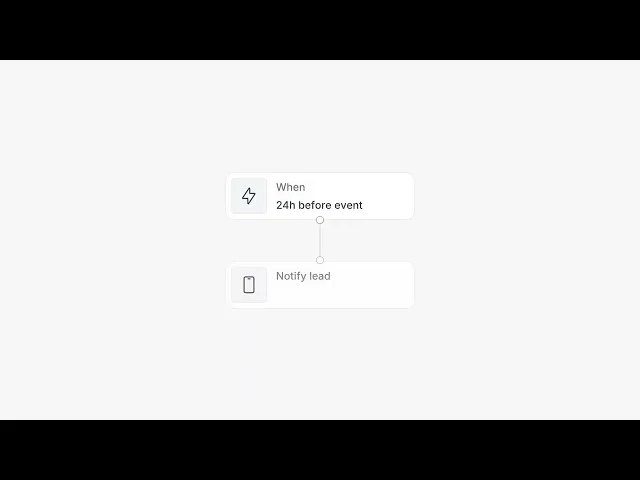
Every Cal.com organization starts with Owner, Admin, and Member roles. Custom roles narrow what each person can see and change, which matters when one team handles client data and the team next to it doesn't. Watch the 21-second preview below.

Cal.com's Roles and permissions
Setting this up for the first time? Our role-based access control guide shows how to create roles and apply them to the whole organization or to individual sub-teams.
Round robin and lead routing
Manifest Law uses routing, booking limits, and role-based permissions to schedule client intake across its entire attorney base, without overloading anyone. Each routing rule checks the booker's answers against team member attributes and falls back to the wider team when nobody matches.

A routing rule in Cal.com that matches the booker's "Service" answer to a team member attribute, with a fallback when nobody matches
The rotation itself is a choice too: equal distribution or availability-based. Our guide to round robin scheduling explains both and walks through setup step by step.
Compliance reports you can download
The compliance row is the one an auditor checks first. Cal.com organizations can download the SOC 2 report, ISO 27001 certificate, and penetration testing report straight from their settings.

The compliance documents page in Cal’s app. These documents are available to organizations.
Still building a shortlist? Our ranking of enterprise scheduling software compares the main options side by side, with a quick comparison table at the end.
Your calendars can stay where they are
A scheduler is only as good as its view of everyone's availability. In plenty of enterprises, the calendars live in three different places, and one of them is older than the intern.
Cal.com connects to Google, Outlook, Apple, and others, including two apps that matter for on-premise setups:
Microsoft Exchange. Our Exchange app reads Exchange calendars and availability through Exchange Web Services (EWS). During setup, you enter your Exchange server's EWS address, choose standard or NTLM authentication, and pick your Exchange version, from 2007 SP1 to 2016.
CalDAV (Beta). CalDAV is the open protocol many self-hosted calendar servers speak.

Calendar apps in the Cal.com App Store
The timing matters if you run Exchange. Microsoft started disabling EWS in Exchange Online in October 2026, with full shutdown in April 2027. On-premises Exchange keeps EWS, so the shutdown doesn't affect Cal.com's Exchange app on your own servers. Since Exchange 2016 and 2019 reached end of support in October 2025, Exchange Server Subscription Edition is the only supported on-premises version.
If your mail lives in Microsoft 365, connect through our Outlook Calendar app instead. It uses Microsoft Graph, so the EWS shutdown doesn't touch it. An admin can connect every member at once with Delegation Credential, so nobody has to remember to do it on day one.
How to run Cal.com on-premise
Today there are three ways to run Cal.com.
Managed Cal.com | Cal.com Enterprise on-premise | Cal.diy | |
|---|---|---|---|
Best for | Most enterprises and teams | Enterprises that must run scheduling inside their own infrastructure | Personal projects and experiments |
Where it runs | Cal.com's infrastructure, with configurable data residency | Your infrastructure | Your infrastructure |
Who maintains it | Cal.com | Your team, with Cal.com's team on the deployment | You |
Teams, routing, workflows, SSO | Included, depending on plan | Included, as the full Cal.com product | Not included |
How to start | Sign up free or talk to sales | Invitation through sales |
Why isn't on-premise self-serve? We moved Cal.com to closed source in April 2026, after five years as an open-source project, and the reason was security. AI can now be pointed at a public codebase and scan it for vulnerabilities systematically, and Cal.com handles calendars, bookings, and customer data. We'd rather you hear the trade-off from us: the full product now runs on your servers only with our team involved. Our post on why Cal.com is going closed source explains the decision in full.
Cal.com Enterprise on-premise
For commercial use, on-premise Cal.com runs through our Enterprise offering. In the words of our repository, you can "get invited to on-prem enterprise access" through sales. You don't download a zip file and hope for the best. Our team works with you so the environment, integrations, and configuration are set up securely from the start. After launch, the servers are yours to run, and our guide to self-hosted scheduling covers that upkeep: security patches, scaling, backups, and uptime.
Managed Cal.com with Enterprise controls
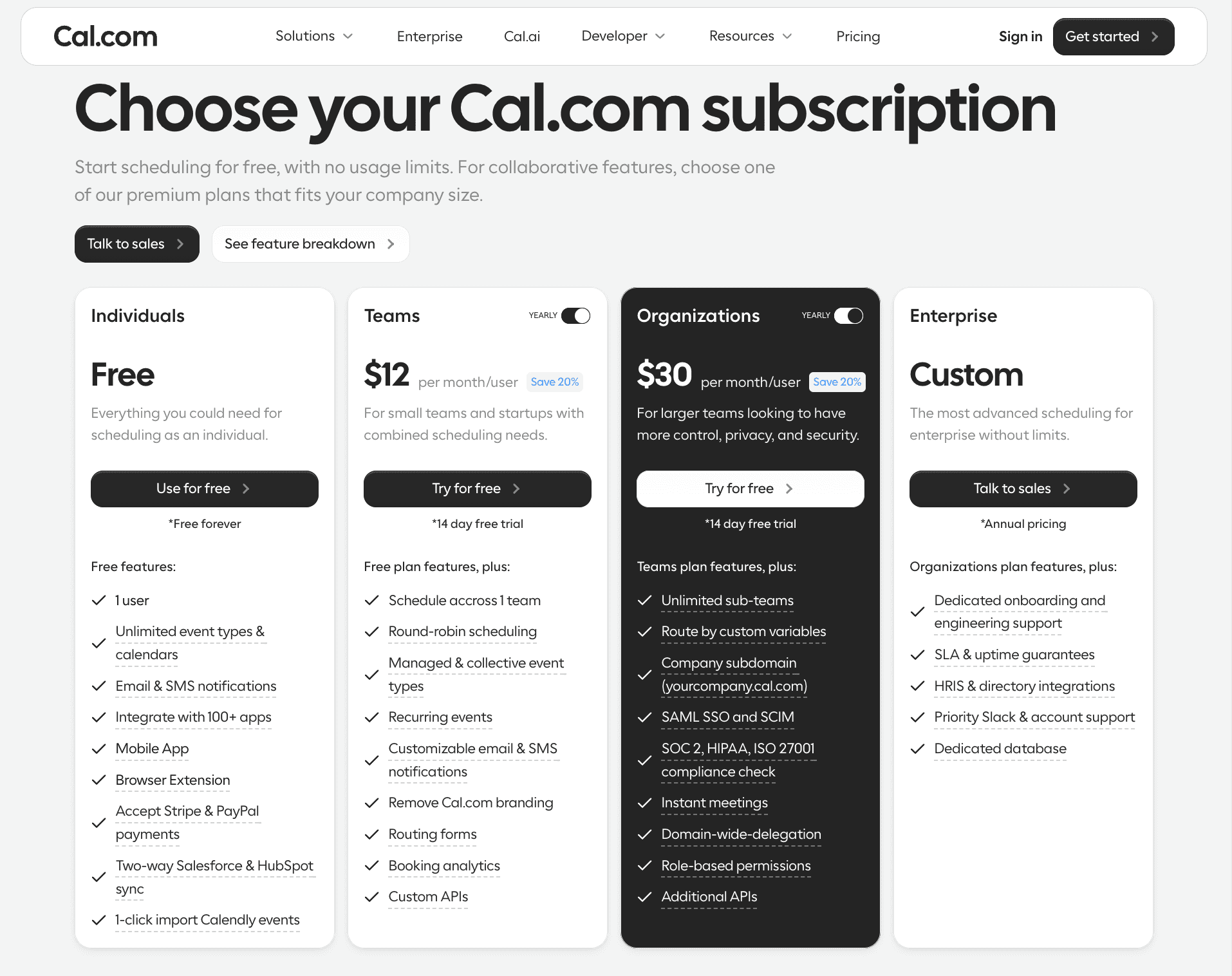
Managed Cal.com Enterprise gives you configurable data residency without the servers. It adds a dedicated database, HRIS and directory integrations, dedicated onboarding and engineering support, and an SLA with 99.9% uptime, or 99.99% as an option. If GDPR is what's behind your on-premise request, our guide to GDPR-compliant scheduling covers data residency, DPAs, and EU hosting in one place.
Deel runs Cal.com Enterprise across more than 1,000 employees, spends 35% less time scheduling, and cut the average time to book a client meeting from 48 hours to under 12. Kiaora schedules patients with providers licensed in their state, and saves 12 to 24 hours of admin a month since centralizing provider availability on Cal.com. Running patient scheduling? Our comparison of HIPAA compliant scheduling software shows which tools sign a BAA, and on which plans.
Data ownership doesn't always mean owning the servers, either. Shimmer built its own video app into Cal.com so it could host coaching sessions itself and own the analytics, across more than 31,000 sessions.
Cal.diy for personal use
Cal.diy is the MIT-licensed community edition of Cal.com, and we recommend it for personal, non-production use only. It keeps the core scheduling engine and booking flows. It doesn't include Teams, Organizations, Insights, Workflows, SSO/SAML, or routing forms, so it isn't a fit for an enterprise rollout. For everything we removed, down to individual packages, see the technical changes behind moving to closed source.

The Cal.diy repository on GitHub, under the MIT License
How to deploy on-premise scheduling without a six-month detour
Most on-premise rollouts don't fail on the software. They fail on ownership: nobody decided who patches it, who answers the pager, or who tells sales their booking links moved. These steps put those decisions first.
Write down where the data must live, and who signs off. Name the regulation or policy, the approver in IT or security, and the business owner who holds the budget.
List every calendar system, including the version. Exchange Server SE and Exchange 2016 are different conversations, and so is a CalDAV server someone set up in 2019.
Connect identity before anything else. Set up SSO and SCIM provisioning first, so access matches your directory from the first booking and booking links don't break when someone leaves.
Size the infrastructure for your busiest week. Plan servers, database, and storage for peak booking volume, not the average Tuesday.
Pilot with one team and run both systems side by side. A sales or support team with real volume shows problems fast. Keep the old tool live until the new one has handled a full cycle.
Test the full booking lifecycle. Create, reschedule, reassign, and cancel bookings. Then check that each change reaches every connected calendar, CRM, and audit log.
Train people on what changes for them. Most employees only need to know their new booking link and where to set availability. Admins need the deeper session on roles, routing, and templates.
Name the owners for patching, backups, and on-call. Agree on a patch window, rehearse a restore, and write down who responds when booking pages go down.
Step eight is the one teams skip. It's also the one an auditor asks about first.
Should your enterprise go on-premise?
Go on-premise when the requirement is real and written down: a regulation, a contract, or a policy that keeps scheduling data inside your infrastructure. You also need a team with the time to patch, monitor, and back it up. If both are true, on-premise Cal.com gives you the same scheduling product enterprises run on our cloud, inside your own walls.
If the real requirement is control over where data lives and proof that it's protected, managed Cal.com with configurable data residency, a dedicated database, SSO, SCIM, and downloadable compliance reports usually gets you there faster. You keep the control and skip the 2 a.m. patching.
Either way, the next step is the same conversation. Talk to the Cal.com sales team about on-premise or managed Enterprise, and bring your security questionnaire. Smaller team without a data center? Create your free Cal.com account, no credit card required, and add your team when you're ready.
FAQs
What is on-premise scheduling software? On-premise scheduling software is a booking and calendar scheduling system that an organization installs on its own servers, inside its own network. The organization controls where scheduling data is stored and who can access it, and it's responsible for updates, security, backups, and uptime.
Is there an on-premise option for round-robin scheduling with lead routing? Yes. Cal.com offers on-premise deployments through its Enterprise offering, by invitation through sales. Cal.com's round robin and routing forms send each lead to the right host by matching answers to attributes such as region or product.
Is on-premise scheduling more secure than cloud scheduling? Not automatically. On-premise scheduling gives an organization more control over where data lives and how it's protected, but it also makes the organization responsible for patching, monitoring, and backups. A well-run cloud service with SOC 2 Type II and ISO 27001 certification can be safer than an on-premise server that misses updates.
What's the difference between on-premise and self-hosted scheduling? On-premise scheduling runs on servers in an organization's own data center. Self-hosted scheduling means the organization runs the software itself, which can be on-premise or in a private cloud account. Every on-premise system is self-hosted, but not every self-hosted system is on-premise.
What affects the cost of booking and scheduling software? For cloud scheduling, the main factors are the number of users, the plan tier, and add-ons such as SSO or a HIPAA BAA. On-premise scheduling adds hardware, hosting, engineering time, security work, backups, and the cost of downtime. Model on-premise costs over three to five years, including staff time.
Does Cal.com work with on-premise Microsoft Exchange? Cal.com's Microsoft Exchange app reads Exchange calendars and availability through Exchange Web Services (EWS). Microsoft is retiring EWS in Exchange Online between October 2026 and April 2027, but the change applies to Exchange Online, not on-premises Exchange Server.
Should I use a cloud or on-premise room scheduler? Room and desk scheduling is a separate category from meeting scheduling. Choose an on-premise room scheduler if your rooms are booked through on-premises Exchange resource mailboxes and policy keeps that data in-house. A cloud room scheduler is quicker to deploy and maintain. Cal.com schedules the meeting itself and checks each host's calendar for conflicts.
How do you evaluate a scheduling platform on compliance and security? Ask for SAML SSO and SCIM provisioning, role-based access control, audit logs, encryption in transit and at rest, and certifications you can verify. Cal.com is SOC 2 Type II and ISO 27001 certified, offers a signed HIPAA BAA on Enterprise, and lets organizations download its compliance reports.
Is Cal.com still open source? No. Cal.com moved to closed source in April 2026 to reduce security risk. The open-source codebase continues as Cal.diy, an MIT-licensed community edition recommended for personal, non-production use, without team, routing, workflow, or enterprise features.
Can I self-host Cal.com for free? You can self-host Cal.diy for free, but Cal.com recommends it for personal, non-production use only. Organizations that need the full commercial product on their own infrastructure can get on-premise access through Cal.com's Enterprise offering.

Get started with Cal.com for free today!
Experience seamless scheduling and productivity with no hidden fees. Sign up in seconds and start simplifying your scheduling today, no credit card required!