" height="18.016311920580208px" id="GKXyVanMq" stroke-dasharray="0" stroke-linecap="butt" stroke-linejoin="miter" stroke-miterlimit="10" stroke-width="0.5" stroke="rgb(0, 0, 0)" transform="translate(3 3)" width="18px"/></svg>)
"/><stop offset="1" stop-color="rgb(227, 224, 244)"/></linearGradient><linearGradient id="CBS1bzkxF-2031533640-linear-gradient" x1="0.49751243781094523" x2="0.5024875621890548" y1="0" y2="1"><stop offset="0" stop-color="rgb(255, 255, 255)"/><stop offset="1" stop-color="rgb(227, 224, 244)"/></linearGradient><linearGradient id="Jd7AK81w9-2031533640-linear-gradient" x1="0.49751243781094523" x2="0.5024875621890548" y1="0" y2="1"><stop offset="0" stop-color="rgb(255, 255, 255)"/><stop offset="1" stop-color="rgb(227, 224, 244)"/></linearGradient></defs><g d="M 0 16 L 0 0 L 16 0 L 16 16 Z M 9.167 5.167 C 9.167 4.891 8.943 4.667 8.667 4.667 C 8.391 4.667 8.167 4.891 8.167 5.167 C 8.167 6.784 7.809 7.834 7.155 8.488 C 6.501 9.143 5.451 9.5 3.833 9.5 C 3.557 9.5 3.333 9.724 3.333 10 C 3.333 10.276 3.557 10.5 3.833 10.5 C 5.451 10.5 6.501 10.857 7.155 11.512 C 7.809 12.166 8.167 13.216 8.167 14.833 C 8.167 15.109 8.391 15.333 8.667 15.333 C 8.943 15.333 9.167 15.109 9.167 14.833 C 9.167 13.216 9.524 12.166 10.178 11.512 C 10.832 10.857 11.883 10.5 13.5 10.5 C 13.776 10.5 14 10.276 14 10 C 14 9.724 13.776 9.5 13.5 9.5 C 11.883 9.5 10.832 9.143 10.178 8.488 C 9.524 7.834 9.167 6.784 9.167 5.167 Z M 4 3.667 C 4 3.483 3.851 3.333 3.667 3.333 C 3.483 3.333 3.333 3.483 3.333 3.667 C 3.333 4.32 3.189 4.715 2.952 4.952 C 2.715 5.189 2.32 5.333 1.667 5.333 C 1.483 5.333 1.333 5.483 1.333 5.667 C 1.333 5.851 1.483 6 1.667 6 C 2.32 6 2.715 6.145 2.952 6.382 C 3.189 6.618 3.333 7.013 3.333 7.667 C 3.333 7.851 3.483 8 3.667 8 C 3.851 8 4 7.851 4 7.667 C 4 7.013 4.145 6.618 4.382 6.382 C 4.618 6.145 5.013 6 5.667 6 C 5.851 6 6 5.851 6 5.667 C 6 5.483 5.851 5.333 5.667 5.333 C 5.013 5.333 4.618 5.189 4.382 4.952 C 4.145 4.715 4 4.32 4 3.667 Z M 7.333 1 C 7.333 0.816 7.184 0.667 7 0.667 C 6.816 0.667 6.667 0.816 6.667 1 C 6.667 1.422 6.573 1.65 6.445 1.778 C 6.317 1.906 6.089 2 5.667 2 C 5.483 2 5.333 2.149 5.333 2.333 C 5.333 2.517 5.483 2.667 5.667 2.667 C 6.089 2.667 6.317 2.761 6.445 2.889 C 6.573 3.016 6.667 3.244 6.667 3.667 C 6.667 3.851 6.816 4 7 4 C 7.184 4 7.333 3.851 7.333 3.667 C 7.333 3.244 7.427 3.016 7.555 2.889 C 7.683 2.761 7.911 2.667 8.333 2.667 C 8.517 2.667 8.667 2.517 8.667 2.333 C 8.667 2.149 8.517 2 8.333 2 C 7.911 2 7.683 1.906 7.555 1.778 C 7.427 1.65 7.333 1.422 7.333 1 Z" fill="transparent" height="16px" id="aoZYv33vR" width="16px"><path d="M 0 16 L 0 0 L 16 0 L 16 16 Z" fill="transparent" height="16px" id="Z2uGmhW9f" width="16px"/><g d="M 7.833 4.5 C 7.833 4.224 7.609 4 7.333 4 C 7.057 4 6.833 4.224 6.833 4.5 C 6.833 6.117 6.476 7.168 5.822 7.822 C 5.168 8.476 4.117 8.833 2.5 8.833 C 2.224 8.833 2 9.057 2 9.333 C 2 9.61 2.224 9.833 2.5 9.833 C 4.117 9.833 5.168 10.191 5.822 10.845 C 6.476 11.499 6.833 12.549 6.833 14.167 C 6.833 14.443 7.057 14.667 7.333 14.667 C 7.609 14.667 7.833 14.443 7.833 14.167 C 7.833 12.549 8.191 11.499 8.845 10.845 C 9.499 10.191 10.549 9.833 12.167 9.833 C 12.443 9.833 12.667 9.61 12.667 9.333 C 12.667 9.057 12.443 8.833 12.167 8.833 C 10.549 8.833 9.499 8.476 8.845 7.822 C 8.191 7.168 7.833 6.117 7.833 4.5 Z M 2.667 3 C 2.667 2.816 2.517 2.667 2.333 2.667 C 2.149 2.667 2 2.816 2 3 C 2 3.654 1.855 4.048 1.618 4.285 C 1.382 4.522 0.987 4.667 0.333 4.667 C 0.149 4.667 0 4.816 0 5 C 0 5.184 0.149 5.333 0.333 5.333 C 0.987 5.333 1.382 5.478 1.618 5.715 C 1.855 5.952 2 6.346 2 7 C 2 7.184 2.149 7.333 2.333 7.333 C 2.517 7.333 2.667 7.184 2.667 7 C 2.667 6.346 2.811 5.952 3.048 5.715 C 3.285 5.478 3.68 5.333 4.333 5.333 C 4.517 5.333 4.667 5.184 4.667 5 C 4.667 4.816 4.517 4.667 4.333 4.667 C 3.68 4.667 3.285 4.522 3.048 4.285 C 2.811 4.048 2.667 3.654 2.667 3 Z M 6 0.333 C 6 0.149 5.851 0 5.667 0 C 5.483 0 5.333 0.149 5.333 0.333 C 5.333 0.756 5.239 0.984 5.112 1.112 C 4.984 1.239 4.756 1.333 4.333 1.333 C 4.149 1.333 4 1.483 4 1.667 C 4 1.851 4.149 2 4.333 2 C 4.756 2 4.984 2.094 5.112 2.222 C 5.239 2.35 5.333 2.578 5.333 3 C 5.333 3.184 5.483 3.333 5.667 3.333 C 5.851 3.333 6 3.184 6 3 C 6 2.578 6.094 2.35 6.222 2.222 C 6.35 2.094 6.578 2 7 2 C 7.184 2 7.333 1.851 7.333 1.667 C 7.333 1.483 7.184 1.333 7 1.333 C 6.578 1.333 6.35 1.239 6.222 1.112 C 6.094 0.984 6 0.756 6 0.333 Z" fill="transparent" height="14.66671286102295px" id="ae6ccdFme" transform="translate(1.333 0.667)" width="12.66663px"><path d="M 5.833 0.5 C 5.833 0.224 5.609 0 5.333 0 C 5.057 0 4.833 0.224 4.833 0.5 C 4.833 2.117 4.476 3.168 3.822 3.822 C 3.168 4.476 2.117 4.833 0.5 4.833 C 0.224 4.833 0 5.057 0 5.333 C 0 5.61 0.224 5.833 0.5 5.833 C 2.117 5.833 3.168 6.191 3.822 6.845 C 4.476 7.499 4.833 8.549 4.833 10.167 C 4.833 10.443 5.057 10.667 5.333 10.667 C 5.609 10.667 5.833 10.443 5.833 10.167 C 5.833 8.549 6.191 7.499 6.845 6.845 C 7.499 6.191 8.549 5.833 10.167 5.833 C 10.443 5.833 10.667 5.61 10.667 5.333 C 10.667 5.057 10.443 4.833 10.167 4.833 C 8.549 4.833 7.499 4.476 6.845 3.822 C 6.191 3.168 5.833 2.117 5.833 0.5 Z" fill="url(%23t2lXByE48-2031533640-linear-gradient)" height="10.66671px" id="t2lXByE48" transform="translate(2 4)" width="10.66663px"/><path d="M 2.667 0.333 C 2.667 0.149 2.517 0 2.333 0 C 2.149 0 2 0.149 2 0.333 C 2 0.987 1.855 1.382 1.618 1.618 C 1.382 1.855 0.987 2 0.333 2 C 0.149 2 0 2.149 0 2.333 C 0 2.517 0.149 2.667 0.333 2.667 C 0.987 2.667 1.382 2.811 1.618 3.048 C 1.855 3.285 2 3.68 2 4.333 C 2 4.517 2.149 4.667 2.333 4.667 C 2.517 4.667 2.667 4.517 2.667 4.333 C 2.667 3.68 2.811 3.285 3.048 3.048 C 3.285 2.811 3.68 2.667 4.333 2.667 C 4.517 2.667 4.667 2.517 4.667 2.333 C 4.667 2.149 4.517 2 4.333 2 C 3.68 2 3.285 1.855 3.048 1.618 C 2.811 1.382 2.667 0.987 2.667 0.333 Z" fill="url(%23CBS1bzkxF-2031533640-linear-gradient)" height="4.66667px" id="CBS1bzkxF" transform="translate(0 2.667)" width="4.66667px"/><path d="M 2 0.333 C 2 0.149 1.851 0 1.667 0 C 1.483 0 1.333 0.149 1.333 0.333 C 1.333 0.756 1.239 0.984 1.112 1.112 C 0.984 1.239 0.756 1.333 0.333 1.333 C 0.149 1.333 0 1.483 0 1.667 C 0 1.851 0.149 2 0.333 2 C 0.756 2 0.984 2.094 1.112 2.222 C 1.239 2.35 1.333 2.578 1.333 3 C 1.333 3.184 1.483 3.333 1.667 3.333 C 1.851 3.333 2 3.184 2 3 C 2 2.578 2.094 2.35 2.222 2.222 C 2.35 2.094 2.578 2 3 2 C 3.184 2 3.333 1.851 3.333 1.667 C 3.333 1.483 3.184 1.333 3 1.333 C 2.578 1.333 2.35 1.239 2.222 1.112 C 2.094 0.984 2 0.756 2 0.333 Z" fill="url(%23Jd7AK81w9-2031533640-linear-gradient)" height="3.333333px" id="Jd7AK81w9" transform="translate(4 0)" width="3.3333399999999997px"/></g></g></svg>)
" height="24px" id="WCm44spAV" width="24px"/><path d="M 3.892 7.742 C 1.674 7.742 0 6.014 0 3.882 C 0 1.738 1.589 0 3.892 0 C 5.107 0 5.951 0.374 6.623 1.173 L 5.566 2.09 C 5.118 1.621 4.564 1.386 3.892 1.386 C 2.452 1.386 1.547 2.517 1.547 3.882 C 1.547 5.246 2.452 6.356 3.924 6.356 C 4.649 6.356 5.193 6.111 5.63 5.63 L 6.718 6.558 C 6.153 7.24 5.193 7.742 3.892 7.742 Z" fill="rgb(255, 255, 255)" height="7.741500000000002px" id="XEPpGD7l5" transform="translate(4 8.25)" width="6.717999999999989px"/><path d="M 2.74 7.922 C 1.215 7.922 0 6.632 0 5.032 C 0 3.433 1.215 2.122 2.74 2.122 C 3.7 2.122 4.201 2.516 4.5 3.113 L 4.5 2.239 L 5.928 2.239 L 5.928 7.784 L 4.531 7.784 L 4.531 6.877 C 4.233 7.507 3.731 7.922 2.74 7.922 Z M 1.439 5.023 C 1.439 5.865 2.057 6.622 2.975 6.622 C 3.924 6.622 4.531 5.897 4.531 5.033 C 4.531 4.169 3.924 3.423 2.975 3.423 C 2.057 3.423 1.439 4.159 1.439 5.022 Z M 6.784 7.784 L 6.784 0 L 8.224 0 L 8.224 7.784 L 6.784 7.784 Z" fill="rgb(255, 255, 255)" height="7.9224997406005855px" id="lGDJupIUR" transform="translate(10.5 8)" width="8.223500194549558px"/></g></svg>)
" width="18px"><path d="M 2 8 C 0.895 8 0 7.105 0 6 L 0 2 C 0 0.895 0.895 0 2 0 L 6 0 C 7.105 0 8 0.895 8 2 L 8 6 C 8 7.105 7.105 8 6 8 Z" fill="transparent" height="8px" id="ZrCrI93dV" stroke-dasharray="" stroke-linecap="round" stroke-linejoin="round" stroke-width="2" stroke="rgb(0, 0, 0)" width="8px"/><path d="M 0 0 L 0 4 C 0 5.105 0.895 6 2 6 L 6 6" fill="transparent" height="6px" id="emltWYAiE" stroke-dasharray="" stroke-linecap="round" stroke-linejoin="round" stroke-width="2" stroke="rgb(0, 0, 0)" transform="translate(4 8)" width="6px"/><path d="M 2 8 C 0.895 8 0 7.105 0 6 L 0 2 C 0 0.895 0.895 0 2 0 L 6 0 C 7.105 0 8 0.895 8 2 L 8 6 C 8 7.105 7.105 8 6 8 Z" fill="transparent" height="8px" id="WpBecYDfi" stroke-dasharray="" stroke-linecap="round" stroke-linejoin="round" stroke-width="2" stroke="rgb(0, 0, 0)" transform="translate(10 10)" width="8px"/></g></svg>)

By

Cédric van Ravesteijn
7 Best Multi Location Scheduling Software
If your business takes appointments at several addresses, your scheduling system needs to send each customer to the right location.
Someone looking for a consultation in one city shouldn't end up booking with a team member who works at another branch.
Cal.com is well suited to businesses where customers book across locations. You can give each location its own sub-team, then use routing forms and member attributes to send customers to the appropriate site and person. Round robin can then distribute bookings among the people available at that location. This makes Cal.com a good fit for multi-branch clinics, med spas, franchises, dealerships, and professional services businesses.
We compared Cal.com with six other multi location scheduling software, including workforce schedulers and industry-specific platforms for restaurants, deskless teams, and clinical practices.
We graded each tool on:
Booking routing: Does each booking reach the right location and person?
Local control: Can each site manage its own schedules and permissions?
Expansion cost: What does adding another location do to the bill?
The comparison table near the end summarizes how the seven tools stack up across these criteria.
TL;DR: the 7 best multi location scheduling software
Cal.com: best for routing customer bookings to the right location
Deputy: best for shift planning and labor forecasting across sites
When I Work: best for hourly staff who move between sites
Connecteam: best for deskless crews working across job sites
7shifts: best for multi-unit restaurant groups
Homebase: best free option for a small team at one location
Pabau: best for multi-clinic med spas and aesthetic clinics
What is multi location scheduling software?
Multi location scheduling software helps businesses manage schedules across two or more physical sites from one system. Instead of keeping a separate calendar or booking page for each location, you can manage your sites, staff, services, and availability from one account.
It keeps track of where each person works, when they're available, which services they can provide, and which location a booking belongs to. That means you can see and manage schedules for all your locations in one place, without creating a separate scheduling system for each site.
What to look for in multi location scheduling software
Managing several locations means keeping bookings, staff, and schedules in sync. Before choosing a tool, check that it can handle these needs:
Location hierarchy: Each location should have its own staff, services, hours, and permissions under one organization. Check whether one employee can work across multiple locations without needing a second profile or subscription.
Booking routing: Customers shouldn't have to choose the right site themselves. Attribute-based routing uses information such as postcode, region, language, specialty, or the page someone came from to send a booking to the right location. Round robin then distributes bookings among available staff at that site.
Central visibility: Head office should be able to see bookings, coverage, and performance across every location, while local managers manage their own schedules. Role-based permissions control who can see and change each location's information.
Scalable pricing: Per-location pricing can become expensive as you add sites, while per-user pricing can add up with large or seasonal teams. Calculate the cost based on your actual locations and staff before choosing a plan.
Compliance: If you handle protected health information, check that the scheduling software supports HIPAA requirements and provides a business associate agreement (BAA). For workforce scheduling, make sure it supports the break, overtime, and scheduling rules that apply in the areas where you operate.
Integrations and API: At a minimum, look for Google, Outlook, and Apple calendar integrations. You may also need CRM, payroll, point of sale (POS), or other integrations depending on how you run your business. A public API is useful if you want to add booking to your own website or app.
The 7 best multi location scheduling software
1. Cal.com: best multi location scheduling software overall
Free plan? | Starting price | Standout feature | Best use case |
|---|---|---|---|
Yes, free forever for one user | $16/user/month | Unlimited sub-teams, one per location, with advanced routing | Customer bookings across several locations |

What it is: Cal.com helps businesses manage customer bookings across multiple locations from one account.
Its sub-teams feature lets you create a separate team for each location, with its own staff, booking pages, services, and scheduling rules. All these teams sit under one organization, so headquarters can manage every location from one place without maintaining separate accounts.
For example, a clinic group with offices in New York and Los Angeles can give each branch its own staff and appointment schedules while keeping an overview of bookings across both locations.
Why it ranks first: Cal.com works well for businesses that need to route customer bookings to the right location and staff member. Routing forms match customers with the right person based on their answers, while round robin distributes bookings among available staff. Managed event types also let headquarters apply the same booking settings across locations without configuring each one separately.

Key features:
Separate location teams: Create a sub-team for each location, with its own staff, booking pages, services, and availability, all managed under one organization.
Booking routing: Send customers to the right location or staff member based on details such as their region, department, or other information they provide.
Automatic booking distribution: Share bookings among available staff based on their availability, booking weights, or priority.
Website booking embeds: Add booking calendars to your website so customers can schedule appointments without leaving it.
Calendar sync: Connect Google, Outlook, Apple, and other calendars to check availability and prevent double bookings.
Access permissions: Control what headquarters and local managers can view or edit, and restrict access to other teams' schedules.
Online payments: Accept Stripe or PayPal payments when customers book appointments.
CRM integrations: Sync bookings and contacts with Salesforce and HubSpot, and use customer information to support your scheduling workflows.
Automated reminders: Send email and SMS notifications to remind customers about upcoming appointments and reduce no-shows.
Booking analytics: Track scheduling activity to understand booking trends and how customers use your booking pages.
Consistent branding: Use branded booking pages, a company subdomain, and customized emails to give customers a consistent experience across locations.
HIPAA support: Support HIPAA-compliant scheduling with a signed business associate agreement (BAA).
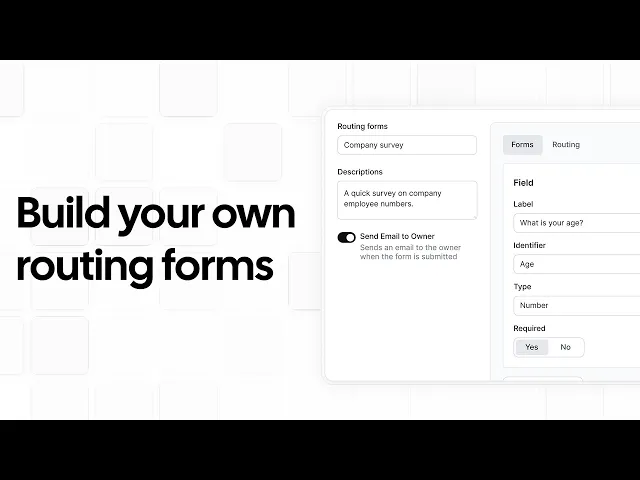
Pricing: Cal.com offers a free plan for one user, with unlimited event types, calendar connections, and integrations. The Teams plan costs $16/user/month or $12/user/month when billed annually, adding routing forms, round robin scheduling, and booking analytics. The Organizations plan costs $37/user/month or $28/user/month when billed annually, adding unlimited sub-teams, role-based permissions, company subdomains, single sign-on (SSO), and organization-wide controls for managing multiple locations.

Best for: Multi-location clinics, med spas, franchises, and service businesses that want to route customer bookings to the right branch and staff member.
Verdict: Cal.com is a good fit for businesses that take customer bookings across several locations. Its routing forms direct each booking to the right branch and staff member, while sub-teams let you manage each location separately under one organization.
Get started with Cal.com’s free plan or request a demo for your team.
2. Deputy: best for shift planning and labor forecasting across sites
Free plan? | Starting price | Standout feature | Best use case |
|---|---|---|---|
No, 30 day trial | $5.50/user/month | Demand forecasting and auto-scheduling | Multi-site teams with hourly workers |

What it is: Deputy is a workforce management platform for businesses with hourly employees working across multiple locations. It helps managers create staff schedules, track working hours, forecast staffing needs, and manage compliance with labor laws. For example, a retail manager can use it to plan shifts around expected customer demand and check whether each branch has enough employees scheduled. It suits retail, hospitality, and service businesses that need to manage staff across several sites.
Key features:
Auto-scheduling: Build staff schedules based on expected demand, employee availability, and staffing requirements.
Location management: Group locations into regions and control what managers can access at each site.
Flexible shifts: Schedule one employee to handle different tasks or work areas during a single shift.
Location-based clock-ins: Use location restrictions and facial recognition at clock-in to verify attendance and reduce buddy punching.
Labor rules and budgets: Track staffing costs, set wage budgets, and manage break and overtime requirements across locations.
Limitations:
HR, Payroll, and some analytics features are only available as paid add-ons.
Deputy has a $30 minimum monthly spend on monthly plans.
It’s built around employee scheduling rather than customer appointment booking.
Pricing: Deputy has no free plan but offers a 30-day free trial. Lite costs $5.50/user/month and includes basic scheduling, timesheets, time clocking, and reporting. Core costs $7.25/user/month and adds advanced scheduling and reporting features. Pro costs $10/user/month and adds custom access levels, advanced timesheets, location hierarchies, and single sign-on (SSO).
Best for: Multi-site retail, hospitality, and service businesses with hourly teams where shift coverage, labor forecasting, and compliance matter more than customer bookings.
Comparison verdict: Deputy is better suited to businesses focused on employee scheduling, shift coverage, and labor costs. Cal.com is the better fit for businesses that need to route customer appointments to the right branch and staff member. You can also use both: Deputy to schedule employees and Cal.com to manage customer bookings.
3. When I Work: best for hourly staff who move between sites
Free plan? | Starting price | Standout feature | Best use case |
|---|---|---|---|
No, 14 day trial | $2.50/user/month | Labor sharing across locations | Hourly staff who cover several sites |

What it is: When I Work is a workforce scheduling platform that helps businesses manage hourly employees across multiple locations. Managers can create schedules for each site, track employee hours, and see who is available to work, all from one account. Employees can also pick up open shifts at other locations, making it easier to fill staffing gaps without hiring additional workers for every branch. This makes When I Work a good fit for retail, hospitality, fitness, and other businesses where hourly employees regularly cover shifts at different locations.
Key features:
Multi-location schedules: Manage separate schedules for each branch, department, or team from one account.
Cross-location shifts: Let eligible employees pick up available shifts at other locations to fill staffing gaps.
Manager permissions: Control which schedules, shifts, and settings managers can view or change.
Job sites: Assign a specific work location to each shift so employees know where to report.
Geofenced clock-ins: Restrict clock-ins to the correct work location and help prevent employees from clocking in remotely.
Limitations:
Labor sharing and role permissions require the highest plan.
The entry plan doesn’t support multi-location management.
Limited integrations and reporting features.
Pricing: When I Work has no free plan but offers a 14-day free trial. The starter plan costs $2.50/user/month and includes employee scheduling, time tracking, attendance, and team messaging for a single location. The higher plan costs $5/user/month and adds multi-location scheduling, labor sharing, custom reporting, and role-based permissions.
Best for: Small and mid-sized multi-site businesses with hourly employees who regularly move between locations, including retail, hospitality, fitness, and franchises.
Comparison verdict: When I Work is a better fit when your sites share a pool of hourly employees. If customers also need to book appointments, Cal.com fills the gap by routing those bookings to the right location and person.
4. Connecteam: best for deskless crews working across job sites
Free plan? | Starting price | Standout feature | Best use case |
|---|---|---|---|
Yes, free up to 10 users | $35/month (for the first 30 users) | Phone-first workforce management | Frontline crews who work from their phones |

What it is: Connecteam is an all-in-one workforce management platform for employees who work in the field or on-site rather than at a desk. It helps businesses schedule shifts, track working hours, assign tasks, and let employees complete digital forms and checklists from their phones. It also includes tools for team communication, employee training, and onboarding. This makes Connecteam a good fit for cleaning, construction, security, and facilities teams whose employees need to access schedules, instructions, and work tasks while on the job.
Key features:
Multiple schedules: Create separate schedules for different branches, teams, or job sites, with access limited to the relevant managers.
GPS clock-ins: Record employees’ clock-in locations and use geofencing to restrict clock-ins to designated work sites.
Digital checklists: Standardize opening and closing procedures, inspections, and job-site checks with forms employees complete on their phones.
Location-based access: Group employees by branch and limit managers’ access to the locations they oversee.
Overtime alerts: Flag scheduling conflicts and potential overtime before publishing shifts, helping managers avoid overlapping schedules and excessive working hours.
Limitations:
Communications and HR are separate hubs, so accessing both requires separate subscriptions.
The entry plan supports only one time clock, limiting you to managing a single location.
It doesn’t offer customer appointment booking or customer record management.
Pricing: Connecteam offers a free plan for up to 10 users, with access to its workforce management tools. Paid plans start at $35/month for the first 30 users and include scheduling and time tracking. Each additional user costs $1/month. Higher plans start at $59/month and include more advanced scheduling and multi-location management features, with higher per-user fees.
Best for: Multi-site businesses with deskless or field staff, including cleaning, security, construction, facilities, and other frontline teams.
Comparison verdict: Connecteam helps managers schedule shifts, assign tasks, and share instructions with field employees. Cal.com is better suited to customer appointments, letting people book at the right location and routing each booking to the appropriate staff member.
5. 7shifts: best for multi-unit restaurant groups
Free plan? | Starting price | Standout feature | Best use case |
|---|---|---|---|
Yes, one location and 15 employees | $44.99/location/month (up to 30 employees) | Shift planning based on expected sales | Restaurant groups aligning staff schedules with sales |

What it is: 7shifts is scheduling and workforce management software designed for restaurants, from individual locations to multi-unit groups. It helps managers build staff schedules, track hours and tips, and monitor labor costs alongside sales. By connecting staffing decisions with sales data, restaurant managers can plan shifts around expected demand, keep labor spending in check, and manage teams across multiple locations.
Key features:
Sales-based scheduling: Connect your POS to use historical sales data to forecast demand and plan staffing levels around expected sales.
Manager permissions: Decide which schedules, reports, and employee records managers can access or edit at each location.
Labor compliance: Apply relevant labor rules to schedules, including break requirements and overtime limits, with settings for different locations.
Tip distribution: Calculate and distribute tips based on hours worked, employee roles, or custom rules.
Automatic scheduling: Generate staff schedules based on availability, time-off requests, assigned roles, and labor targets.
Limitations:
You pay separately for each location, so costs increase as you add restaurants.
It’s designed for employee scheduling, not customer bookings.
Payroll, tip management, and task management are paid add-ons.
Pricing: 7shifts has a free plan for one location and up to 15 employees, with access to basic scheduling, POS integration, and chat support. Paid plans start at $44.99/location/month for up to 30 employees. If you exceed the employee limit, you’ll need to upgrade to a higher plan.
Best for: Multi-location restaurants, bars, and cafés that need staff scheduling and labor management tools built for food service.
Comparison verdict: Choose 7shifts to manage restaurant staff schedules, shifts, and labor costs. Choose Cal.com when you need customers to book private events, tastings, catering consultations, or other appointments and direct each booking to the right location and person.
6. Homebase: best free option for a small team at one location
Free plan? | Starting price | Standout feature | Best use case |
|---|---|---|---|
Yes, one location and 10 employees | $30/location/month | Free scheduling and time tracking | Small teams opening their first site |

What it is: Homebase helps businesses with hourly employees manage staff schedules, track working hours, communicate with their teams, and monitor labor costs in one place. It’s particularly useful for small businesses getting started with workforce management, as its free plan covers one location and up to 10 employees. Managers can organize shifts, record attendance, and keep employees informed without paying for separate tools.
Key features:
Multi-location scheduling: Assign employees to shifts at different locations from one account, with each shift showing staff where they need to work.
Manager permissions: Give managers access to specific locations or departments so they can manage their own teams without changing other locations’ schedules.
Company-wide timesheets: Review employee hours and labor costs across locations in one place, rather than checking each site separately.
Overtime tracking: Track employee hours across all locations to identify when someone is approaching overtime, even if they work at different sites.
Team messaging: Send updates to individual employees, specific locations, departments, or the entire company without relying on separate group chats.
Limitations:
Per-location pricing becomes expensive as you add sites.
Payroll, tip manager, and task manager are paid add-ons.
Customer appointment booking is not the platform's focus.
Pricing: Homebase has a free plan for one location and up to 10 employees, which includes basic scheduling, basic time tracking, and POS integration. Paid plans start at $30/location/month for unlimited employees and unlock advanced scheduling, advanced time tracking, and team communication.
Best for: Small operators with one or two locations and hourly teams, such as cafes, shops, and local service businesses.
Comparison verdict: Homebase suits small businesses that need to schedule employees and track working hours at one location. Cal.com is better suited to businesses managing customer appointments across multiple branches and routing bookings to the right location and staff member.
7. Pabau: best for multi-clinic med spas and aesthetic clinics
Free plan? | Starting price | Standout feature | Best use case |
|---|---|---|---|
No, and no trial | Custom quote | Clinical records, booking, and practice management | Med spa and aesthetic clinic groups |

What it is: Pabau is practice management software for aesthetic, wellness, and private medical clinics. It helps clinics handle the full patient journey, from online appointment bookings and consent forms to clinical records and payments. For clinic groups, Pabau brings appointments, staff schedules, stock levels, and performance reports for multiple locations into one system. Each site can have its own services and pricing, while managers can oversee operations across the group.
Key features:
Online booking: Let clients choose the clinic they want to visit when booking appointments online, with each location's available services and staff.
Location calendars: View appointments by clinic or switch between locations to check staff availability and manage bookings from one account.
Stock tracking: Monitor inventory at each clinic to see what products are available and where supplies need replenishing.
User permissions: Set access rights for staff based on their roles, controlling which records, reports, and business functions they can view or change.
Location reports: Review performance at individual clinics or across the whole group to compare results and identify where changes may be needed.
Limitations:
No free plan, trial, or published prices.
It’s not suitable for non-healthcare business needs.
Multi-location management is only available on the Enterprise plan.
Pricing: Pabau doesn’t offer a free plan or trial. You’ll need to book and request a custom quote.
Best for: Multi-site med spas, aesthetic clinics, wellness practices, and private clinics that want clinical records and booking in one system.
Comparison verdict: Pabau suits clinics that need to manage appointments, patient records, consent forms, and stock in one system. Cal.com is a better fit if you already use separate clinical software and need to manage appointment bookings across locations. Its routing rules can direct patients to the right clinic and practitioner based on their needs.
Multi location scheduling software: quick comparison
Here’s how the seven multi location scheduling software compare on key features and free plans:
Tool | Free plan | Booking routing | Local control | Expansion cost |
|---|---|---|---|---|
Cal.com | ✅ Free forever for one user | ✅ Route customers based on their form responses | ✅ Location-level permissions and separate sub-teams | ✅ No location fee; priced per user |
Deputy | ❌ No, 30-day trial | ❌ Employee shifts, not customer bookings | ✅ Location hierarchies and access controls | ✅ No location fee; priced per user |
When I Work | ❌ No, 14-day trial | ❌ Employee shifts, not customer bookings | ✅ Role-based permissions | ⚠️ Multi-location scheduling costs $5/user/month |
Connecteam | ✅ Free for up to 10 users | ❌ Employee shifts, not customer bookings | ✅ Location-based access controls | ⚠️ Multiple locations supported on higher tiers |
7shifts | ✅ One location, 15 employees | ❌ Employee shifts, not customer bookings | ✅ Manager permissions | ❌ Per-location pricing |
Homebase | ✅ One location, 10 employees | ❌ Employee shifts, not customer bookings | ✅ Location and department permissions | ❌ Per-location pricing |
Pabau | ❌ No, and no trial | ⚠️ Clients pick their clinic; no routing | ✅ Role-based permissions | ⚠️ Multi-location management requires Enterprise plan |
Final verdict
The best multi location scheduling software for your business depends on whether you need to coordinate customer appointments, employee shifts, or both.
Cal.com is the best fit for businesses that take customer bookings across multiple locations. Its sub-teams let you manage each location's staff, services, and availability separately, while routing forms direct customers to the right branch and staff member. Round robin scheduling distributes bookings among available team members, and calendar sync helps prevent double bookings.
For employee scheduling and labor management, consider Deputy, When I Work, Connecteam, and 7shifts. Homebase suits small teams that need basic employee scheduling and time tracking at one location. If you run a clinic and need appointment booking alongside patient records, consent forms, and stock management, consider Pabau.
If customer bookings are your priority, start with Cal.com's free plan or request a demo for your team.
Frequently asked questions
What's the best multi location scheduling software? Cal.com is the best fit if customers book appointments across several locations. Its routing forms and sub-teams help direct each booking to the right branch and staff member. For employee scheduling and labor management, consider Deputy, When I Work, Connecteam, or 7shifts.
How much does multi location scheduling software cost? It depends on the software and its pricing model. When I Work starts at $5/user/month for multi-location scheduling, while Deputy starts at $5.50/user/month. Cal.com’s paid plans start at $16/user/month and $37/user/month. Homebase starts at $30/location/month, 7shifts at $44.99/location/month, and Connecteam at $35/month for up to 30 users. Pabau requires a custom quote.
Which Cal.com plan do I need for several locations? Cal.com's Organizations plan is designed for multi-location businesses that need unlimited sub-teams, attribute-based routing, and role-based permissions. It costs $37/user/month, or $28/user/month billed annually. The Teams plan costs $16/user/month, or $12/user/month billed annually, and includes routing forms, round robin scheduling, and booking analytics.
Do I pay twice for an employee who works at two locations? With per-user tools such as Cal.com, Deputy, and When I Work, you pay per user rather than per location. However, check how each platform handles employees assigned to multiple sites and whether any additional features or subscriptions are required. With per-location tools such as Homebase and 7shifts, each location has its own plan fee.
Does Cal.com support HIPAA compliance across multiple clinic locations? Cal.com supports HIPAA-compliant scheduling with a signed business associate agreement (BAA). Its Organizations plan lets you manage each clinic as a separate sub-team, with its own staff and booking pages, while role-based permissions control access across locations.

Get started with Cal.com for free today!
Experience seamless scheduling and productivity with no hidden fees. Sign up in seconds and start simplifying your scheduling today, no credit card required!