" height="18.016311920580208px" id="GKXyVanMq" stroke-dasharray="0" stroke-linecap="butt" stroke-linejoin="miter" stroke-miterlimit="10" stroke-width="0.5" stroke="rgb(0, 0, 0)" transform="translate(3 3)" width="18px"/></svg>)
"/><stop offset="1" stop-color="rgb(227, 224, 244)"/></linearGradient><linearGradient id="CBS1bzkxF-2031533640-linear-gradient" x1="0.49751243781094523" x2="0.5024875621890548" y1="0" y2="1"><stop offset="0" stop-color="rgb(255, 255, 255)"/><stop offset="1" stop-color="rgb(227, 224, 244)"/></linearGradient><linearGradient id="Jd7AK81w9-2031533640-linear-gradient" x1="0.49751243781094523" x2="0.5024875621890548" y1="0" y2="1"><stop offset="0" stop-color="rgb(255, 255, 255)"/><stop offset="1" stop-color="rgb(227, 224, 244)"/></linearGradient></defs><g d="M 0 16 L 0 0 L 16 0 L 16 16 Z M 9.167 5.167 C 9.167 4.891 8.943 4.667 8.667 4.667 C 8.391 4.667 8.167 4.891 8.167 5.167 C 8.167 6.784 7.809 7.834 7.155 8.488 C 6.501 9.143 5.451 9.5 3.833 9.5 C 3.557 9.5 3.333 9.724 3.333 10 C 3.333 10.276 3.557 10.5 3.833 10.5 C 5.451 10.5 6.501 10.857 7.155 11.512 C 7.809 12.166 8.167 13.216 8.167 14.833 C 8.167 15.109 8.391 15.333 8.667 15.333 C 8.943 15.333 9.167 15.109 9.167 14.833 C 9.167 13.216 9.524 12.166 10.178 11.512 C 10.832 10.857 11.883 10.5 13.5 10.5 C 13.776 10.5 14 10.276 14 10 C 14 9.724 13.776 9.5 13.5 9.5 C 11.883 9.5 10.832 9.143 10.178 8.488 C 9.524 7.834 9.167 6.784 9.167 5.167 Z M 4 3.667 C 4 3.483 3.851 3.333 3.667 3.333 C 3.483 3.333 3.333 3.483 3.333 3.667 C 3.333 4.32 3.189 4.715 2.952 4.952 C 2.715 5.189 2.32 5.333 1.667 5.333 C 1.483 5.333 1.333 5.483 1.333 5.667 C 1.333 5.851 1.483 6 1.667 6 C 2.32 6 2.715 6.145 2.952 6.382 C 3.189 6.618 3.333 7.013 3.333 7.667 C 3.333 7.851 3.483 8 3.667 8 C 3.851 8 4 7.851 4 7.667 C 4 7.013 4.145 6.618 4.382 6.382 C 4.618 6.145 5.013 6 5.667 6 C 5.851 6 6 5.851 6 5.667 C 6 5.483 5.851 5.333 5.667 5.333 C 5.013 5.333 4.618 5.189 4.382 4.952 C 4.145 4.715 4 4.32 4 3.667 Z M 7.333 1 C 7.333 0.816 7.184 0.667 7 0.667 C 6.816 0.667 6.667 0.816 6.667 1 C 6.667 1.422 6.573 1.65 6.445 1.778 C 6.317 1.906 6.089 2 5.667 2 C 5.483 2 5.333 2.149 5.333 2.333 C 5.333 2.517 5.483 2.667 5.667 2.667 C 6.089 2.667 6.317 2.761 6.445 2.889 C 6.573 3.016 6.667 3.244 6.667 3.667 C 6.667 3.851 6.816 4 7 4 C 7.184 4 7.333 3.851 7.333 3.667 C 7.333 3.244 7.427 3.016 7.555 2.889 C 7.683 2.761 7.911 2.667 8.333 2.667 C 8.517 2.667 8.667 2.517 8.667 2.333 C 8.667 2.149 8.517 2 8.333 2 C 7.911 2 7.683 1.906 7.555 1.778 C 7.427 1.65 7.333 1.422 7.333 1 Z" fill="transparent" height="16px" id="aoZYv33vR" width="16px"><path d="M 0 16 L 0 0 L 16 0 L 16 16 Z" fill="transparent" height="16px" id="Z2uGmhW9f" width="16px"/><g d="M 7.833 4.5 C 7.833 4.224 7.609 4 7.333 4 C 7.057 4 6.833 4.224 6.833 4.5 C 6.833 6.117 6.476 7.168 5.822 7.822 C 5.168 8.476 4.117 8.833 2.5 8.833 C 2.224 8.833 2 9.057 2 9.333 C 2 9.61 2.224 9.833 2.5 9.833 C 4.117 9.833 5.168 10.191 5.822 10.845 C 6.476 11.499 6.833 12.549 6.833 14.167 C 6.833 14.443 7.057 14.667 7.333 14.667 C 7.609 14.667 7.833 14.443 7.833 14.167 C 7.833 12.549 8.191 11.499 8.845 10.845 C 9.499 10.191 10.549 9.833 12.167 9.833 C 12.443 9.833 12.667 9.61 12.667 9.333 C 12.667 9.057 12.443 8.833 12.167 8.833 C 10.549 8.833 9.499 8.476 8.845 7.822 C 8.191 7.168 7.833 6.117 7.833 4.5 Z M 2.667 3 C 2.667 2.816 2.517 2.667 2.333 2.667 C 2.149 2.667 2 2.816 2 3 C 2 3.654 1.855 4.048 1.618 4.285 C 1.382 4.522 0.987 4.667 0.333 4.667 C 0.149 4.667 0 4.816 0 5 C 0 5.184 0.149 5.333 0.333 5.333 C 0.987 5.333 1.382 5.478 1.618 5.715 C 1.855 5.952 2 6.346 2 7 C 2 7.184 2.149 7.333 2.333 7.333 C 2.517 7.333 2.667 7.184 2.667 7 C 2.667 6.346 2.811 5.952 3.048 5.715 C 3.285 5.478 3.68 5.333 4.333 5.333 C 4.517 5.333 4.667 5.184 4.667 5 C 4.667 4.816 4.517 4.667 4.333 4.667 C 3.68 4.667 3.285 4.522 3.048 4.285 C 2.811 4.048 2.667 3.654 2.667 3 Z M 6 0.333 C 6 0.149 5.851 0 5.667 0 C 5.483 0 5.333 0.149 5.333 0.333 C 5.333 0.756 5.239 0.984 5.112 1.112 C 4.984 1.239 4.756 1.333 4.333 1.333 C 4.149 1.333 4 1.483 4 1.667 C 4 1.851 4.149 2 4.333 2 C 4.756 2 4.984 2.094 5.112 2.222 C 5.239 2.35 5.333 2.578 5.333 3 C 5.333 3.184 5.483 3.333 5.667 3.333 C 5.851 3.333 6 3.184 6 3 C 6 2.578 6.094 2.35 6.222 2.222 C 6.35 2.094 6.578 2 7 2 C 7.184 2 7.333 1.851 7.333 1.667 C 7.333 1.483 7.184 1.333 7 1.333 C 6.578 1.333 6.35 1.239 6.222 1.112 C 6.094 0.984 6 0.756 6 0.333 Z" fill="transparent" height="14.66671286102295px" id="ae6ccdFme" transform="translate(1.333 0.667)" width="12.66663px"><path d="M 5.833 0.5 C 5.833 0.224 5.609 0 5.333 0 C 5.057 0 4.833 0.224 4.833 0.5 C 4.833 2.117 4.476 3.168 3.822 3.822 C 3.168 4.476 2.117 4.833 0.5 4.833 C 0.224 4.833 0 5.057 0 5.333 C 0 5.61 0.224 5.833 0.5 5.833 C 2.117 5.833 3.168 6.191 3.822 6.845 C 4.476 7.499 4.833 8.549 4.833 10.167 C 4.833 10.443 5.057 10.667 5.333 10.667 C 5.609 10.667 5.833 10.443 5.833 10.167 C 5.833 8.549 6.191 7.499 6.845 6.845 C 7.499 6.191 8.549 5.833 10.167 5.833 C 10.443 5.833 10.667 5.61 10.667 5.333 C 10.667 5.057 10.443 4.833 10.167 4.833 C 8.549 4.833 7.499 4.476 6.845 3.822 C 6.191 3.168 5.833 2.117 5.833 0.5 Z" fill="url(%23t2lXByE48-2031533640-linear-gradient)" height="10.66671px" id="t2lXByE48" transform="translate(2 4)" width="10.66663px"/><path d="M 2.667 0.333 C 2.667 0.149 2.517 0 2.333 0 C 2.149 0 2 0.149 2 0.333 C 2 0.987 1.855 1.382 1.618 1.618 C 1.382 1.855 0.987 2 0.333 2 C 0.149 2 0 2.149 0 2.333 C 0 2.517 0.149 2.667 0.333 2.667 C 0.987 2.667 1.382 2.811 1.618 3.048 C 1.855 3.285 2 3.68 2 4.333 C 2 4.517 2.149 4.667 2.333 4.667 C 2.517 4.667 2.667 4.517 2.667 4.333 C 2.667 3.68 2.811 3.285 3.048 3.048 C 3.285 2.811 3.68 2.667 4.333 2.667 C 4.517 2.667 4.667 2.517 4.667 2.333 C 4.667 2.149 4.517 2 4.333 2 C 3.68 2 3.285 1.855 3.048 1.618 C 2.811 1.382 2.667 0.987 2.667 0.333 Z" fill="url(%23CBS1bzkxF-2031533640-linear-gradient)" height="4.66667px" id="CBS1bzkxF" transform="translate(0 2.667)" width="4.66667px"/><path d="M 2 0.333 C 2 0.149 1.851 0 1.667 0 C 1.483 0 1.333 0.149 1.333 0.333 C 1.333 0.756 1.239 0.984 1.112 1.112 C 0.984 1.239 0.756 1.333 0.333 1.333 C 0.149 1.333 0 1.483 0 1.667 C 0 1.851 0.149 2 0.333 2 C 0.756 2 0.984 2.094 1.112 2.222 C 1.239 2.35 1.333 2.578 1.333 3 C 1.333 3.184 1.483 3.333 1.667 3.333 C 1.851 3.333 2 3.184 2 3 C 2 2.578 2.094 2.35 2.222 2.222 C 2.35 2.094 2.578 2 3 2 C 3.184 2 3.333 1.851 3.333 1.667 C 3.333 1.483 3.184 1.333 3 1.333 C 2.578 1.333 2.35 1.239 2.222 1.112 C 2.094 0.984 2 0.756 2 0.333 Z" fill="url(%23Jd7AK81w9-2031533640-linear-gradient)" height="3.333333px" id="Jd7AK81w9" transform="translate(4 0)" width="3.3333399999999997px"/></g></g></svg>)
" height="24px" id="WCm44spAV" width="24px"/><path d="M 3.892 7.742 C 1.674 7.742 0 6.014 0 3.882 C 0 1.738 1.589 0 3.892 0 C 5.107 0 5.951 0.374 6.623 1.173 L 5.566 2.09 C 5.118 1.621 4.564 1.386 3.892 1.386 C 2.452 1.386 1.547 2.517 1.547 3.882 C 1.547 5.246 2.452 6.356 3.924 6.356 C 4.649 6.356 5.193 6.111 5.63 5.63 L 6.718 6.558 C 6.153 7.24 5.193 7.742 3.892 7.742 Z" fill="rgb(255, 255, 255)" height="7.741500000000002px" id="XEPpGD7l5" transform="translate(4 8.25)" width="6.717999999999989px"/><path d="M 2.74 7.922 C 1.215 7.922 0 6.632 0 5.032 C 0 3.433 1.215 2.122 2.74 2.122 C 3.7 2.122 4.201 2.516 4.5 3.113 L 4.5 2.239 L 5.928 2.239 L 5.928 7.784 L 4.531 7.784 L 4.531 6.877 C 4.233 7.507 3.731 7.922 2.74 7.922 Z M 1.439 5.023 C 1.439 5.865 2.057 6.622 2.975 6.622 C 3.924 6.622 4.531 5.897 4.531 5.033 C 4.531 4.169 3.924 3.423 2.975 3.423 C 2.057 3.423 1.439 4.159 1.439 5.022 Z M 6.784 7.784 L 6.784 0 L 8.224 0 L 8.224 7.784 L 6.784 7.784 Z" fill="rgb(255, 255, 255)" height="7.9224997406005855px" id="lGDJupIUR" transform="translate(10.5 8)" width="8.223500194549558px"/></g></svg>)
" width="18px"><path d="M 2 8 C 0.895 8 0 7.105 0 6 L 0 2 C 0 0.895 0.895 0 2 0 L 6 0 C 7.105 0 8 0.895 8 2 L 8 6 C 8 7.105 7.105 8 6 8 Z" fill="transparent" height="8px" id="ZrCrI93dV" stroke-dasharray="" stroke-linecap="round" stroke-linejoin="round" stroke-width="2" stroke="rgb(0, 0, 0)" width="8px"/><path d="M 0 0 L 0 4 C 0 5.105 0.895 6 2 6 L 6 6" fill="transparent" height="6px" id="emltWYAiE" stroke-dasharray="" stroke-linecap="round" stroke-linejoin="round" stroke-width="2" stroke="rgb(0, 0, 0)" transform="translate(4 8)" width="6px"/><path d="M 2 8 C 0.895 8 0 7.105 0 6 L 0 2 C 0 0.895 0.895 0 2 0 L 6 0 C 7.105 0 8 0.895 8 2 L 8 6 C 8 7.105 7.105 8 6 8 Z" fill="transparent" height="8px" id="WpBecYDfi" stroke-dasharray="" stroke-linecap="round" stroke-linejoin="round" stroke-width="2" stroke="rgb(0, 0, 0)" transform="translate(10 10)" width="8px"/></g></svg>)

Cal.com vs. Chili Piper: Why Sales and RevOps Teams are Switching in 2026
Chili Piper works well for high-velocity inbound sales teams, but costs escalate fast once you add products. Routing and Scheduling now ship as a single, packaged plan starting at $1,250 per month; the Experiences tier starts at $3,500 per month; and the standalone calendar tool requires a minimum of 200 seats.

When teams ask whether there's a better way, they usually have three questions: Can it do everything Chili Piper does? Will it work with our CRM? And what will it actually cost us?
This page breaks down exactly how Cal.com vs. Chili Piper compare across routing depth, CRM integration, pricing, developer flexibility, and compliance, using real customer examples and current pricing.
For most sales and RevOps teams, Cal.com delivers the same core routing and scheduling capabilities at a fraction of the cost, with fewer CRM constraints and broader use across the organization.
Cal.com vs. Chili Piper: At a Glance
Here's how that plays out plan by plan, before we get into the specifics your team will actually be evaluating.
Aspect | Cal.com | Chili Piper |
Pricing model | Free plan. Teams: $12/user/month billed annually ($16/user/month, month-to-month). Organizations: $28/user/month billed annually ($37/user/month, month-to-month). Enterprise: custom pricing. | $1,250/month billed annually. No month-to-month option, per Chili Piper's pricing FAQ. |
Free plan | Yes, unlimited bookings, routing and CRM sync | No |
CRM support | Any CRM via native integrations, webhooks, or API | Salesforce-first. HubSpot gets form routing only. |
Lead routing | Attribute-based routing, territory logic, round-robin, weighted distribution | Concierge, Distro, and Handoff, bundled into Routing & Scheduling |
Use cases | Sales, customer success, HR, recruiting, internal ops, healthcare, education | Primarily top-of-funnel sales |
Hosting | Cloud, or enterprise self-hosted, managed with Cal.com's team | Cloud only |
UTM attribution | Hidden-field injection captures UTM parameters from form fill through to CRM record | Not natively supported. UTM data is lost when prospects click from ad to booking form |
Billing model | Active user billing. Charges only booked users | Flat-packaged pricing plus per-seat ChiliCal add-on |
AI scheduling | Cal AI for conversational scheduling, automated workflows, and webhook triggers | Chili Assist for plain-English routing rules, plus Meeting Prep and Email Composer AI features |
1. More Flexible Lead Routing Than Chili Piper, Without the Salesforce Lock-in
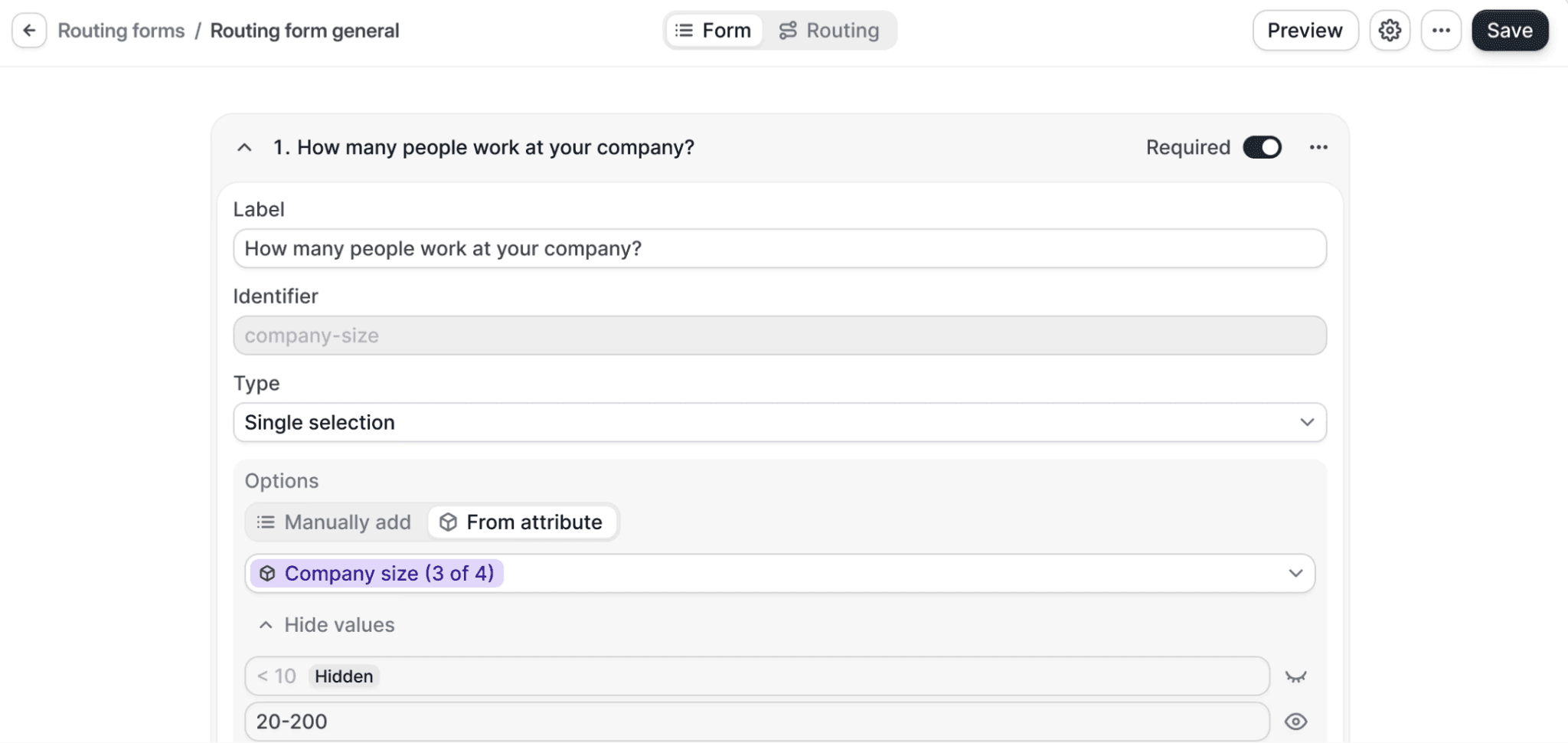
Chili Piper built its reputation on lead routing for Salesforce-first sales teams. Cal.com takes sales scheduling further, with routing forms that dynamically qualify leads, route to AEs or SDRs using round-robin, tag-based, or availability logic, and instantly trigger meetings from marketing pages, all without requiring Salesforce as the CRM backbone.
For example, Impel had been routing 90% of its demos through manual SDR assignment and phone calls. Switching to Cal.com moved the team to automated territory routing with Salesforce integration that syncs both ways, plus SDR qualification at the form level, cutting out the manual booking step entirely. In another case, FanBasis needed revenue-based routing by GMV tier with that same two-way Salesforce integration, replacing a workflow it had to rebuild manually for every product launch.
Front Row Health was losing UTM attribution on every HubSpot booking. Cal.com fixed this with a hidden-field injection that captures UTM parameters into the CRM record, closing a gap Chili Piper's HubSpot integration doesn't address, since its deepest routing logic remains Salesforce-native.
Deel routes bookings across global markets, localizes availability, and keeps rep utilization high on Cal.com, whether the team is inbound-heavy or outbound-driven.
2. One Platform for Every Team, Not Just Revenue
Chili Piper focuses narrowly on top-of-funnel sales. It has no functionality for HR interviews, internal ops meetings, customer success scheduling, or recruiting, so any use case outside revenue needs a separate tool. Cal.com was designed to serve every team across the org, from HR automating interviews and onboarding, to customer success streamlining escalations and quarterly reviews, to internal teams aligning calendars for cross-functional syncs.
At Deel, over 1,200 team members use Cal.com for customer success, support, sales, and more, saving more than 6,000 hours per week on manual coordination. BLACKCLOAK moved from a pooled team structure to segregated pods, each with sequential booking, its own routing logic, and two-way Salesforce sync, exactly the kind of multi-team use case Chili Piper's sales-funnel-focused platform can't replicate.
Cal.com customer Albert Luque described the experience as:
"The fact that Cal.com serves as a comprehensive solution for all my operational team's needs, eliminating the necessity for multiple tools, is a significant advantage. The smooth transition from Chili Piper to Cal.com affirms its superior utility."
3. Every Core Scheduling Feature, Including Ones Chili Piper Charges Extra For
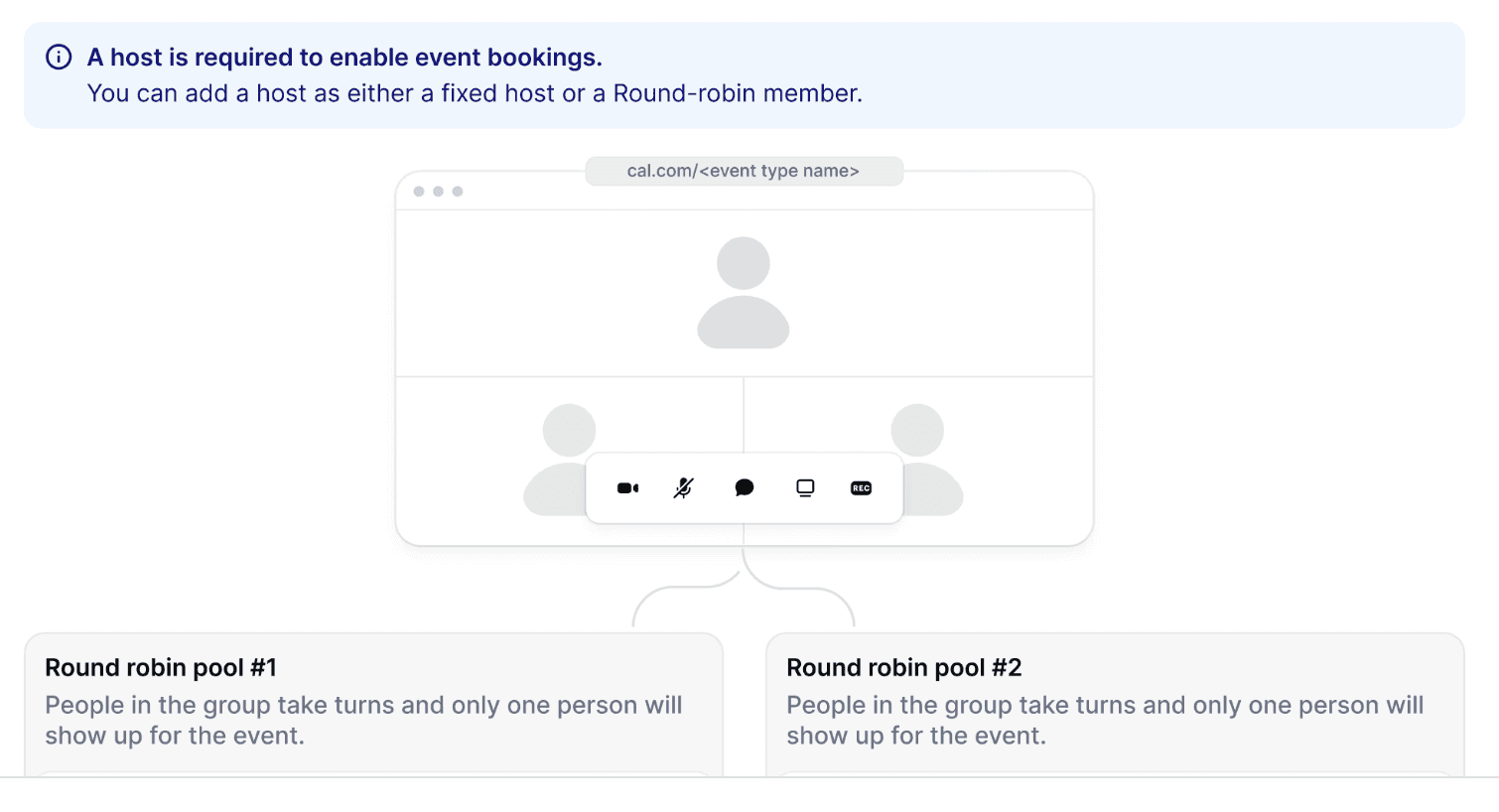
Round-robin scheduling comes included with Cal.com's free plan. On Chili Piper, that functionality is available in the paid Routing & Scheduling plan, which starts at $1,250 a month, so there's no way to get it without the full package.
The pattern repeats across the basics, including:
Calendar integrations with Google, Outlook, and iCloud
Buffers and availability controls
Branded, embeddable booking links
All of these features ship for free or as part of Cal.com's entry-level tier.
Cal.com also includes Cal Video, a built-in video conferencing tool. Teams that don't need Zoom or Google Meet can drop that subscription entirely, which matters more the larger your team gets.
In short, Cal.com gives you everything you'd expect from modern scheduling software, so you're not trading flexibility for completeness or paying a packaged-plan minimum to unlock features Cal.com includes by default.
4. Transparent Pricing vs. Chili Piper's Packaged Plans
Prompt Health cited Chili Piper's escalating costs as the primary reason it switched to Cal.com, and the Cal.com vs. Chili Piper pricing gap shows up fast.

Routing & Scheduling starts at $1,250 per month, billed annually, with 45,000 credits included per year and overage charges for usage beyond that. Experiences, Chili Piper's higher tier with dedicated experts, starts at $3,500 a month. ChiliCal, the standalone calendar tool, comes free with either paid plan or costs $12/user/month on its own, with a 200-seat minimum, per Chili Piper's pricing page.
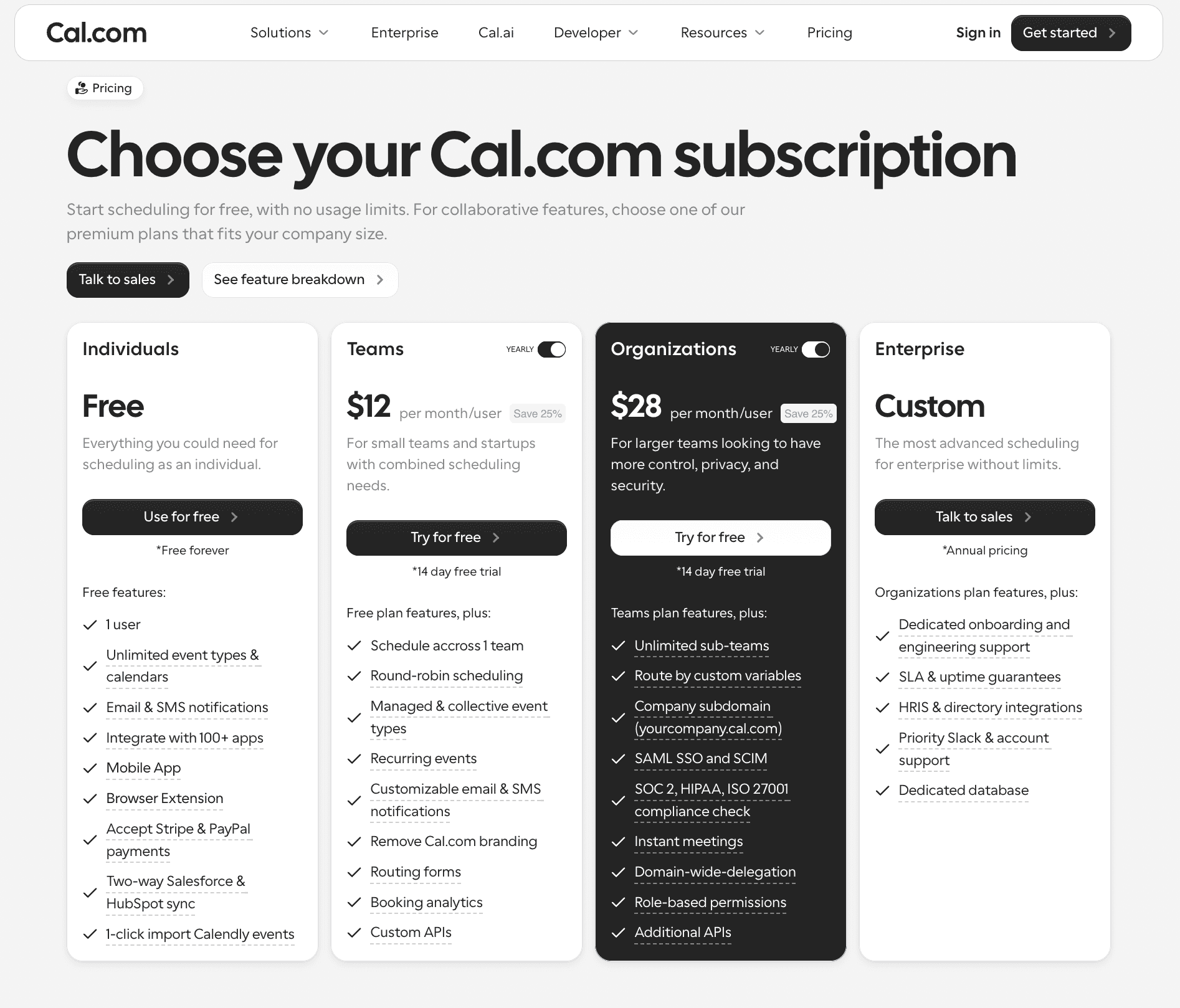
A 10-person team on Chili Piper's Routing & Scheduling plan pays the full $15,000 a year even though the plan already covers up to 15 seats, so actual headcount doesn't move the bill until you cross that threshold, and then it's $45 per extra seat per month. The same team on Cal.com's pricing, on the Organizations plan at $28/user/month [billed annually], pays $3,360/year and gets routing, round-robin, Salesforce sync, and every core feature included.
5. Developer-friendly API and Extensibility, Where Chili Piper Has Limits
Chili Piper's integrations run through Salesforce, HubSpot, and Zapier as part of its sales-focused workflows. Cal.com ships 100+ API endpoints with no plan restrictions. Prompt Cal.com also offers a dedicated App Store with 80+ purpose-built plugins spanning sales, HR, education, and operations, a more extensible foundation than a CRM-bound integration list.
Retell AI integrated Cal.com into its voice AI platform, which handles millions of monthly calls. The team cited a developer-friendly API, a highly responsive team collaborating in Slack throughout implementation, and no rate-limit issues at scale. As they put it:
"Cal.com's open API and seamless integration have been a game-changer. Our customers love it, and we couldn't be happier with the results."
Enterprise teams can also work with Cal.com to deploy a self-hosted instance for data control. Cal.com integrates with your infrastructure, not the other way around.
6. Enterprise Self-hosting and Control Capabilities That Chili Piper Cannot Offer
Cal.com recently moved to a closed-source model to protect customer data, as AI-driven vulnerability scanning made it too risky to run production code in the open. Enterprise teams can still work directly with Cal.com to deploy a self-hosted instance for organizations with strict compliance, data residency, or governance needs. This isn't a self-serve download. It's an enterprise deployment managed by Cal.com's team. The MIT-licensed Cal.diy fork remains available separately for personal, non-production use.
Chili Piper runs on closed, cloud-only infrastructure, with no self-hosting option for its scheduling software, so there's no path to deploying scheduling infrastructure in your own environment.
Booz Allen Hamilton needed a self-hosted deployment on AWS GovCloud for 350,000 users, a use case Chili Piper's cloud-only infrastructure can't support. Cal.com also supports SOC 2, HIPAA, and ISO 27001, and Cal.eu hosts your data inside the EU for teams needing residency guarantees that Chili Piper doesn't offer.
7. Enterprise Admin Controls, Managing Scheduling at the Org Scale
Enterprise-grade scheduling software requires more than booking links. It requires visibility, security, and governance that scale past a single sales team. Cal.com gives admins centralized billing and usage management, so finance and RevOps see spend across the org in one place instead of reconciling per-team invoices. Domain-wide delegation lets IT provision access the same way it manages every other tool in the stack.
Role-based access control and user hierarchies mean a 400-person sales org and a 12-person support team can run different permission sets without separate admin panels. SAML and SCIM support automate provisioning as headcount changes, which matters most for security teams audited on offboarding speed.
Chili Piper's admin controls are built primarily for sales workflows, including permissions, routing rules, and Salesforce sync. It doesn't offer org-wide SCIM provisioning, cross-department RBAC, or the hierarchical structure Cal.com supports. LegalZoom managed 400 external attorneys across 35 law firms with complete data isolation between sub-teams, a multi-tenant setup Chili Piper's sales-focused platform can't replicate.
What Chili Piper Does Well, and Where Cal.com Pulls Ahead
Chili Piper is a good fit for high-velocity revenue teams fully committed to Salesforce. Its Concierge functionality genuinely excels at converting form submissions into meetings, and its Salesforce integration is in-depth and native. Chili Piper also connects natively to ZoomInfo, Clay, Lusha, LeadIQ, and Apollo, enriching lead data before routing. For teams with a ZoomInfo or Clay contract already in place, that's a genuine reason to stay.
But if you want a platform that scales beyond your sales org, the trade-offs get clear fast:
Narrow focus: Chili Piper focuses primarily on revenue teams. Cal.com serves sales, HR, customer success, education, healthcare, and internal ops with equal ease.
Packaged pricing: Chili Piper's Routing & Scheduling plan alone starts at $15,000 a year, before Experiences or extra seats, a range that G2's pricing data also confirms. Cal.com offers transparent pricing, a free plan, and enterprise features without a minimum package size.
Rigid workflows: Chili Piper's automation is powerful but built around Salesforce. Cal.com offers flexible routing, plugin-based workflows, and developer APIs matching whatever CRM you run.
See our full breakdown of Chili Piper alternatives if you're weighing multiple options.
Cal.com vs. Chili Piper: Quick Comparison
Chili Piper | Cal.com | |
Ideal for | Sales orgs | Multi-faceted orgs: sales, HR, ops, CS |
Extensibility | CRM-driven workflows | Plugins, APIs, full developer control |
Hosting | Cloud only | Cloud, or enterprise self-hosted, managed with Cal.com's team |
Pricing | From $1,250/month, plus per-seat ChiliCal add-on. Annual commitment required. | Free plan available. Paid from $12/user/month [billed annually]. No packaged-plan minimum. |
Still weighing Cal.com vs. Chili Piper for your team? Start for free, or book a demo with our team to see how Cal.com fits your stack. |
Frequently Asked Questions
1. What makes Cal.com different from Chili Piper?
The difference between Cal.com and Chili Piper starts with scope. For example, Cal.com is flexible and works across the whole org, built for sales, HR, and customer success, not just revenue. Chili Piper prices by plan, starting at $1,250/month for Routing & Scheduling, while Cal.com offers a free plan and pricing from $12/user/month [billed annually]. Cal.com's enterprise self-hosting option also gives teams a deployment path that Chili Piper's cloud-only infrastructure doesn't offer.
2. Can I use Cal.com for sales team scheduling?
Yes, you can use Cal.com for sales team scheduling. Cal.com matches Chili Piper's core sales capabilities, where routing forms cover what Concierge does, attribute-based routing covers Distro's lead assignment, and round-robin covers ChiliCal's calendar functions. To give you an example, Impel moved from 90% manual SDR assignment to automated territory routing after switching. FanBasis now routes by GMV tier with bidirectional sync instead of manually rebuilding logic for every launch.
3. Does Cal.com offer video conferencing integration?
Yes, Cal.com does offer video conferencing integration. It integrates with Zoom, Google Meet, and Microsoft Teams and includes Cal Video, its own built-in conferencing tool, so you don't need a separate subscription. Chili Piper has no native video conferencing tool.
4. Is Cal.com open source? How does that benefit me?
No, Cal.com is not open-source. It moved to a closed-source model in 2026 to reduce the risk of AI-driven vulnerability scanning against a public codebase. The MIT-licensed Cal.diy fork remains available separately for personal, non-production use. Enterprise teams can still work directly with Cal.com to deploy a self-hosted instance for compliance, data residency, or governance needs, without relying on public source access. This benefits regulated teams that need infrastructure control even though the core platform is no longer open source.
5. What pricing options does Cal.com offer?
Cal.com has a free plan, a Teams plan at $12/user/month [billed annually], and an Organizations plan at $28/user/month [billed annually] with SAML, SCIM, and advanced routing. Enterprise pricing is custom. Chili Piper's Routing & Scheduling plan alone starts at $1,250 a month, so even a small team can pay more than Cal.com's Organizations plan for a full department.
6. Can I integrate Cal.com with other tools?
Yes, Cal.com's Salesforce integration works alongside HubSpot, Pipedrive, and Close, as well as Google Calendar, Zoom, Outlook, and Stripe. An App Store with 80+ plugins and a public API extends that further. Chili Piper's deepest routing logic is Salesforce-native, so HubSpot teams get form routing but lose its most advanced lead-to-account matching.
7. What if I need help integrating Cal.com into my systems?
Cal.com offers multiple integration support options. It provides self-serve API documentation and SDKs for developers building it themselves, plus 100+ API endpoints with no plan restrictions. Prompt Health described competitor APIs as offering only 10% of the endpoint coverage Cal.com provides. Enterprise customers also get direct support from Cal.com's engineering team for custom integrations.
8. How does Cal.com handle compliance and security?
Yes, Cal.com supports compliance and security requirements with SOC 2 Type II, HIPAA, and ISO 27001 certifications. HIPAA is included with the Organizations plan instead of being sold as an add-on. Enterprise teams can also deploy a self-hosted instance through Cal.com's team for greater control over their data. By comparison, Chili Piper does not publish HIPAA compliance as a standard feature, which may be important for teams in regulated industries.
9. Is Cal.com suitable for enterprises?
Yes, Cal.com is suitable for enterprises. Deel runs over 1,200 team members on Cal.com across customer success, support, and sales, and Retell AI built Cal.com into its voice AI platform at scale. Booz Allen Hamilton deployed a self-hosted instance on AWS GovCloud for 350,000 users, though that deployment predates Cal.com's 2026 move to closed source. Enterprise self-hosting today runs as a managed deployment through Cal.com's team, not an independent setup. LegalZoom manages 400 attorneys across 35 law firms with complete data isolation between sub-teams.
10. What is the onboarding process like for Cal.com?
No, onboarding with Cal.com does not take long. Most teams go live within hours on the cloud plan, with step-by-step guides and integration support. Enterprise deployments involving custom routing, SSO, or a self-hosted instance typically take days, not weeks, with direct support from Cal.com's team throughout, faster than Chili Piper's implementation, which often needs a dedicated RevOps resource to configure routing rules first.

Get started with Cal.com for free today!
Experience seamless scheduling and productivity with no hidden fees. Sign up in seconds and start simplifying your scheduling today, no credit card required!