" height="18.016311920580208px" id="GKXyVanMq" stroke-dasharray="0" stroke-linecap="butt" stroke-linejoin="miter" stroke-miterlimit="10" stroke-width="0.5" stroke="rgb(0, 0, 0)" transform="translate(3 3)" width="18px"/></svg>)
"/><stop offset="1" stop-color="rgb(227, 224, 244)"/></linearGradient><linearGradient id="CBS1bzkxF-2031533640-linear-gradient" x1="0.49751243781094523" x2="0.5024875621890548" y1="0" y2="1"><stop offset="0" stop-color="rgb(255, 255, 255)"/><stop offset="1" stop-color="rgb(227, 224, 244)"/></linearGradient><linearGradient id="Jd7AK81w9-2031533640-linear-gradient" x1="0.49751243781094523" x2="0.5024875621890548" y1="0" y2="1"><stop offset="0" stop-color="rgb(255, 255, 255)"/><stop offset="1" stop-color="rgb(227, 224, 244)"/></linearGradient></defs><g d="M 0 16 L 0 0 L 16 0 L 16 16 Z M 9.167 5.167 C 9.167 4.891 8.943 4.667 8.667 4.667 C 8.391 4.667 8.167 4.891 8.167 5.167 C 8.167 6.784 7.809 7.834 7.155 8.488 C 6.501 9.143 5.451 9.5 3.833 9.5 C 3.557 9.5 3.333 9.724 3.333 10 C 3.333 10.276 3.557 10.5 3.833 10.5 C 5.451 10.5 6.501 10.857 7.155 11.512 C 7.809 12.166 8.167 13.216 8.167 14.833 C 8.167 15.109 8.391 15.333 8.667 15.333 C 8.943 15.333 9.167 15.109 9.167 14.833 C 9.167 13.216 9.524 12.166 10.178 11.512 C 10.832 10.857 11.883 10.5 13.5 10.5 C 13.776 10.5 14 10.276 14 10 C 14 9.724 13.776 9.5 13.5 9.5 C 11.883 9.5 10.832 9.143 10.178 8.488 C 9.524 7.834 9.167 6.784 9.167 5.167 Z M 4 3.667 C 4 3.483 3.851 3.333 3.667 3.333 C 3.483 3.333 3.333 3.483 3.333 3.667 C 3.333 4.32 3.189 4.715 2.952 4.952 C 2.715 5.189 2.32 5.333 1.667 5.333 C 1.483 5.333 1.333 5.483 1.333 5.667 C 1.333 5.851 1.483 6 1.667 6 C 2.32 6 2.715 6.145 2.952 6.382 C 3.189 6.618 3.333 7.013 3.333 7.667 C 3.333 7.851 3.483 8 3.667 8 C 3.851 8 4 7.851 4 7.667 C 4 7.013 4.145 6.618 4.382 6.382 C 4.618 6.145 5.013 6 5.667 6 C 5.851 6 6 5.851 6 5.667 C 6 5.483 5.851 5.333 5.667 5.333 C 5.013 5.333 4.618 5.189 4.382 4.952 C 4.145 4.715 4 4.32 4 3.667 Z M 7.333 1 C 7.333 0.816 7.184 0.667 7 0.667 C 6.816 0.667 6.667 0.816 6.667 1 C 6.667 1.422 6.573 1.65 6.445 1.778 C 6.317 1.906 6.089 2 5.667 2 C 5.483 2 5.333 2.149 5.333 2.333 C 5.333 2.517 5.483 2.667 5.667 2.667 C 6.089 2.667 6.317 2.761 6.445 2.889 C 6.573 3.016 6.667 3.244 6.667 3.667 C 6.667 3.851 6.816 4 7 4 C 7.184 4 7.333 3.851 7.333 3.667 C 7.333 3.244 7.427 3.016 7.555 2.889 C 7.683 2.761 7.911 2.667 8.333 2.667 C 8.517 2.667 8.667 2.517 8.667 2.333 C 8.667 2.149 8.517 2 8.333 2 C 7.911 2 7.683 1.906 7.555 1.778 C 7.427 1.65 7.333 1.422 7.333 1 Z" fill="transparent" height="16px" id="aoZYv33vR" width="16px"><path d="M 0 16 L 0 0 L 16 0 L 16 16 Z" fill="transparent" height="16px" id="Z2uGmhW9f" width="16px"/><g d="M 7.833 4.5 C 7.833 4.224 7.609 4 7.333 4 C 7.057 4 6.833 4.224 6.833 4.5 C 6.833 6.117 6.476 7.168 5.822 7.822 C 5.168 8.476 4.117 8.833 2.5 8.833 C 2.224 8.833 2 9.057 2 9.333 C 2 9.61 2.224 9.833 2.5 9.833 C 4.117 9.833 5.168 10.191 5.822 10.845 C 6.476 11.499 6.833 12.549 6.833 14.167 C 6.833 14.443 7.057 14.667 7.333 14.667 C 7.609 14.667 7.833 14.443 7.833 14.167 C 7.833 12.549 8.191 11.499 8.845 10.845 C 9.499 10.191 10.549 9.833 12.167 9.833 C 12.443 9.833 12.667 9.61 12.667 9.333 C 12.667 9.057 12.443 8.833 12.167 8.833 C 10.549 8.833 9.499 8.476 8.845 7.822 C 8.191 7.168 7.833 6.117 7.833 4.5 Z M 2.667 3 C 2.667 2.816 2.517 2.667 2.333 2.667 C 2.149 2.667 2 2.816 2 3 C 2 3.654 1.855 4.048 1.618 4.285 C 1.382 4.522 0.987 4.667 0.333 4.667 C 0.149 4.667 0 4.816 0 5 C 0 5.184 0.149 5.333 0.333 5.333 C 0.987 5.333 1.382 5.478 1.618 5.715 C 1.855 5.952 2 6.346 2 7 C 2 7.184 2.149 7.333 2.333 7.333 C 2.517 7.333 2.667 7.184 2.667 7 C 2.667 6.346 2.811 5.952 3.048 5.715 C 3.285 5.478 3.68 5.333 4.333 5.333 C 4.517 5.333 4.667 5.184 4.667 5 C 4.667 4.816 4.517 4.667 4.333 4.667 C 3.68 4.667 3.285 4.522 3.048 4.285 C 2.811 4.048 2.667 3.654 2.667 3 Z M 6 0.333 C 6 0.149 5.851 0 5.667 0 C 5.483 0 5.333 0.149 5.333 0.333 C 5.333 0.756 5.239 0.984 5.112 1.112 C 4.984 1.239 4.756 1.333 4.333 1.333 C 4.149 1.333 4 1.483 4 1.667 C 4 1.851 4.149 2 4.333 2 C 4.756 2 4.984 2.094 5.112 2.222 C 5.239 2.35 5.333 2.578 5.333 3 C 5.333 3.184 5.483 3.333 5.667 3.333 C 5.851 3.333 6 3.184 6 3 C 6 2.578 6.094 2.35 6.222 2.222 C 6.35 2.094 6.578 2 7 2 C 7.184 2 7.333 1.851 7.333 1.667 C 7.333 1.483 7.184 1.333 7 1.333 C 6.578 1.333 6.35 1.239 6.222 1.112 C 6.094 0.984 6 0.756 6 0.333 Z" fill="transparent" height="14.66671286102295px" id="ae6ccdFme" transform="translate(1.333 0.667)" width="12.66663px"><path d="M 5.833 0.5 C 5.833 0.224 5.609 0 5.333 0 C 5.057 0 4.833 0.224 4.833 0.5 C 4.833 2.117 4.476 3.168 3.822 3.822 C 3.168 4.476 2.117 4.833 0.5 4.833 C 0.224 4.833 0 5.057 0 5.333 C 0 5.61 0.224 5.833 0.5 5.833 C 2.117 5.833 3.168 6.191 3.822 6.845 C 4.476 7.499 4.833 8.549 4.833 10.167 C 4.833 10.443 5.057 10.667 5.333 10.667 C 5.609 10.667 5.833 10.443 5.833 10.167 C 5.833 8.549 6.191 7.499 6.845 6.845 C 7.499 6.191 8.549 5.833 10.167 5.833 C 10.443 5.833 10.667 5.61 10.667 5.333 C 10.667 5.057 10.443 4.833 10.167 4.833 C 8.549 4.833 7.499 4.476 6.845 3.822 C 6.191 3.168 5.833 2.117 5.833 0.5 Z" fill="url(%23t2lXByE48-2031533640-linear-gradient)" height="10.66671px" id="t2lXByE48" transform="translate(2 4)" width="10.66663px"/><path d="M 2.667 0.333 C 2.667 0.149 2.517 0 2.333 0 C 2.149 0 2 0.149 2 0.333 C 2 0.987 1.855 1.382 1.618 1.618 C 1.382 1.855 0.987 2 0.333 2 C 0.149 2 0 2.149 0 2.333 C 0 2.517 0.149 2.667 0.333 2.667 C 0.987 2.667 1.382 2.811 1.618 3.048 C 1.855 3.285 2 3.68 2 4.333 C 2 4.517 2.149 4.667 2.333 4.667 C 2.517 4.667 2.667 4.517 2.667 4.333 C 2.667 3.68 2.811 3.285 3.048 3.048 C 3.285 2.811 3.68 2.667 4.333 2.667 C 4.517 2.667 4.667 2.517 4.667 2.333 C 4.667 2.149 4.517 2 4.333 2 C 3.68 2 3.285 1.855 3.048 1.618 C 2.811 1.382 2.667 0.987 2.667 0.333 Z" fill="url(%23CBS1bzkxF-2031533640-linear-gradient)" height="4.66667px" id="CBS1bzkxF" transform="translate(0 2.667)" width="4.66667px"/><path d="M 2 0.333 C 2 0.149 1.851 0 1.667 0 C 1.483 0 1.333 0.149 1.333 0.333 C 1.333 0.756 1.239 0.984 1.112 1.112 C 0.984 1.239 0.756 1.333 0.333 1.333 C 0.149 1.333 0 1.483 0 1.667 C 0 1.851 0.149 2 0.333 2 C 0.756 2 0.984 2.094 1.112 2.222 C 1.239 2.35 1.333 2.578 1.333 3 C 1.333 3.184 1.483 3.333 1.667 3.333 C 1.851 3.333 2 3.184 2 3 C 2 2.578 2.094 2.35 2.222 2.222 C 2.35 2.094 2.578 2 3 2 C 3.184 2 3.333 1.851 3.333 1.667 C 3.333 1.483 3.184 1.333 3 1.333 C 2.578 1.333 2.35 1.239 2.222 1.112 C 2.094 0.984 2 0.756 2 0.333 Z" fill="url(%23Jd7AK81w9-2031533640-linear-gradient)" height="3.333333px" id="Jd7AK81w9" transform="translate(4 0)" width="3.3333399999999997px"/></g></g></svg>)
" height="24px" id="WCm44spAV" width="24px"/><path d="M 3.892 7.742 C 1.674 7.742 0 6.014 0 3.882 C 0 1.738 1.589 0 3.892 0 C 5.107 0 5.951 0.374 6.623 1.173 L 5.566 2.09 C 5.118 1.621 4.564 1.386 3.892 1.386 C 2.452 1.386 1.547 2.517 1.547 3.882 C 1.547 5.246 2.452 6.356 3.924 6.356 C 4.649 6.356 5.193 6.111 5.63 5.63 L 6.718 6.558 C 6.153 7.24 5.193 7.742 3.892 7.742 Z" fill="rgb(255, 255, 255)" height="7.741500000000002px" id="XEPpGD7l5" transform="translate(4 8.25)" width="6.717999999999989px"/><path d="M 2.74 7.922 C 1.215 7.922 0 6.632 0 5.032 C 0 3.433 1.215 2.122 2.74 2.122 C 3.7 2.122 4.201 2.516 4.5 3.113 L 4.5 2.239 L 5.928 2.239 L 5.928 7.784 L 4.531 7.784 L 4.531 6.877 C 4.233 7.507 3.731 7.922 2.74 7.922 Z M 1.439 5.023 C 1.439 5.865 2.057 6.622 2.975 6.622 C 3.924 6.622 4.531 5.897 4.531 5.033 C 4.531 4.169 3.924 3.423 2.975 3.423 C 2.057 3.423 1.439 4.159 1.439 5.022 Z M 6.784 7.784 L 6.784 0 L 8.224 0 L 8.224 7.784 L 6.784 7.784 Z" fill="rgb(255, 255, 255)" height="7.9224997406005855px" id="lGDJupIUR" transform="translate(10.5 8)" width="8.223500194549558px"/></g></svg>)
" width="18px"><path d="M 2 8 C 0.895 8 0 7.105 0 6 L 0 2 C 0 0.895 0.895 0 2 0 L 6 0 C 7.105 0 8 0.895 8 2 L 8 6 C 8 7.105 7.105 8 6 8 Z" fill="transparent" height="8px" id="ZrCrI93dV" stroke-dasharray="" stroke-linecap="round" stroke-linejoin="round" stroke-width="2" stroke="rgb(0, 0, 0)" width="8px"/><path d="M 0 0 L 0 4 C 0 5.105 0.895 6 2 6 L 6 6" fill="transparent" height="6px" id="emltWYAiE" stroke-dasharray="" stroke-linecap="round" stroke-linejoin="round" stroke-width="2" stroke="rgb(0, 0, 0)" transform="translate(4 8)" width="6px"/><path d="M 2 8 C 0.895 8 0 7.105 0 6 L 0 2 C 0 0.895 0.895 0 2 0 L 6 0 C 7.105 0 8 0.895 8 2 L 8 6 C 8 7.105 7.105 8 6 8 Z" fill="transparent" height="8px" id="WpBecYDfi" stroke-dasharray="" stroke-linecap="round" stroke-linejoin="round" stroke-width="2" stroke="rgb(0, 0, 0)" transform="translate(10 10)" width="8px"/></g></svg>)


5 Best Agency Scheduling Software
Agency scheduling software has two jobs. It needs to make sure each meeting reaches the right person on your team, while also making it easy for clients to find a time that works and book it themselves.
Cal.com is the best agency scheduling software because it handles both sides well. Round-robin routing and routing forms help distribute bookings to the right team members, while full white-labeling and custom domains give clients a booking experience that feels like part of your agency. Calendar and CRM integrations keep everything in sync after each booking.
But Cal.com isn’t the only option. We compared it with Calendly, Acuity Scheduling, SavvyCal, and HubSpot Meetings based on:
Team routing: Can bookings reach the right team member automatically?
Client branding: Can you control how your booking pages are branded?
Sync coverage: Does it connect with your calendars and CRM?
The comparison table near the end scores all five tools on these three questions, plus their free plans.
TL;DR: best agency scheduling software at a glance
Cal.com: best for team routing and branded client booking
Calendly: best for easy, familiar scheduling
Acuity Scheduling: best for paid sessions and workshops
SavvyCal: best for a client-first booking experience
HubSpot Meetings: best for agencies using HubSpot
What is agency scheduling software?
Agencies use scheduling software to let clients and prospects book meetings without having to coordinate times manually. It can also decide who should take each meeting, keep team calendars up to date, and connect bookings with client records.
For example, an agency might use round-robin scheduling to distribute discovery calls, create separate booking pages for different services, or give each client a dedicated way to schedule recurring meetings with their account team.
Agency scheduling software focuses on getting meetings booked and coordinated. It's different from project and resource management software, which helps agencies plan team capacity, assign work, and manage project schedules.
Many agencies also run it alongside other services they manage for clients, like a domain reseller program for registering the domains that client websites and booking pages run on.
The 5 best agency scheduling software
1. Cal.com: best for team routing and branded client booking
Free plan? | Starting price | Standout feature | Best use case |
|---|---|---|---|
Yes | $16/user/month | Team routing and white-label booking | Agencies that need branded client booking and flexible team scheduling |

What it is: Cal.com is a scheduling platform that helps individuals and teams manage meetings and appointments. Agencies can use it to coordinate availability across their team, route bookings to the right person, and keep meetings connected to their calendars and CRM. They can also collect payments for paid sessions and customize booking pages to create a more branded experience for clients.

Why it ranks first: Cal.com makes it easier to manage bookings across your team while keeping the client-facing experience under your agency’s brand. Round-robin scheduling and routing send bookings to the right people, while branding and white-label options give you more control over the booking pages clients see.
Key features:
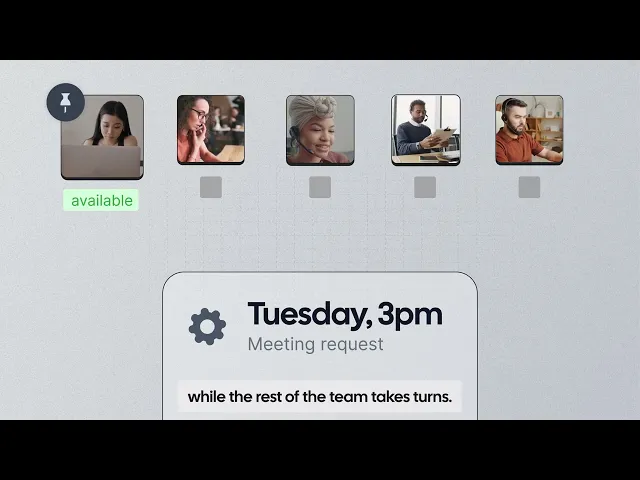
Round-robin scheduling: Distribute bookings across your team so meetings automatically go to the right person.
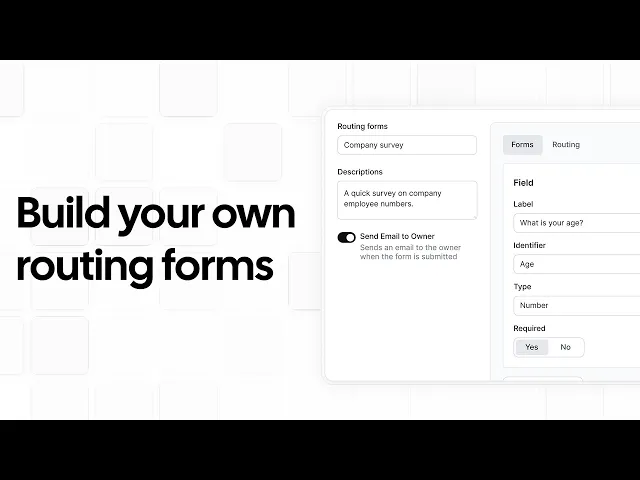
Routing forms: Qualify incoming requests and send them to the right team member or meeting type.
Collective scheduling: Find times that work for multiple team members.
Managed events: Give admins visibility and control over team bookings.
Branded booking pages: Customize the client-facing experience to match your agency.
White-labeling: Remove Cal.com branding from booking pages and emails.
Custom domains: Use your own domain for client booking pages.
Calendar sync: Connect Google, Outlook, and Apple calendars to keep availability updated.
CRM integrations: Connect Salesforce and HubSpot to keep booking and customer data in sync.
Workflow automation: Automate confirmations, reminders, and follow-ups.
Booking analytics: Track booking activity and performance to understand how your scheduling is working.
Calendar overlay: Let clients overlay their own calendar when booking to find a time that works for them.
Payments: Accept payments through Stripe and PayPal when clients book paid consultations or workshops.
Cal AI: Let clients schedule meetings by phone through a conversational AI assistant.
Pricing: Cal.com’s free plan covers unlimited event types, unlimited bookings, calendar sync, reminders, and payments for one user. Paid plans start at $16/user/month, or $12/user/month when billed annually, and add team features such as round-robin scheduling, routing forms, collective events, custom reminders, booking analytics, and removing Cal.com branding.

Best for: Agencies that want one scheduling platform for client booking, team routing, branding, automation, and integrations.
Verdict: Cal.com combines the internal routing agencies need with the branded client experience they want, while leaving room to customize or embed scheduling as the agency grows.
Get started with Cal.com’s free plan, or book a demo if you want to talk through how to set up scheduling for your agency.
2. Calendly: best for easy, familiar scheduling
Free plan? | Starting price | Standout feature | Best use case |
|---|---|---|---|
Yes | $12/seat/month | Familiar booking experience | Agencies that want an easy-to-adopt scheduling tool |

What it is: Calendly is one of the most familiar scheduling tools on the market, which can make it an easy choice for agencies. Clients are likely to recognize the booking experience, so you won't have to explain how it works. It supports team scheduling, round-robin distribution, lead routing, CRM integrations, and booking pages.
Key features:
Round-robin and team scheduling for distributing bookings across team members.
Lead routing to qualify prospects and send them to the right person.
CRM integrations with Salesforce, HubSpot, Marketo, and Pardot.
Embeddable booking pages for adding scheduling to your website.
Automated reminders and workflows to keep clients updated before and after meetings.
Pricing: Calendly has a free plan that includes one event type and one calendar connection. Paid plans start at $12/seat/month and add features such as round-robin scheduling, team scheduling, lead routing, and Salesforce integration.
Pros:
Clients are already familiar with the booking experience
Simple setup with little learning required
Broad integration ecosystem
Cons:
Restrictive free plan
Limited branding options
Best for: Agencies that want a familiar booking experience and don't need extensive customization.
Comparison verdict: Choose Calendly if you want a scheduling tool your clients are likely to recognize and understand immediately. Choose Cal.com if your agency needs more control over team routing, client-facing branding, integrations, and the booking experience.
3. Acuity Scheduling: best for paid sessions and workshops
Free plan? | Starting price | Standout feature | Best use case |
|---|---|---|---|
No, 7-day trial | $20/month | Intake forms and payments | Agencies that sell paid sessions or workshops |

What it is: Acuity Scheduling combines appointment scheduling with client intake, payments, deposits, packages, and reminders. An agency can use it to let clients book a strategy session or workshop, collect the information needed before the meeting, and take a deposit or payment during the booking process. It also supports packages, which can be useful when an agency sells a set of sessions rather than a single appointment.
Key features:
Client intake forms to collect information before a session.
Payments, deposits, and packages through Stripe, Square, PayPal, and Venmo.
Multiple calendars for different team members or locations.
Automated email and text reminders on supported plans.
API access on the highest plan.
Pricing: Acuity doesn’t have a free plan, but all plans include a 7-day free trial. Paid plans start at $20/month and include features such as client intake, payments, deposits, packages, and appointment reminders.
Pros:
Excellent for paid appointments and service bookings
Intake forms and payments are built into the booking flow
Supports packages and other paid booking options
Cons:
No free plan after the trial
Not suitable for complex inbound routing
Best for: Agencies that sell paid consultations, audits, workshops, or other appointment-based services.
Comparison verdict: Acuity is a better choice when payment and client intake are central to the booking process. Cal.com is a better fit if you want to accept one-time payments while also getting deeper team routing, branded booking pages, and CRM-connected scheduling.
4. SavvyCal: best for a client-first booking experience
Free plan? | Starting price | Standout feature | Best use case |
|---|---|---|---|
No, and no trial | $12/user/month | Calendar-overlay booking that clients enjoy | Agencies that want a polished client booking experience |

What it is: SavvyCal takes a different approach to scheduling. Instead of asking clients to look through your availability on a traditional booking page, its calendar overlay lets them compare your availability with their own calendar. That makes the experience feel more collaborative, which can be useful for agencies that schedule meetings with clients frequently. It also supports team scheduling, ranked availability, meeting polls, and custom domains on its Premium plan.
Key features:
Calendar overlays that let clients compare their availability with yours.
Ranked availability to highlight preferred meeting times.
Meeting polls for coordinating groups.
Round-robin and collective scheduling for team meetings.
Paid bookings for agencies that charge for appointments.
Pricing: SavvyCal doesn’t offer a free plan or trial. Paid plans start at $12/user/month and include features such as calendar overlays, round-robin scheduling, and collective scheduling. Custom domains and paid bookings are available on higher plans.
Pros:
Customer-friendly booking experience
Calendar overlay makes finding a mutually convenient time easier
Ranked availability helps teams guide clients toward preferred times
Cons:
No free plan or trial
It focuses on a smaller set of scheduling features
Best for: Client-facing agencies that want the booking experience to feel more collaborative and polished.
Comparison verdict: SavvyCal is a good choice when the booking experience itself is a priority. Cal.com is a better fit for agencies that also need deeper routing, CRM connectivity, white-label control, and more customization.
5. HubSpot Meetings: best for agencies using HubSpot
Free plan? | Starting price | Standout feature | Best use case |
|---|---|---|---|
Yes | Included with HubSpot Sales Hub subscription | Automatic CRM logging on every booking | Agencies already using HubSpot as their CRM |

What it is: If your agency already uses HubSpot, Meetings connects your scheduling activity directly with your CRM. Bookings are logged against contact and deal records, keeping meeting activity alongside the rest of your client data. The downside is that advanced team scheduling features require paid HubSpot seats. For a small agency that only needs scheduling software, those costs can add up quickly.
Key features:
Automatic CRM logging that connects bookings with contact and deal records.
Round-robin and group scheduling on paid Sales Hub or Service Hub plans.
Embeddable booking pages for websites.
Automated reminders for upcoming meetings.
Payments through HubSpot's payment tools and Stripe.
Pricing: HubSpot offers a free plan with meeting scheduling, although features are limited. Starter plans start at $20/seat/month and add features such as round-robin and group scheduling, with pricing reaching up to $100/seat/month.
Pros:
Free tools are available to get started
Scheduling and CRM data live in one system
Familiar, clean booking experience for clients
Cons:
Steep learning curve for new HubSpot users
Full white-label control is limited compared with Cal.com
You're buying into a much larger CRM platform rather than a dedicated scheduler
Best for: Agencies that already use HubSpot and want scheduling and CRM in one place.
Comparison verdict: HubSpot Meetings is a good choice if your agency already uses HubSpot as its CRM. If you want a standalone scheduling tool that also connects with HubSpot or another CRM, choose Cal.com.
Agency scheduling software: quick comparison
Here’s how the five agency scheduling software stack up across key features and free plans:
Tool | Free plan | Team routing | Client branding | Sync coverage |
|---|---|---|---|---|
Cal.com | ✅ Yes | ✅ Round-robin, routing forms, collective scheduling | ✅ Full white-label on your own domain | ✅ Google, Outlook, Apple, HubSpot, Salesforce, and more |
Calendly | ✅ Yes | ✅ Round-robin and lead routing | ⚠️ Logo and branding; no full white-label | ✅ Major calendars & CRMs |
Acuity Scheduling | ❌ No, 7-day trial | ✅ Round-robin and priority routing | ⚠️ Custom branding, but not full white-label | ⚠️ Limited CRM and calendar integrations |
SavvyCal | ❌ No free plan or trial | ✅ Round-robin and collective | ⚠️ Custom branding & domain; not full white-label | ⚠️ Limited CRM and calendar integrations |
HubSpot Meetings | ✅ Yes | ✅ Round-robin and group scheduling | ⚠️ Logo, colors & domain; not full white-label | ✅ HubSpot, Google, Office 365 |
Final verdict
Think about what your agency needs most: team routing, client appointments, or CRM-connected scheduling.
Cal.com is the best choice if you want routing, white-label booking pages, and calendar and CRM integrations in one tool. Its generous free plan gives you room to start, while its paid plans add the team features you need.
If you want familiar scheduling that clients already know, choose Calendly. If you sell appointments with intake forms and packages, Acuity Scheduling may suit you better. If you want clients to have more control when finding a time, try SavvyCal. And if you already use HubSpot as your CRM, HubSpot Meetings keeps scheduling there.
Want to see if Cal.com is right for your agency? start with the free plan or book a demo to get started.
Frequently asked questions
What is the best scheduling software for agencies? Cal.com is the best agency scheduling software overall. It combines team routing, branded and white-label booking pages, calendar and CRM integrations, workflow automation, and payments.
Is there free scheduling software for agencies? Yes. Cal.com has a free plan with unlimited event types and bookings, calendar sync, reminders, and payments for one user. HubSpot also offers free meeting scheduling, while Calendly's free plan is limited to one event type.
How much does Cal.com cost for an agency? Cal.com has a free plan for individuals. Paid plans start at $16/user/month, or $12/user/month when billed annually, and add team features such as round-robin scheduling, routing forms, collective events, booking analytics, and branding controls.
Which scheduling software is best if we already use HubSpot? HubSpot Meetings is a good choice if you want scheduling and CRM data in the same system. If you want a standalone scheduling tool that also connects to HubSpot, Cal.com gives you team routing, branded booking pages, and CRM integration.
Can agencies white-label their client booking pages? Yes. The level of control varies by tool. Cal.com offers full white-labeling and custom domains. Calendly, Acuity Scheduling, SavvyCal, and HubSpot Meetings offer branding controls, but with more limitations than Cal.com's white-label options.

Get started with Cal.com for free today!
Experience seamless scheduling and productivity with no hidden fees. Sign up in seconds and start simplifying your scheduling today, no credit card required!