" height="18.016311920580208px" id="GKXyVanMq" stroke-dasharray="0" stroke-linecap="butt" stroke-linejoin="miter" stroke-miterlimit="10" stroke-width="0.5" stroke="rgb(0, 0, 0)" transform="translate(3 3)" width="18px"/></svg>)
"/><stop offset="1" stop-color="rgb(227, 224, 244)"/></linearGradient><linearGradient id="CBS1bzkxF-2031533640-linear-gradient" x1="0.49751243781094523" x2="0.5024875621890548" y1="0" y2="1"><stop offset="0" stop-color="rgb(255, 255, 255)"/><stop offset="1" stop-color="rgb(227, 224, 244)"/></linearGradient><linearGradient id="Jd7AK81w9-2031533640-linear-gradient" x1="0.49751243781094523" x2="0.5024875621890548" y1="0" y2="1"><stop offset="0" stop-color="rgb(255, 255, 255)"/><stop offset="1" stop-color="rgb(227, 224, 244)"/></linearGradient></defs><g d="M 0 16 L 0 0 L 16 0 L 16 16 Z M 9.167 5.167 C 9.167 4.891 8.943 4.667 8.667 4.667 C 8.391 4.667 8.167 4.891 8.167 5.167 C 8.167 6.784 7.809 7.834 7.155 8.488 C 6.501 9.143 5.451 9.5 3.833 9.5 C 3.557 9.5 3.333 9.724 3.333 10 C 3.333 10.276 3.557 10.5 3.833 10.5 C 5.451 10.5 6.501 10.857 7.155 11.512 C 7.809 12.166 8.167 13.216 8.167 14.833 C 8.167 15.109 8.391 15.333 8.667 15.333 C 8.943 15.333 9.167 15.109 9.167 14.833 C 9.167 13.216 9.524 12.166 10.178 11.512 C 10.832 10.857 11.883 10.5 13.5 10.5 C 13.776 10.5 14 10.276 14 10 C 14 9.724 13.776 9.5 13.5 9.5 C 11.883 9.5 10.832 9.143 10.178 8.488 C 9.524 7.834 9.167 6.784 9.167 5.167 Z M 4 3.667 C 4 3.483 3.851 3.333 3.667 3.333 C 3.483 3.333 3.333 3.483 3.333 3.667 C 3.333 4.32 3.189 4.715 2.952 4.952 C 2.715 5.189 2.32 5.333 1.667 5.333 C 1.483 5.333 1.333 5.483 1.333 5.667 C 1.333 5.851 1.483 6 1.667 6 C 2.32 6 2.715 6.145 2.952 6.382 C 3.189 6.618 3.333 7.013 3.333 7.667 C 3.333 7.851 3.483 8 3.667 8 C 3.851 8 4 7.851 4 7.667 C 4 7.013 4.145 6.618 4.382 6.382 C 4.618 6.145 5.013 6 5.667 6 C 5.851 6 6 5.851 6 5.667 C 6 5.483 5.851 5.333 5.667 5.333 C 5.013 5.333 4.618 5.189 4.382 4.952 C 4.145 4.715 4 4.32 4 3.667 Z M 7.333 1 C 7.333 0.816 7.184 0.667 7 0.667 C 6.816 0.667 6.667 0.816 6.667 1 C 6.667 1.422 6.573 1.65 6.445 1.778 C 6.317 1.906 6.089 2 5.667 2 C 5.483 2 5.333 2.149 5.333 2.333 C 5.333 2.517 5.483 2.667 5.667 2.667 C 6.089 2.667 6.317 2.761 6.445 2.889 C 6.573 3.016 6.667 3.244 6.667 3.667 C 6.667 3.851 6.816 4 7 4 C 7.184 4 7.333 3.851 7.333 3.667 C 7.333 3.244 7.427 3.016 7.555 2.889 C 7.683 2.761 7.911 2.667 8.333 2.667 C 8.517 2.667 8.667 2.517 8.667 2.333 C 8.667 2.149 8.517 2 8.333 2 C 7.911 2 7.683 1.906 7.555 1.778 C 7.427 1.65 7.333 1.422 7.333 1 Z" fill="transparent" height="16px" id="aoZYv33vR" width="16px"><path d="M 0 16 L 0 0 L 16 0 L 16 16 Z" fill="transparent" height="16px" id="Z2uGmhW9f" width="16px"/><g d="M 7.833 4.5 C 7.833 4.224 7.609 4 7.333 4 C 7.057 4 6.833 4.224 6.833 4.5 C 6.833 6.117 6.476 7.168 5.822 7.822 C 5.168 8.476 4.117 8.833 2.5 8.833 C 2.224 8.833 2 9.057 2 9.333 C 2 9.61 2.224 9.833 2.5 9.833 C 4.117 9.833 5.168 10.191 5.822 10.845 C 6.476 11.499 6.833 12.549 6.833 14.167 C 6.833 14.443 7.057 14.667 7.333 14.667 C 7.609 14.667 7.833 14.443 7.833 14.167 C 7.833 12.549 8.191 11.499 8.845 10.845 C 9.499 10.191 10.549 9.833 12.167 9.833 C 12.443 9.833 12.667 9.61 12.667 9.333 C 12.667 9.057 12.443 8.833 12.167 8.833 C 10.549 8.833 9.499 8.476 8.845 7.822 C 8.191 7.168 7.833 6.117 7.833 4.5 Z M 2.667 3 C 2.667 2.816 2.517 2.667 2.333 2.667 C 2.149 2.667 2 2.816 2 3 C 2 3.654 1.855 4.048 1.618 4.285 C 1.382 4.522 0.987 4.667 0.333 4.667 C 0.149 4.667 0 4.816 0 5 C 0 5.184 0.149 5.333 0.333 5.333 C 0.987 5.333 1.382 5.478 1.618 5.715 C 1.855 5.952 2 6.346 2 7 C 2 7.184 2.149 7.333 2.333 7.333 C 2.517 7.333 2.667 7.184 2.667 7 C 2.667 6.346 2.811 5.952 3.048 5.715 C 3.285 5.478 3.68 5.333 4.333 5.333 C 4.517 5.333 4.667 5.184 4.667 5 C 4.667 4.816 4.517 4.667 4.333 4.667 C 3.68 4.667 3.285 4.522 3.048 4.285 C 2.811 4.048 2.667 3.654 2.667 3 Z M 6 0.333 C 6 0.149 5.851 0 5.667 0 C 5.483 0 5.333 0.149 5.333 0.333 C 5.333 0.756 5.239 0.984 5.112 1.112 C 4.984 1.239 4.756 1.333 4.333 1.333 C 4.149 1.333 4 1.483 4 1.667 C 4 1.851 4.149 2 4.333 2 C 4.756 2 4.984 2.094 5.112 2.222 C 5.239 2.35 5.333 2.578 5.333 3 C 5.333 3.184 5.483 3.333 5.667 3.333 C 5.851 3.333 6 3.184 6 3 C 6 2.578 6.094 2.35 6.222 2.222 C 6.35 2.094 6.578 2 7 2 C 7.184 2 7.333 1.851 7.333 1.667 C 7.333 1.483 7.184 1.333 7 1.333 C 6.578 1.333 6.35 1.239 6.222 1.112 C 6.094 0.984 6 0.756 6 0.333 Z" fill="transparent" height="14.66671286102295px" id="ae6ccdFme" transform="translate(1.333 0.667)" width="12.66663px"><path d="M 5.833 0.5 C 5.833 0.224 5.609 0 5.333 0 C 5.057 0 4.833 0.224 4.833 0.5 C 4.833 2.117 4.476 3.168 3.822 3.822 C 3.168 4.476 2.117 4.833 0.5 4.833 C 0.224 4.833 0 5.057 0 5.333 C 0 5.61 0.224 5.833 0.5 5.833 C 2.117 5.833 3.168 6.191 3.822 6.845 C 4.476 7.499 4.833 8.549 4.833 10.167 C 4.833 10.443 5.057 10.667 5.333 10.667 C 5.609 10.667 5.833 10.443 5.833 10.167 C 5.833 8.549 6.191 7.499 6.845 6.845 C 7.499 6.191 8.549 5.833 10.167 5.833 C 10.443 5.833 10.667 5.61 10.667 5.333 C 10.667 5.057 10.443 4.833 10.167 4.833 C 8.549 4.833 7.499 4.476 6.845 3.822 C 6.191 3.168 5.833 2.117 5.833 0.5 Z" fill="url(%23t2lXByE48-2031533640-linear-gradient)" height="10.66671px" id="t2lXByE48" transform="translate(2 4)" width="10.66663px"/><path d="M 2.667 0.333 C 2.667 0.149 2.517 0 2.333 0 C 2.149 0 2 0.149 2 0.333 C 2 0.987 1.855 1.382 1.618 1.618 C 1.382 1.855 0.987 2 0.333 2 C 0.149 2 0 2.149 0 2.333 C 0 2.517 0.149 2.667 0.333 2.667 C 0.987 2.667 1.382 2.811 1.618 3.048 C 1.855 3.285 2 3.68 2 4.333 C 2 4.517 2.149 4.667 2.333 4.667 C 2.517 4.667 2.667 4.517 2.667 4.333 C 2.667 3.68 2.811 3.285 3.048 3.048 C 3.285 2.811 3.68 2.667 4.333 2.667 C 4.517 2.667 4.667 2.517 4.667 2.333 C 4.667 2.149 4.517 2 4.333 2 C 3.68 2 3.285 1.855 3.048 1.618 C 2.811 1.382 2.667 0.987 2.667 0.333 Z" fill="url(%23CBS1bzkxF-2031533640-linear-gradient)" height="4.66667px" id="CBS1bzkxF" transform="translate(0 2.667)" width="4.66667px"/><path d="M 2 0.333 C 2 0.149 1.851 0 1.667 0 C 1.483 0 1.333 0.149 1.333 0.333 C 1.333 0.756 1.239 0.984 1.112 1.112 C 0.984 1.239 0.756 1.333 0.333 1.333 C 0.149 1.333 0 1.483 0 1.667 C 0 1.851 0.149 2 0.333 2 C 0.756 2 0.984 2.094 1.112 2.222 C 1.239 2.35 1.333 2.578 1.333 3 C 1.333 3.184 1.483 3.333 1.667 3.333 C 1.851 3.333 2 3.184 2 3 C 2 2.578 2.094 2.35 2.222 2.222 C 2.35 2.094 2.578 2 3 2 C 3.184 2 3.333 1.851 3.333 1.667 C 3.333 1.483 3.184 1.333 3 1.333 C 2.578 1.333 2.35 1.239 2.222 1.112 C 2.094 0.984 2 0.756 2 0.333 Z" fill="url(%23Jd7AK81w9-2031533640-linear-gradient)" height="3.333333px" id="Jd7AK81w9" transform="translate(4 0)" width="3.3333399999999997px"/></g></g></svg>)
" height="24px" id="WCm44spAV" width="24px"/><path d="M 3.892 7.742 C 1.674 7.742 0 6.014 0 3.882 C 0 1.738 1.589 0 3.892 0 C 5.107 0 5.951 0.374 6.623 1.173 L 5.566 2.09 C 5.118 1.621 4.564 1.386 3.892 1.386 C 2.452 1.386 1.547 2.517 1.547 3.882 C 1.547 5.246 2.452 6.356 3.924 6.356 C 4.649 6.356 5.193 6.111 5.63 5.63 L 6.718 6.558 C 6.153 7.24 5.193 7.742 3.892 7.742 Z" fill="rgb(255, 255, 255)" height="7.741500000000002px" id="XEPpGD7l5" transform="translate(4 8.25)" width="6.717999999999989px"/><path d="M 2.74 7.922 C 1.215 7.922 0 6.632 0 5.032 C 0 3.433 1.215 2.122 2.74 2.122 C 3.7 2.122 4.201 2.516 4.5 3.113 L 4.5 2.239 L 5.928 2.239 L 5.928 7.784 L 4.531 7.784 L 4.531 6.877 C 4.233 7.507 3.731 7.922 2.74 7.922 Z M 1.439 5.023 C 1.439 5.865 2.057 6.622 2.975 6.622 C 3.924 6.622 4.531 5.897 4.531 5.033 C 4.531 4.169 3.924 3.423 2.975 3.423 C 2.057 3.423 1.439 4.159 1.439 5.022 Z M 6.784 7.784 L 6.784 0 L 8.224 0 L 8.224 7.784 L 6.784 7.784 Z" fill="rgb(255, 255, 255)" height="7.9224997406005855px" id="lGDJupIUR" transform="translate(10.5 8)" width="8.223500194549558px"/></g></svg>)
" width="18px"><path d="M 2 8 C 0.895 8 0 7.105 0 6 L 0 2 C 0 0.895 0.895 0 2 0 L 6 0 C 7.105 0 8 0.895 8 2 L 8 6 C 8 7.105 7.105 8 6 8 Z" fill="transparent" height="8px" id="ZrCrI93dV" stroke-dasharray="" stroke-linecap="round" stroke-linejoin="round" stroke-width="2" stroke="rgb(0, 0, 0)" width="8px"/><path d="M 0 0 L 0 4 C 0 5.105 0.895 6 2 6 L 6 6" fill="transparent" height="6px" id="emltWYAiE" stroke-dasharray="" stroke-linecap="round" stroke-linejoin="round" stroke-width="2" stroke="rgb(0, 0, 0)" transform="translate(4 8)" width="6px"/><path d="M 2 8 C 0.895 8 0 7.105 0 6 L 0 2 C 0 0.895 0.895 0 2 0 L 6 0 C 7.105 0 8 0.895 8 2 L 8 6 C 8 7.105 7.105 8 6 8 Z" fill="transparent" height="8px" id="WpBecYDfi" stroke-dasharray="" stroke-linecap="round" stroke-linejoin="round" stroke-width="2" stroke="rgb(0, 0, 0)" transform="translate(10 10)" width="8px"/></g></svg>)

7 Best Automotive Scheduling Software | Cal.com
Your shop can only take so many vehicles in a day, no matter how many customers want an appointment. The scheduling software you use should help you fill those available slots without letting online bookings exceed the time your technicians and bays can handle.

That’s why Cal.com is the best scheduling software for your automotive business if you need more control over online bookings. Its booking pages limit appointments by the total minutes available each day, while routing forms, buffers, and team scheduling help direct different services to the right people and time slots. You can also embed the booking page on your website and keep it branded to your shop.
We compared Cal.com with six other automotive scheduling software based on three things:
Shop capacity: Can you limit bookings based on available technician time?
Repair order handoff: Does the booking sync with your shop system?
Booking cost: Is online booking included in paid plans or sold as an add-on?
The comparison table near the end brings these differences together and shows how each tool stacks up against these three criteria.
TL;DR: top automotive scheduling software at a glance
Cal.com: best for online booking without a platform add-on
Tekmetric: best for running the whole shop in one system
Shopmonkey: best for a polished all-in-one system with fast onboarding
AutoLeap: best for growing independent shops that want retention tools
Shop-Ware: best for busy repair shops balancing appointments with technician capacity
AutoOps: best automotive scheduler for existing shop systems
Koalendar: best free booking link for a solo mechanic
What is automotive scheduling software?
Automotive scheduling software helps repair shops book and manage service appointments. At a minimum, it gives customers a way to book online and gives the team a shared calendar for managing appointments. More advanced tools add automated reminders, service routing, and technician or bay assignment.
Shop management platforms connect scheduling with repair orders, parts, payments, and customer records. Dedicated scheduling tools focus on online booking and work alongside the systems you already use.
If you're replacing your shop management system, an all-in-one platform may make sense. If you already have one, a dedicated scheduler adds online booking without requiring you to move your repair orders, parts, or customer history to a new platform.
What to look for in automotive scheduling software
The hard part is telling a real scheduling tool from a shop platform that merely includes scheduling. These are the six things we weighed, and they'll tell you quickly which camp a tool belongs in and whether it fits your shop.
Online self-scheduling. Customers should be able to book from your website and Google Business Profile at any hour, without calling. It's the single biggest lever on both booked jobs and front-counter time. Look for embeddable booking pages, a clean mobile experience, and the ability to capture the vehicle and service up front.
Calendar sync and double-booking prevention. Every appointment should land on one shared calendar that updates in real time. Two-way sync with Google, Outlook, and Apple keeps bays from being booked twice and keeps everyone looking at the same schedule, whether they're at the counter or on the floor.
Automated reminders and no-show reduction. Text and email reminders are the cheapest way to protect your schedule. The best tools automate confirmations, reminders, and follow-ups, and some let you require a deposit at booking so a filled slot stays filled.
Service routing and team assignment. A diagnostic isn't an oil change. Look for the ability to route different service types to the right duration, advisor, technician, or bay, with round-robin or rules-based distribution so work spreads evenly and nothing stacks on one person.
Shop system and website fit. Decide whether you want scheduling bundled into a full management platform or layered on top of what you run today. If layered, confirm it integrates with your management system or at least embeds cleanly on any website and host.
Customer communication and payments. Two-way texting, branded confirmations, and the option to collect a deposit at booking all cut friction. Branding your booking page with your shop's name and colors builds trust before the customer ever pulls in.
The 7 best automotive scheduling software
1. Cal.com: best for online booking without a platform add-on
Free plan? | Starting price | Standout feature | Best use case |
|---|---|---|---|
Yes, for one user | $16/user/month | Embeddable booking pages with two-way calendar sync | Branded online booking on top of any shop system |

What it is: Cal.com gives your repair shop a simple way to handle online appointments without changing the systems you already use. Customers book through a branded page on your website, while Cal.com keeps those appointments aligned with your calendars and your team's availability. You can set different service durations, add buffers, route bookings to the right team member, send reminders, and collect payments or deposits.
Why it ranks here: Cal.com is a good option for shops that want customers to book online without replacing their existing shop management system. You can add booking to your website, while routing and team scheduling give you more control over who handles each appointment.
Key features:
Embeddable booking pages: Add a booking page or widget to your shop website so customers can choose an available service time without calling.
Two-way calendar sync: Sync Google, Outlook, Apple, and other supported calendars to keep availability updated and avoid scheduling conflicts.
Service-specific event types: Create separate booking options for services such as oil changes, diagnostics, or longer repairs, each with its own duration, availability, and buffer time.
Booking limits: Set limits on how much time can be booked each day and restrict when specific services are available.
Routing forms: Ask customers questions before they book, then use their answers to send them to the right service, duration, or team member.
Round-robin scheduling: Distribute appointments across your team based on availability, priority, or booking load instead of sending every booking to the same person.
Automated reminders: Send booking confirmations, reminders, and follow-ups by email or SMS based on booking and appointment triggers.
Payments and deposits: Collect payment upfront through Stripe or PayPal when a customer books, including deposits for appointments that need them.
Booking analytics: Track booking trends, team workload, and event performance to see how your appointments are performing over time.
Webhooks and integrations: Send booking data to other systems when appointments are created, changed, or canceled, and connect Cal.com with tools such as Zapier and Make.
Custom branding: Customize booking pages and communications to match your shop's brand, including your own colors and branding.
API and developer tools: Connect Cal.com to a custom website or application when you need more control over how customers book and how booking data moves through your systems.
Pricing: Cal.com has a free plan for one user that includes booking pages, website embeds, calendar sync, payments, and automated reminders. Paid plans start at $16/user/month, or $12/user/month when billed annually, and add features such as routing, round-robin scheduling, custom notifications, and Cal.com branding removal.
Best for: Shops that want a branded, self-service booking experience without replacing their existing shop management system, as well as smaller shops that only need scheduling.
Verdict: Cal.com makes the most sense for shops that need online booking without replacing their shop management system. You can add it to your existing website, control how appointments are scheduled and assigned, and start free before adding team features.
Get started with Cal.com’s free plan, or book a demo to see how it could work for your automotive business.
2. Tekmetric: best for running the whole shop in one system
Free plan? | Starting price | Standout feature | Best use case |
|---|---|---|---|
No, and no trial | $199/month | All-in-one shop management with built-in scheduling | Single or multi-location shops that want one system |

What it is: Tekmetric is a cloud-based shop management platform that brings scheduling, repair orders, inspections, parts, payments, and customer communication into one system. Customers can book appointments online, and those appointments flow directly into the shop's workflow, so your team doesn't have to re-enter booking details when creating a repair order. From the same system, your team can manage the work that follows, from estimates and inspections to payments and customer updates.
Key features:
Smart Jobs: Build estimates faster by automatically pulling vehicle-specific labor, parts, and pricing into the repair order.
Online booking: Let customers schedule service online and control availability by service, appointment duration, and daily booking limits.
Digital vehicle inspections: Send customers inspection results with photos and videos so they can review and approve recommended work digitally.
Parts and inventory management: Order parts from the repair order, track inventory, and get alerts when stock is running low.
Integrated payments: Let customers pay through digital invoices, payment links, Text-to-Pay, Apple Pay, and Google Pay without leaving the platform.
Limitations:
Entry pricing is high for very small shops
Marketing and multi-shop features cost extra
Two-way texting is on the highest paid plan
Pricing: Tekmetric has no free plan or trial. Paid plans start at $199/month for unlimited users and include scheduling, repair orders, inspections, payments, and other core shop management features. You need to purchase its Marketing Suite for an additional $345/shop/month to access online booking.
Best for: Single- and multi-location shops that want scheduling, repair orders, payments, inventory, and customer communication in one system.
Comparison verdict: Tekmetric suits shops that want scheduling connected to repair orders and the rest of their shop operations. If online booking is all you need, Cal.com gives you a simpler and more affordable way to do just that without requiring you to switch to a full shop management platform.
3. Shopmonkey: best for a polished all-in-one system with fast onboarding
Free plan? | Starting price | Standout feature | Best use case |
|---|---|---|---|
No, and no trial | $239/month (3 user licences) | Intuitive all-in-one shop management | Shops moving off paper or an older system |

What it is: Shopmonkey is a cloud-based shop management platform that brings scheduling, estimates, work orders, invoicing, payments, and customer communication into one system. Your team can manage an appointment from booking through repair and payment without moving between separate tools. Its interface is designed to be easy for new staff to learn, which helps shops get new team members up to speed without a long training process.
Key features:
Scheduling and reminders: Manage appointments, control availability, and send automated reminders. Customers can also book available services online.
Work orders and estimates: Build estimates with vehicle, service, labor, and parts details, then turn approved work into invoices.
Two-way customer messaging: Handle SMS and email for appointment updates, estimates, approvals, and other customer communication.
Digital vehicle inspections: Share inspection results, photos, videos, and recommendations with customers for digital review and approval.
Payments and parts ordering: Take payments and manage parts lookup and ordering through integrations with major suppliers.
Limitations:
Entry pricing can be high for smaller shops
Online booking is part of the paid CRM Essentials add-on
Multi-shop management is a separate Enterprise tier with custom pricing
Pricing: Shopmonkey doesn't offer a free plan or trial. Paid plans start at $239/month for three user licenses and include scheduling, automated reminders, estimates and invoices, digital vehicle inspections, two-way text and email, integrated payments, and parts lookup and ordering. Additional user licenses cost $20/month. Online booking is available through the CRM Essential add-on for an additional $349/month.
Best for: Shops that want scheduling, estimates, work orders, payments, and customer communication in one system and don't mind paying extra for online booking.
Comparison verdict: Shopmonkey works well when you want appointments connected to the rest of your shop workflow. If those functions are already covered and you only need online booking, Cal.com lets you add it without moving to another shop management system.
4. AutoLeap: best for growing independent shops that want retention tools
Free plan? | Starting price | Standout feature | Best use case |
|---|---|---|---|
No, and no trial | $199/month | Reviews and follow-up tools | Growing independent shops focused on repeat business |

What it is: AutoLeap is an all-in-one shop management platform that brings scheduling, repair orders, inspections, payments, and customer communication into one system. Your team can manage an appointment from booking through repair and payment without switching between separate tools. AutoLeap also puts more attention on getting customers back, with tools for requesting Google reviews, sending follow-ups, and running marketing campaigns alongside the day-to-day shop operations.
Key features:
Online scheduling and reminders: Let customers book from your website or Google, while your team manages appointments and sends automated reminders.
Digital inspections and estimates: Create inspections with photos, videos, and notes, then turn findings into estimates customers can review and approve online.
Repair orders and invoicing: Turn approved estimates into repair orders and invoices without re-entering the same information.
Technician workflow: Give technicians access to assigned jobs, inspections, service history, and labor tracking while your team monitors job progress.
Customer retention: Bring customers back with service reminders, follow-ups, deferred-service reminders, review requests, and marketing messages.
LImitations:
You’ll have to pay a one-time setup fee
Two-way texting isn’t on the starter plan
Online booking requires the Marketing Suite add-on
Pricing: AutoLeap doesn't offer a free plan or trial. Paid plans start at $199/month and include scheduling, repair orders, inspections, estimates, invoicing, and customer management. Online booking, Google Book Online, automated reminders, and marketing tools require an additional add-on with custom pricing.
Best for: Growing independent shops that want shop management plus tools for reviews, follow-ups, and repeat business.
Comparison verdict: AutoLeap works well for shops that want scheduling, shop management, and customer retention tools in one system. If you already have a shop management system and mainly need online booking, Cal.com lets you add customer scheduling without switching platforms.
5. Shop-Ware: best for busy repair shops balancing appointments with technician capacity
Free plan? | Starting price | Standout feature | Best use case |
|---|---|---|---|
No, and no trial | $279/month | Technician workload and capacity management | Matching incoming appointments to technician availability |

What it is: Shop-Ware brings scheduling and shop management into one system, with a focus on helping you manage a busy repair operation. You can schedule appointments around technician availability, keep repair jobs organized, and control how much work your shop takes on at once. That makes it useful if you regularly need to balance a full appointment schedule with limited technician capacity.
Key features:
Digital inspections: Share repair findings with customers through photos, videos, technician notes, and live updates, then let them review and approve recommended work from their phone.
Shop workflow: Track repair orders, approvals, services, billed hours, and work status from one view, while moving jobs between team members as needed.
Technician tools: Give technicians access to assigned jobs, vehicle details, service information, parts, and inspection items from their mobile devices, where they can also record findings and add photos.
Online scheduling: Let customers book appointments online while using scheduling rules and capacity controls to manage available shop hours and prevent overbooking.
Parts and inventory: Track parts availability and order status in real time, compare pricing and availability from multiple vendors, and order parts directly from repair orders.
Limitations:
Online scheduling is a paid add-on
More expensive than a dedicated booking tool
Data migration and accounting integration fees may apply
Pricing: Shop-Ware doesn't offer a free plan or trial. Paid plans start at $279/month and include scheduling, repair orders, digital inspections, parts management, and technician workflow tools. Its CRM + Online Service Scheduler feature costs an additional $249/month.
Best for: Established, high-volume shops that want scheduling alongside digital inspections, technician workflows, customer communication, and other shop management features.
Comparison verdict: Shop-Ware is a better fit if you want one system to manage customer appointments alongside repair jobs and technician workloads. If your shop already has a management system and you only want customers to book online, Cal.com adds scheduling without requiring you to move to another platform.
6. AutoOps: best automotive scheduler for existing shop systems
Free plan? | Starting price | Standout feature | Best use case |
|---|---|---|---|
No, and no trial | Custom quote | Auto-specific scheduler that sends bookings to your shop system | Shops using a supported shop management system |
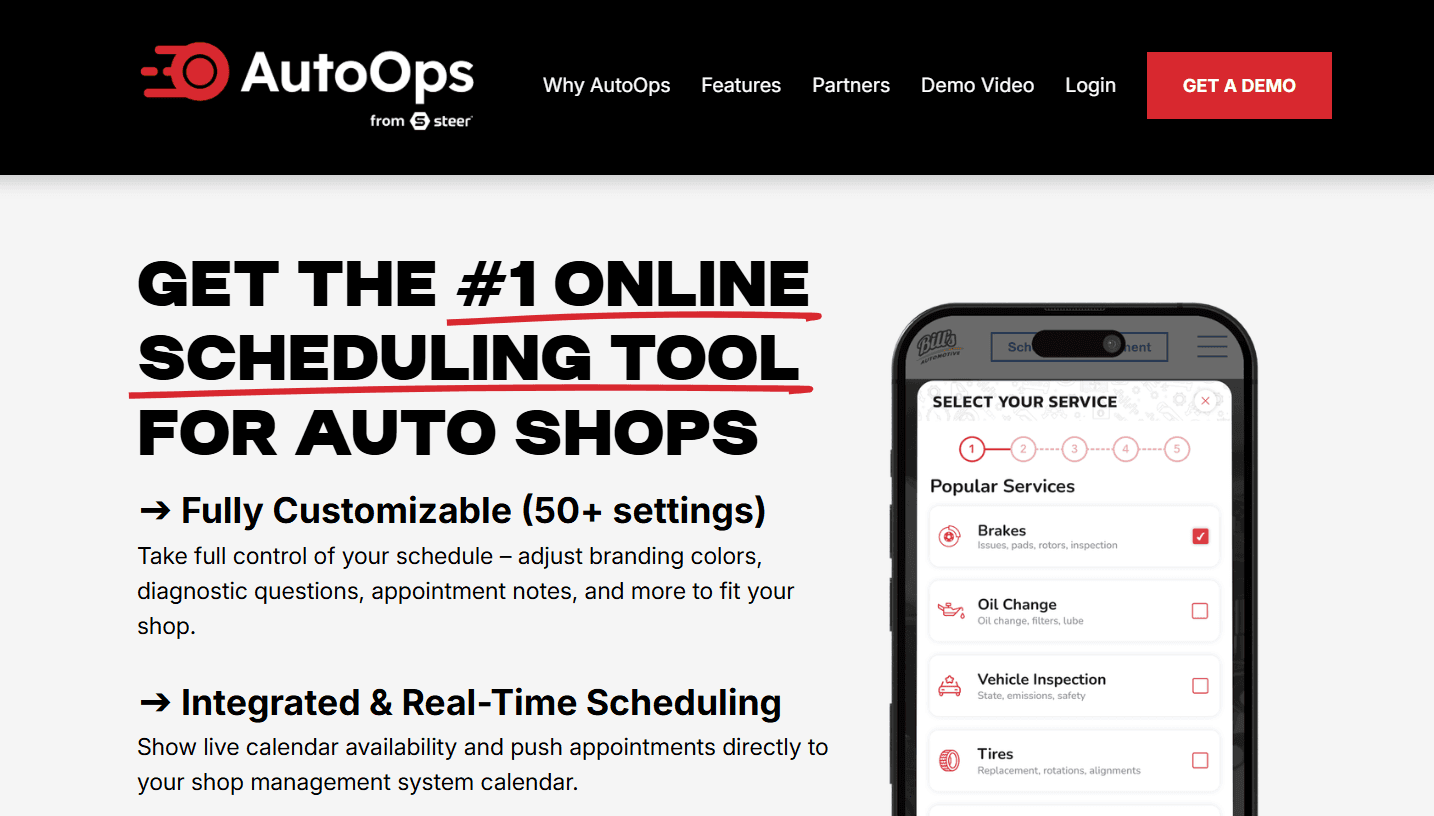
What it is: AutoOps handles online scheduling while your existing shop management system handles the rest of your shop operations. It connects with systems such as Tekmetric, Shopmonkey, Shop-Ware, Mitchell, and NAPA TRACS to show current availability and send booked appointments back to your calendar. You also get automotive-specific tools for recognizing returning customers and vehicles, following up on declined services, and accepting bookings through Google.
Key features:
Live availability: Syncs your shop's current schedule with online booking and sends confirmed appointments back to your calendar.
Custom booking questions: Collects diagnostic details and appointment notes before the customer arrives.
Google and website booking: Lets customers book through your website or Google Search and Maps.
Service recommendations: Shows previously declined services during booking so customers can add them to a new appointment.
Customer follow-up: Recognizes returning customers and vehicles, supports waiter and drop-off scheduling, and sends appointment reminders by text.
Limitations:
Requires a supported shop management system
There’s no free plan and pricing isn't publisher
Not designed to work as a standalone scheduler
Pricing: AutoOps has no free plan or trial. You’ll need to book a demo to get a custom quote.
Best for: Shops that already use a supported management system and want a dedicated automotive booking experience that syncs with it.
Comparison verdict: AutoOps works well if you already use a supported shop management system and want automotive-specific scheduling without changing it. Cal.com gives you more flexibility to build scheduling around your existing tools, with calendar sync, booking limits, routing, webhooks, and an API for custom integrations.
7. Koalendar: best free booking link for a solo mechanic
Free plan? | Starting price | Standout feature | Best use case |
|---|---|---|---|
Yes, one user and two calendar connections | $9.99/seat/month | Unlimited bookings on free plan | Solo mechanics and small garages |

What it is: Koalendar is a general-purpose scheduling tool that gives you a simple way to let customers book appointments online and manage those bookings from your calendar. You can connect your Google, Outlook, or Apple calendars and add booking pages to your website. It isn't built around automotive workflows, so it focuses on scheduling rather than managing repair orders, parts, inspections, or other shop operations.
Key features:
Unlimited bookings and booking pages on the free plan, the reason to choose it
Calendar sync with Google, Outlook, and Apple to prevent double bookings
Embeddable booking pages for your shop website
Automated reminders by email on free, with SMS on the paid tier
Branded pages and payments with payments available on the paid tier
Limitations:
Not built specifically for automotive shops
Advanced reminders and integrations such as Zapier and webhooks require a paid plan
Pricing: Koalendar has a free plan for one user and two connected calendars, with unlimited bookings, booking pages, and website embeds. Paid plans start at $9.99/seat/month and add features such as custom booking forms, payments, automated reminders, and additional integrations.
Best for: Solo mechanics and small garages that want a simple, free online booking page.
Comparison verdict: Koalendar works well if you mainly need a simple way for customers to book appointments online. Cal.com gives you more flexibility, including unlimited calendar connections and payment collection on its free plan, along with routing, team scheduling, booking analytics, APIs, and webhooks for connecting scheduling with other systems.
Automotive scheduling software: quick comparison
Here's how the seven automotive scheduling software compare on key features and free plans:
Tool | Free plan | Shop capacity | Repair order handoff | Booking cost |
|---|---|---|---|---|
Cal.com | ✅ Free; unlimited calendars and bookings | ✅ Yes | ⚠️ No native connection; use webhooks, Zapier, or API | ✅ Included on free and paid plans |
Tekmetric | ❌ No free plan or trial | ✅ Yes | ✅ Yes, bookings flow into the repair workflow | ⚠️ $345//month per shop add-on |
Shopmonkey | ❌ No free plan or trial | ✅ Yes | ✅ Yes, bookings flow into the shop workflow | ⚠️ $349/month add-on |
AutoLeap | ❌ No free plan or trial | ✅ Yes | ✅ Yes, bookings appear in the shop workflow | ⚠️ Add-on; custom pricing |
Shop-Ware | ❌ No free plan or trial | ✅ Yes | ✅ Yes, bookings connect to repair workflows | ⚠️ $249/month add-on |
AutoOps | ❌ No free plan or trial | ✅ Yes | ✅ Yes, for supported shop systems | ⚠️ Sold separately; custom pricing |
Koalendar | ✅ Free; two calendars and unlimited bookings | ✅ Yes | ⚠️ No native shop system connection | ✅ Included on free and paid plans |
Final verdict
The right automotive scheduling software depends on whether you mainly need online booking or want scheduling built into a full shop management system.
Cal.com is the best fit for shops focused on flexible, branded online booking. Its free plan gives one user unlimited booking pages and bookings, unlimited calendar connections with two-way sync, website embeds, payments, and automated reminders. You can add routing and team scheduling as your needs grow.
For all-in-one scheduling and shop management, consider Tekmetric, Shopmonkey, AutoLeap, or Shop-Ware. AutoOps is for shops that want automotive-specific scheduling connected to a supported shop system, while Koalendar is a simpler option for shops that mainly need online appointment booking.
If Cal.com matches what you need, start with the free plan to get your shop's online booking up and running, or book a demo if you need help deciding how to use it alongside your current tools.
Frequently asked questions
What is the best automotive scheduling software? It depends on whether you mainly need online booking or want scheduling built into your shop management system. Cal.com is a good fit if you need online booking without replacing your existing systems. For scheduling tied to repair orders and other shop operations, consider Tekmetric, Shopmonkey, AutoLeap, or Shop-Ware.
Is Cal.com free, and how much does it cost? Cal.com has a free plan for one user that includes unlimited booking pages and bookings, website embeds, calendar sync, payments, and automated reminders. Paid plans start at $16/user/month, or $12/user/month when billed annually, and add features such as routing, round-robin scheduling, custom notifications, booking analytics, and Cal.com branding removal.
How much does automotive scheduling software cost? Dedicated scheduling tools like Cal.com and Koalendar usually start free, while paid options may cost around $10 or more per seat per month. Full shop management platforms typically start around $199 to $279 per month, with additional costs for features such as online booking, marketing, or other add-ons.
Which automotive scheduling software is best for a small or independent repair shop? If you mainly need customers to book online, Cal.com or Koalendar provides a simpler way to get started without adopting a full shop management platform. If you also need repair orders, inspections, parts, and invoicing, an all-in-one platform such as Tekmetric, Shopmonkey, AutoLeap, or Shop-Ware may make more sense.
Can automotive scheduling software reduce no-shows for a repair shop? Automated confirmations and email or SMS reminders help customers remember upcoming appointments and reduce the work involved in following up manually. Some tools also support deposits, which helps protect appointment slots from last-minute cancellations or no-shows. Cal.com includes automated reminders and payment collection, even on its free plan.

Get started with Cal.com for free today!
Experience seamless scheduling and productivity with no hidden fees. Sign up in seconds and start simplifying your scheduling today, no credit card required!







