" height="18.016311920580208px" id="GKXyVanMq" stroke-dasharray="0" stroke-linecap="butt" stroke-linejoin="miter" stroke-miterlimit="10" stroke-width="0.5" stroke="rgb(0, 0, 0)" transform="translate(3 3)" width="18px"/></svg>)
"/><stop offset="1" stop-color="rgb(227, 224, 244)"/></linearGradient><linearGradient id="CBS1bzkxF-2031533640-linear-gradient" x1="0.49751243781094523" x2="0.5024875621890548" y1="0" y2="1"><stop offset="0" stop-color="rgb(255, 255, 255)"/><stop offset="1" stop-color="rgb(227, 224, 244)"/></linearGradient><linearGradient id="Jd7AK81w9-2031533640-linear-gradient" x1="0.49751243781094523" x2="0.5024875621890548" y1="0" y2="1"><stop offset="0" stop-color="rgb(255, 255, 255)"/><stop offset="1" stop-color="rgb(227, 224, 244)"/></linearGradient></defs><g d="M 0 16 L 0 0 L 16 0 L 16 16 Z M 9.167 5.167 C 9.167 4.891 8.943 4.667 8.667 4.667 C 8.391 4.667 8.167 4.891 8.167 5.167 C 8.167 6.784 7.809 7.834 7.155 8.488 C 6.501 9.143 5.451 9.5 3.833 9.5 C 3.557 9.5 3.333 9.724 3.333 10 C 3.333 10.276 3.557 10.5 3.833 10.5 C 5.451 10.5 6.501 10.857 7.155 11.512 C 7.809 12.166 8.167 13.216 8.167 14.833 C 8.167 15.109 8.391 15.333 8.667 15.333 C 8.943 15.333 9.167 15.109 9.167 14.833 C 9.167 13.216 9.524 12.166 10.178 11.512 C 10.832 10.857 11.883 10.5 13.5 10.5 C 13.776 10.5 14 10.276 14 10 C 14 9.724 13.776 9.5 13.5 9.5 C 11.883 9.5 10.832 9.143 10.178 8.488 C 9.524 7.834 9.167 6.784 9.167 5.167 Z M 4 3.667 C 4 3.483 3.851 3.333 3.667 3.333 C 3.483 3.333 3.333 3.483 3.333 3.667 C 3.333 4.32 3.189 4.715 2.952 4.952 C 2.715 5.189 2.32 5.333 1.667 5.333 C 1.483 5.333 1.333 5.483 1.333 5.667 C 1.333 5.851 1.483 6 1.667 6 C 2.32 6 2.715 6.145 2.952 6.382 C 3.189 6.618 3.333 7.013 3.333 7.667 C 3.333 7.851 3.483 8 3.667 8 C 3.851 8 4 7.851 4 7.667 C 4 7.013 4.145 6.618 4.382 6.382 C 4.618 6.145 5.013 6 5.667 6 C 5.851 6 6 5.851 6 5.667 C 6 5.483 5.851 5.333 5.667 5.333 C 5.013 5.333 4.618 5.189 4.382 4.952 C 4.145 4.715 4 4.32 4 3.667 Z M 7.333 1 C 7.333 0.816 7.184 0.667 7 0.667 C 6.816 0.667 6.667 0.816 6.667 1 C 6.667 1.422 6.573 1.65 6.445 1.778 C 6.317 1.906 6.089 2 5.667 2 C 5.483 2 5.333 2.149 5.333 2.333 C 5.333 2.517 5.483 2.667 5.667 2.667 C 6.089 2.667 6.317 2.761 6.445 2.889 C 6.573 3.016 6.667 3.244 6.667 3.667 C 6.667 3.851 6.816 4 7 4 C 7.184 4 7.333 3.851 7.333 3.667 C 7.333 3.244 7.427 3.016 7.555 2.889 C 7.683 2.761 7.911 2.667 8.333 2.667 C 8.517 2.667 8.667 2.517 8.667 2.333 C 8.667 2.149 8.517 2 8.333 2 C 7.911 2 7.683 1.906 7.555 1.778 C 7.427 1.65 7.333 1.422 7.333 1 Z" fill="transparent" height="16px" id="aoZYv33vR" width="16px"><path d="M 0 16 L 0 0 L 16 0 L 16 16 Z" fill="transparent" height="16px" id="Z2uGmhW9f" width="16px"/><g d="M 7.833 4.5 C 7.833 4.224 7.609 4 7.333 4 C 7.057 4 6.833 4.224 6.833 4.5 C 6.833 6.117 6.476 7.168 5.822 7.822 C 5.168 8.476 4.117 8.833 2.5 8.833 C 2.224 8.833 2 9.057 2 9.333 C 2 9.61 2.224 9.833 2.5 9.833 C 4.117 9.833 5.168 10.191 5.822 10.845 C 6.476 11.499 6.833 12.549 6.833 14.167 C 6.833 14.443 7.057 14.667 7.333 14.667 C 7.609 14.667 7.833 14.443 7.833 14.167 C 7.833 12.549 8.191 11.499 8.845 10.845 C 9.499 10.191 10.549 9.833 12.167 9.833 C 12.443 9.833 12.667 9.61 12.667 9.333 C 12.667 9.057 12.443 8.833 12.167 8.833 C 10.549 8.833 9.499 8.476 8.845 7.822 C 8.191 7.168 7.833 6.117 7.833 4.5 Z M 2.667 3 C 2.667 2.816 2.517 2.667 2.333 2.667 C 2.149 2.667 2 2.816 2 3 C 2 3.654 1.855 4.048 1.618 4.285 C 1.382 4.522 0.987 4.667 0.333 4.667 C 0.149 4.667 0 4.816 0 5 C 0 5.184 0.149 5.333 0.333 5.333 C 0.987 5.333 1.382 5.478 1.618 5.715 C 1.855 5.952 2 6.346 2 7 C 2 7.184 2.149 7.333 2.333 7.333 C 2.517 7.333 2.667 7.184 2.667 7 C 2.667 6.346 2.811 5.952 3.048 5.715 C 3.285 5.478 3.68 5.333 4.333 5.333 C 4.517 5.333 4.667 5.184 4.667 5 C 4.667 4.816 4.517 4.667 4.333 4.667 C 3.68 4.667 3.285 4.522 3.048 4.285 C 2.811 4.048 2.667 3.654 2.667 3 Z M 6 0.333 C 6 0.149 5.851 0 5.667 0 C 5.483 0 5.333 0.149 5.333 0.333 C 5.333 0.756 5.239 0.984 5.112 1.112 C 4.984 1.239 4.756 1.333 4.333 1.333 C 4.149 1.333 4 1.483 4 1.667 C 4 1.851 4.149 2 4.333 2 C 4.756 2 4.984 2.094 5.112 2.222 C 5.239 2.35 5.333 2.578 5.333 3 C 5.333 3.184 5.483 3.333 5.667 3.333 C 5.851 3.333 6 3.184 6 3 C 6 2.578 6.094 2.35 6.222 2.222 C 6.35 2.094 6.578 2 7 2 C 7.184 2 7.333 1.851 7.333 1.667 C 7.333 1.483 7.184 1.333 7 1.333 C 6.578 1.333 6.35 1.239 6.222 1.112 C 6.094 0.984 6 0.756 6 0.333 Z" fill="transparent" height="14.66671286102295px" id="ae6ccdFme" transform="translate(1.333 0.667)" width="12.66663px"><path d="M 5.833 0.5 C 5.833 0.224 5.609 0 5.333 0 C 5.057 0 4.833 0.224 4.833 0.5 C 4.833 2.117 4.476 3.168 3.822 3.822 C 3.168 4.476 2.117 4.833 0.5 4.833 C 0.224 4.833 0 5.057 0 5.333 C 0 5.61 0.224 5.833 0.5 5.833 C 2.117 5.833 3.168 6.191 3.822 6.845 C 4.476 7.499 4.833 8.549 4.833 10.167 C 4.833 10.443 5.057 10.667 5.333 10.667 C 5.609 10.667 5.833 10.443 5.833 10.167 C 5.833 8.549 6.191 7.499 6.845 6.845 C 7.499 6.191 8.549 5.833 10.167 5.833 C 10.443 5.833 10.667 5.61 10.667 5.333 C 10.667 5.057 10.443 4.833 10.167 4.833 C 8.549 4.833 7.499 4.476 6.845 3.822 C 6.191 3.168 5.833 2.117 5.833 0.5 Z" fill="url(%23t2lXByE48-2031533640-linear-gradient)" height="10.66671px" id="t2lXByE48" transform="translate(2 4)" width="10.66663px"/><path d="M 2.667 0.333 C 2.667 0.149 2.517 0 2.333 0 C 2.149 0 2 0.149 2 0.333 C 2 0.987 1.855 1.382 1.618 1.618 C 1.382 1.855 0.987 2 0.333 2 C 0.149 2 0 2.149 0 2.333 C 0 2.517 0.149 2.667 0.333 2.667 C 0.987 2.667 1.382 2.811 1.618 3.048 C 1.855 3.285 2 3.68 2 4.333 C 2 4.517 2.149 4.667 2.333 4.667 C 2.517 4.667 2.667 4.517 2.667 4.333 C 2.667 3.68 2.811 3.285 3.048 3.048 C 3.285 2.811 3.68 2.667 4.333 2.667 C 4.517 2.667 4.667 2.517 4.667 2.333 C 4.667 2.149 4.517 2 4.333 2 C 3.68 2 3.285 1.855 3.048 1.618 C 2.811 1.382 2.667 0.987 2.667 0.333 Z" fill="url(%23CBS1bzkxF-2031533640-linear-gradient)" height="4.66667px" id="CBS1bzkxF" transform="translate(0 2.667)" width="4.66667px"/><path d="M 2 0.333 C 2 0.149 1.851 0 1.667 0 C 1.483 0 1.333 0.149 1.333 0.333 C 1.333 0.756 1.239 0.984 1.112 1.112 C 0.984 1.239 0.756 1.333 0.333 1.333 C 0.149 1.333 0 1.483 0 1.667 C 0 1.851 0.149 2 0.333 2 C 0.756 2 0.984 2.094 1.112 2.222 C 1.239 2.35 1.333 2.578 1.333 3 C 1.333 3.184 1.483 3.333 1.667 3.333 C 1.851 3.333 2 3.184 2 3 C 2 2.578 2.094 2.35 2.222 2.222 C 2.35 2.094 2.578 2 3 2 C 3.184 2 3.333 1.851 3.333 1.667 C 3.333 1.483 3.184 1.333 3 1.333 C 2.578 1.333 2.35 1.239 2.222 1.112 C 2.094 0.984 2 0.756 2 0.333 Z" fill="url(%23Jd7AK81w9-2031533640-linear-gradient)" height="3.333333px" id="Jd7AK81w9" transform="translate(4 0)" width="3.3333399999999997px"/></g></g></svg>)
" height="24px" id="WCm44spAV" width="24px"/><path d="M 3.892 7.742 C 1.674 7.742 0 6.014 0 3.882 C 0 1.738 1.589 0 3.892 0 C 5.107 0 5.951 0.374 6.623 1.173 L 5.566 2.09 C 5.118 1.621 4.564 1.386 3.892 1.386 C 2.452 1.386 1.547 2.517 1.547 3.882 C 1.547 5.246 2.452 6.356 3.924 6.356 C 4.649 6.356 5.193 6.111 5.63 5.63 L 6.718 6.558 C 6.153 7.24 5.193 7.742 3.892 7.742 Z" fill="rgb(255, 255, 255)" height="7.741500000000002px" id="XEPpGD7l5" transform="translate(4 8.25)" width="6.717999999999989px"/><path d="M 2.74 7.922 C 1.215 7.922 0 6.632 0 5.032 C 0 3.433 1.215 2.122 2.74 2.122 C 3.7 2.122 4.201 2.516 4.5 3.113 L 4.5 2.239 L 5.928 2.239 L 5.928 7.784 L 4.531 7.784 L 4.531 6.877 C 4.233 7.507 3.731 7.922 2.74 7.922 Z M 1.439 5.023 C 1.439 5.865 2.057 6.622 2.975 6.622 C 3.924 6.622 4.531 5.897 4.531 5.033 C 4.531 4.169 3.924 3.423 2.975 3.423 C 2.057 3.423 1.439 4.159 1.439 5.022 Z M 6.784 7.784 L 6.784 0 L 8.224 0 L 8.224 7.784 L 6.784 7.784 Z" fill="rgb(255, 255, 255)" height="7.9224997406005855px" id="lGDJupIUR" transform="translate(10.5 8)" width="8.223500194549558px"/></g></svg>)
" width="18px"><path d="M 2 8 C 0.895 8 0 7.105 0 6 L 0 2 C 0 0.895 0.895 0 2 0 L 6 0 C 7.105 0 8 0.895 8 2 L 8 6 C 8 7.105 7.105 8 6 8 Z" fill="transparent" height="8px" id="ZrCrI93dV" stroke-dasharray="" stroke-linecap="round" stroke-linejoin="round" stroke-width="2" stroke="rgb(0, 0, 0)" width="8px"/><path d="M 0 0 L 0 4 C 0 5.105 0.895 6 2 6 L 6 6" fill="transparent" height="6px" id="emltWYAiE" stroke-dasharray="" stroke-linecap="round" stroke-linejoin="round" stroke-width="2" stroke="rgb(0, 0, 0)" transform="translate(4 8)" width="6px"/><path d="M 2 8 C 0.895 8 0 7.105 0 6 L 0 2 C 0 0.895 0.895 0 2 0 L 6 0 C 7.105 0 8 0.895 8 2 L 8 6 C 8 7.105 7.105 8 6 8 Z" fill="transparent" height="8px" id="WpBecYDfi" stroke-dasharray="" stroke-linecap="round" stroke-linejoin="round" stroke-width="2" stroke="rgb(0, 0, 0)" transform="translate(10 10)" width="8px"/></g></svg>)
By

Cédric van Ravesteijn
Why You Need SCIM Provisioning for Enterprise Scheduling
A customer books a demo with your sales rep for Tuesday. The problem? The rep left the company three weeks ago. IT turned off their Okta account on their last day, so they can't sign in through Okta. But nobody deactivated their scheduling account, so their booking link is still on the website, in old email signatures, and in a dozen proposals your customers saved.
That's the gap SCIM provisioning closes. The average company now uses 101 apps, according to Okta's Businesses at Work 2025 report. Every one of them is a place where a leaver's access can survive, and a scheduling tool is one of the few your customers use directly.
This guide covers what SCIM is, why a scheduling tool needs it, and what to ask any scheduling tool before you buy.

SCIM provisioning in short: SCIM provisioning lets your identity provider, such as Okta, create, update and deactivate user accounts in other apps automatically. When someone joins, changes role or leaves, every connected app follows. It's different from single sign-on (SSO): SSO controls how people sign in, and SCIM controls whether their account exists.
Key takeaways
SCIM keeps app accounts in step with your identity provider across joiners, movers and leavers, so nobody has to add or remove people by hand.
SSO alone doesn't close the offboarding gap. It stops a leaver signing in, but it leaves their account, and anything that works without signing in, in place.
In a scheduling tool, a forgotten account stays visible to customers through booking links, team routing and invites.
Cal.com includes SCIM and SAML SSO on the Organizations plan and Enterprise, with Okta as the documented identity provider.
What is SCIM provisioning?
SCIM provisioning is the automatic creation, updating and deactivation of user accounts in an app, driven by your identity provider. SCIM stands for System for Cross-domain Identity Management. It's an open standard, first created in 2011 and now at version 2.0, according to Okta.
Two systems take part:
The identity provider (IdP) holds the list of people in your company and what they're allowed to use. Okta is one example. When something changes, the identity provider sends that change out.
The app, in this case your scheduling tool, receives the change and applies it. It creates the account, updates the name or team, or deactivates the account.
Provisioning means giving someone an account and access. Deprovisioning means taking it away.

An everyday comparison helps. Think of the HR system that issues and cancels building badges. When someone is hired, a badge appears. When they leave, it stops working, and nobody at the front desk has to remember to cancel it. SCIM does the same for app accounts.
In a scheduling tool, SCIM doesn't schedule meetings. It manages who can use the scheduling tool and which team they're on.
Microsoft's SCIM explainer covers the protocol in more depth. For a scheduling tool, the part that matters is what SCIM does at each stage of someone's time at your company.
What does SCIM do across the user lifecycle?
SCIM handles the three moments when an account needs to change: someone joins, someone moves, and someone leaves. Identity teams call this the joiner, mover and leaver lifecycle.
Here's what each stage looks like in a scheduling tool:
Stage | What happens in the identity provider | What SCIM does in the scheduling tool |
|---|---|---|
Joiner | A new hire is assigned the app | Their account is created and they're added to their mapped team |
Mover | Someone moves to a new role or team, which puts them in a new group | They're added to the team mapped to that group |
Leaver | Someone leaves or loses access | Their account is deactivated |

The leaver stage is called deprovisioning, and it's the one that matters most for security. It's also the easiest one to miss when it's done by hand. A joiner who doesn't get an account files a ticket the same morning. A leaver who keeps one doesn't complain, so the account can sit there until someone notices.
Many teams assume single sign-on already covers leavers. It doesn't, and the difference is worth understanding before you sign off on any tool.
What's the difference between SCIM and SSO?
SSO controls how people sign in. SCIM controls whether their account exists. You need both, because each one covers what the other can't.
Single sign-on (SSO) lets people sign in to many apps with one company login. The two common ways to do it are SAML (Security Assertion Markup Language) and OIDC (OpenID Connect). Both pass a signed message from the identity provider to the app that says who the person is. Neither one changes the account itself.
SSO (SAML or OIDC) | SCIM | |
|---|---|---|
What it answers | "Who are you?" | "Should this account exist, and on which team?" |
When it runs | When someone signs in | In the background, whenever the directory changes |
What it can't do | Deactivate an account when someone leaves | Sign anyone in |
So SCIM doesn't replace SAML. They do different jobs.
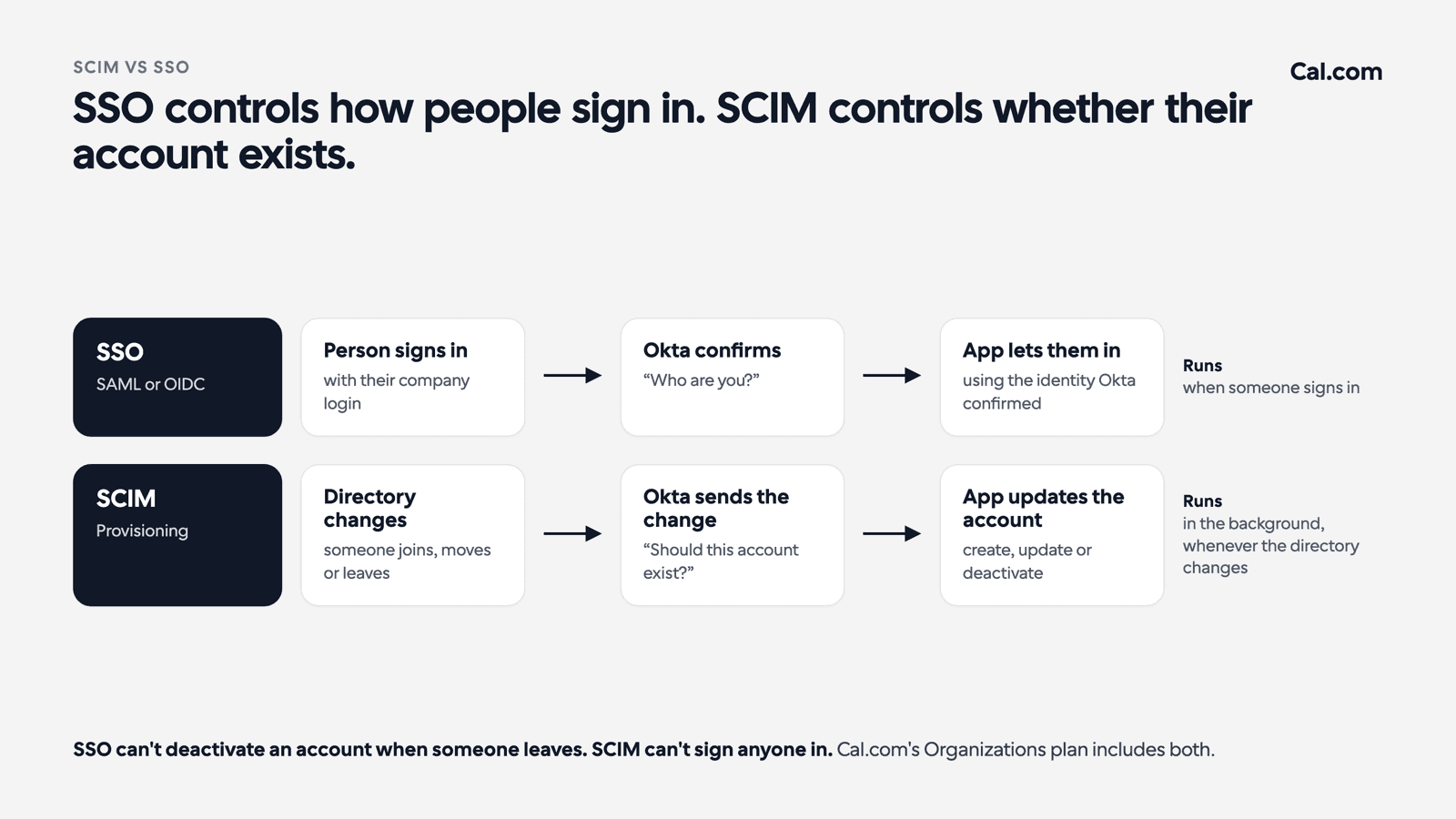
Some apps also offer just-in-time (JIT) provisioning. A new employee signs in to an app with Okta for the first time, and the app creates their account on the spot. That's convenient for joiners, but it runs only at sign-in, so it can't deactivate anyone. A person who has left never signs in again, and nothing tells the app they're gone.
That's the point the rest of this guide builds on. SSO alone leaves the account in place. Turning off someone's Okta account stops them signing in through SSO, but anything in the app that works without signing in can keep working. Cal.com's Organizations plan includes both: SSO for sign-in and SCIM for accounts.
Why does a scheduling tool need SCIM?
A scheduling tool needs SCIM because it's public-facing. In most apps, a leaver's forgotten account sits unused. In a scheduling tool, your customers are the ones using it.

Three things can happen when a leaver's scheduling account is left active.
Booking links stay live
Every person on your team has a booking link, and those links spread. They sit on your website, in email signatures, in proposals and in your customers' bookmarks. If the account stays active, prospects and customers can still book time with someone who's gone, and nobody is there to take the call.
Round robin keeps routing
Sales, Customer Success and Recruiting teams often share one booking link that hands meetings out across the team. That's round robin scheduling. If a former employee is still a team member, the shared link can keep sending meetings their way, and a qualified lead lands in an empty calendar.
The stakes grow with the team. Storyblok uses Cal.com's fixed round robin to spread demos across engineers in more than 40 countries, and saw a 50% increase in demo efficiency. Routing like that is only as good as the list of people it routes to.
Invites carry the wrong name
Customers get meeting invites and reminders from a person who no longer works for you. It tells them nobody noticed the person left, which is the wrong message to send a customer you're trying to keep.
With SCIM, the scheduling account is deactivated in the same step that removes the person from your identity provider. Offboarding the scheduling tool no longer depends on someone remembering to do it.
One practical habit applies whichever tool you use: when someone leaves, reassign their upcoming meetings to a colleague before their last day.
Want to see how a leaver is handled in Cal.com before you commit? Bring your offboarding checklist to our team, and we'll walk you through what happens to the account step by step.
What should you ask a scheduling tool about SCIM?
Look for a scheduling tool that offers SSO and SCIM on the same plan, deactivates accounts automatically when someone leaves your identity provider, and maps identity-provider groups to teams.
Those three points decide the purchase, but your security review will ask for more. Two people usually need answers. The buyer owns the rollout and the budget. The approver owns the identity provider, which usually means the IT manager, the Director of IT or, at tech companies, the CTO.
Question | Who asks it | Why it matters |
|---|---|---|
Which plan includes SCIM and SSO? | Buyer | SCIM is often only on the top plan, which changes the price per seat |
What happens to seats when someone leaves? | Buyer | Decides whether leavers keep costing money |
Which identity providers are supported? | Approver | It has to match the one your company runs |
Is the account deactivated automatically when someone leaves? | Both | This is the offboarding gap from the section above |
Can identity-provider groups map to teams? | Approver | New hires land on the right team without a ticket |
Is there a domain check? | Approver | Stops accounts being created for outside email addresses |
Which profile fields sync? | Approver | Tells IT what still has to be managed inside the app |
Can we download the security reports? | Approver | The security review will ask for SOC 2 or ISO 27001 |
If you're comparing plans across tools, Cal.com plans shows where each feature sits, and our secure scheduling infrastructure covers the wider security review.
Already have security questions? Bring them to our team, and we'll answer every row of this table for your set-up before your review meeting.
How does SCIM work in Cal.com?
Your Okta admin connects Okta to Cal.com once. From then on, Okta decides who has a Cal.com account and which team they're on, and Cal.com follows whatever Okta says.
Here are our answers to the questions above, split by who's asking.
For the buyer
SCIM and SAML SSO are included on the Organizations plan, at $28 per user a month billed yearly, and on Enterprise.
Every team, from Sales to Recruiting, is managed through Okta, and admins control them from one dashboard. That's how Cal.com Enterprise runs scheduling across a whole company. Deel, for example, has more than 1,000 employees using Cal.com. At that size, adding and removing people by hand stops being a small admin task.
Here's how SCIM ties into meetings in practice.
A new account executive joins the "Sales EMEA" group in Okta. SCIM creates their Cal.com account and adds them to the Sales EMEA team. The team has a managed "Customer demo" event set to assign all team members, so on day one the new rep gets their own copy of the team's demo, with the same length and booking questions as everyone else. When they leave, Okta removes them and SCIM deactivates the account.

Managed event types are meeting templates an admin sets up once. With Assign all team members turned on, they apply to current and future members of the team, which is what makes the day-one part work. Role-based access control then decides what each person can change.
What your IT team should know
Okta is the documented identity provider.
Your company verifies its email domain first. Cal.com only creates accounts for addresses on that domain or its subdomains, so nobody can use SCIM to create an account for an outside address.
SCIM is set up together with SAML or OIDC single sign-on. Once their account exists, members sign in with their work email through SSO.
Five fields sync: username, first name, last name, email and display name.
Okta groups map to Cal.com teams. The group name has to match Okta exactly.
Leavers are deactivated, not deleted.
Audit logs are included with every organization plan. They record security events such as SSO sign-ins, and the developer guide to audit logs lists membership changes too.
Our security and compliance reports, including SOC 2 Type II and ISO 27001, are available to download.
The full technical walkthrough is in our SCIM set-up guide for developers.

What does setting up SCIM with Okta involve?
Your Okta admin connects it once, and after that nobody manages Cal.com accounts by hand. On the Cal.com side, the person setting it up needs to be an organization admin.
For the approver, the order looks like this:
Set up SAML or OIDC single sign-on. For Okta, follow setting up OIDC with Okta.
Verify your company's email domain in Cal.com.
Turn on Directory Sync in Cal.com, then paste the SCIM URL and secret token into Okta.
Test with one user.
Assign everyone else.

To follow each step with screenshots, see how to set up SCIM with Okta in our help center.
Close the offboarding gap where customers can see it
A scheduling tool is where a leaver's access stays visible to your customers. The fix is to stop managing those accounts in two places and let your identity provider decide. With SCIM, someone who leaves Okta leaves Cal.com in the same step, and new hires arrive on the right team with the right meeting links.
If your security review has asked "does it support SCIM?", bring the rest of its questions to us. Talk to our team about your Okta set-up, your teams and your seat count, or see what's included with Organizations.
FAQs
What does SCIM stand for?
SCIM stands for System for Cross-domain Identity Management. It's an open standard that lets an identity provider create, update and deactivate user accounts in other apps automatically.
Is SCIM the same as SSO?
No. SSO controls how people sign in, while SCIM controls whether their account exists and which team it belongs to.
Does SCIM replace SAML?
No. SAML is a way to do single sign-on, and SCIM manages accounts, so you need both.
Which Cal.com plan includes SCIM?
SCIM is included on Cal.com's Organizations plan, at $28 per user a month billed yearly, and on Enterprise. Both plans also include SAML SSO.
Which identity providers work with Cal.com SCIM?
Okta is the identity provider Cal.com documents for SCIM. Cal.com's docs don't cover other identity providers yet.
What happens when someone is removed from Okta?
SCIM deactivates their Cal.com account automatically. The account is deactivated, not deleted.
Do I need SSO to use SCIM in Cal.com?
Cal.com's documented set-up starts with a SAML or OIDC single sign-on app in Okta, as the SSO set-up guide describes. You turn on SCIM provisioning in that same app, so plan to set up both.

Get started with Cal.com for free today!
Experience seamless scheduling and productivity with no hidden fees. Sign up in seconds and start simplifying your scheduling today, no credit card required!