" height="18.016311920580208px" id="GKXyVanMq" stroke-dasharray="0" stroke-linecap="butt" stroke-linejoin="miter" stroke-miterlimit="10" stroke-width="0.5" stroke="rgb(0, 0, 0)" transform="translate(3 3)" width="18px"/></svg>)
"/><stop offset="1" stop-color="rgb(227, 224, 244)"/></linearGradient><linearGradient id="CBS1bzkxF-2031533640-linear-gradient" x1="0.49751243781094523" x2="0.5024875621890548" y1="0" y2="1"><stop offset="0" stop-color="rgb(255, 255, 255)"/><stop offset="1" stop-color="rgb(227, 224, 244)"/></linearGradient><linearGradient id="Jd7AK81w9-2031533640-linear-gradient" x1="0.49751243781094523" x2="0.5024875621890548" y1="0" y2="1"><stop offset="0" stop-color="rgb(255, 255, 255)"/><stop offset="1" stop-color="rgb(227, 224, 244)"/></linearGradient></defs><g d="M 0 16 L 0 0 L 16 0 L 16 16 Z M 9.167 5.167 C 9.167 4.891 8.943 4.667 8.667 4.667 C 8.391 4.667 8.167 4.891 8.167 5.167 C 8.167 6.784 7.809 7.834 7.155 8.488 C 6.501 9.143 5.451 9.5 3.833 9.5 C 3.557 9.5 3.333 9.724 3.333 10 C 3.333 10.276 3.557 10.5 3.833 10.5 C 5.451 10.5 6.501 10.857 7.155 11.512 C 7.809 12.166 8.167 13.216 8.167 14.833 C 8.167 15.109 8.391 15.333 8.667 15.333 C 8.943 15.333 9.167 15.109 9.167 14.833 C 9.167 13.216 9.524 12.166 10.178 11.512 C 10.832 10.857 11.883 10.5 13.5 10.5 C 13.776 10.5 14 10.276 14 10 C 14 9.724 13.776 9.5 13.5 9.5 C 11.883 9.5 10.832 9.143 10.178 8.488 C 9.524 7.834 9.167 6.784 9.167 5.167 Z M 4 3.667 C 4 3.483 3.851 3.333 3.667 3.333 C 3.483 3.333 3.333 3.483 3.333 3.667 C 3.333 4.32 3.189 4.715 2.952 4.952 C 2.715 5.189 2.32 5.333 1.667 5.333 C 1.483 5.333 1.333 5.483 1.333 5.667 C 1.333 5.851 1.483 6 1.667 6 C 2.32 6 2.715 6.145 2.952 6.382 C 3.189 6.618 3.333 7.013 3.333 7.667 C 3.333 7.851 3.483 8 3.667 8 C 3.851 8 4 7.851 4 7.667 C 4 7.013 4.145 6.618 4.382 6.382 C 4.618 6.145 5.013 6 5.667 6 C 5.851 6 6 5.851 6 5.667 C 6 5.483 5.851 5.333 5.667 5.333 C 5.013 5.333 4.618 5.189 4.382 4.952 C 4.145 4.715 4 4.32 4 3.667 Z M 7.333 1 C 7.333 0.816 7.184 0.667 7 0.667 C 6.816 0.667 6.667 0.816 6.667 1 C 6.667 1.422 6.573 1.65 6.445 1.778 C 6.317 1.906 6.089 2 5.667 2 C 5.483 2 5.333 2.149 5.333 2.333 C 5.333 2.517 5.483 2.667 5.667 2.667 C 6.089 2.667 6.317 2.761 6.445 2.889 C 6.573 3.016 6.667 3.244 6.667 3.667 C 6.667 3.851 6.816 4 7 4 C 7.184 4 7.333 3.851 7.333 3.667 C 7.333 3.244 7.427 3.016 7.555 2.889 C 7.683 2.761 7.911 2.667 8.333 2.667 C 8.517 2.667 8.667 2.517 8.667 2.333 C 8.667 2.149 8.517 2 8.333 2 C 7.911 2 7.683 1.906 7.555 1.778 C 7.427 1.65 7.333 1.422 7.333 1 Z" fill="transparent" height="16px" id="aoZYv33vR" width="16px"><path d="M 0 16 L 0 0 L 16 0 L 16 16 Z" fill="transparent" height="16px" id="Z2uGmhW9f" width="16px"/><g d="M 7.833 4.5 C 7.833 4.224 7.609 4 7.333 4 C 7.057 4 6.833 4.224 6.833 4.5 C 6.833 6.117 6.476 7.168 5.822 7.822 C 5.168 8.476 4.117 8.833 2.5 8.833 C 2.224 8.833 2 9.057 2 9.333 C 2 9.61 2.224 9.833 2.5 9.833 C 4.117 9.833 5.168 10.191 5.822 10.845 C 6.476 11.499 6.833 12.549 6.833 14.167 C 6.833 14.443 7.057 14.667 7.333 14.667 C 7.609 14.667 7.833 14.443 7.833 14.167 C 7.833 12.549 8.191 11.499 8.845 10.845 C 9.499 10.191 10.549 9.833 12.167 9.833 C 12.443 9.833 12.667 9.61 12.667 9.333 C 12.667 9.057 12.443 8.833 12.167 8.833 C 10.549 8.833 9.499 8.476 8.845 7.822 C 8.191 7.168 7.833 6.117 7.833 4.5 Z M 2.667 3 C 2.667 2.816 2.517 2.667 2.333 2.667 C 2.149 2.667 2 2.816 2 3 C 2 3.654 1.855 4.048 1.618 4.285 C 1.382 4.522 0.987 4.667 0.333 4.667 C 0.149 4.667 0 4.816 0 5 C 0 5.184 0.149 5.333 0.333 5.333 C 0.987 5.333 1.382 5.478 1.618 5.715 C 1.855 5.952 2 6.346 2 7 C 2 7.184 2.149 7.333 2.333 7.333 C 2.517 7.333 2.667 7.184 2.667 7 C 2.667 6.346 2.811 5.952 3.048 5.715 C 3.285 5.478 3.68 5.333 4.333 5.333 C 4.517 5.333 4.667 5.184 4.667 5 C 4.667 4.816 4.517 4.667 4.333 4.667 C 3.68 4.667 3.285 4.522 3.048 4.285 C 2.811 4.048 2.667 3.654 2.667 3 Z M 6 0.333 C 6 0.149 5.851 0 5.667 0 C 5.483 0 5.333 0.149 5.333 0.333 C 5.333 0.756 5.239 0.984 5.112 1.112 C 4.984 1.239 4.756 1.333 4.333 1.333 C 4.149 1.333 4 1.483 4 1.667 C 4 1.851 4.149 2 4.333 2 C 4.756 2 4.984 2.094 5.112 2.222 C 5.239 2.35 5.333 2.578 5.333 3 C 5.333 3.184 5.483 3.333 5.667 3.333 C 5.851 3.333 6 3.184 6 3 C 6 2.578 6.094 2.35 6.222 2.222 C 6.35 2.094 6.578 2 7 2 C 7.184 2 7.333 1.851 7.333 1.667 C 7.333 1.483 7.184 1.333 7 1.333 C 6.578 1.333 6.35 1.239 6.222 1.112 C 6.094 0.984 6 0.756 6 0.333 Z" fill="transparent" height="14.66671286102295px" id="ae6ccdFme" transform="translate(1.333 0.667)" width="12.66663px"><path d="M 5.833 0.5 C 5.833 0.224 5.609 0 5.333 0 C 5.057 0 4.833 0.224 4.833 0.5 C 4.833 2.117 4.476 3.168 3.822 3.822 C 3.168 4.476 2.117 4.833 0.5 4.833 C 0.224 4.833 0 5.057 0 5.333 C 0 5.61 0.224 5.833 0.5 5.833 C 2.117 5.833 3.168 6.191 3.822 6.845 C 4.476 7.499 4.833 8.549 4.833 10.167 C 4.833 10.443 5.057 10.667 5.333 10.667 C 5.609 10.667 5.833 10.443 5.833 10.167 C 5.833 8.549 6.191 7.499 6.845 6.845 C 7.499 6.191 8.549 5.833 10.167 5.833 C 10.443 5.833 10.667 5.61 10.667 5.333 C 10.667 5.057 10.443 4.833 10.167 4.833 C 8.549 4.833 7.499 4.476 6.845 3.822 C 6.191 3.168 5.833 2.117 5.833 0.5 Z" fill="url(%23t2lXByE48-2031533640-linear-gradient)" height="10.66671px" id="t2lXByE48" transform="translate(2 4)" width="10.66663px"/><path d="M 2.667 0.333 C 2.667 0.149 2.517 0 2.333 0 C 2.149 0 2 0.149 2 0.333 C 2 0.987 1.855 1.382 1.618 1.618 C 1.382 1.855 0.987 2 0.333 2 C 0.149 2 0 2.149 0 2.333 C 0 2.517 0.149 2.667 0.333 2.667 C 0.987 2.667 1.382 2.811 1.618 3.048 C 1.855 3.285 2 3.68 2 4.333 C 2 4.517 2.149 4.667 2.333 4.667 C 2.517 4.667 2.667 4.517 2.667 4.333 C 2.667 3.68 2.811 3.285 3.048 3.048 C 3.285 2.811 3.68 2.667 4.333 2.667 C 4.517 2.667 4.667 2.517 4.667 2.333 C 4.667 2.149 4.517 2 4.333 2 C 3.68 2 3.285 1.855 3.048 1.618 C 2.811 1.382 2.667 0.987 2.667 0.333 Z" fill="url(%23CBS1bzkxF-2031533640-linear-gradient)" height="4.66667px" id="CBS1bzkxF" transform="translate(0 2.667)" width="4.66667px"/><path d="M 2 0.333 C 2 0.149 1.851 0 1.667 0 C 1.483 0 1.333 0.149 1.333 0.333 C 1.333 0.756 1.239 0.984 1.112 1.112 C 0.984 1.239 0.756 1.333 0.333 1.333 C 0.149 1.333 0 1.483 0 1.667 C 0 1.851 0.149 2 0.333 2 C 0.756 2 0.984 2.094 1.112 2.222 C 1.239 2.35 1.333 2.578 1.333 3 C 1.333 3.184 1.483 3.333 1.667 3.333 C 1.851 3.333 2 3.184 2 3 C 2 2.578 2.094 2.35 2.222 2.222 C 2.35 2.094 2.578 2 3 2 C 3.184 2 3.333 1.851 3.333 1.667 C 3.333 1.483 3.184 1.333 3 1.333 C 2.578 1.333 2.35 1.239 2.222 1.112 C 2.094 0.984 2 0.756 2 0.333 Z" fill="url(%23Jd7AK81w9-2031533640-linear-gradient)" height="3.333333px" id="Jd7AK81w9" transform="translate(4 0)" width="3.3333399999999997px"/></g></g></svg>)
" height="24px" id="WCm44spAV" width="24px"/><path d="M 3.892 7.742 C 1.674 7.742 0 6.014 0 3.882 C 0 1.738 1.589 0 3.892 0 C 5.107 0 5.951 0.374 6.623 1.173 L 5.566 2.09 C 5.118 1.621 4.564 1.386 3.892 1.386 C 2.452 1.386 1.547 2.517 1.547 3.882 C 1.547 5.246 2.452 6.356 3.924 6.356 C 4.649 6.356 5.193 6.111 5.63 5.63 L 6.718 6.558 C 6.153 7.24 5.193 7.742 3.892 7.742 Z" fill="rgb(255, 255, 255)" height="7.741500000000002px" id="XEPpGD7l5" transform="translate(4 8.25)" width="6.717999999999989px"/><path d="M 2.74 7.922 C 1.215 7.922 0 6.632 0 5.032 C 0 3.433 1.215 2.122 2.74 2.122 C 3.7 2.122 4.201 2.516 4.5 3.113 L 4.5 2.239 L 5.928 2.239 L 5.928 7.784 L 4.531 7.784 L 4.531 6.877 C 4.233 7.507 3.731 7.922 2.74 7.922 Z M 1.439 5.023 C 1.439 5.865 2.057 6.622 2.975 6.622 C 3.924 6.622 4.531 5.897 4.531 5.033 C 4.531 4.169 3.924 3.423 2.975 3.423 C 2.057 3.423 1.439 4.159 1.439 5.022 Z M 6.784 7.784 L 6.784 0 L 8.224 0 L 8.224 7.784 L 6.784 7.784 Z" fill="rgb(255, 255, 255)" height="7.9224997406005855px" id="lGDJupIUR" transform="translate(10.5 8)" width="8.223500194549558px"/></g></svg>)
" width="18px"><path d="M 2 8 C 0.895 8 0 7.105 0 6 L 0 2 C 0 0.895 0.895 0 2 0 L 6 0 C 7.105 0 8 0.895 8 2 L 8 6 C 8 7.105 7.105 8 6 8 Z" fill="transparent" height="8px" id="ZrCrI93dV" stroke-dasharray="" stroke-linecap="round" stroke-linejoin="round" stroke-width="2" stroke="rgb(0, 0, 0)" width="8px"/><path d="M 0 0 L 0 4 C 0 5.105 0.895 6 2 6 L 6 6" fill="transparent" height="6px" id="emltWYAiE" stroke-dasharray="" stroke-linecap="round" stroke-linejoin="round" stroke-width="2" stroke="rgb(0, 0, 0)" transform="translate(4 8)" width="6px"/><path d="M 2 8 C 0.895 8 0 7.105 0 6 L 0 2 C 0 0.895 0.895 0 2 0 L 6 0 C 7.105 0 8 0.895 8 2 L 8 6 C 8 7.105 7.105 8 6 8 Z" fill="transparent" height="8px" id="WpBecYDfi" stroke-dasharray="" stroke-linecap="round" stroke-linejoin="round" stroke-width="2" stroke="rgb(0, 0, 0)" transform="translate(10 10)" width="8px"/></g></svg>)



Calendly pricing looks simple, but costs rise as you scale. This guide breaks down each plan, key limitations, and hidden fees. Learn when it makes sense and when alternatives like Cal.com offer better value, flexibility, and scalability.
Calendly simplifies meeting scheduling for millions of users. But understanding the true cost requires looking beyond the advertised price. Many users only see the base monthly fee and miss the limitations, scaling costs, and features locked behind higher tiers.
This guide breaks down Calendly pricing in 2026. You'll understand what each plan includes, where hidden costs appear, and when cheaper alternatives make more sense.
A brief Calendy review

Calendly is an online scheduling tool that eliminates back-and-forth emails. Share your booking link. People see your available times. They pick a slot that works. The meeting books automatically.
The platform handles appointment scheduling, calendar automation, and meeting coordination. It integrates with Google Calendar, Outlook, and other calendar services to prevent double bookings.
Calendly works for one-on-one meetings, group sessions, and team scheduling. Sales teams use it for demos. Consultants use it for client calls. Support teams use it for technical assistance appointments.
Is Calendly free?
Yes, Calendly offers a permanently free plan. But "free" comes with significant limitations. Here’s what you can realistically do on Calendly’s free plan:
Schedule unlimited meetings of one type
Connect one calendar
Use basic video conferencing integrations
Share a booking link
Like most free things, Calendly’s free plan also hits some serious limitations. Most users cite the following:
Only one event type is active (can't offer different meeting lengths)
One calendar connection (can't check work and personal calendars)
Calendly branding is visible to all clients
No payment collection
No team coordination
Limited automation
Basic support
The free plan works for very basic use cases. Most professionals outgrow it quickly and need to upgrade.
Who should use Calendly?
Calendly works well for specific user types who benefit from its features and integrations. Understanding which plan fits your role helps avoid overpaying for features you won't use or choosing a tier that lacks what you need.
Individuals and freelancers
Solo consultants, freelance designers, and independent coaches are Calendly’s biggest customers. Anyone scheduling client appointments without needing team coordination can find that the free and Standard plans provide enough features for most individual needs.
Sales teams
Sales organizations that rely on booking demos and discovery calls. The Teams plan provides round-robin distribution, Salesforce integration, and lead routing. These features justify the higher per-user cost for revenue-generating teams.
Customer support teams
Support organizations that schedule technical assistance appointments can benefit from round-robin scheduling. This helps ensure tickets are distributed evenly. Collective scheduling coordinates when multiple support engineers need to join complex calls.
Consultants and coaches
Professional service providers who charge for their time. Payment collection through Stripe or PayPal simplifies the booking and payment process. Clients pay when they book, reducing no-shows.
Small businesses
Local businesses that coordinate appointments and service providers scheduling consultations. The Standard or Teams plan works depending on whether coordination across multiple people matters.
Calendly pricing plans in 2026
Calendly offers 4 main pricing tiers: Free, Standard, Teams, and Enterprise. Each unlocks different features and capabilities.
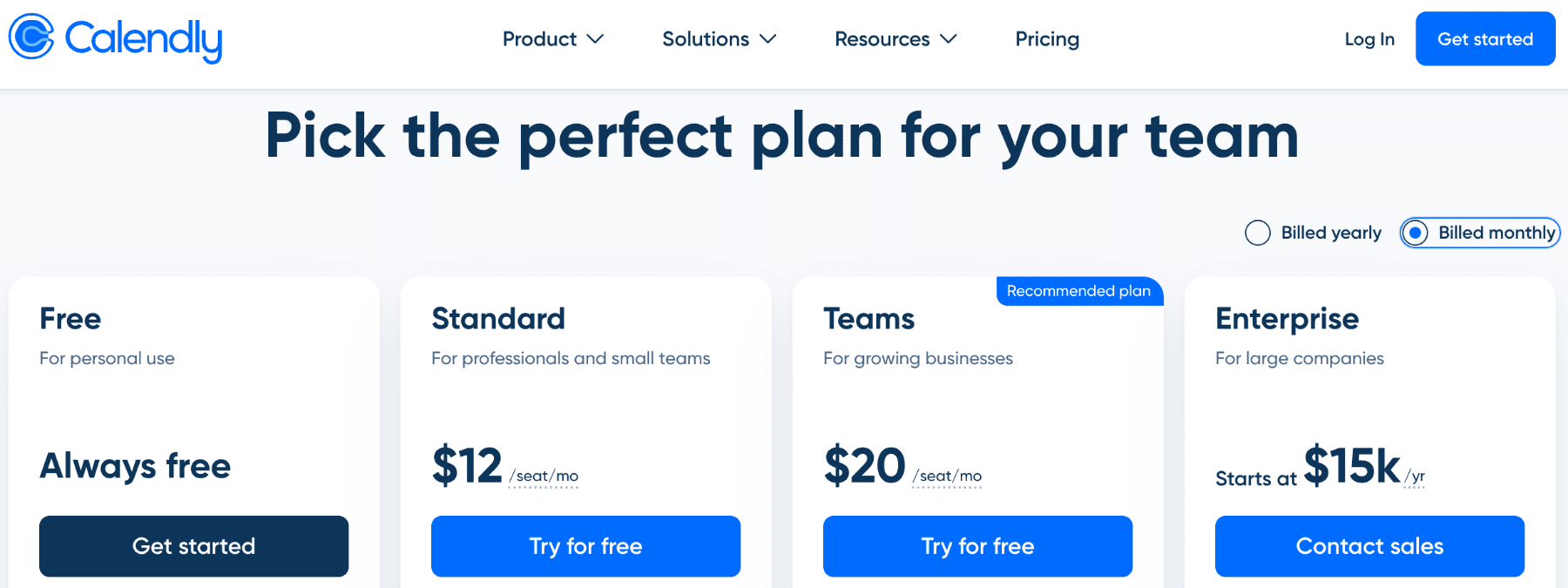
Free plan
Cost: $0
Who it's for: Individual users with basic scheduling needs
Main features:
One active event type
Unlimited scheduled meetings
One calendar connection per user
Basic integrations (Zoom, Google Meet, Microsoft Teams)
Automated email confirmations
Personal booking page
Key limitations:
Only one event type is active at a time
Cannot connect multiple calendars
Calendly branding on all booking pages
No payment processing
Limited automation options
No team scheduling features
The free plan works for freelancers who need a simple scheduling link. If you schedule the same type of meeting repeatedly, one event type might suffice. But most professionals need multiple event types for different meeting lengths or purposes.
Standard plan
Pricing: $12/month per user (monthly billing) or $10/month per user (annual billing)
Key features unlocked:
Unlimited event types
Connect up to six calendars per user
Remove Calendly branding
Customizable email reminders and follow-ups
Group event scheduling
Payment collection via Stripe and PayPal
Basic reporting and analytics
Zapier integration
Live chat and email support
Best use cases:
Solo professionals who need flexibility. Consultants who charge for appointments. Small business owners coordinating multiple meeting types.
The Standard plan removes the most frustrating limitations of the free plan. Multiple event types let you offer 15-minute calls, 30-minute consultations, and hour-long strategy sessions from one account.
Teams plan
Pricing: $20/month per user (monthly billing) or $16/month per user (annual billing)
Annual subscribers benefit from tiered pricing that decreases per-user costs as teams grow beyond 30 members.
Tiered pricing breakdown (annual billing):
Seats 1-30: $16/month per user
Seats 31-50: $14.50/month per user
Seats 51-100: $13/month per user
101+ seats: Custom pricing
Team scheduling features:
Round-robin scheduling (distribute meetings evenly)
Collective scheduling (find times when multiple people are available)
Routing forms (direct clients to the right team member)
Team pages and admin controls
Salesforce integration
HubSpot integration
Admin dashboard with team analytics
Admin and collaboration tools:
Organization owners manage permissions, enforce branding standards, and view team-wide booking performance. Sales managers track which reps book the most meetings. Support leads see response times.
The Teams plan makes sense when coordination across multiple people matters more than individual scheduling.
Enterprise plan
Custom pricing: Starting at $15,000 per year (approximately $42 per user per month for 30 users)
Security and compliance features:
Single Sign-On (SSO) with SAML support
SCIM user provisioning
Domain control and verification
Advanced security controls
Data retention policies
Audit logs and compliance reporting
Advanced integrations and support:
Salesforce routing by assignment
Microsoft Dynamics 365 integration
Dedicated account partner
Expedited support response
Implementation assistance
Custom onboarding and training
Priority feature requests
Enterprise pricing is custom and negotiable based on user count and specific requirements. Organizations with more than 30 users typically qualify for Enterprise pricing.
Calendly features
Automated scheduling
Share your Calendly link via email, on your website, or on social media. Visitors see your available times automatically. They select a slot. You receive a calendar invitation. Both parties get confirmation emails.
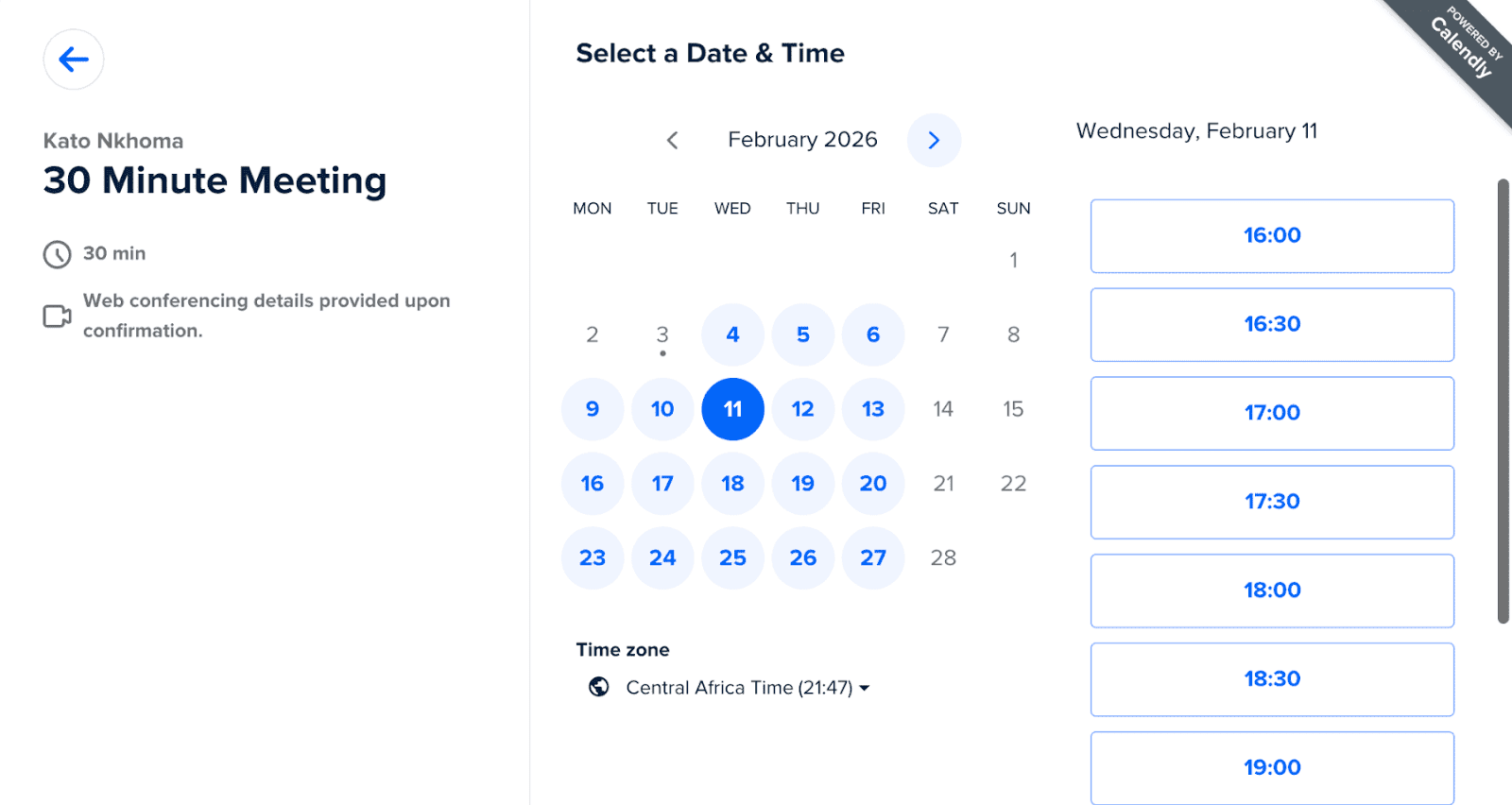
This eliminates the typical back-and-forth: "Are you free Tuesday?" "Tuesday doesn't work. How about Wednesday?" "Wednesday afternoon is blocked." The entire conversation disappears.
Calendar integrations
Calendly syncs with major calendar services:
Google Calendar
Microsoft Outlook and Office 365
Apple Calendar (iCloud)
Exchange
The platform checks all connected calendars before showing available times. If you're busy in Google Calendar, that time won't appear as available in Calendly. This prevents double bookings automatically.
Different meeting types
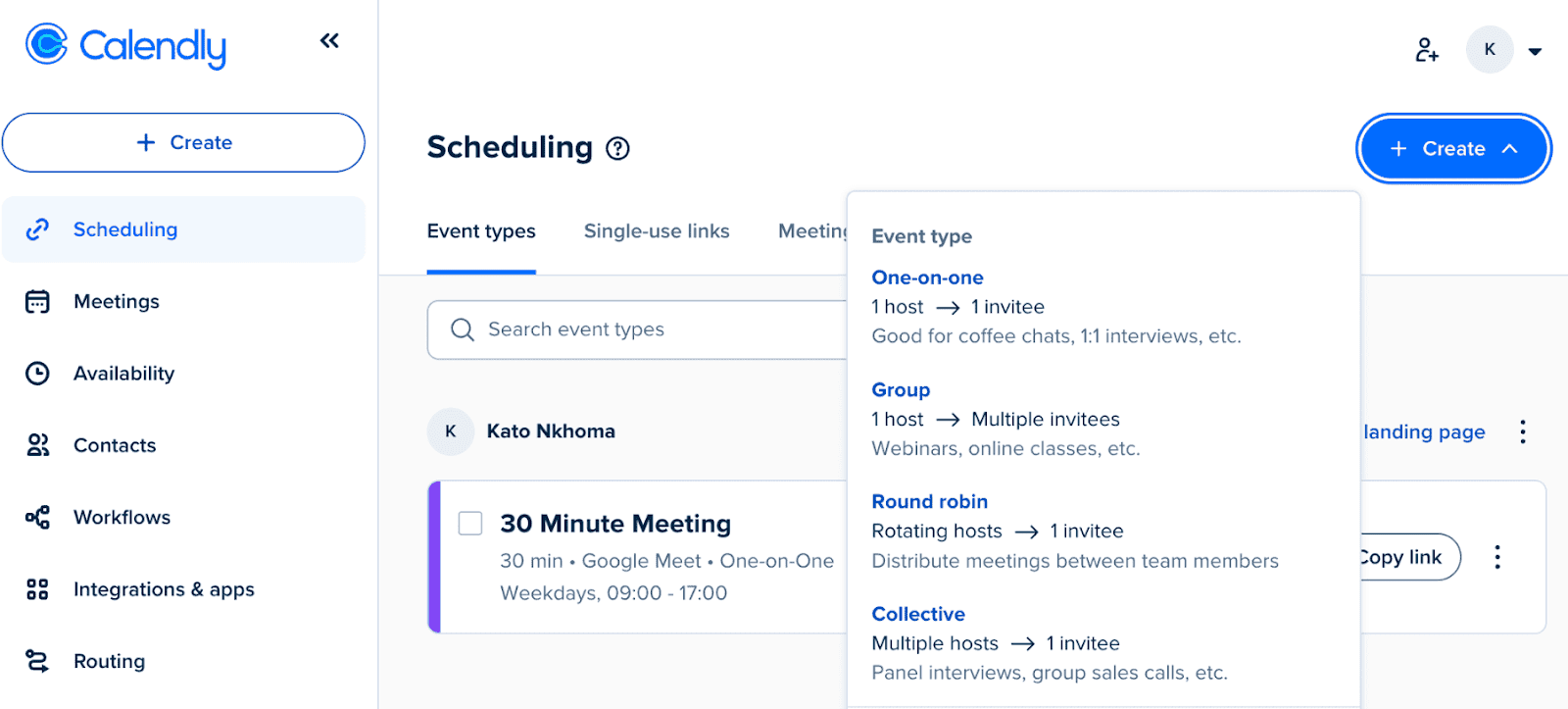
Calendly allows you to set up different meeting types with different durations:
One-on-one meetings: Standard individual appointments with defined duration
Group meetings: Multiple people attend the same session (webinars, workshops, classes)
Round-robin scheduling: Distribute incoming meetings evenly across team members (requires Teams plan)
Collective scheduling: Find times when multiple specific people are available simultaneously (requires Teams plan)
Workflow automation
Calendar workflow automations automatically handle the tasks that happen before and after a meeting is scheduled. Calendly automates several actions, including:
Send confirmation emails when meetings are booked
Send reminders 24 hours before meetings
Send follow-up emails after meetings are complete
Collect custom information through booking forms
Update CRM records when meetings are scheduled
Trigger workflows in connected apps via Zapier
Not only do these workflows help save time, but they also ensure an efficient scheduling system that reduces no-shows and increases overall meeting reliability and client engagement
Integrations
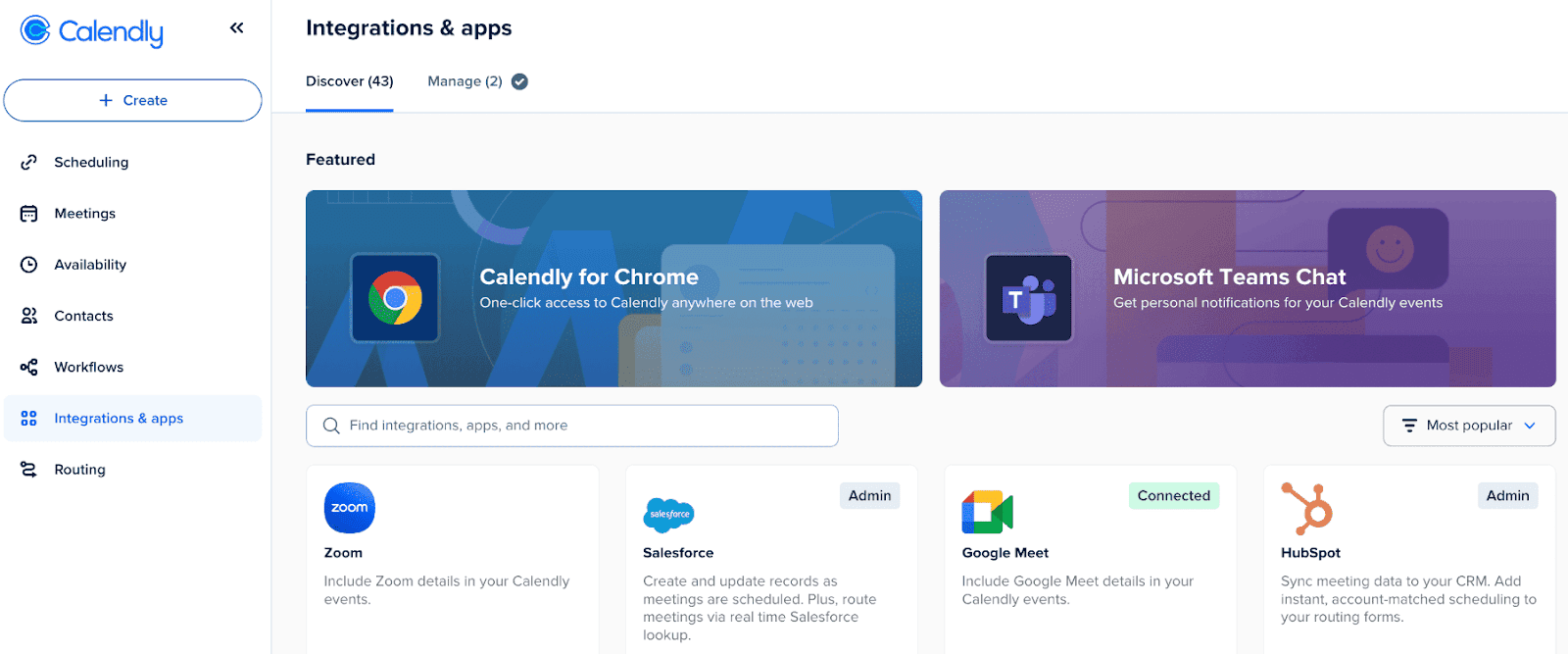
Integrations are important because they allow your scheduling tool to connect with the other apps you already use. Some of the integrations you’ll find in Calendly include:
Video conferencing
Zoom (automatic meeting link generation)
Google Meet
Microsoft Teams
GoToMeeting
Webex
Payment processing
Stripe (requires Standard plan or higher)
PayPal (requires Standard plan or higher)
CRM and sales
Salesforce (requires Teams plan)
HubSpot (requires Teams plan)
Pipedrive (via Zapier)
Productivity
Slack (notifications for new bookings)
Zapier (connect to 5,000+ apps)
Webhooks (custom integrations)
Calendly free vs paid plans
Is there a big difference between Calendly plans?
The jump from Free to Standard is significant. The jump from Standard to Teams matters most for coordination across multiple people. Here’s what these differences look like:
Feature | Free | Standard | Teams |
Event Types | 1 active | Unlimited | Unlimited |
Calendar Connections | 1 per user | 6 per user | 6 per user |
Remove Branding | No | Yes | Yes |
Payment Collection | No | Yes | Yes |
Team Scheduling | No | No | Yes |
Round-Robin | No | No | Yes |
CRM Integration | No | Basic | Advanced |
Admin Controls | No | No | Yes |
Custom Workflows | No | Limited | Advanced |
The free version of Calendly is a good choice if you want a simple way to let others book time with you and want to test the platform.
Paid plans make more sense when you need advanced features like integrations, team routing, and stronger branding options. Ultimately, upgrading is worthwhile when those features help save time or improve booking conversions.
Calendly pricing: the hidden costs
While Calendly offers several paid tiers, the total cost can rise quickly as you unlock more advanced features. Understanding these hidden costs helps you decide whether the upgrade truly delivers value for your needs. Here are the ones to look out for:
Per-user pricing adds up fast
Calendly charges per user, not per account. A five-person team on the Standard plan pays $50/month (annual billing) or $60/month (monthly billing).
A 20-person sales team on the Teams plan pays $320/month (annual billing) or $400/month (monthly billing). These costs compound quickly as teams grow.
Compare this to alternatives like Cal.com, where unlimited users can use the free plan, and team features start at $12/month/user, with more included.
Advanced integrations require higher plans
Most integrations require the Teams plan minimum. For sales teams, this integration is essential. But it forces an upgrade from $10/month to $16/month per user.
HubSpot, Marketo, and other marketing automation tools also require Teams or Enterprise plans. The integrations you need dictate your minimum spend.
Scaling costs for businesses
A startup with three people pays $30-36/month on Standard. Manageable.
That same company grows to 30 people. Now they pay $300-360/month on Standard or need to upgrade to Teams ($480/month monthly billing, $384/month annual billing).
At 100 people, costs become substantial. Even with tiered pricing that reduces per-seat costs for larger teams, the total annual expense reaches five figures.
Top 3 Calendly alternatives
Calendly was one of the first scheduling tools on the scene. But that doesn’t mean it’s the best. Some users have switched because of its limitations and other frustrations.
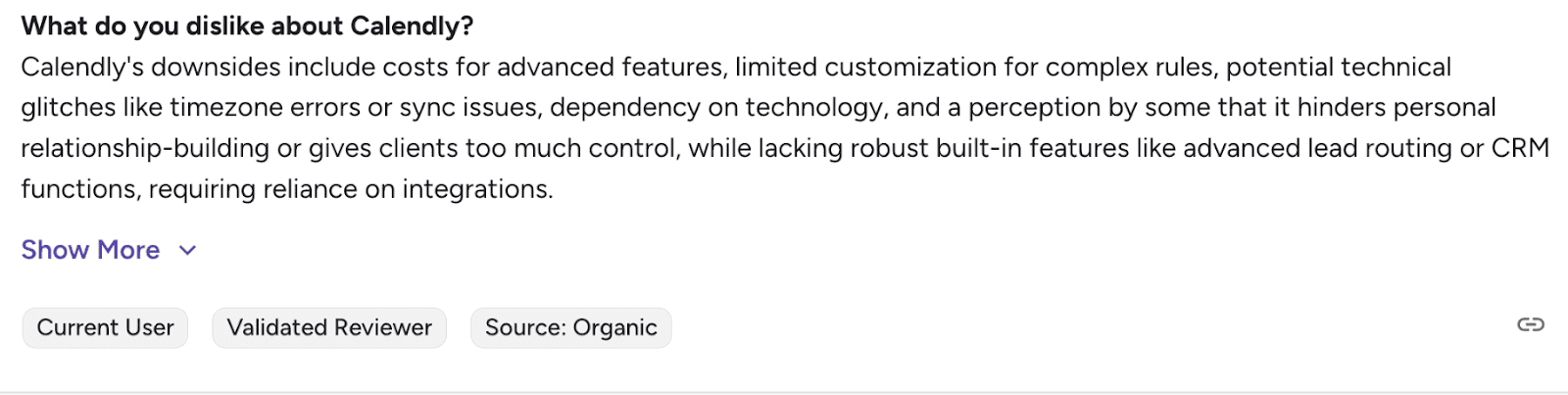
So, which Calendly alternatives should you consider?
1. Cal.com
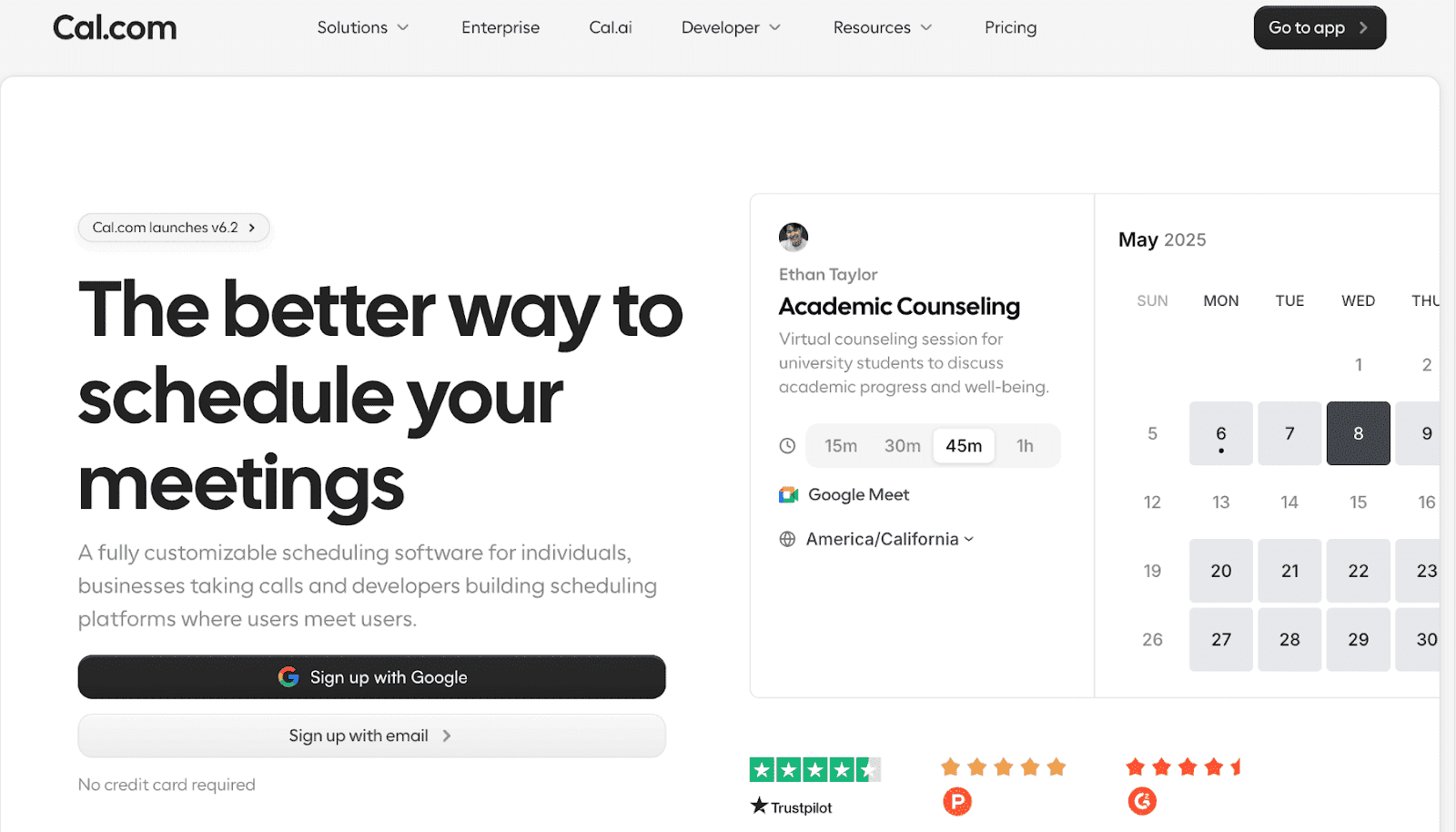
Cal.com is the best Calendly alternative for teams and businesses that value flexibility, customization, and data ownership. It offers everything Calendly does, plus features it can’t match. The free plan is very generous and includes unlimited event types, unlimited bookings, and some team features.
Key features
Cal.com agents: Easily schedule appointments by chat using Telegram, Slack, or Open Claw
Round-robin and group scheduling: Distribute meetings evenly across team members or find common availability for group meetings. Handle complex scheduling scenarios that force Calendly users to expensive tiers.
Smart routing: Cal.com’s routing forms collect customer information and direct clients to the right team member or service automatically based on their needs.
Workflow automation: Easily automate confirmations, reminders, and follow-ups to reduce no-shows.
Team scheduling: Evenly distribute appointments across your team with round-robin assignments. Alternatively, let clients choose their preferred person.
Payment collection: Accept deposits or full payments through Stripe and PayPal when clients book.
AI-powered scheduling: Use AI to handle inbound phone calls and book appointments, ensuring no leads are lost.
Multi-location support: Manage bookings across multiple service areas (even across time zones) from a single dashboard. Each location can have its own calendars and booking rules for smoother coordination.
Multi-language support: Cal.com detects time zones and browser languages, making it ideal for multi-time-zone/multi-language businesses with clients who prefer different languages.
App store: The app store makes it super easy to integrate Cal with your favorite tools, including conferencing, analytics, and automation tools.
Pricing: Paid plans start at $12/month/user for advanced features.
Note: Do you know that when you switch from Calendly to Cal.com, we will cover your remaining Calendly license? If you’re a Calendly user, now is the time to make the move.
SimplyBook.me
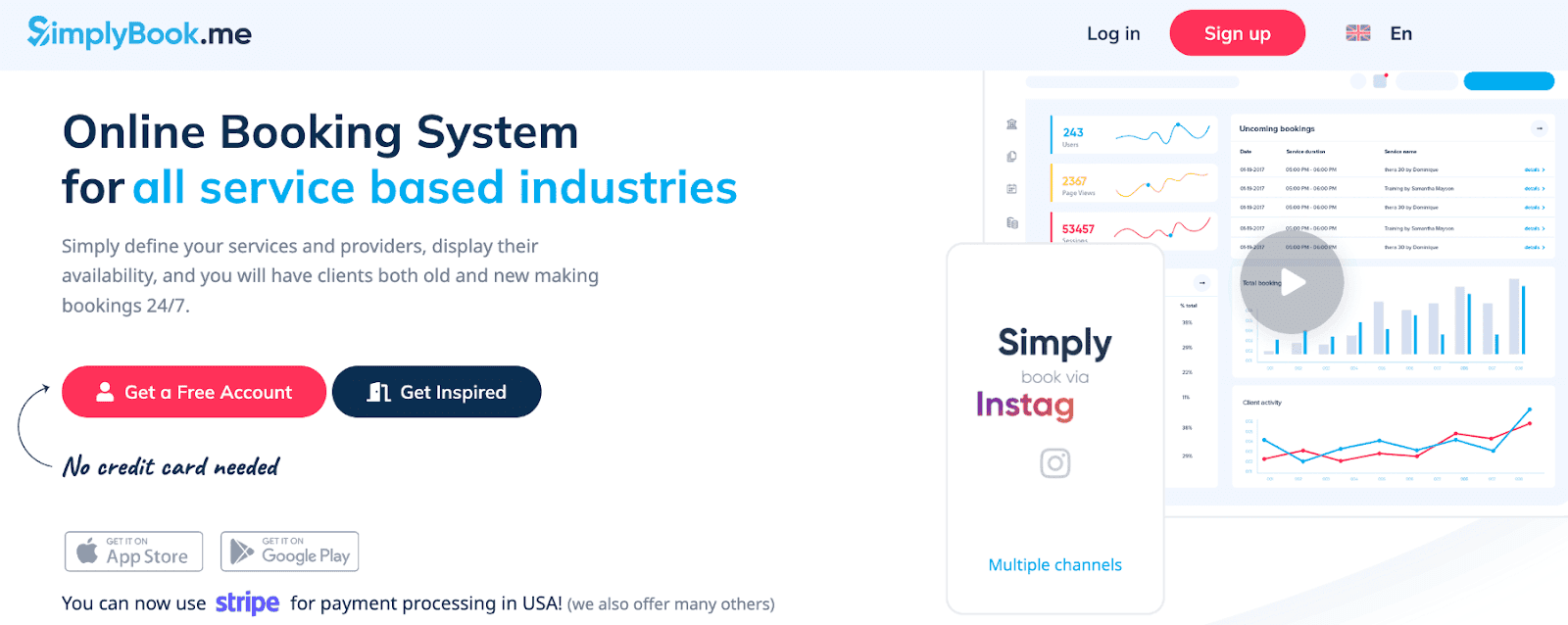
SimplyBook.me serves service-based businesses that need more than appointment scheduling. The platform includes point-of-sale systems, inventory management, staff scheduling, and branded client mobile apps. These operational tools make it better suited for salons, gyms, fitness studios, spas, and medical clinics than general scheduling software.
Key features
POS and payment processing: Accept payments, track inventory, manage sales
Memberships and packages: Sell class packages, monthly memberships, gift certificates
Client mobile app: Customers book through a branded app
Staff management: Track employee schedules, commissions, and performance
Custom feature marketplace: Add industry-specific features as needed
Pricing: Paid plans start at $11.90/month for 5 users.
Acuity Scheduling

Acuity Scheduling (owned by Squarespace) is another Calendly competitor to consider. Like Squarespace, it targets solopreneurs and small businesses, so its features are more limited than those of other scheduling tools.
Key features
Client intake forms: Collect detailed information before appointments so you understand what your client needs before your meetings start.
Payments and packages: Accept payments at booking, sell class packs, offer gift certificates, and manage memberships.
Recurring appointments: Set up weekly sessions, monthly check-ins, or custom recurring schedules.
Pricing: Paid plans start at $16/month (1 calendar supported) for basic features.
For more details, check out our comparison of Calendly and Acuity Scheduling.
Final thoughts on Calendly pricing
Calendly’s free plan works for very basic needs, but most users outgrow it quickly. Per-user pricing scales costs rapidly as teams grow. Advanced features and integrations require higher-tier plans.
Consider alternatives when:
Your team is growing, and costs are climbing
You need features locked behind expensive tiers
You want more customization and flexibility
Budget constraints make per-user pricing prohibitive
Calendly remains a solid choice for teams prioritizing proven reliability and extensive integrations. Evaluate your specific needs against the pricing structure before committing.
Frequently Asked Questions
What is Calendly used for?
Calendly is a scheduling tool that allows people to share booking links so others can schedule meetings without back-and-forth emails.
Is Calendly free?
Yes. Calendly offers a free plan with limited features, including one event type and basic scheduling capabilities.
How much does Calendly cost?
Calendly paid plans typically start around $10 to $16 per user per month, depending on the plan and billing cycle.
Does Calendly charge per user?
Yes. Most paid plans are priced per user, which means costs increase as teams grow.
What are the best Calendly alternatives?
Popular alternatives include Cal.com, Google Calendar scheduling, and other scheduling software designed for teams and businesses.
Does Calendly support paid appointments?
Yes. Calendly integrates with Stripe and PayPal, allowing businesses to charge for bookings or consultations.
Can teams use Calendly?
Yes. The Teams and Enterprise plans provide team scheduling features such as round robin assignments and shared scheduling pages.

Get started with Cal.com for free today!
Experience seamless scheduling and productivity with no hidden fees. Sign up in seconds and start simplifying your scheduling today, no credit card required!







